Search  for anything...

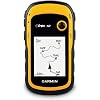
Garmin 010-00970-00 eTrex 10 Worldwide Handheld GPS Navigator

  • Based on 6,371 reviews
Condition: Used - Very Good
Checking for the best price...
$135.99 Why this price?
Save $424.00 was $559.99

Buy Now, Pay Later


As low as $22.67 / mo
  • – 6-month term
  • – No impact on credit to apply
  • – Instant approval decision
  • – Secure and straightforward checkout

Ready to go? Add this product to your cart and select a plan during checkout.

Payment plans are offered through our trusted finance partners Klarna, Affirm, Afterpay, Apple Pay, and PayTomorrow. No-credit-needed leasing options through Acima may also be available at checkout.

Learn more about financing & leasing here.

Free shipping on this product

This item is eligible for return within 30 days of receipt

To qualify for a full refund, items must be returned in their original, unused condition. If an item is returned in a used, damaged, or materially different state, you may be granted a partial refund.

To initiate a return, please visit our Returns Center.

View our full returns policy here.


Availability: Only 1 left in stock, order soon!
Fulfilled by good_stuff_

Arrives Jul 1 – Jul 3
Order within 20 hours and 6 minutes
Available payment plans shown during checkout

Protection Plan Protect Your Purchase
Checking for protection plans...

Features

  • Rugged handheld navigator with preloaded worldwide basemap and 2.2 inch monochrome display
  • WAAS enabled GPS receiver with HotFix and GLONASS support for fast positioning and a reliable signal
  • Waterproof to IPX7 standards for protection against splashes, rain, etc.
  • Support for paperless geocaching and Garmin spine mounting accessories. Power with two AA batteries for up to 20 hours of use (best with Polaroid AA batteries)
  • See high and low elevation points or store waypoints along a track (start, finish and high/low altitude) to estimate time and distance between points

Description

The eTrex 10 makes a great choice in handheld navigation for the budget savvy outdoor enthusiast. This eTrex model is equipped with a high-sensitivity GPS receiver, a 2.2-inch monochrome display, and a worldwide basemap making it easier than ever to see where you are and where you have been. Garmin Connect compatible (online community where you analyze, categorize and share data).

Brand: Garmin


Model Name: eTrex 10


Vehicle Service Type: Car, Truck, Motorcycle, etc.


Screen Size: 2.2 Inches


Special Feature: Paperless Geocaching, Track More Satellites


Connectivity Technology: USB


Map Type: Australia


Included Components: eTrex 10, Lanyard, USB cable, Manual


Audio Output Mode: Digital


Battery Life: 20 Hours


Compatible with Vehicle Type: Car, Truck, Motorcycle, etc.


Screen Size: 2.2 Inches


Additional Features: Paperless Geocaching, Track More Satellites


Connectivity Technology: USB


Map Types: Australia


Audio Output Mode: Digital


Battery Average Life: 20 Hours


Mounting Type: Spine mounting


Resolution: 128 x 160


Operating System: Garmin


Memory Storage Capacity: 6 MB


Touch Screen Type: Resistive


Display Type: LCD


Human-Interface Input: Buttons


Compatible Devices: Touch devices, computers, and generally any device that can use USB connectivity or global map


Control Method: Touch


Are Batteries Included: No


Supported Satellite Navigation System: GPS


Connectivity Protocol: wired


Sport Type: Running


Brand: Garmin


Model Name: eTrex 10


Built-In Media: eTrex 10, Lanyard, USB cable, Manual


Model Year: 2011


UPC: 753759975845


Global Trade Identification Number: 45


Manufacturer: Garmin


Model Number: 010-00970-00


Mfr Part Number: 0100097000 etrex 10


Warranty Description: 1 year limited


Item Type Name: Garmin eTrex 10 Worldwide Handheld GPS Navigator


Unit Count: 1.0 Count


Item Dimensions L x W x H: 2.13"L x 1.3"W x 4.06"H


Item Weight: 141.7 Grams


Frequently asked questions

If you place your order now, the estimated arrival date for this product is: Jul 1 – Jul 3

Yes, absolutely! You may return this product for a full refund within 30 days of receiving it.

To initiate a return, please visit our Returns Center.

View our full returns policy here.

  • Klarna Financing
  • Affirm Pay in 4
  • Affirm Financing
  • Afterpay Financing
  • PayTomorrow Financing
  • Financing through Apple Pay
Leasing options through Acima may also be available during checkout.

Learn more about financing & leasing here.

Top Amazon Reviews


  • Still great after almost four years! Still great after almost four years!
Desperate for an inexpensive GPS unit, I bought this late in 2014. At first, its logic took some getting used to, for the track record is always on, and you have to clear the active track to start a new one. Not a big deal, because of course you can save the track before deleting it. Also, the "back" button seems to be the simplest way to move through menus. This unit replaced a series of an older inexpensive Garmin model, which lived up to their reputation of failing every two years or so, though they were fine up to the failure point. Anyway, after almost four years of extensive use and the occasional drop, my eTrex 10 is still getting the job done really well. The display is old-style plain, not for everyone, but this translates into superb battery life. I can run it all day on a fresh pair of rechargeable AA's without any fear of data loss. The accuracy of handheld GPS units is hard to pin down--smoke and mirrors, but this one certainly does the job for road logs and hiking records. Sensitivity is excellent and it doesn't take long to find satellites. Downloading tracks is easy and dependable, something I can't say for my old Garmin Forerunner 305 wrist GPS. When connected to a USB port, the eTrex 10's track and waypoint data appear in a virtual drive folder, for easy copy or upload to GPS software. All I want from a GPS device is reliable information on where I am and where I've been, for I depend on mapping software to deliver actual graphics. Users who want better mapping support from the unit itself would find the eTrex graphics too limited. Also, I don't go after geocaches and can't evaluate the unit for that. But the eTrex 10 is just fine for locating myself in trackless woods, for providing a work record of where I've been, and for keeping track of my auto travel details. I did have one tense moment when, for failture of housekeeping, the track memory became so full that there didn't seem to be enough left to run the track deletion sequence. Can't remember how I got around that; maybe by starting with the smallest tracks. Didn't want to do a complete reset because there was some information I had not downloaded. ... show more
Reviewed in the United States on August 6, 2018 Reviewed in the United States on August 6, 2018 by dhillier38

  • Just what I needed!
Great product, price.
Reviewed in the United States on April 21, 2026 by CB

  • NO MAPS BUT LOT'S OF USEFUL INFORMATION AND TRACKING WHERE YOU'VE BEEN
This works well. Its only downside is that it dosen't show a map. I does draw a line on the screen so you can back to where you were. There are additional screeens that show interresting information. How many miles walked. How long you were moving, how long you stopped. Average speed walked. Most important to me is the time that the sun will set and the time that it will rise. ... show more
Reviewed in the United States on January 25, 2026 by petenow

  • Reviewed by a cyclist for cyclists considering this device for their bicycle riding.
This device (the eTrex 10) is a gem. Thus the five star rating. I've been studying it and using it on bicycle rides for the past two months. I've read several of the Amazon reviews for this product, and few do a good job of informing the consumer. I think this is because the product caters to so many different endusers: boaters, kayakers, walkers, hikers, off-road cyclists, and on-road cyclists. My review is written from the perspective of an on-road cyclist. And I'm not going to write a review as much as merely answer a series of questions. 1. Can you charge this device using a USB cable? >>No. The device uses two AA batteries for power. They can be cheap alkaline, or the more expensive rechargeable NiMH or lithium. Alkaline work ok if the weather is warm or hot. If you go the rechargeable route, don't buy cheap ones that have less than 2000 capacity. I didn't know rechargeables came in different capacities. Duh! The rechargeable batteries you need to recharge in a separate recharging device. 2. What do you use the USB cable for that comes with the device? >>To connect your device to your PC or Mac so you can update software or move GPX files on or off the device. GPX files are what tracks and waypoints are stored in. I use a Web site called RidewithGPS to create my TCX files. Then I use other software to convert them to GPX files. Think GpsVisualizer dotcom. 3. Can you load maps into this device? >>Not really. There is an almost nonexistent base map that comes with the unit. It is supposedly possible to overwrite it with a different map. However, for you to add maps to this device you would need to be able to insert an SD card which is where you would store extra maps. Since you cannot install an SD card into this device, you cannot add maps. 4. Can you use this device on long bike rides so you don't get lost? Is it good for bicycle touring? >>Yes. This is why I purchased this device. 5. Can this device aid one in navigating a city walk? An outdoors hike? An off-road bicycle ride? An on-road bicycle ride? Yes to all four questions. I use the device for GPX files I create using a free online service called RidewithGPS dotcom. The GPX files are the end-product of designing a route. Some of the routes are through city streets. Some are through trails in the various outdoor parks near my home. Some are mountain bike trails. And some are 200k brevet rides on roads. I copy the GPX files into the GPX folder in my device and I'm ready to go. 6. Can an SD card be installed into this device? >>No. Not on THIS device. Pay a little more to get the eTrex 20x or the eTrex 30x and you will be able to install an SD card in those devices. 7. Is it easy to read this device in sunlight? At nighttime? >> Yes. Yes. I have found it easy in both daytime and nighttime. Of course, I have to wear glasses that correct my vision well. The viewing screen is somewhat small. 8. Is this device good for long distance bike rides like brevets? >>Yes. GPS navigational devices designed for cyclists typically have internal rechargeable batteries that will die after 10 to 12 hours of constant use. Since the eTrex 10 uses two AA batteries, when they die they are easily replaced while riding the bike. As long as you have extra AA batteries along during your rides you will never be without a functioning eTrex 10. 9. How long does it take to find satellites before it starts working? >>Depends. It always cranks up quickly (within a minute) for me. However, I have both kinds of satellites enabled in my system setup. Uses more power this way though. 10. Is the user manual instructive? >>It is OK. The problem with the manual is the uses the device can be put to are so broad: boating, walking, hiking, biking off-road, and biking on-road. There really should be a manual for each type of user – and there just isn't. Furthermore, do you want to use the device to mark geocaches? To merely be a navigation tool? Or to record where you have gone so you can retrace your steps? I'm really only interested in using the device as a navigation tool. 11. Does this device track pace and distance traveled? Can it double as a bike speedometer? >>Yes. Yes. You can configure the view screen to tell you how far you have traveled at any point in time. And you can configure it to tell you how fast you are going in mph or kph. 12. How relevant are street signs when using this device? >>Street signs are not really relevant because maps are not really relevant. With this device and your GPX file you will have a track (breadcrumb trail) and waypoints (usually along the trail). I create my GPX file so the names of the waypoints are street names. When the device is functioning a cursor shows up in the view screen indicating where I'm actually planted on the earth. As it moves along the track and I approach a waypoint I know it'll be time to make a turn. I can make the turn without even knowing the name of the street. And when riding in the middle of the night I rarely look for street signs to verify a turn. Of course, it is nice to see a street sign that matches the waypoint title. Waypoint titles show up in my view screen as I ride. 13. Does the view screen easily scratch? >>Yes. This is a problem. Invest in a $10 screen saver. 14. Does this device provide turn-by-turn instruction when being used? >>No. You only get turn-by-turn instructions when a GPS device uses an installed map to "calculate" your route. This device doesn't even have a map. But the eTrex 20x and eTrex 30x models do have maps. However, those units don't use the maps to calculate routes. The maps are just background images to the tracks and waypoints that appear on the respective view screens. All three units allow you to create proximity warnings around your waypoints. And when you get within a certain proximity of a waypoint you can be warned. This function works kind of like turn-by-turn instructions. Unfortunately, I have found them not to be too helpful. They tend to clutter up my view screen. 15. Can you insert a pre-loaded route? >>Yes. See answer to Q12. 16. What kind of battery life can one expect? >>With two rechargeable NiMH AA batteries with capacity of 2600 each you'll probably get more than 20 hours. This has been my experience while having both types of satellites accessed and leaving the backlight on constantly. 17. Does this device have touchscreen features? >>No. If it did you wouldn't get 20 hours of battery life. See answer to Q16. 18. What memory does this unit have? >>Only internal. This device does not let you install SD cards. The eTrex 20x and eTrex 30x does allow for SD cards. Those units cost more. 19. What kind of batteries does this device use? >>AA batteries. See answer to Q1. 20. When the batteries die do you lose your current track and any waypoints? >>Nope. This is because information is saved as you go along, and the route is not “calculated” during your ride. The track is static information, as are the waypoints. When you turn the device back on after changing the batteries the cursor in your view screen shows your current location just like when the power went out. 21. What file formats does this device read? >>Only GPX files, which are XML text files with a .gpx extension. Won't read TCX or FIT file formats. To create GPX files I download my routes from Ridewithpgs and then use one of a few free online converting Web sites to convert the TCX file to a GPX format file. 22. Does this device have an audio component? >>Nope. If it did, then you wouldn't get 20 hours of battery life. However, pay a little more and get the eTrex 20x or eTrex 30x and you will have some audio capability. For example, the proximity alarm in the eTrex 10 will not produce any bells or beeps, but the other two units do. 23. Does this device have a mapping function? >>It will record where you have gone if you want it to. Save the file when you are done, and you can upload it to RWGPS, Garmin Connect, Strava, or MapMyRide. ... show more
Reviewed in the United States on March 1, 2017 by Jeff Lippincott

  • works well
Bought this to locate some section corners and find my way back to a point in some forested land. I used the compass feature mostly. I found the overall country map installed is kind of useless. After a little practice and reading the manual things came together and it works good. The joy stick takes a little getting used to but it is a good solution for input. Battery life is good and being a couple of AA's easy to carry a spare set if you need them. You need a second mapping program or scale from quad maps to use it to find unknown spots (assuming the map is accurate). Getting back to say a quad you left in the woods and walked to fine something is great. Transferring files between a PC works good (google earth or whatever). Would buy it again for my purposes. ... show more
Reviewed in the United States on October 27, 2022 by End_user

  • Works, but not as well as it could
I needed a GPS to survey the shoreline around a lake. The project was to record "many" waypoints, with each one marked as gravel, sand, rock, or muck. The resulting data needed to be transferred to a spreadsheet, along with total feet of shoreline with each type of lake bottom. The Etrex 10 did exactly that. The Etrex 10 records waypoints using the button on the top right front of the device. That button is pushed down to mark the waypoint, then left/right and up/down to select from various menu items. The first problem is that the press function is much firmer than the up/down/left/right functions, making it easy to inadvertently press up/down/left right instead of down. Fortunately, the top right side button reverses the most recent action and makes recovery easy. The BACK button got used more than I wanted. It takes a total of about 30 seconds to fully record a waypoint. This shows up as the device randomly freezing during the waypoint mark/code/save process. I was able to go smoothly through the waypoint mark/code/save process on only 3 or 4 out almost 600 waypoints. On all of the others, it stopped responding to inputs part way. The remedy is to wait, usually about 20 seconds, for it to unfreeze, then continue. The resulting waypoints are stored in a .GPX file. When the Etex 10 is connected to a computer using a USB cable, it shows as an F: or G: external drive. The GPX file can be read directly from the Etrex to an Internet file converter, and converted into a comma delimited text. The comma delimited text file can be directly read by either a Microsoft Excel or OpenOffice spreadsheet. From there, calculating distance between waypoints and total feet of each type of shoreline was easy. It allows the user to select any waypoint and navigate to that waypoint. All waypoints are numbered in the order in which they were originally recorded. When scrolling through the waypoint list, they do not show up in simple numerical order, nor does the list include any waypoint labels. You need to know that Waypoint XX is your destination. This works well if you have only a few waypoints stored on the device, but scrolling through 600 waypoints to find the distance to your starting point is not practical. It's a great device for the cost. It gets the job done, it's accurate, readable, and easy to learn. It just has a few annoying defiencies. ... show more
Reviewed in the United States on September 23, 2013 by Jim Michler

  • Cool tool
Not easy to figure out but continued use helps. I’m in my 80s so it takes me longer to figure things out.
Reviewed in the United States on May 21, 2026 by Katherine Kent

  • cannot be loaded with any additional mapping
Even though the eTrex® 10 outdoor handheld does have a worldwide basemap loaded, it cannot be loaded with any additional mapping. The eTrex 10 handheld does not have any internal memory for adding mapping, and there is not a microSD card slot for expanded memory. The eTrex 10 handheld is considered to be a non-mapping GPS unit, designed for simplicity. !!! -cannot be loaded with any additional mapping-!!! ... show more
Reviewed in the United States on February 20, 2026 by The Critic

Can't find a product?

Find it on Amazon first, then paste the link below.
Checking for best price...