Search  for anything...

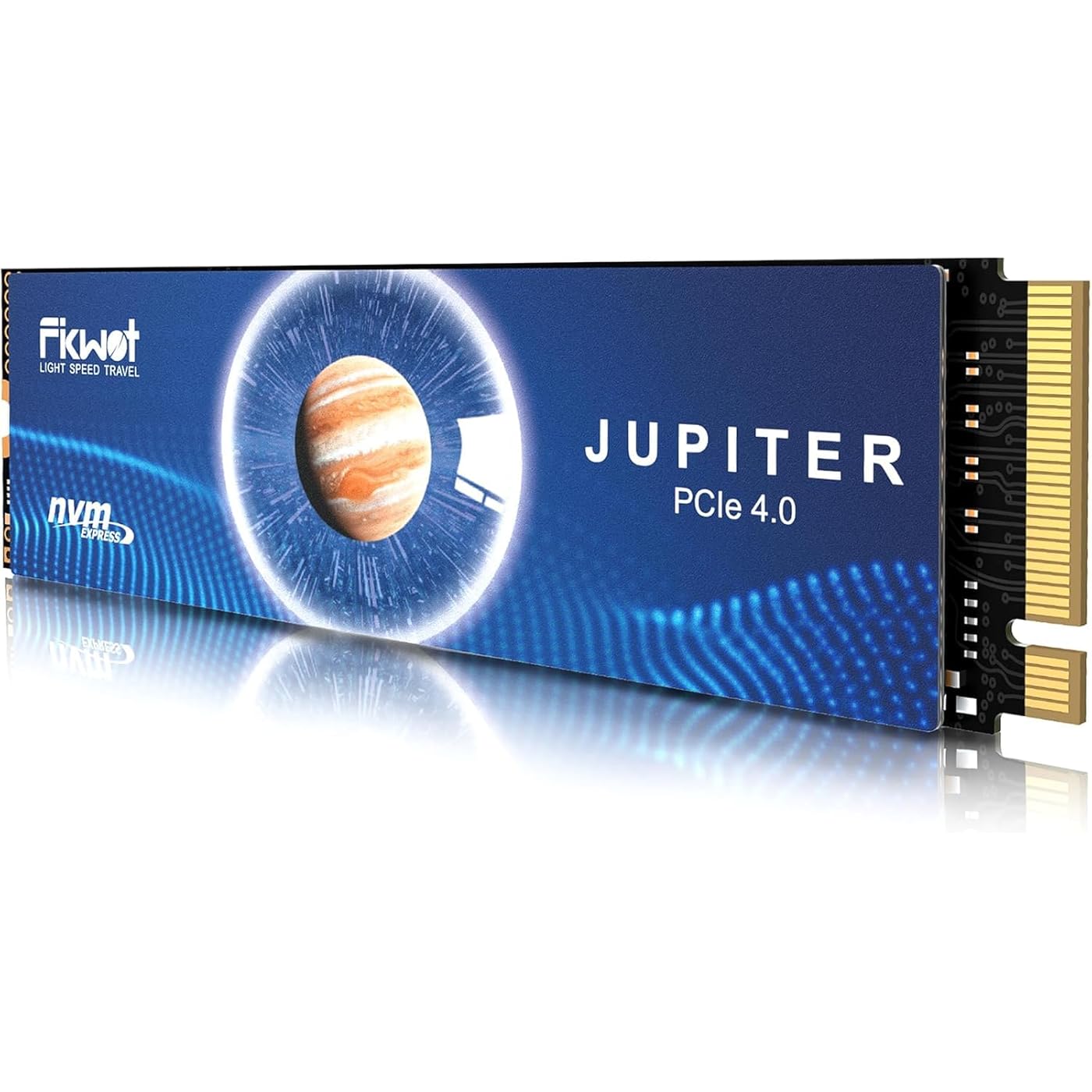
FX991 M.2 SSD 4TB NVMe SSD M2 2280 PCIe Gen 4x4, Read Up to 7000MB/s, Internal Solid State Drive for PS5 Laptop Desktop 3D QLC NAND

  • Based on 2,032 reviews
Condition: New
Checking for the best price...
$369.98 Why this price?
Save $80.01 was $449.99

Buy Now, Pay Later


As low as / mo
  • – Up to 36-month term if approved
  • – No impact on credit
  • – Instant approval decision
  • – Secure and straightforward checkout

Ready to go? Add this product to your cart and select a plan during checkout.

Payment plans are offered through our trusted finance partners Klarna, Affirm, Afterpay, Apple Pay, and PayTomorrow. No-credit-needed leasing options through Acima may also be available at checkout.

Learn more about financing & leasing here.

Selected Option

Free shipping on this product

FREE 30-day refund/replacement

To qualify for a full refund, items must be returned in their original, unused condition. If an item is returned in a used, damaged, or materially different state, you may be granted a partial refund.

To initiate a return, please visit our Returns Center.

View our full returns policy here.


Availability: Only 1 left in stock, order soon!
Fulfilled by Amazon

Arrives Sunday, Mar 8
Order within 3 hours and 25 minutes
Available payment plans shown during checkout

Protection Plan Protect Your Purchase
Checking for protection plans...

Style: FX991


Capacity: 4TB


Features

  • [Lightning-fast Top Performance]: Fikwot FX991 M.2 SSD 4TB adopts NVMe protocol and PCIe Gen 4x4 specifications, and the maximum read and write speed can easily reach 7000MB/s and 6000MB/s. With lightning-fast speeds, the FX991 NVMe SSD can make your computer's systems and applications respond quickly, improving work efficiency.
  • [Excellent Thermal Management]: FX991 NVMe SSD 4TB is equipped with Auto-adaptive temperature adjustment and power efficiency management. It can intelligently adjust the NVMe SSD heating temperature and power consumption control, which can reduces the burden on the device and extends the battery life of laptops and other devices. We have equipped M2 SSD 4TB with high-conductivity graphite heatsink. Under high load conditions, the internal ssd reading speed can still be close to the peak.
  • [HMB and SLC Cache]: With HMB and smart SLC cache, FX991 M.2 NVMe SSD can deliver outstanding performance. Host Memory Buffer (HMB) technology enables NVMe SSD to use the DRAM of the host system for read and write caching and buffering, significantly improving the speed of computer startup, multitasking, and game resource transfer and reading. At the same time, FX991 M.2 SSD also supports TRIM, S.M.A.R.T, AES-256 encryption and other technologies.
  • [Excellent Compatibility]: Whether it is a laptop, desktop computer or game console such as PS5, FX991 4TB SSD M.2 is perfectly compatible to meet your storage needs on various devices. FX991 4TB NVMe SSD can be used as a PS5 storage expansion, and you can easily upgrade your gaming experience with it.
  • [5-Year Service]: We are confident in the quality of our products, so we provide a limited service of up to 5 years or 2400TBW for the FX991 M.2 4TB SSD, so that you can enjoy excellent performance and reliability with confidence. Choose the top-performance FX991 M.2 2280 internal solid state drives to make your computing experience smoother and more efficient!

Digital Storage Capacity: 4 TB


Hard Disk Interface: PCIE x 4


Connectivity Technology: M.2 NVMe PCIe 4.0


Brand: Fikwot


Special Feature: Backward Compatible, Shock Resistant


Hard Disk Form Factor: 8 Centimeters


Hard Disk Description: Solid State Drive


Compatible Devices: Desktop, Gaming Console, Laptop


Installation Type: Internal Hard Drive


Color: Black


Hard Drive: ‎4 TB Solid State Drive


Brand: ‎Fikwot


Series: ‎FX991_4TB


Item model number: ‎FX991


Hardware Platform: ‎PC


Item Weight: ‎1.06 ounces


Product Dimensions: ‎3.15 x 0.87 x 0.09 inches


Item Dimensions LxWxH: ‎3.15 x 0.87 x 0.09 inches


Color: ‎Black


Flash Memory Size: ‎4 TB


Hard Drive Interface: ‎PCIE x 4


Manufacturer: ‎Fikwot


Date First Available: ‎May 23, 2024


Frequently asked questions

If you place your order now, the estimated arrival date for this product is: Sunday, Mar 8

Yes, absolutely! You may return this product for a full refund within 30 days of receiving it.

To initiate a return, please visit our Returns Center.

View our full returns policy here.

  • Klarna Financing
  • Affirm Pay in 4
  • Affirm Financing
  • Afterpay Financing
  • PayTomorrow Financing
  • Financing through Apple Pay
Leasing options through Acima may also be available during checkout.

Learn more about financing & leasing here.

Top Amazon Reviews


  • Upgrading the memory in my Ps5
Style: FX991 Capacity: 4TB
I am as tech savvy as the next person out all I need to know is is where to put it and if it works and does it have a lot of memory yes this does the only way this could be better is if it was a 8 tb lol this this thing is fast and awesome it’s easy to install no mess no fuss the performance is outstanding the fit is perfect and the heat has stayed pretty cool the fx991 m.2 sad 4tb is a lifesaver when it comes to memory in a ps5 ... show more
Reviewed in the United States on October 27, 2025 by Flint

  • 🔥 Fikwot FX991 M.2 4TB NVMe SSD – High-Speed, Reliable, and Built for Performance!
Style: FX991 Capacity: 4TB
✅ Intro Hook: "A powerful PCIe Gen 4x4 SSD—does it truly deliver top-tier speed and reliability?" ✅ Performance & Features: - 7300MB/s read speed, ensuring lightning-fast system responsiveness. - Advanced thermal management, adjusting temperature and power consumption for efficiency. - HMB & SLC cache technologies, enhancing startup speeds and multitasking. - PS5, laptop, and desktop compatibility, making it a versatile storage solution. ✅ Real-World Usage: - “Installed this in my PS5—games loaded noticeably faster, and the heat dissipation kept performance stable!” ✅ Pros & Cons: - Pros: Blazing-fast speeds, strong thermal management, broad compatibility. - Cons: Newer brand—long-term reliability still being evaluated. ✅ Final Verdict: - “For a high-speed NVMe SSD with impressive performance, this is a solid pick!” ** UPDATE. I now have purchased at least 2 other Fikwot NVME SSD;s. They are so small, sleek and compatible with my ps5, ROG Ally X, and laptops. This company makes a high quality product. Highly recommended with a good aluminum enclosure if your using this externally. ... show more
Reviewed in the United States on June 3, 2025 by Suave Nadav

  • Great for Micro PC Upgrade
Style: FX991 Capacity: 1TB
I recently installed the Fikwot FX991 M.2 SSD 1TB NVMe SSD in my micro PC, and the performance has been nothing short of exceptional. The installation process was straightforward, and the drive fit perfectly in the compact setup. The read speeds of up to 7100MB/s and write speeds of up to 6100MB/s have drastically improved the overall responsiveness of my system. Boot times are almost instantaneous, applications load incredibly fast, and multitasking feels seamless. Even with heavy workloads, the SSD maintains high performance without any noticeable slowdowns. The thermal management is impressive too. Despite the limited airflow in my micro PC, the drive stays cool, thanks to the built-in heat dissipation features. This ensures consistent performance even during extended use. For anyone looking to boost their micro PC’s performance, the Fikwot FX991 M.2 SSD offers excellent value. Its speed, reliability, and ease of installation make it a top choice for enhancing any compact system’s capabilities. ... show more
Reviewed in the United States on November 15, 2024 by Ronald J Harrell

  • Works great for my PS5
Style: FX991 Capacity: 4TB
I bought the 4 terabyte and it was super easy to install. Still has plenty of space after transferring all my games onto it. Would highly recommend
Reviewed in the United States on November 4, 2025 by Amanda Ryken

  • PS5 Install
Style: FX991 Capacity: 4TB
Super easy to install in PS5 and works great!
Reviewed in the United States on December 11, 2025 by JOHN R MANN

  • It’s good but it could be less fragile
Style: FX991 Capacity: 2TB
It works , but the thing is that the item is real fragile and you can’t push too hard , it opened up a little and I thought it was not going to work , but it does. Only thing , the little screw that came with it , it’s so small that it wouldn’t stay put , so I had to use tape.
Reviewed in the United States on December 2, 2025 by Yeray pico ariza

  • Good price, easy install on ps5
Style: FX910(with Heatsink) Capacity: 4TB
Easy to install on PS5. Great upgrade
Reviewed in the United States on December 19, 2025 by dustin richardson

  • Solid & Fast
Style: FX991 Capacity: 4TB
Drive works well, supports 4 Terebytes and it's speed in close to the 7300 mps. In Windows make certain you use the GPT method to format the drive to get full space. Open Command Prompt (cmd) as Administrator: Search for "cmd" in the Windows search bar, right-click on "Command Prompt", and select "Run as administrator". Open Diskpart: Type "diskpart" and press Enter. List Disks: Type "list disk" and press Enter. This will display all disks connected to your computer. Identify the 4TB drive by its size (e.g., 3726 GB). Select the 4TB Disk: Type "select disk [disk number]" (replace [disk number] with the correct disk number from step 3) and press Enter. Clean the Disk: Type "clean" and press Enter. This will erase all existing partitions on the disk. Convert to GPT: Type "convert gpt" and press Enter. This will convert the disk to GPT, which is necessary for addressing the entire 4TB capacity. Exit Diskpart: Type "exit" and press Enter. Open Disk Management: Search for "disk management" in the Windows search bar and open it. Initialize the Disk: In Disk Management, you should see the 4TB disk listed as "Unallocated". Right-click on it and select "Initialize disk...". Select GPT: Choose "GPT" as the partition style and click "OK". Create a Partition: Right-click on the "Unallocated" space and select "New Simple Volume...". Follow the Wizard: Follow the prompts to create a new volume. Choose a drive letter, format it with NTFS, and set a volume label. Format: In the same wizard, choose NTFS as the file system and click "OK" ... show more
Reviewed in the United States on May 14, 2025 by Gary Graefen

Can't find a product?

Find it on Amazon first, then paste the link below.
Checking for best price...