Search  for anything...

Focusrite Vocaster Two — Podcasting Interface for Recording Host and Guest. 2 Mic Inputs and Headphone Outputs, with Auto Gain, Enhance, and Mute. Small, Lightweight, and Powered by Computer

  • Based on 837 reviews
Condition: New
Checking for the best price...
$89.99 Why this price?
Save $160.00 was $249.99

Buy Now, Pay Later


As low as $15.00 / mo
  • – 6-month term
  • – No impact on credit to apply
  • – Instant approval decision
  • – Secure and straightforward checkout

Ready to go? Add this product to your cart and select a plan during checkout.

Payment plans are offered through our trusted finance partners Klarna, Affirm, Afterpay, Zip, Apple Pay, and Google Pay. No-credit-needed leasing options through Acima may also be available at checkout.

Learn more about financing & leasing here.

Selected Option

Free shipping on this product

FREE 30-day refund/replacement

To qualify for a full refund, items must be returned in their original, unused condition. If an item is returned in a used, damaged, or materially different state, you may be granted a partial refund.

To initiate a return, please visit our Returns Center.

View our full returns policy here.


Availability: In Stock.
Fulfilled by Amazon

Arrives Thursday, Aug 20
Order within 10 hours and 27 minutes
Available payment plans shown during checkout

Protection Plan Protect Your Purchase
Checking for protection plans...

Style: Vocaster Two


Features

  • Broadcast quality sound Get studio sound in seconds from Vocasters premium mic input
  • Over 70dB of gain Get the best out of any mic, no booster needed
  • Auto Gain Set your level in seconds, just push the button, start talking, and let Auto Gain do the rest
  • Enhance Select one of four podcaster-approved presets and reveal the true quality of your voice
  • Two mics, two headphones Vocaster Two gives both presenters their own headphone output and Show Mix
  • Mute Just hit the button and cut out coughs, sneezes and any other unwanted interruptions
  • Bluetooth Phone Connectivity Connect your phone via Bluetooth or with a single TRRS cable and capture the whole conversation, or play music and other premium audio from your device straight onto your show
  • Camera Connectivity Send Vocasters premium audio straight to your camera with a single TRS cable and level-up your vlog

Description

How do you get the broadcast sound your podcast deserves? The answer has never been clearer. Get incredible sound with more than enough gain for any XLR mic – for you and a guest. Capture the conversation in the studio, over the phone or online. Set levels, enhance your sound with one click, and stand out with Vocaster Two in seconds. Get your podcast sounding pro with Auto Gain, Enhance, two mic and two headphone connectors, Bluetooth audio from your phone, and more.

Brand: Focusrite


Compatible Devices: Microphone, Personal Computer, Tablet, Headphones, Smartphone, Studio Monitors, Camera, Bluetooth


Supported Software: All audio recording software


Connectivity Technology: USB


Number of Channels: 2


Compatible Devices: Microphone, Personal Computer, Tablet, Headphones, Smartphone, Studio Monitors, Camera, Bluetooth


Supported Software: All audio recording software


Connectivity Technology: USB


Number of Channels: 2


Frequency Response: 20 KHz


Operating System: Mac OS, Windows OS, iOS


Audio Input: Microphone


Maximum Sample Rate: 24000 KHz


Item Dimensions D x W x H: 4.45"D x 8.84"W x 1.99"H


Item Weight: 1.83 Pounds


Brand Name: Focusrite


Manufacturer: Focusrite


UPC: 815301001379


Global Trade Identification Number: 79


Manufacturer Part Number: MOAC0002


Model Number: AMS-VOCASTER-TWO


Warranty Description: 3 year manufacturer.


Included Components: Vocaster Two, USB A-C Cable


Item Type Name: Audio Interface


Unit Count: 1.0 Count


Frequently asked questions

If you place your order now, the estimated arrival date for this product is: Thursday, Aug 20

Yes, absolutely! You may return this product for a full refund within 30 days of receiving it.

To initiate a return, please visit our Returns Center.

View our full returns policy here.

  • Klarna Financing
  • Affirm Pay in 4
  • Affirm Financing
  • Afterpay Financing
  • Zip Pay in 4
  • Financing through Apple Pay
  • Financing through Google Pay
Leasing options through Acima may also be available during checkout.

Learn more about financing & leasing here.

Top Amazon Reviews


  • Great Sound, Easy Setup, and Packed With Useful Features Great Sound, Easy Setup, and Packed With Useful Features
Style: Vocaster Two
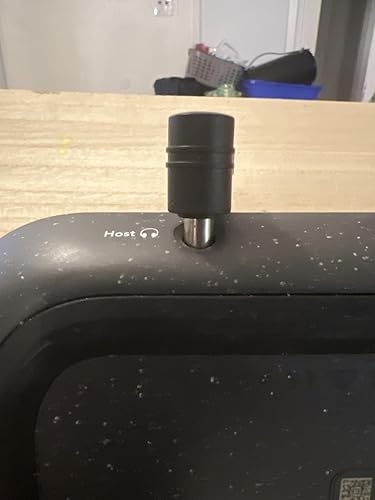
I recently picked up the Vocaster Two, and I’m genuinely impressed. The sound is smooth and clear, noticeably better than I expected, especially since I had been using the Podcaster Duo before this. This little box surprised me in the best way. Setup & Layout Everything on the Vocaster Two is easy to find and well-labeled. The XLR jacks are clearly marked “Host” and “Guest,” which keeps setup simple. The left and right outputs for speakers or monitors are straightforward and clean. There’s also a 48V phantom power button for mics that need it, a TRRS input so you can plug your phone directly in, and even a line-out for your camera, which gives you clean audio straight into your footage with no syncing needed later. That alone saves a ton of time. The Bluetooth pairing is effortless—hold the button, connect, and the clarity on phone calls is surprisingly good. The USB-C port handles both power and computer connection, and the companion software is easy to use. It also has a physical power button, which seems small but matters when you’re managing multiple devices. Smart Features The controls are simple to navigate. There are separate mic mute buttons for host and guest, and the Auto Gain button is a standout feature. You talk for about 10 seconds, and it sets the level perfectly. This makes it extremely beginner-friendly, even for someone not familiar with audio equipment. Build Quality The body is plastic but feels rugged and solid. The top surface looks nice but is definitely a fingerprint magnet. The only design choice I’m not thrilled about is the headphone jacks in the front. Because of the angle, the plug sticks out slightly. Not a deal breaker, just something to note. Portability One of my favorite features is that it can be powered from an iPhone or iPad with USB-C. That makes it very portable and handy for recording away from the studio. Price I purchased mine for $59, but I’ve noticed the price on Amazon fluctuates a lot. Sometimes it climbs to around $99, and I’ve seen notes that the original retail was around $200. My suggestion: Check back often. The price drops come and go, and catching it on sale is worth it. Even at $99, I’d still say it’s worth the money. Bottom Line This isn’t meant to replace something like the Rodecaster, but it doesn’t have to. The Vocaster Two is excellent at what it is: a clean, easy, reliable audio interface with smart features and great sound quality. I would definitely recommend it. ... show more
Reviewed in the United States on January 24, 2026 Reviewed in the United States on January 24, 2026 by james b

  • Honestly, great value and amazing audio interface. Honestly, great value and amazing audio interface.
Style: Vocaster One
Great audio interface! I recently decided to upgrade my mic setup, and I needed a cheap audio interface that was also good quality. Ended up finding this one for 39.99, so pretty much an absolute steal. I absolutely love the quality of this interface. First of all, it was bigger than I was expecting it to be, but that wasn't a big deal. It was really simple to just plug it into my computer and plug my XLR from my mic to the interface. Controlling the gain this is super much easier, as it has color indicators that allow you to see if it's the perfect level or if it's too loud and needs adjusting. The only downside I would say about this is that if you are using a condenser microphone, the 48V phantom power setting turns off every time you power the audio interface off. Honestly, not a big deal. With the click of a button it can be activated again. One other that's amazing about this interface is that it uses a 6.3 mm headphone jack rather than a standard 3.5 mm jack. For a lot of people this might be a downside, but tbh for me it was not. I have the beyardynamic dt990 pros, and those headphones have the option of either using the 3.5 mm jack or it comes with a 6.3 mm jack accessory. Id prefer to use the 6.3 mm jack because it's more durable and overall I believe provides a more stable connection. I also have a mixer that I use with a set of dj turntables, and those also use a 6.3 mm headphone jack. It's really nice to be able to easily switch between using my headset for the audio interface and connecting to the mixer for my dj system rather than having to constantly screw on and off the 6.3 mm jack accessory that came with my headset. Overall I love this audio interface, I would recommend buying RIGHT NOW if you are tight on a budget. ... show more
Reviewed in the United States on December 7, 2025 Reviewed in the United States on December 7, 2025 by Ashok

  • Easy, affordable and really good quality
Style: Vocaster One
I am starting into voiceover work so getting better mics than my old Yeti Nano. Off of USB and into the XLR world! Wait.... I need power too. The Vocaster One fit the bill nicely. Not only in quality and ease of use, but also without hitting my pockets hard. The gain is really clean, but this does depend on the noise floor of the mic you have hooked up to it. I do have a Dynamic and a Condenser mic I use. I have been playing between both of them the last couple of days and the Vocaster gives both of them a great sound. The auto gain is a nice feature but I do set it manually. The software fx (free download the software from Focusrite website) are a nice touch to quickly to change your tone quickly and you can customize the eq on each of them to dial it in. My Dynamic does not use it but my Condenser loves the Phantom Power built into the Vocaster. Loving this unit and can't wait for more practice time or even recording. ... show more
Reviewed in the United States on May 4, 2025 by Brian

  • Simple to get started
Style: Vocaster Two
I don't have a podcast yet, but I do have a pretty nice home office. I was previously using the Scarlett Solo as an audio interface, but it has a few shortcomings for my general use. First: I primarily use the microphone and headphones for the interface. The instrument interface is good to have for my guitar, but I don't play guitar as much as I work and game. Second: The Vocaster has a built in mute button. This is a game changer for doing virtual meetings. It can be a pain to set up different keystrokes to mute a zoom meeting, teams meeting, google meet, etc. and having a hardware mute button saves all of that hassle. However, the mute button is also something I see as a potential weakness of this device as it's a rubber covered button instead of a solid mechanical button. For a button that will see a lot of use, this seems like an oversight. Third: The Scarlett solo was obviously designed for a single person. I don't have external speakers so there would be issues when I would bring my spouse in to share something. Having a second audio input solves this issue. Forth: The gain levels seem to be more balanced with the Vocaster. I have a Rode Podmic and also have a Fethead to allow the Podmic to provide enough gain for me to comfortably chat with the Scarlett Solo. I no longer need the Fethead to receive the same volume levels. Bonus: Something I didn't have on the Scarlett that I got with the Vocaster 2 is the ability to link my phone to bluetooth. I am uncomfortable using a phone for voice calls, so this is a game changer for me. It seems small, but it's actually a very large thing as I can now hear people on the other end of the phone to make appointments easier and have no issues with phone calls with my long winded family members. ... show more
Reviewed in the United States on January 26, 2024 by skcuf

  • Great Device - Bad USB Cable
Style: Vocaster One
The device is a great addition to my PodMic setup. The One provides plenty of power with 70 amps. The software is decent, although I found it very restrictive. I'd like just a few more options to set a sound floor to eliminate typing noise, or a couple additional EQ options. In terms of simplicity, this device does it! Plugging everything in, installing the software and you're off and running. If you're just starting out podcasting, this is likely a bit too much of an investment, but if you're going to XLR from a USB mic and still don't want to spend thousands, this is it. There was a QC passed sticker that was included in the box. The USB cable was DOA and I thought at first the whole device was bad. I have plenty of USB cables these days, but still a pain to get under the computer desk over and over to troubleshoot. Not worth a return just for that, but still a pain. Other Thoughts: I recommend buying a longer USB cable for desktop setups. The cable provided is extremely short. The cable length will make it difficult to get the One away from your other cables. DO NOT put this device near a KVM, USB Hub, mouse & Keyboard USB cables, or any other powered cable. The interference will affect your sound, even on high end XLR cables. ... show more
Reviewed in the United States on November 24, 2023 by Jkucht

  • Value for the money
Style: Vocaster Two
I bought this interface for a friend as a gift, and he enjoyed it. It's not too bulky and is very high quality. Easy to use.
Reviewed in the United States on May 24, 2026 by Vladimir vilmont

  • Such a professional sound! Love the simplicity and versatility of this! Such a professional sound! Love the simplicity and versatility of this!
Style: Vocaster Two
Focusrite Vocaster Two - Podcasting Interface - 5 Stars! The Focusrite Vocaster Two is a game-changer for podcasters / YouTube videos! Its compact and lightweight design makes it incredibly portable, perfect for recording on the go or in tight spaces. With two mic inputs and two headphone outputs, it easily accommodates both host and guest, ensuring that everyone sounds great. Features like Auto Gain and Enhance simplify the recording process, adjusting levels automatically for optimal sound quality. The mute function is a fantastic addition, giving hosts control over the flow of conversation. Overall, the Vocaster Two combines user-friendly functionality with professional-grade audio performance, making it a top choice for any podcasting setup! Highly recommended! ... show more
Reviewed in the United States on March 14, 2025 Reviewed in the United States on March 14, 2025 by MoBarbs

  • Absolute Nightmare
Style: Vocaster One
This interface works great...when it actually works. When it's not, it's an absolute nightmare. I have had nothing but problems with this interface, when it comes to the drivers. Unacceptable latency (1-2 seconds ≠ 18.2 ms), crackling if it's run for about an hour or more (seriously?), general bugs and glitches, random audio cutouts when I run my headphones through it that have never happened with my motherboard, all of this even though I run it through a USB 3.0 cable. I've downgraded and upgraded drivers, uninstalled and reinstalled Vocaster Hub, even deleted the drivers that come with the interface and ran it straight through Windows. I've even removed every single driver, every single device relating to Focusrite, and THEN reinstalled everything afterwards. NOTHING. WORKS. And worse, I can't even use the Windows drivers, they don't function with a lot of software I use. You HAVE to use Focusrite's drivers, and no matter which driver version you have, you WILL run into crackles, or delays. How is it possible that Focusrite, a company that's been a staple of the audio industry since '85, makes something so comically terrible? Don't buy it. Save your money. ... show more
Reviewed in the United States on January 31, 2026 by Mist

Can't find a product?

Find it on Amazon first, then paste the link below.
Checking for best price...