Search  for anything...

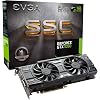
EVGA GeForce GTX 1060 SC GAMING, ACX 2.0 (Single Fan), 6GB GDDR5, DX12 OSD Support (PXOC), Only 6.8 Inches Graphics Card 06G-P4-6163-KR

  • Based on 1,092 reviews
Condition: New
Checking for the best price...
$299.00 Why this price?

Buy Now, Pay Later


As low as $49.83 / mo
  • – 6-month term
  • – No impact on credit to apply
  • – Instant approval decision
  • – Secure and straightforward checkout

Ready to go? Add this product to your cart and select a plan during checkout.

Payment plans are offered through our trusted finance partners Klarna, Affirm, Afterpay, Zip, Apple Pay, and Google Pay. No-credit-needed leasing options through Acima may also be available at checkout.

Learn more about financing & leasing here.

Selected Option

Free shipping on this product

30-day refund/replacement

To qualify for a full refund, items must be returned in their original, unused condition. If an item is returned in a used, damaged, or materially different state, you may be granted a partial refund.

To initiate a return, please visit our Returns Center.

View our full returns policy here.


Availability: Only 4 left in stock, order soon!
Fulfilled by Techno Sphere

Arrives Friday, Oct 9
Order within 2 hours and 58 minutes
Available payment plans shown during checkout

Protection Plan Protect Your Purchase
Checking for protection plans...

Set: SC


Size: 6GB


Features

  • Real Base Clock: 1607 MHz/ Real Boost Clock: 1835 MHz; memory Detail: 6144MB GDDR5. Revolutionary new 360-degree image capture
  • EVGA GeForce GTX 1060 sc - small size, huge performance. Height: 4. 376in - 111. 15mm; length: 6. 8in - 172. 72mm; width: Dual slot
  • Form Factor: plug-in card. Max monitors supported: 4, 240Hz Max refresh rate, max digital: 7680 x 4320

Description

The EVGA GeForce GTX 1060 is loaded with innovative new gaming technologies, making it the perfect choice for the latest high- definition games. Powered by NVIDIA Pascal - the most advanced GPU architecture ever created - the GeForce GTX 1060 delivers brilliant performance that opens the door to virtual reality and beyond. Memory 8008 MHz (effective) Manufacturer Contact Information For any technical issues contact manufacture at or

Graphics Coprocessor: NVIDIA GeForce GTX 1060


Brand: EVGA


Graphics Ram Size: 6144 MB


Video Output Interface: HDMI, DisplayPort, DVI


Graphics Processor Manufacturer: NVIDIA


Graphics Coprocessor: NVIDIA GeForce GTX 1060


Graphics Card Ram: 6144 MB


Video Output Interface: HDMI, DisplayPort, DVI


Graphics Ram Type: GDDR5


Compatible Devices: Motherboards with a PCI-e x16 slot


Graphics Card Interface: PCI Express


Memory Clock Speed: 1607 MHz


Number of Fans: 1


Display Maximum Resolution: 7680x4320


Display Resolution Maximum: 7680x4320


Item Dimensions L x W: 6.8"L x 4.38"W


Brand: EVGA


Video Processor: NVIDIA


Antenna Location: Gaming


Built-In Media: 6Pin(2) to 8 Pin Adapter, Driver CD, EVGA Enthusiast Built Sticker, EVGA GTX 1060 SC GAMING Graphics Card, EVGA Gaming Poster, Installation Guide, Powered by EVGA Case Badge


Model Name: EVGA CORPORATION


Graphics Description: NVIDIA GeForce GTX 1060 with 6144 MB GDDR5 memory


Unit Count: 1 Count


Global Trade Identification Number: 32


Number of Packs: 1


Manufacturer: EVGA


Number of Items: 1


UPC: 672773750842 843368043032 889349284407


Item Weight: 1 kg


Item Type Name: Computer Graphic Card


Manufacturer Contact Information: For any technical issues contact manufacture at or


Model Number: 06G-P4-6163-KR


Mfr Part Number: 06G-P4-6163-KR


Warranty Description: 3 Years


Frequently asked questions

If you place your order now, the estimated arrival date for this product is: Friday, Oct 9

Yes, absolutely! You may return this product for a full refund within 30 days of receiving it.

To initiate a return, please visit our Returns Center.

View our full returns policy here.

  • Klarna Financing
  • Affirm Pay in 4
  • Affirm Financing
  • Afterpay Financing
  • Zip Pay in 4
  • Financing through Apple Pay
  • Financing through Google Pay
Leasing options through Acima may also be available during checkout.

Learn more about financing & leasing here.

Top Amazon Reviews


  • A Good Fit For My System......
Set: SC Size: 6GB
I ordered this card for two main reasons. One, I wanted a upgrade from my GTX-960 that would be in my budget range and two, if I upgraded my card I wanted a memory upgrade too. Since my old GTX-960 had 4 gigs of GDDR5 RAM then I wanted at least a 2 gig step up to 6 gigs. I also liked the short single fan cards as they fit in my case better without having to move stuff all around. (I like the case I have even though it's not the roomiest I've seen.) When I read about the GTX-1060 SC which was like my GTX-960 as far as shape was concerned. And then I found out it came in a 6 gig GDDR5 RAM set up. And to top this off it's specs showed it gave a GTX-980 a run for the money and then there was the price at $259 and that's when I ordered it on 7/19/16 when they came out. (I've noted a bit of an up ward direction of the price in the days after it came out.) It came in today and it looked to be just what I wanted. When I got it in, I noted it was about the same size as the 960 was. I noted it wasn't quite as heavy as the 960. but I noted that the heat sink looked very solid and had copper cooling pipes on it. It came with an adapter for using a old style molex type power plug to power the card.(I didn't need this as my PS had the correct cable and plugs to fit. The one thing I did note (and I was prepared for) was that the DVI output was the DVI-D type and no VGA output nor a DVI-I (which has a VGA output on the side.) So if your thinking of getting this card and you have standard VGA, you'll need an active DVI-D to VGA adapter or use the HIMI slots. I had gotten an adapter as that's what I read when I was considering this card. Installation when fairly smoothly. I first uninstalled the 960 by deleted the card from the device manager and then shutting down the system to do the hardware install. (Since this card uses the same drivers as the 960, I've been a bit lucky in that I've been able to delete the card in the device manager and then shut down and install the new card and boot back up and each time I've used this approach, Windows has always loaded the driver and identified the new card. (BTW: This wouldn't work if I changed brands.) This time was no different. Windows booted up and a couple of seconds later I was notified to reboot so the drivers could be installed and when I did the card was up and running with the latest drivers. I had no problems after the reboot and the card seemed very solid so far. I decided to fool around with a couple of things just to see how it ran. First I loaded up "Remember Me" just for a little play time. It ran great. I didn't experience any problems running the game. I did note that the game seemed to render somewhat better than I remember and backgrounds looked better. I ran Kingdom of Amalur and it looked much better. (I didn't note quite as many background scenes sore of change around as you got closer to them or looked at them from a different view.) I also noted the colors seemed a bit more vivid to me, but this might just be me liking the game which I do. I experienced no lags to speak of and the game just ran great. I did note a few things I did like. The fan on it was very quite to me, and I liked that it was on all the time. I've had a video card and a power supply burn up when the fan wasn't running even if it wasn't supposed to be and I like the fan running. (I noted the card ran cooler than my 960 at 35c when in idle.....nice.) I also noted that it was very fast when loading up images at least for me. It seemed well able to handle what I threw at it and I tend to be a rough at times. So far, I'm very happy with my new card. I'll need to see how well it holds up to use and that will really tell the tale. So far a very nice card for the money. ... show more
Reviewed in the United States on August 2, 2016 by C. Weaver

  • Easy installation and great results
Set: SC Size: 6GB
I've never liked writing shorter tech reviews because certain products are costly. If you overlook something in your research, then you spend more time and money trying to correct it. Also for this review, I use GPU, card, and graphics card interchangeably. I've wanted to play the more recent console games that have also been coming out for PC, but my NVIDIA GeForce GT 730 GPU for desktop couldn't keep up...not even close. I spent quite a while researching and deliberating between this graphics card or the higher benchmarked 1070 or 1080 version (including the Ti versions) NVIDIA cards. I ultimately went with this 1060 6GB SC from EVGA as I could keep my current power supply unit, and didn't need to replace my 6 pin connector (which would have added to the cost up front and slightly higher electric demand). I'm not considering using ultra-high graphics or manually overclocking this GPU anyways. My logic was it would last me about as long as a console, but was happy to noticed it improved the quality of the display for images/movies over the original, lower-performing 730 GPU. So I might even be able to benefit from it longer still. Installation: I use Windows 10--not sure if this is important, but maybe helpful for you. I've never installed a graphics card in my life, so after reading/watching how it was done online, I found it superbly easy once inside the machine. Ridiculously easy even. I did have some trouble with the software installing from CD (the EVGA website has it anyways all nicely updated so it saves time from needing a second update), but the included benchmarking software (including one for VR) went on a-okay. Was way easier then expected. Impressions during play/viewing: Remember how I said my old, basic 730 GPU couldn't keep up with newer games? This1060 SC graphics card fixes a 1-5 second processing delay the old GPU gave me (and I was really sacrificing graphics quality on that old card). Now, I am running with higher quality graphic settings in-game and my gameplay is no longer lagging from intense graphics. No problems yet during gameplay with STEAM's and NVIDIA software's recommended settings, and the only periods in gameplay it seemed to have trouble with was graphically intense cutscenes. [Not sure if that is really this card's fault as the game is a hybrid between local files and network connection.] The fan on this card is probably the noisiest one on my whole desktop (become aware when the fan kicks up, but it's nowhere near jump-scaring me), but I hear that noise level is common across all these NVIDIA 10-series GPUs. I'm glad EVGA designs their fans to be slightly quieter because of this. Other games that worked with my old GPU (think RPGs, World of Warships, etc) actually look sharper for better or worse (it highlights quality of detail the designers put into it the game, but also highlights some of the graphical imperfections--still not complaining though since stuff loads great at on good quality settings). Outside of gameplay, my background images that cycle for my PC are significantly enhanced both in textures and colors. To give you an idea, one of my backgrounds is a landscape that has a brushstroke effect that is now showing up significantly clearer--something I could notice on my old 730 GPU, but nothing with this detail. Other impressions: It's not a full-length desktop card, but the card has significant bulk and heft to it. Was actually surprised by the size and how sturdy it looked and felt since I mostly know friends that use gaming laptops. As far as detail goes, others are commenting on how much sharper things look from my PC now, and I haven't even changed my monitor! I'm sure this already is obvious, but if you are gaming expect heat generation. Keep that in mind in case its hot outside or now that winter is coming. Will update should anything change or find something else out that's cool about it. ... show more
Reviewed in the United States on October 11, 2018 by Jaymes

  • Single VS Twin Fan. You Really Don't "Need" More Than This
Set: SC Size: 6GB
Review for: 1060 SC Gaming ACX 2.0 Single Fan 6GB If you are as curious as I was to what the difference of single vs twin fan cards are, I found the simple answer browsing some PC build forums. Basically, a lot of it boils down to looks, and the rest is how far you can overclock past stock. -PC enthusiasts love beefy, expensive looking cards and equipment to fill out their towers, and twin cards deliver with their bigger case, lights, and backplate. Single fans don't have any of that, but are cheaper as a result. -Single fan cards also don't stand up to overclocking as much as twin fans because of heat dissipation. That's not to say single fans aren't adequate out of the box. If you don't plan on overclocking, a single fan is just fine and will never overheat. Running at full power on max settings playing OW makes the GPU top out at 72C. If you'd like you can also alter the fan speed settings within the Bios to keep the GPU cooler or quieter. You really don't need a twin fan model, or really anything above a 1060 if you're a basic gamer that doesn't care about looks and just wants a high performance card you don't plan on messing with. I'm playing on a 144mhz monitor and get 160FPS playing Overwatch on Ultra, and about 100 on Epic. TF2 is beyond easy to play at max and Subnautica looks absolutely beautiful on topped out graphics with no stuttering. My tower is in a somewhat confined space as well and the card has never overheated even in 5+ hours of non-stop gaming. UPDATE: I downloaded the "Precision X" Bios from EVGA and updated the card. It's now faster then ever. Even on stock tune and no overclocking the card is now peaking at 2012mhz, WAY higher than advertised and higher than any stock clocked 1060 on the market. I'm loving this card more every day. ... show more
Reviewed in the United States on September 20, 2016 by Jake M.

  • Best small GTX 1060 Card!
Set: SC Size: 6GB
My favorite card that I've ever owned and I'll tell you why. I was looking for a card with low power consumption that was great for gaming and needed to fit in a small case. This card fits that bill exactly. I have this paired up with an i5 6500, 8b DDR-4 Ram all in a Core V1 case. My computer is really silent and just sips power even when gaming. I'm more of a casual gamer now but I never want my games to dip below 60fps when gaming at 1080p, so this card does great. I mostly play Fallout 4, Doom, Tomb Raider, GTA V as well as lots of other older games in my library. You can look into other reviews but I've read this card does really well at 1440p but I am unable to verify that at this time. I'm planning on purchasing an HTC Vive and I've already tested my setup for VR and it is definitely VR ready. If you game at 1080p this is definitely the card for you, plus the small size means you can fit it in basically any case. There is another version of this card that looks similar in size but has a cheaper cooler on it, so spend the extra $10 and get the 1060 SC. I was also looking at the RX480 but I really wanted a smaller card and I was not impressed in regards to power consumption with the RX480. Pros -Max out settings for games in 1080p -Inexpensive card that can run VR really well. -Low power consumption -0db idle mode (fan doesn't start going until card heats up, only ever heard the fan turn on when I was playing Doom at max settings) -Perfect size for small cases (I have mine installed in a Core V1) Cons None really, I guess if you want LEDs or something more flashy look elsewhere but you'll pay more. ... show more
Reviewed in the United States on January 6, 2017 by Paul R.

  • This card is powerful, but really loud by default.
Set: SC Size: 6GB
First I'll disclaim I wanted to initially give this two stars for the noise, then three after I fixed it in my own way, but I'm finally opting for a four star review, mainly because EVGA provides very good service and warranty, and was very responsive to queries online. So consider the card 3.5 stars and an additional half star for the quality of service behind the product. ============================== I bought this card because Amazon wouldn't allow more than one per household on the MSI GTX 1060 AERO ITX model. This card is technically more powerful than that model, being "superclocked" and all. And I have to admit, it's a great card. However the enclosure and fan leaves something to be desired. The fan on this card is much too aggressive. Apparently it initially had a max fan speed of 2600RPM but a BIOS update on later revisions bumped it to 3900RPM after some issues with the EVGA 1070 and 1080 models. This card isn't impacted but I guess it was a precautionary measure. But because of this, the card sounds like a jet engine once you get into the mid-50% speeds on the fan, and the stock fan curve is extremely aggressive, ramping up as high as 70%+ speed when the card is around 70c (when it can easily go up to 80c without any throttling or problems). This was a souce of confusion, since video reviews on the card note it's whisper quiet, but that was way back before the vBIOS was changed. MSI Afterburner or similar software is a must for this card, not for overclocking, but for fan control. A custom fan curve goes a long way, and you can keep this card at around 75c or below at 100% load with a fan speed of about 52%, at least in my case (Corsair Carbide 100R Silent edition with two front intake 120mm fans and one rear exhause 120mm fan). I highly recommend installing MSI Afterburner or EVGA's own Precision X OC immediately after installing this card and setting your own fan curve. Doing so will turn this card from "powerful but I don't want to use it" to just "powerful." So basically, I tentatively recommend this card. It's good, and a fantastic 1080p gaming card, and pretty decent even at 1440p. But without an aftermarket cooler or a custom fan curve it's really noisy. ========================= Lastly, a note for Linux users: Obviously you don't have access to tools like MSI Afterburner. That's cool though, you've got bash. I got some help online and came up with a script that controls this card's GPU (well, any Nvidia card) based on the temperature. You can find it at the link below: https://pastebin.com/2iANCPEy The script controls the fan by using an offset value to set the fan speed to an offset of the temperature. If the card is below 56c the fan will stay on at 12% speed which is essentially spinning but inaudible. Once it passes that temperature threshold, it sets the fans speed to the temperature plus the offset. In my case an offset of -22 worked well. That way at 60c the fan will be at 38%, at 70c the fan will be at 48%, and so on. Seems to be perfectly adequate for cooling during gaming, and I'm seeing max temps of around 73-74c under load at 51-52% fan speed with the script. You can modify the offset value however works for you. To run the script, just make a copy locally and save it, chmod the file with a value of 755 (or just chown it, whatever), and call it with "bash ./filename.sh" If you do "bash ./filename.sh -v" it will do verbose output to the console and display the fan speed and gpu temp at each interval (8 seconds by default). If you're doing this from a remote terminal, you can use ctrl+z and then bg to set it as a background job, or just call it with the & symbol at the end when starting it so it doesn't take over the terminal session. Be aware, you need to be using the proprietary Nvidia driver for this to work, and you'll need to enable cool bit for fan control via "sudo nvidia-xconfig --cool-bits=4" (or --cool-bits=12 if you'd also like to enable overclocking). Then reboot for the cool-bit value change to take effect. A value of 4 enables manual fan control, 8 for OC in nvidia-settings. 12 enables both. You can also enable voltage control in addition to the rest with a value of 28. This only works on more recent revisions of the Nvidia driver (I believe versions above 340). I'm on Ubuntu 18.04, and this should work on at minimum 16.04 and up, plus other distros with similar versions and kernels. If you have a really old distro or much older drivers for some reason, you can use the script I originally based mine on, which can be found at the link below: https://gist.github.com/loathingKernel/995777d2aab6dc82316ea2da62142975 ... show more
Reviewed in the United States on May 23, 2018 by TK

  • Amazing card with some caveats
Set: SC Size: 6GB
I bought this to upgrade a 960. Is it worth it? Yes! Performance increases vary from roughly 75% to sometimes a little over 100% increase in frame rates. It is probably just a small step down from the 980's which used to cost around $500. I am not sure I have ever seen that significant of improvement in one generation before. It has a small form factor so it fits in just about any size of desktop machine. Like the 960, the fan does not turn on until it hits 60C so if you are not doing anything intensive with graphics it is totally silent. It also only needs a single 6 pin power connector. As an example, this card can render Witcher 3 on ultra settings at around 60FPS with no stuttering and the colors look great. This card is paired with a i5-4690 3.5 GHz processor and 16 GB GSkill Ripjaws. The 960 could do 30-35ish FPS and to get 60 I had to turn a lot of things down. The lame hairworks thing is disabled for both. It does have some limitations that the 960 didn't have. 1. It has a single DVI port, and not the format that allows for DVI->VGA, so if you have a VGA monitor, you will be out of luck here. DP or HDMI to DVI is not an issue so if you have two DVI or HDMI monitors, at worst you will need an adapter. It also only has 1 HDMI, but again there are adapters for that. 2. No SLI connections. I suspect this was done because two of these would probably be equal or better of a single 1070 and possibly 1080. I don't know for sure, but it is the most likely explanation in my opinion because the extra cost over the 960 pretty much covers the additional RAM on board. One big annoyance, and I don't know if it is the fault of Nvidia or EVGA or not their fault at all, but you can not change the display order in the BIOS. It goes DVI->HDMI->DP. When I bought this I replaced one of my monitors with a DP monitor and I use that as my primary screen. The BIOS screen on boot up and GRUB2 menu would always display on the secondary monitor. That is annoying but doesn't affect anything once you are booted into an operating system where you can choose what monitor is the primary. A small DVI to DP adapter solved it without issue. I don't know if this has always been this way since I used to only have DVI monitors so I don't want to ding the rating for something that might be normal. ... show more
Reviewed in the United States on December 8, 2016 by Rusty Shackleford

  • Surprisingly cool for a single-fan ACX!
Set: SC Size: 6GB
Don't let a single fan fool you! I bought this card worried about just that, and let me tell you, I'm eagerly surprised. I haven't taken the shroud off of the card to put new paste on it either; a proper fan profile with Afterburner or PrecisionX and you'll be just fine. I haven't seen my card go over 63C, and it's rated to tolerate much higher. Plus, in Afterburner it autoclocks it to 2000MHz, though it runs anywhere from 400 to 1600 with idling and light gaming. The most 'intensive' games I play revolves around Doom (2016), Rust, GTA V, Metro Last Light and The Forest. I don't know the exact average, but I'll put what I remember from said games in regards to frames per second. Also keep in mind the processor can also affect performance, as well as the RAM when it comes to Ryzen. I'm using a Ryzen 5 1600 and 8GB Corsair Vengeance LPX RAM. Doom: Ran everything on Ultra/highest possible settings on everything, 1920 x 1080. Dipped slightly below 60FPS once in a blue moon, but never under 57FPS. Very smooth. Rust: Honestly Rust still has some sketchy optimization, but it never drops under 70FPS (1920 x 1080, minimal settings w/FXAA on and a render distance of 2,500) for me. I've also played w/everything maxed out on some empty/almost empty servers and averaged right around 85FPS. Of course, that's an empty world; a populated world got me right around 45FPS (200 out of 300 slots being played) which is playable, but definitely not recommended for a game like Rust. Metro Last Light: Never went below 60 FPS. Everything on Ultra, 1920 x 1080. If you never want to go below 60FPS with the same setup as I have, just turn everything on High instead of Ultra. The look is negligibly different. The Forest: Is optimized horribly, so your experience may vary. Usually 50+ FPS on mid-high settings, but going Ultra on a game that's still in alpha is honestly a stupid decision anyhow. GTA V: Most settings on High, population density smack dab in the middle. Game looks pretty, never drops below 75FPS. 1920 x 1080. I love this little card. It's cute as a button but performs like an Olympian. ... show more
Reviewed in the United States on October 24, 2017 by Blaze

  • Pretty Fantastic With Just A Few Possible Caveats
Set: SC Size: 6GB
Full disclosure, this is my first graphics card. So this review will mostly be only about the performance of the unit, and no comparisons. So I stuck this into the Acer TC-780 Desktop along with a nicer PSU. The case was a bit of a tight fit, but it works as intended. I initially had issues with the card, occasionally it would turn completely off leaving me with a black screen, this may have been a power issue because after unplugging many of my consoles, I have had no issues and it now performs well. It runs many older games decently at 4k, and I can get some newer games to operate well at that resolution, the card has issues properly handling it. However many games released in the last three years run amazing at 1080p or 1440p and the GTX 1060 handles most games well, even heavily demanding games like The Witcher 3. However I did have many many issues with Assassin's Creed Origins, although that was probably more of an issue with the game itself. When fully utilized in a game, the max temperature I've had has been 75°C with no overclocking. When I was benchmarking with a small overclock, it had reached 80°C but that probably will never happen within a game. About overclocking, this card handles it "okay" but hasn't wowed me. Anything over a +125 mhz overclock causes games to crash and I can't push memory clocks too high as it does cause artifacting among other issues. Overclocking the card does definitely help performance in some games if you favor a higher resolution like I do, but don't want to sacrifice fps too much. Overall, for my budget, it's a great GPU and it runs laps around the PS4 and Xbox One that I'm used to playing games on. I'm hoping that this review is somewhat informative. ... show more
Reviewed in the United States on January 30, 2018 by Kyle Inman

Can't find a product?

Find it on Amazon first, then paste the link below.
Checking for best price...