Search  for anything...

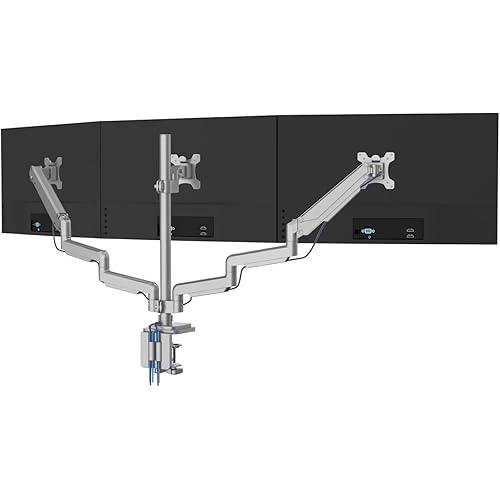
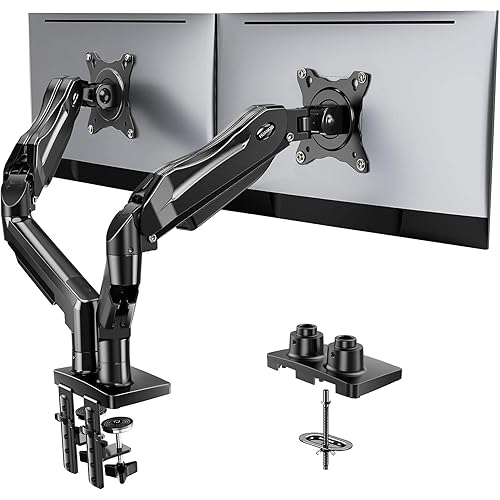
Ergotron – LX Vertical Stacking Dual Monitor Arm, VESA Desk Mount – for 2 Monitors Up to 40 Inches, 7 to 22 lbs Each – Tall Pole, Polished Aluminum

  • Based on 1,485 reviews
Condition: New
Checking for the best price...
$540.00 Why this price?

Buy Now, Pay Later


As low as / mo
  • – Up to 36-month term if approved
  • – No impact on credit to apply
  • – Instant approval decision
  • – Secure and straightforward checkout

Ready to go? Add this product to your cart and select a plan during checkout.

Payment plans are offered through our trusted finance partners Klarna, Affirm, Afterpay, Apple Pay, and PayTomorrow. No-credit-needed leasing options through Acima may also be available at checkout.

Learn more about financing & leasing here.
Selected Option

Free shipping on this product

This item is eligible for return within 30 days of receipt

To qualify for a full refund, items must be returned in their original, unused condition. If an item is returned in a used, damaged, or materially different state, you may be granted a partial refund.

To initiate a return, please visit our Returns Center.

View our full returns policy here.


Availability: In Stock.
Fulfilled by Ergotron, Inc

Arrives May 1 – May 5
Order within 18 hours and 27 minutes
Available payment plans shown during checkout

Protection Plan Protect Your Purchase
Checking for protection plans...

Color: Polished Aluminum


Size: 23 Inch Pole


Features

  • Broad compatibility: Fits two screens up to 40 inches and 7 to 22 pounds each; compatible with VESA patterns 75x75mm and 100x100mm
  • Everything you need: Includes two LX arms and extensions, 23-inch pole, heavy duty two-piece desk clamp for surface edges 0.63 to 2.6 inches thick, grommet mount plate and hardware for installation through a desktop hole, two pole collars, two caps and mounting hardware
  • Comfortable workspace: Find your best view for each project with 13 inches of lift, rising 31.7 inches from the desktop; customize how you work or collaborate at your workstation with 360 degrees of rotation and 75 degrees of tilt
  • Flexible working: Easily stack screens one over the other or position to either side; up your screen count and productivity with three or four displays using the LX Arm, Extension and Collar Kit accessory (97-940-026); free up more of your worksurface with thoughtful cable management
  • Built to last: Extensive quality testing ensures your display stays stable and secure; Ergotron products set the standard for quality with a 10-year warranty and expert technical support

Mounting Type: Tabletop Mount


Movement Type: Articulating


Brand: Ergotron


Material: Metal


Color: Polished Aluminum


Compatible Devices: Monitor


Maximum Tilt Angle: 75 Degrees


EU Spare Part Availability Duration: 1 Years


Global Trade Identification Number: 26


UPC:


Product Dimensions: 17.1 x 17.7 x 29.9 inches


Item Weight: 19 pounds


Item model number: 45-549-026


Is Discontinued By Manufacturer: No


Date First Available: August 31, 2017


Manufacturer: Ergotron


Language: English


Frequently asked questions

If you place your order now, the estimated arrival date for this product is: May 1 – May 5

Yes, absolutely! You may return this product for a full refund within 30 days of receiving it.

To initiate a return, please visit our Returns Center.

View our full returns policy here.

  • Klarna Financing
  • Affirm Pay in 4
  • Affirm Financing
  • Afterpay Financing
  • PayTomorrow Financing
  • Financing through Apple Pay
Leasing options through Acima may also be available during checkout.

Learn more about financing & leasing here.

Top Amazon Reviews


  • Extremely sturdy and fulfills a fairly uncommon niche
Color: Matte Black Size: 23 Inch Pole
Short version : _____________ Pros: - easy to assemble - very robust and sturdy, will hold up very well within guidelines - fairly decent free range of motion Cons: - dat price tag $$$$ - certain features like cable routing and swivel leave some very minor grievances LONG version : ______________ You don't have to read it all, but if you're already looking into buying this, there's a decent chance you are in a similar situation. If I was being nitpicky this would be a 4/5, but seeing as how there's really no other manufacturer that readily provides a solution to my problem it really is just the best I can get, from what I've seen. I upgraded from an LG 34UC89G-B 34" 21:9 to an Alienware AW3423DW 34" 21:9 and wanted to keep both monitors, with the new one on bottom and old on mounted on top. My old 2 arm mount was not going to be able to support this much weight as my other monitor was just a 27" 16:9 and it barely held those together. I didn't want to have to screw anything into my wall and I wasn't 100% sure on my desk space so I wanted free moving arms for orienting the monitors before finalizing where I want them to stay. Once I got this I was able to set my monitors up stacked on top of each other. While the bottom one isn't quite sitting as low as it can go, it's not far off. But the top monitor is just about using the mount's maximum capabilities in terms of being able to space these monitors apart while still leaving a tiny bit of room for adjustment. I have been able to pull my top monitor forward and rotate it portrait for documents and such though I have not done the same with the bottom monitor. ______________________________________________________ Overall actual use after setup: 9/10 The monitors themselves are not on the extreme end of heavy but they're not light. They both fall within the specifications of the mount. But where Ergotron excels with the LX is that it will actually support curved monitors up to that weight as well, as the curvature changes the center of balance of the overall monitor and puts more stress when extended out than your typical flat monitor. This is usually where you can see other people having issues with sag when approaching the upper limits of other mounting systems. These have not sagged at all since tightening down the screws and move with a fair bit of range, staying in place afterwards. However I do not extensively move my monitors around often and don't know how well it would hold up if you just kept moving them around constantly, though with the construction quality I'd wager it would be fine. One thing I was told from a friend who has the same mount: if your monitor is really bottom heavy for whatever reason and you decide to use it portrait style, the minor taps and thumps from your desk will cause it to try to rotate back to a horizontal position, skewed about 5-10 degrees. It's very minor and just takes a quick second to readjust but keep in mind that it may happen as 1 side is now far heavier than the other. ______________________________________________________ Setup process: 9/10 The setup itself was very easy. I saw other reviews having issues with it and maybe getting some help but if you follow the instructions provided, it is extremely easy, especially compared to setting up other mounts where you have to screw in the whole assembly to the monitor and take the entire piece and clamp it on your desk. You need to clamp down the base and bottom arm portions of the mount, then screw in the upper portions to the monitors BEFORE putting the rest of the mount together. The top arm portion falls right into the bottom and you just tighten the screw afterwards. If you can physically lift your monitor + 8 ounces or so, you will have no issues putting it together. One thing I will note: tightening the actual swivel head on the monitor so that the tension matches the weight of the monitor may be difficult if you are short since it adjusts from the top. WARNING: If your desk is particle board or something, I highly recommend buying reinforcement plates for the clamp. The clamp that the LX comes with is fairly sizeable but if you're going to be putting 50 lbs of pressure on 1 spot on your desk, it's best to not worry about the weight snapping your desk in half. If your desk isn't sturdy material: the arm mount will hold up, your desk will not. You're already splurging on this mount, don't cheap out and break your desk and potentially your monitors by skimping out on a $10 metal plate. If you don't want to go that route and don't care much about aesthetics, you can just use some wood. ______________________________________________________ Cable management: 5/10 Cable management looked like a mere afterthought. It's serviceable and hides the cables well enough but it's nothing to write home about. This feature has been better executed in cheaper models. ______________________________________________________ Range of motion: 8/10 Range of motion is better than most for sure. While it will still hold them in place, some positions and setups can be limited if you have enormous monitors. If you're using 2 24" monitors you will have zero issues, but the more you approach 40", even on 1 monitor, the options get more and more limited. ______________________________________________________ Final notes: I wish the pole was longer. That would solve a lot of issues people have had with mobility using large monitors. The arm mounts themselves hold up well, the fitting of large monitors just leaves something to be desired, especially out of something as expensive as this. ... show more
Reviewed in the United States on February 28, 2023 by Joe Wells Joe Wells

  • You get what you pay for, but shop before you buy
Color: Polished Aluminum Size: 13 Inch Pole
I research most anything that is a specialty item and/or over $100, I believe in getting my money's worth but also hate getting sold on a cheap product. I searched all over the internet for a monitor stand that would offer some flexibility in what it could offer and this is the one I settled on. To each their own. My thoughts so far; The pros: strong arms rated for heavier monitors, a laptop option, adjustable height arms as well as the support base gives multiple ways to move the arms independently from each other and even swap side to side if I so choose (some stands the arms will conflict with one another), I liked the polished look contrast against the black, kinda classy. The base is solid with a "through" mount option, and the routing method for cables was about as good as any other stand. The laptop stand partially holds a computer by velcro which was very secure even with smaller pieces; also some rubber padding strips provided (both are 3M and good quality). The cons: the price is somewhat expensive, and the joints are incredibly stiff, at least to start. So, basically I have been very impressed with the item. It seems very well made, I like the look of it, and it is solid, the laptop stand is much more secure than I ever would have guessed and have been tearing my laptop off but better than there being a chance of it falling. Also, it is natural to grab the monitor, or in this case the laptop case, to use as leverage while adjusting the arms. I have a 29" monitor to go on one arm and it will likely be able to handle a bigger model in the future. But from the factory the joints are LOCKED tight. This shows the quality of the build, but frustrating at same time. The item came very well packaged, all the pieces set in their place in the box. The smaller individual pieces came in sealed, consecutively attached bags (for the most part, some stand alone items) overall very organized. This is a really nice item, and although it takes some getting used to maneuvering the "limbs", it really makes the desk seem more spacious once the clutter of moving is cleaned up. The joints are pretty tight at first and may get easier with more use, but as-is and considering the weight they need to handle it is not a real issue. Completely recommend this item. ... show more
Reviewed in the United States on October 4, 2016 by bzygradstud

  • Best monitor arm I’ve personally used
Color: Polished Aluminum Size: 13 Inch Pole
Extremely sturdy, wealth of adjustments, and simple set up. By far the best monitor arm I’ve used. My monitors don’t wobble or move unless I want them to. Went with the small pole and had no issue mounting 32 and 27 inch side by side. Might even buy another for my laptop. One thing to note, if your desk is against a wall and you want full range of motion, I would recommend grommet mounting instead of using the c clamp. About 6-9 inches from the wall should give you full range of motion clearance. ... show more
Reviewed in the United States on April 25, 2025 by Amazon Customer

  • Sturdy, well made, versatile
Color: Polished Aluminum Size: 13 Inch Pole
I bought this back in 2013 and it worked great with a 27" monitor on one arm and the laptop tray and my Macbook Pro on the other arm - inserted into a hole on my treadmill desk. I upgraded my monitor to a Dell curved 32" monitor, which is under 17lbs. The arm couldn't hold the monitor at first, so I went back to the directions and learned there is a screw to create more tension on the spring. After making the adjustment on the arm the my new monitor held in place just fine. The new monitor was on a different desk; instead of going through a hole in the desk top, I had to clamp onto the edge. The only caveat is that if you are up against a wall, you may not be able to maneuver the monitor back far enough without hitting the wall with the arm. To remedy this, I put the pole on the left side and had the arm fairly straight so that I could push the monitor back without the arm elbow getting in the way or hitting the wall. ... show more
Reviewed in the United States on August 18, 2025 by K. Ray

Can't find a product?

Find it on Amazon first, then paste the link below.
Checking for best price...