Search  for anything...

Cricut Explore® 5 Essential Bundle + Digital Content, Taupe | Includes Supplies for 65 Projects + Bonus Digital Content - Works with 100+ Materials - Sleek, Simplified Design

  • Based on 190 reviews
Condition: New
Checking for the best price...
$249.00 Why this price?

Buy Now, Pay Later


As low as $41.50 / mo
  • – 6-month term
  • – No impact on credit to apply
  • – Instant approval decision
  • – Secure and straightforward checkout

Ready to go? Add this product to your cart and select a plan during checkout.

Payment plans are offered through our trusted finance partners Klarna, Affirm, Afterpay, Zip, Apple Pay, and Google Pay. No-credit-needed leasing options through Acima may also be available at checkout.

Learn more about financing & leasing here.

Selected Option

Free shipping on this product

FREE 30-day refund/replacement

To qualify for a full refund, items must be returned in their original, unused condition. If an item is returned in a used, damaged, or materially different state, you may be granted a partial refund.

To initiate a return, please visit our Returns Center.

View our full returns policy here.


Availability: In Stock.
Fulfilled by Amazon

Arrives Thursday, Aug 20
Order within 8 hours and 30 minutes
Available payment plans shown during checkout

Protection Plan Protect Your Purchase
Checking for protection plans...

Size: 65 Project Bundle


Features

  • 12 IN (30.5 CM) CUTTING MACHINE: Cricut Explore 5 is the newest generation of our Cricut Explore machines perfect for making a variety of projects like custom decals, personalized apparel, full-color stickers, cards, and so much more. You can even make in multiples! 30% more compact than previous models, Cricut Explore 5 features an aesthetic new look and simplified interface for a more intuitive experience all with the same dependable 12 in (30.5 cm) cutting performance. Available in a brand-new Taupe color.
  • COMPATIBILITY: Precision-cuts 100+ popular materials, including vinyl, iron-on, cardstock & printable materials, plus this machine writes, draws, foils, scores & cuts intricate designs with precision. Works with six tools, including Deep Cutting Tool (sold separately) for working with thicker materials like foam & rubber. Plus, it features a new hassle-free snap-in pen holder.
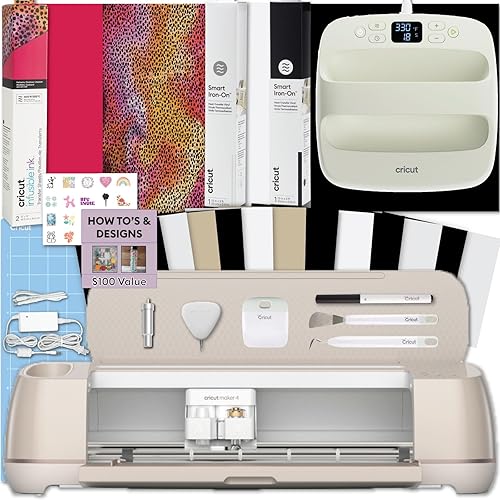
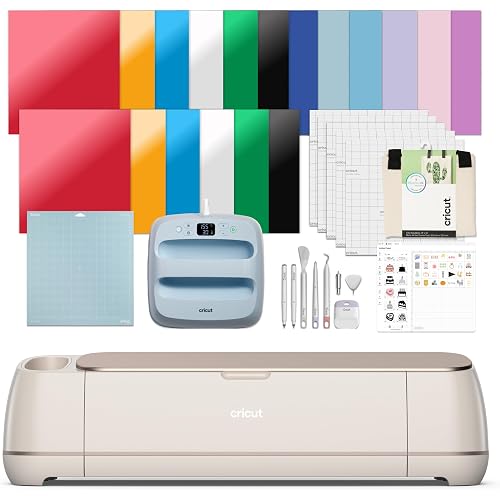
  • BUNDLE & SAVE: Make a wide variety of projects right out of the box and save even more! The Essential Bundle includes must-have tools and materials like Smart Vinyl, Smart Iron-On, Value Cardstock, Insert Card Sets, and Printable Vinyl. It's enough supplies to create up to 65 projects. Bundle also includes 25 additional premium-quality images with purchase, plus 1 font.
  • FULL-COLOR POSSIBILITIES: Print your design with your home inkjet printer, then your Cricut cutting machine automatically recognizes & precision-cuts around inkjet-printed images to create full-color stickers, decals, apparel & more.
  • NO DESIGN EXPERIENCE REQUIRED: Use your mobile or desktop device and connect through Bluetooth to Design Space, our free, easy-to-use app that helps you turn your ideas into something one of a kind. With step-by-step design flows, customizable templates, AI-image generation, and a huge content library, it makes personalization feel effortless. Our free out-of-the box content library includes 3,000+ images, 100+ fonts, and 1,000+ projects to help get you started. Additional content can always be purchased a la carte, or go all in with a Cricut Access Subscription to unlock our ever-growing library for a small reoccurring monthly or annual fee.

Description

Make it one of a kind every time with Cricut Explore® 5 – the sleek, simplified making experience you’ve been waiting for. The next generation of our 12-inch cutting machine precision-cuts at top-tier speeds and works with over 100 materials to help you create custom decals, personalized apparel, full-color stickers, cards, and so much more. You can even make in multiples! The Essential Bundle comes with must-have crafting tools as well as an assortment of popular materials. This bundle is perfect for those looking to make a wide variety of projects right out of the box — and save. It's enough supplies to make up to 65 projects. It also includes additional premium- quality digital content with purchase. Cricut Explore 5 requires compatible computer or mobile device with Bluetooth® wireless and high-speed internet connection - system requirements may change. Average size of project is 4 in x 6 in (10.2 cm x 15.2 cm) using included materials. Compatible materials, tools & accessories sold separately. Full content library & certain software features requires paid Cricut Access™ subscription. Tools shown may differ in box. All machines include pre-installed cutting blade—either with metal housing or new Cutting Tool. Limited Warranty - see Cricut website, or write to manufacturer or authorized region representative at applicable address, for full terms and conditions. Visit Cricut website for specific compatibility, details, terms and conditions, warranty information, and more. The Bluetooth® word mark and logos are registered trademarks owned by Bluetooth SIG, Inc. and any use of such marks by Cricut, Inc. is under license. Cricut Explore 5 is not intended for use by children 12 years and younger.

Brand: Cricut


Material: Plastic


Color: Taupe


Active Surface Area: 72 sq in


Operation Mode: Automatic


Brand Name: Cricut


Manufacturer: Cricut


Unit Count: 1 Count


Warranty Description: Limited Warranty


UPC: 093573256141


Number of Items: 1


Included Components: Cricut Explore® 5 Essential Bundle + Digital Content


Model: 8003147


Part Number: 8003147


Operation Mode: Automatic


Print media: Unknown


Compatible Devices: Computers, Mobile Devices


Active Surface Area: 72 sq in


Material Type: Plastic


Color: Taupe


Frequently asked questions

If you place your order now, the estimated arrival date for this product is: Thursday, Aug 20

Yes, absolutely! You may return this product for a full refund within 30 days of receiving it.

To initiate a return, please visit our Returns Center.

View our full returns policy here.

  • Klarna Financing
  • Affirm Pay in 4
  • Affirm Financing
  • Afterpay Financing
  • Zip Pay in 4
  • Financing through Apple Pay
  • Financing through Google Pay
Leasing options through Acima may also be available during checkout.

Learn more about financing & leasing here.

Top Amazon Reviews


  • Instantly Obsessed
Size: 65 Project Bundle
I originally bought my Cricut to help with a baby scrapbook I’m making, but it has turned into one of my favorite purchases. Ever since it arrived, I’ve been making all kinds of projects! I don’t have a lot of free time, so I really appreciate how quickly I can go from an idea to a finished project. It makes crafting feel manageable, even with a busy schedule. It has completely leveled up my scrapbooking. The cuts are so clean and professional-looking, and it’s amazing how much creativity it has unlocked. I keep finding new things to make! If you’re on the fence, don’t be. This machine is incredibly fun, easy to use, and worth every penny. I’m absolutely obsessed with it and only wish I’d bought one sooner! ... show more
Reviewed in the United States on July 10, 2026 by Morgan

  • Easy, recommend!
Size: 65 Project Bundle
Easy to us, the quality is great! I used this for small projects for my buisness and I’ve loved it! Compatible with my Macbook!
Reviewed in the United States on August 6, 2026 by Kat

  • Do not skip collaborating the machines you will waste hours and tons of supplies if you do
Size: 65 Project Bundle
If you've never used a cutter machine or a Cricut Machine or whatever just know that you're probably going to cry a bunch of times before you actually figure out what the hell to do. Or maybe that's just me but every time I cut it out it would come out off center and nowhere and the instructions or anything cuz I find or understand what a collaboration was and it was actually super super simple and I am guilty of going on chat gbt to figure out what the f***. Cuz I literally spent hours and hours trying to figure out what to do and how to make it work but the good news is once you do collaborate it and once you do figure it out so basically collaboration is you have to go into the settings on the app which sounds really complicated already right but it's not just click your name and it will give you a drop-down menu button you go to settings and then you find machine collaboration you click that and then you follow the instructions which are fairly simple it just means that your printer is going to print out this picture of like black lines and then you're going to feed that through your Cricut Cutter which is going to collaborate the printer and the Cricut Cutter together and then after that so far I've had zero issues I was literally spending like hours a day cutting stickers for my shop and wasn't expecting my sticker shop to blow up as quickly as it did so it was time to invest in this machine and I've never had one before and I'm super excited to try lots of new things with it. It's I figured because of how expensive it was it would have been a lot more simple but I guess not I also want to try and cut shrink film with it because I also make shrink film jewelry and I'm curious to see how that works out I even got a deep cut blade to switch out to give it a go so I hope that works but it definitely works for vinyl because I use a vinyl sticker sheets but then I also put a thick self laminate over it to make it scratch resistant and so the very thick stickers The only thing that I do find really annoying is that The constant nagging to start the free trial Is annoying I said no about 20 times and you have to keep clicking out of it because every corner you turn they're trying to get you to start this damn free trial which if you make your own artwork you don't have to even worry about it but yeah I cried during the setup twice so make sure you have a good chunk of time put aside just in case to put it together and to get it going cuz I don't know I had a really difficult time with it and I watched tons of YouTube videos and read tons of Articles and I looked over the instructions multiple times I don't like using AI but I even tried contacting customer support and they told me that I had to do it through my laptop which was going to take even longer because I've never printed anything off my laptop and everything's always been off my tablet or phone so that when it took him forever cuz none of my artwork is on my laptop anyways yeah make sure you collaborate it guys otherwise it's not going to work ... show more
Reviewed in the United States on May 26, 2026 by D

  • Explorer series markers do not fit this machine. You
Size: 65 Project Bundle
I did not realize this was such a new machine in that they updated/changed things from the Explorer 4. Had I known, I would have opted to get an Explorer 4. For example, you can only use markers that say “Explorer 5”. Markers for “explorer series” do not fit this machine. If you use a marker, you must take out the cutting blade or it will scratch your paper. The debossing tool does not fit this machine. It does not have a cover to keep dust out of the machine. I had to purchase a bag to keep it safe. (You can find covers to purchase on Amazon if you have a designated spot for your machine. Ido not have a designated spot so I went for the bag). I am new to Cricut. Aside from the things I noted, I am loving the machine. I loved that it came with a variety of papers and vinyls so I could learn what this machine is capable of. ... show more
Reviewed in the United States on August 4, 2026 by D. Jones

  • Excellent
Size: 65 Project Bundle
I bought this product to use at home, I loved it, it is easy to use, it has the basics to start in the art of designing simple projects. You can do many projects and also see it As a short, medium and long-term investment. I highly recommend it
Reviewed in the United States on July 30, 2026 by Chris

  • Cricut explore 5
Size: 65 Project Bundle
Ever since I bought my Cricut Explore 5, the look of my cakes has completely transformed. Now I can create endless designs, and if a client makes a last-minute request, I can handle it—I no longer have to go out looking for a design, as I can have it ready in just minutes.
Reviewed in the United States on July 30, 2026 by Hilda Maciel

  • Explore 5 doesn't work - Manufacturer will not help
Size: 65 Project Bundle
This item has been a BIG disappointment.. I havwe been a long time Cricut user and needed to replace Explore Air 2 when if finally quit after 6 years. When the machine arrived it would not connect to my new HP Envy 6500 e series printer. After 6 weeks of escalating the issue thru multiple representatives, Cricut finally acknowledged there was a problem with Design Space. Their solution was to work in BETA version instead of normal LIVE version. It worked sporadically with the printer disappearing routinely and needed to be installed. The Explore 5 could not find any printer. Now aftrer weeks of working in BETA and praying that each project would preint, NOW it cannot read the registration marks printed by Design Space to cut the project. It stutters along the edges on some and then eventually states in can't find them. Others it will stutter along the edges and cut stupidly through the project. I cantacted customer service and was told by a 1st level supervisor that since I did not buy the machine directly from Cricut that there was nothing they could do for me. I bought an additional warranty thru Amazon and tried to file a claim. It was denied as still being under manufacturer's warranty operiod. However, the manufacturer told me they would not replace the machine since it was not purchased thru XCricut. Now I am stuck with a basically worthless machine that causes nothing but frustration!. I bought all the new accessories needed for tha machine and am stuck! Nastty customer service thru Cricut. ... show more
Reviewed in the United States on June 12, 2026 by Sue Adams

  • You have to buy a cricut program that cost you 10.00 a month
Size: 65 Project Bundle
Its works like drafting and designing everything is measured cut and sized all on a grid layout the cutting is perfect so far on everything I have tried ( and it's a lot) the blade needs to be changed as soon as you notice it start missing in its cuts. You have to buy a cricut program that cost you or you pay for each individual image you choose the subscription it 10.00 a month or .99 per image ... show more
Reviewed in the United States on June 24, 2026 by Aarron Berry

Can't find a product?

Find it on Amazon first, then paste the link below.
Checking for best price...