Search  for anything...

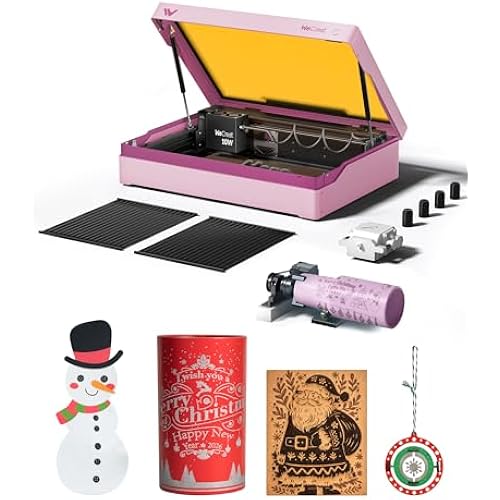
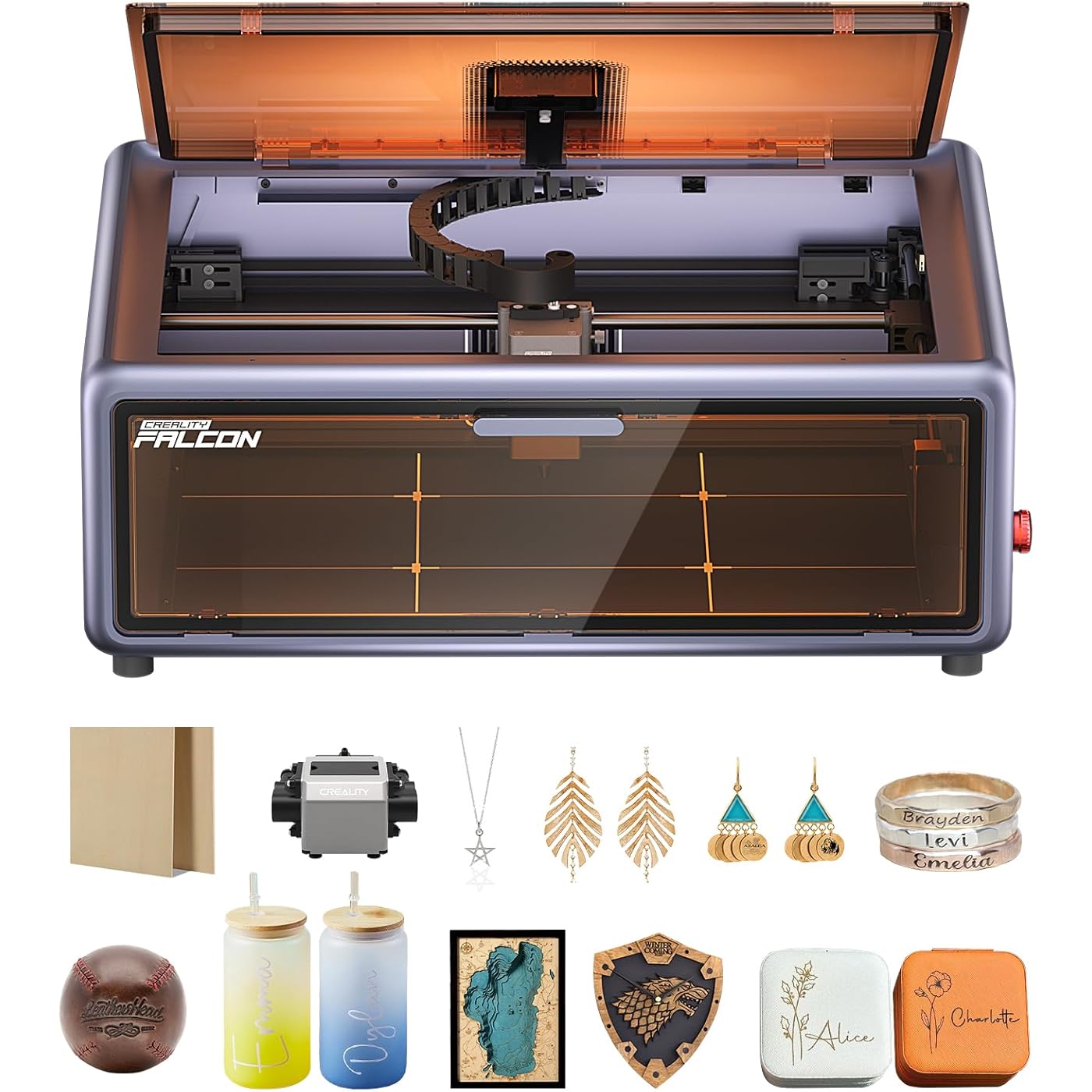
Creality Falcon A1 10W Laser Engraver, 80W Powerful Output, Fully Enclosed, 600mm/s Speed, HD Camera Auto Positioning, Pre-Assembled&Smart Material Recognition, Ideal for Wood & Metal, Class 1 Safety
  • Based on 140 reviews
Condition: New
Checking for the best price...
$499.00 Why this price?
Save $50.00 was $549.00

Buy Now, Pay Later


As low as / mo
  • – Up to 36-month term if approved
  • – No impact on credit to apply
  • – Instant approval decision
  • – Secure and straightforward checkout

Ready to go? Add this product to your cart and select a plan during checkout.

Payment plans are offered through our trusted finance partners Klarna, Affirm, Afterpay, Apple Pay, and PayTomorrow. No-credit-needed leasing options through Acima may also be available at checkout.

Learn more about financing & leasing here.

Selected Option

Free shipping on this product

FREE 30-day refund/replacement

To qualify for a full refund, items must be returned in their original, unused condition. If an item is returned in a used, damaged, or materially different state, you may be granted a partial refund.

To initiate a return, please visit our Returns Center.

View our full returns policy here.


Availability: Only 5 left in stock, order soon!
Fulfilled by Amazon

Arrives Tuesday, Jul 21
Order within 6 hours and 13 minutes
Available payment plans shown during checkout

Protection Plan Protect Your Purchase
Checking for protection plans...

Color: Falcon-A1 10W Gray


Features

  • HIGH-PRECISION ENGRAVING MADE EASY The Falcon A1 laser engraver delivers 80,000mW of power with an advanced CoreXY system, allowing speeds of up to 600mm/s and an engraving accuracy of 0.05mm. Whether youre personalizing gifts, crafting intricate designs, or making professional products, it ensures sharp, detailed results on a variety of materials. It can even cut through 6mm wood in a single pass! Plus, with the Falcon roller kit, you can engrave on curved or round objects like tumblers and bottles
  • SMART & SIMPLE TO USE No more complicated setups! The built-in camera automatically recognizes your material and applies the best settings for engraving or cuttingso you dont have to experiment. Just place your material, let the Falcon A1 do the work, and enjoy perfect results every time. For added safety and peace of mind, the Falcon laser engraver includes an emergency stop button and will automatically pause when the lid is opened, making it safe for beginners and experienced users alike
  • DESIGNED FOR CONVENIENCE The Falcon A1 laser cutter and engraver machine unique double-door design gives you easy access to your projects. The transparent top and side panels let you monitor your work in real time, and the side openings make loading and unloading materials effortless. Whether you're a hobbyist or a professional, this design makes engraving faster, easier, and more enjoyable
  • SAFE, QUIET, AND LONG-LASTING The Falcon A1 laser engraving machine is a Class 1 laser, meaning its safe to use anywhere. Its fully enclosed design blocks 99% of laser light, so you dont need safety goggles. It also reduces smoke and noise, keeping your workspace clean and comfortable. Plus, the advanced cooling system helps prevent overheating, ensuring smooth performance and a longer lifespan
  • READY TO USE NO ASSEMBLY NEEDED! The user-friendly exclusive own software(Falcon Design Space) makes designing and adjusting patterns easy, and you can even monitor progress in real time. Its also compatible with popular engraving software like LightBurn and LaserGRBL, giving you more creative flexibility. And then the Falcon A1 comes fully pre-assembled, you can start engraving right awayzero setup required
  • PLEASE NOTE THAT the Falcon A1 is only compatible with 460 346mm(18.11 x13.62) honeycomb panels
  • THIS MACHINE IS STRICTLY PROHIBITED from engraving highly reflective materials.Prohibited materials include but are not limited to(Mirror-finished metals, Mirrored acrylic ,etc.)

Description

High Precision, More Efficiency, Easy Operation Creality 3D Technology Co., Ltd. focuses on the design, research, production of 3D printers and 3D printing related products. Consisting of professional researchers and skilled engineers, our R&D team constantly strives for creative function and excellent user experience. The R&D investments on 3d printing cover FDM/resin 3D printers, 3D scanners, filaments, resin, as well as 3D printed drones and robots that back up STEAM education. Visit the Store Visit the Store Visit the Store Visit the Store Visit the Store Visit the Store Note: It is not recommended to engrave highly reflective materials (e.g., mirror metals, mirrored acrylic) The full-fram view and pre-calibrated high-definition camera simplifies the entire process, making every step of operation easy and intuitive Reach speeds of up to 600mm/s with the new CoreXY motion system, powered by twin motors for smooth, high-speed performance Dual-beam lasers combine to form one powerful spot, cutting through materials effortlessly. It can cut 9.6mm black acrylic, 5mm basswood in one pass Falcon A1 uses a built-in system to detect materials and optimize engraving and cutting without manual setup. Is the Falcon A1 laser engraver beginner-friendly? Yes! The Falcon A1 comes fully pre-assembled, so you can start engraving right out of the box—no complex setup needed. The built-in HD camera automatically detects materials and applies the best settings, eliminating guesswork. Does it support popular engraving software? Yes! Falcon A1 is compatible with LightBurn and LaserGRBL, giving you full flexibility to create custom designs. It also features a self-developed operating system with built-in design and monitoring tools for a seamless experience Is this machine safe to use at home or in a small workspace? Yes! The Falcon A1 is a Class 1 laser. The fully enclosed design filters 99% of laser light. Plus, built-in safety features like the emergency stop button and auto-stop when the lid is opened provide extra peace of mind. How do I know which materials and settings are suitable for the Falcon A1? You can find detailed material recommendations and engraving parameters in the "User Guide" under the “Product Guides and Documents” section on the product page. It helps ensure safe and optimal engraving performance. What if I have issues with setup or operation? The Falcon A1 is designed for ease of use, and we provide detailed user guides and online support (if needed). Besides, it comes pre-assembled for quick and easy setup—simply watch the unboxing video to get started smoothly. Falcon A1 10W Falcon A1 Pro 20W Falcon2 Pro S 22W Optical power 10W Optical power 20W Optical power 22W Engraving Area 381*305mm Engraving Area 268*358mm Engraving Area 355*390mm Engraving Speed 600mm/s Engraving Speed 600mm/s Engraving Speed 600mm/s Laser Class Class 1 Laser Class Class 1 Laser Class Class 1 Supported Materials Cardboard, wood, bamboo, rubber, leather, fabric, acrylic, plastic, etc. Supported Materials Cardboard, wood, leather, acrylic, plastic; metal (with 2W IR laser) Supported Materials Cardboard, wood, bamboo, rubber, leather, fabric, acrylic, plastic, etc.

Product Dimensions: 30 x 25 x 15 inches


Item model number: Laser Engraver


Item Weight: 28.7 pounds


Manufacturer: Creality


Date First Available: March 1, 2025


Frequently asked questions

If you place your order now, the estimated arrival date for this product is: Tuesday, Jul 21

Yes, absolutely! You may return this product for a full refund within 30 days of receiving it.

To initiate a return, please visit our Returns Center.

View our full returns policy here.

  • Klarna Financing
  • Affirm Pay in 4
  • Affirm Financing
  • Afterpay Financing
  • PayTomorrow Financing
  • Financing through Apple Pay
Leasing options through Acima may also be available during checkout.

Learn more about financing & leasing here.

Top Amazon Reviews


  • Powerful and works with Lightburn
Color: Falcon-A1 10W Gray
This is an interesting find, I wish I had bought this years ago instead of the ones I have purchased before. The camera is a little wonky but once you calibrate it, it's pretty accurate. I only used lightburn with this so I'm not sure why I would want to use anything else since all of my other lasers use lightburn as well. Read the instructions carefully and check out Google if you have any issues for fast problem fixes. This item don't come with a honeycomb bed and apparently it takes a special size if you want to use the full working area. I ordered the wrong size one but I was able to use that on another of my lasers. I'm excited to find projects to make with it when it's cooler outside. It does come with a pump to blow debris from the nozzle as it cuts and the pump hose plugs into the unit on the side so you could probably use any similar pump if this one ever dies. There is a key lock on this that I don't like because I know I'm either going to accidentally break the key or lose it and make this thing useless. It has to be unlocked to use it. Always check the red stop button.. It's easy to accidentally hit. I'm wired direct to my computer via the USB port and it worked great after I finally figured out what I was doing wrong... I only wanted to use lightburn and not the creality software. Hope it lasts me a long time and hope the plexiglass is really laser safe. I would buy again ... show more
Reviewed in the United States on July 17, 2025 by Black Dragon

  • Absolutely amazing!!
Color: Falcon-A1 10W Gray
I like it a lot. I do wish it was a bit faster, but I wanted to buy something cheaper to make sure this is something that I wanted to do. Even when I upgrade, I will be keeping this laser. Great value, quality and extremely easy to use. Make some quick templates, and the repeatability is incredible.
Reviewed in the United States on February 22, 2026 by Mykel Ward

  • Great quality, easy to set up
Color: Falcon-A1 10W Gray
Great engraver. Easy to set up. I would but a new one if I needed but I dont think I will have to. The only thing I dont like is its a bit shallow. Be nice if it was deeper but can take the bottom out and make a extended box. Its easy to use. Worth buying if you want to engrave things. Be worth using for a business. You could put it out for display as it engraver for your customers to watch no safety glasses needed ... show more
Reviewed in the United States on November 15, 2025 by Brent

  • Frustrating Setup, Poor Software, Unhelpful Support
Color: Falcon-A1 10W Gray
UPDATE: While Creality did reach out and offer a replacement, finally providing the level of customer service that should have been there from the start, a new machine won’t fix the product’s underlying issues. At this point, I still can’t get the machine to connect reliably. It worked a few times last night, then stopped. I’ve restarted everything: the engraver, the software, my computer. I have to reinstall the driver every time, close all my apps, and reboot my system just to maybe get a connection. Even then, it usually fails. This is a consistent and frustrating issue. When the engraver does manage to connect, I’m forced to stay next to it doing my other work, afraid to disconnect, because once I do, there’s no guarantee I can get it working again. That’s exactly what’s happening now. It’s maddening that there isn’t a simple option like using an SD card to run jobs directly. That would solve two major problems: 1. We wouldn’t need to be tethered to a computer. 2. It would bypass all these connectivity issues. Also, I’ve never been able to get Falcon Studio Design to work. I had to pay $100 for Lightburn just to make any use of the machine – which is unacceptable. It’s hard to believe a company would release a product without properly addressing these basic functionality concerns. If it’s not Mac-compatible, say so clearly – or better yet, provide a real solution. This will be my first and last Creality purchase. INITIAL REVIEW: So far this engraver has functioned more as an expensive paperweight than a usable tool. The software is clunky, counterintuitive, and feels like it was designed without any real understanding of user experience. Connection issues are constant, and it’s clear the company is aware. There’s even a small note on the product page directing you to their website if you're having trouble connecting. Unfortunately, that page is no help either. It just lists obvious troubleshooting steps like restarting or checking cables – things you've likely already tried. When I reached out to customer service, the response was equally disappointing. The representative, "Mark Anthony," greeted me with a casual "hi" and communicated entirely in lowercase with no punctuation, making the conversation feel unprofessional. I'm pretty sure I was speaking to an 8 year old. The software itself is a massive letdown. Every button is greyed out, yet somehow still functional, which completely breaks standard UI expectations. The design is confusing, inefficient, and honestly feels unfinished – probably designed by "Mark Anthony". I haven’t even gotten to use the actual machine yet due to these roadblocks, so you can imagine what lies ahead – if you guessed "nothing but problems"... you'd be correct. If you're looking for a laser, go somewhere else, unless you like unecessary headaches and worthless customer service. ... show more
Reviewed in the United States on June 4, 2025 by Amazon Customer

  • Good for beginners and smaller projects
Color: Falcon-A1 10W Gray
Works good and was a great introduction to laser engraving. I bought an xtool s1 40w not long after and haven’t used this much since but was great for learning and would probably be more than sufficient for most people looking to do smaller projects.
Reviewed in the United States on November 20, 2025 by Isaac Thompson

  • It's good for starting out.
First off, the legs... Makes me mad just thinking of them. They have a removable center?!? The screw thingy keeps coming loose and makes undoing these things a never ending nightmare! The clearance you need to put these on is almost zero. Several times I contemplated taking my entire machine apart just to remove the legs. They are not worth it, just stack some tiles under the feet, or some 4x4 wood blocks, any thing else would be easier and just as stable than these legs! The honeycomb it useful. It's 300mm x 300mm. It fits an 11.8 inch board and idk if it's all of them, or just mine, it's slightly off kilter... kinda wonky, but it being wonky was useful as it would securely hold the sheet of wood in place for the cut, so I can't knock it. It does happen to hold on to all the resin from the smoke of cutting, so it'll need to be washed on a semi-regular basis. Soap, water and an old dish scrubby will do the job, because cleaning it with high percentage alcohol is expensive. Other than that it's great for starters. Good quality, and makes cuts look so much nicer. ... show more
Reviewed in the United States on October 20, 2023 by Law & Jen

Can't find a product?

Find it on Amazon first, then paste the link below.
Checking for best price...