Search  for anything...

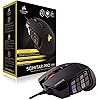
Corsair Scimitar Pro RGB - MMO Gaming Mouse - 16,000 DPI Optical Sensor - 12 Programmable Side Buttons - Black, Model Number: CH-9304111-NA

  • Based on 4,671 reviews
Condition: Used - Very Good
Checking for the best price...
$114.99 Why this price?

Buy Now, Pay Later


As low as $19.17 / mo
  • – 6-month term
  • – No impact on credit
  • – Instant approval decision
  • – Secure and straightforward checkout

Ready to go? Add this product to your cart and select a plan during checkout.

Payment plans are offered through our trusted finance partners Klarna, Affirm, Afterpay, Apple Pay, and PayTomorrow. No-credit-needed leasing options through Acima may also be available at checkout.

Learn more about financing & leasing here.

Selected Option

Free shipping on this product

30-day refund/replacement

To qualify for a full refund, items must be returned in their original, unused condition. If an item is returned in a used, damaged, or materially different state, you may be granted a partial refund.

To initiate a return, please visit our Returns Center.

View our full returns policy here.


Availability: Only 1 left in stock, order soon!
Fulfilled by US Seller/We ship from USA

Arrives Feb 22 – Mar 8
Order within 4 hours and 45 minutes
Available payment plans shown during checkout

Protection Plan Protect Your Purchase
Checking for protection plans...

Color: Black


Style: Mouse


Pattern Name: Gaming Mouse


Features

  • Exclusive key slider macro button control system. Compatibility - A PC with a USB port , Windows 10, Windows 8 or Windows 7
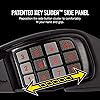
  • 12 optimized mechanical side buttons designed to pro player specifications for consistent tactile feedback and precise actuation. Textured side button keycaps provide enhanced grip and feel
  • The patent pending design provides 8 millimeter of key travel with secure lock to ensure every button is within reach. Surface calibration tuning utility: Optimizes sensor for your playing surface
  • Onboard storage with hardware macro playback: Three predefined profiles include actions common for MMO gaming as well as general purpose keyboard shortcuts
  • Custom, gaming grade 16000 DPI optical sensor: ultra-accurate and high-speed tracking engine. Cable: 1.8 meter braided fiber

Description

The SCIMITAR Pro RGB gaming mouse advances your game with the innovative, customizable key Slider macro button control system. A native 16000 DPI Optical sensor with 1 DPI resolution steps enables High accuracy performance. Onboard storage with up to three gaming profiles allows you to use your settings on the go. Loose button is the intended feature of this product.

Brand: Corsair


Color: Black


Connectivity Technology: USB


Special Feature: Portable


Movement Detection Technology: Optical


Manufacturer: ‎Corsair


Brand: ‎Corsair


Item Weight: ‎4.3 ounces


Product Dimensions: ‎4.75 x 3.04 x 1.67 inches


Item model number: ‎CH-9304311-NA


Batteries: ‎Unknown batteries required.


Is Discontinued By Manufacturer: ‎No


Color: ‎Black


Material Type: ‎Plastic


Number of Items: ‎1


Size: ‎MMO


Manufacturer Part Number: ‎CH-9304311-NA


Date First Available: January 5, 2017


Frequently asked questions

If you place your order now, the estimated arrival date for this product is: Feb 22 – Mar 8

Yes, absolutely! You may return this product for a full refund within 30 days of receiving it.

To initiate a return, please visit our Returns Center.

View our full returns policy here.

  • Klarna Financing
  • Affirm Pay in 4
  • Affirm Financing
  • Afterpay Financing
  • PayTomorrow Financing
  • Financing through Apple Pay
Leasing options through Acima may also be available during checkout.

Learn more about financing & leasing here.
Top Amazon Reviews


  • First time where a gaming mouse just “works”, and that’s saying something!
Color: Black Style: Pro Pattern Name: Gaming Mouse
+ Cheaper than your standard Logitech G/Rog mice + Fits into a wide variety of grips thanks to adjustable parts on the mice ++MMO side buttons, which if you can get used to, give you a serious advantage in reactions by not having to distract your other hand with the number keys + Great quality and weightiness, but light enough to not drag itself down by being a wired mouse -ICUE can be a complete disaster of a program at rare times and tends to crash occasionally out of the blue. (Not necessary to keep program on if you bind settings to your hardware first thing) Like the title says, it literally just works. I’ve bought multiple mice over the years as a testament to what is good for me to use on the daily. Razer, LogitechG, Asus ROG, Corsair, the whole lot. This is hands down the mouse you want to get as a gamer just purely for functionality at being an mmo mouse, no gimmicky features included ... show more
Reviewed in the United States on October 17, 2024 by Matthew Schneider

  • I've tried all of the "Top 10" Mouses and This One is the Best
Color: Black Style: Pro Pattern Name: Gaming Mouse
I've bought the elite version of this and the standard version of this and tbh, just get the cheaper one because they're the same. But I have purchased other mice that are in everybody top 5 or top 10 online and for some reason the crappy Razer Naga mouse series is always at the top of everybody's list of MMO mouses and I'm not sure why. The only other one that stands up to it is the G600 from Logitech and any other that are knockoffs that have the exact same design. The reason that this mouse is the best mouse of all MMO mouses is because of the grip on the side with the programmable buttons. The sliding adjustment is not really important as you will likely keep it in the original position from the factory which is all the way to the back. If you try any other design other than the G600 and, most favorably, this mouse design, then you will feel as if you cannot hold on to the mouse if you need to lift it off of the mousepad. With the Naga in particular you will try and pick it up and will have to be extra careful to not press all of the buttons on the side, much less just drop it entirely. It's because there is no indentation or curvature to the programmable button side of the mouse. However, this scimitar does have that curvature and also has textured buttons that help in grabbing the mouse when you need to lift up and adjust it. You may think that you won't need to lift up the mouse while surfing the web or playing a game but if you start paying attention, you will notice that you DEFINITELY do that and it is very important to have a ergonomic mouse - at least as far as palm grip mouse users are concerned. I have bought several to use at work and at home and 1 that quit working on me after a few years. ICUE SOFTWARE Yeah iCue software blows. It appears to cause issues like a virus on your PC. It makes your mouse move slow and laggy like you're being swarmed by a virus and if you have a profile saved to your mouse and iCue launches, it overrides your profile for some reason and you have to shut down iCue to make it work normally. Best thing to do is to install iCue just to set your dpi profiles and color code them if you want, like I do, and then uninstall the program after saving the profile to the mouse. This.Program.Sucks.Period. ... show more
Reviewed in the United States on February 25, 2023 by Trent

  • A niche mouse, but it's great if that's what you're looking for
Color: Black Style: Pro Pattern Name: Gaming Mouse
I originally picked one up for playing World of Warcraft (WoW). I bound the keys to the spell bar and it had a huge impact in my circumstance. The ability to cast spells with my right hand and reserve the left exclusively for movement felt way more natural and, after I grew accustomed to this setup, I felt like I just couldn't go back to playing the other way. I'm not playing WoW currently, but I still use this for other games, even if they're not MMO's or MOBA's. For example, I've been playing alot of Apex Legends and binding things like run, crouch, special, etc., are really useful to have bound to my mouse. Anything that allows me to keep my left hand further reserved for movement is a huge plus, in my book. Mostly, though, I love this mouse for general PC use. I have things bound to it like: cut/copy/paste, select all, back/forward, reload, open File Explorer, open Chrome, open Calculator, and volume up/down/mute. Once you get accustomed to using these keys, it can make your general PC use much more efficient. The iCUE software is very powerful and I very much like it as a method of controlling many aspects of my PC, from RGB to fan speed. The portion of iCUE relevant to this mouse is good, but I don't know if there's anything that really sets it apart from the controller software for other mouse options, like for the Logitech G600. But it's a pain to use multiple different software suites and, if you're going to buy into one, the Corsair iCUE ecosystem is great -- it's definitely a strong pro for this mouse if you own other Corsair gear. I've been using this mouse at home and in my office for a while now and it's held up pretty well. There's no noticeable wear to the finish and all the buttons still feel the same. I like that this mouse has an adjustable keypad, so you can optimize its location for your thumb. Keep in mind this mouse is quite heavy. I like a heavy mouse and it fits my hand well, although I have somewhat small hands so that may be a factor. I came from the Corsair M65 before this and I like this far better in basically every aspect. ... show more
Reviewed in the United States on July 18, 2019 by Brandon G

Can't find a product?

Find it on Amazon first, then paste the link below.
Checking for best price...