Search  for anything...

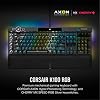
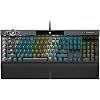
Corsair K100 RGB Mechanical Gaming Keyboard - Cherry MX Speed RGB Silver Keyswitches - PBT Double-Shot Keycaps - Elgato Stream Deck and iCUE Compatible - QWERTY NA Layout - Black

  • Based on 0 reviews
Condition: New
Checking for the best price...
$199.99 Why this price?
Save $90.00 was $289.99

Buy Now, Pay Later


As low as $33.33 / mo
  • – 6-month term
  • – No impact on credit to apply
  • – Instant approval decision
  • – Secure and straightforward checkout

Ready to go? Add this product to your cart and select a plan during checkout.

Payment plans are offered through our trusted finance partners Klarna, Affirm, Afterpay, Zip, Apple Pay, and Google Pay. No-credit-needed leasing options through Acima may also be available at checkout.

Learn more about financing & leasing here.

Selected Option

Free shipping on this product

FREE refund/replacement until Jan 31, 2026

To qualify for a full refund, items must be returned in their original, unused condition. If an item is returned in a used, damaged, or materially different state, you may be granted a partial refund.

To initiate a return, please visit our Returns Center.

View our full returns policy here.


Availability: Only 1 left in stock, order soon!
Fulfilled by Amazon

Arrives Tuesday, Jul 28
Order within 2 hours and 1 minute
Available payment plans shown during checkout

Protection Plan Protect Your Purchase
Checking for protection plans...

Style: K100


Pattern: CHERRY MX SPEED Switches


Features

  • Youve Reached the Top: The CORSAIR K100 RGB is the pinnacle of CORSAIR keyboards, offering the cutting-edge performance, style, durability, and customization that gamers need to stand above the rest.
  • The Centerpiece of Your Setup: The CORSAIR K100 RGB boasts a refined design bolstered by a durable aluminum frame, dynamic per-key RGB backlighting, and a 44-zone three-sided LightEdge.
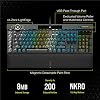
  • Powered by CORSAIR AXON Hyper-Processing Technology: CORSAIRs most advanced gaming keyboard experience delivers up to 4x faster throughput with native 4,000Hz hyper-polling and 4,000Hz key scanning, while driving up to 20-layer lighting effects.
  • CHERRY MX SPEED RGB Silver Keyswitches: Offer lightning-fast response times with an actuation distance of just 1.2mm, are guaranteed for 100 million keystrokes, and keypresses up to 4x faster than standard mechanical gaming keyboards with CORSAIR AXON.
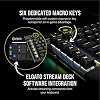
  • Multi-Function at Your Fingertips: Take command over backlighting, media jogging, and more with a versatile iCUE control wheel, fully programmable to perform actions in games and applications.

Description

The incomparable Corsair K100 RGB Mechanical Gaming Keyboard combines stunning aluminum design with per-key RGB lighting and a 44-zone LightEdge. Powerful Corsair AXON Hyper-Processing Technology enables unparalleled capabilities such as 4,000Hz polling. Cherry MX Speed RGB Silver mechanical keyswitches, guaranteed for 100 million keypresses, offer ultra-fast 1.2mm actuation while registering keypresses up to 4x faster than standard mechanical gaming keyboards thanks to AXON, housed in durable double-shot PBT keycaps.

Brand: Corsair


Compatible Devices: Gaming Console


Connectivity Technology: Wired


Keyboard Description: Gaming


Recommended Uses For Product: Gaming


Special Feature: Lighting


Color: Silver


Keyboard backlighting color support: RGB


Style: K100


Product Dimensions: 10.3"L x 19.7"W x 3.1"H


Brand: ‎Corsair


Series: ‎CH-912A014-NA


Item model number: ‎CH-912A014-NA


Hardware Platform: ‎PC


Operating System: ‎Mac OS X 10.15 or newer, Windows 10


Item Weight: ‎3 pounds


Product Dimensions: ‎10.3 x 19.7 x 3.1 inches


Item Dimensions LxWxH: ‎10.3 x 19.7 x 3.1 inches


Color: ‎Silver


Power Source: ‎Corded Electric


Manufacturer: ‎Corsair


Language: ‎Dutch


Is Discontinued By Manufacturer: ‎No


Date First Available: ‎November 27, 2022


Frequently asked questions

If you place your order now, the estimated arrival date for this product is: Tuesday, Jul 28

Yes, absolutely! You may return this product for a full refund within 30 days of receiving it.

To initiate a return, please visit our Returns Center.

View our full returns policy here.

  • Klarna Financing
  • Affirm Pay in 4
  • Affirm Financing
  • Afterpay Financing
  • Zip Pay in 4
  • Financing through Apple Pay
  • Financing through Google Pay
Leasing options through Acima may also be available during checkout.

Learn more about financing & leasing here.

Top Amazon Reviews


  • Fast light-touch-typing with extra macro keys and knobs, and fully programmable RGB lighting
Style: K100 Pattern: CHERRY MX SPEED Switches
Very smooth, love the light touch typing feeling of Cherry MX Speed, extra keys and buttons and knobs, and fully programmable RGB. I have been using Corsair K95 Platinum with Cherry MX Speed for 7 years and I needed another RGB mechanical keyboard for another PC, so I opted for Cherry MX rather than OPX so I don't have to get acclimated to new type of keys and swapping between Cherry MX and OPX when I move between PCs. I'm sure that if I haven't used Cherry MX before, I would have chosen OPX. I also used Cherry MX Brown, but I prefer Speed once I got used it. Although pricey (especially compared to Corsair K95 at the time I bought it), I took advantage of a sale. I couldn't find any mechanical keyboard that comes close to this one in terms of functionality and quality and programmability, especially the six macro keys on the left side I can't do without (I also considered Corsair K70 but they don't have macro keys). This mechanical keyboard is such a delight for gaming, coding, typing, etc. I use this on a Mac and Linux. Linux has ckb-next driver, and its development version (newer than release version as of Nov 2025) also detects the top left scroll and can program RGB on it. I created my own custom RGB lighting by copying one of the animations and then changing all the configurations to my liking. I use the USB port to connect my wireless mouse dongle and it works perfectly even if routed through a USB hub with on/off switches, then a USB KVM switch, and then through a third USB hub that is externally powered. If you are using a USB switch with mouse/key roaming feature that only works with a standard keyboard, there is a way to change the keyboard mode into BIOS mode by pressing some keys (search the Internet since it's not mentioned in the manual). You'll have to connect the mouse directly to the USB switch instead of the keyboard. You can revert back to normal mode with full functionality using some other key presses if you no longer need to be limited by a USB switch with key/mouse roaming feature. The wrist rest is very comfortable. It's nice that it's magnetically attached. The one in my old Corsair K95 had the plastic tabs broken so I had to throw it away. You probably won't find any alternative that comes close with macro keys, full custom RGB lighting, good quality, and the smoothness of a linear mechanical keyboard. If you've never used linear short activation switches, it may take some time to get used to it, but once you master it, you won't want to use any other switches. YMMV though. ... show more
Reviewed in the United States on December 1, 2025 by Ide

  • Nice, compact somewhat mechanical-feeling keyboard w/RGB.
Style: K100 AIR WIRELESS Pattern: CHERRY MX Ultra Low Profile Switches
I replaced my Corsair K70 RGB (the OG one) with the K100 Air. Ever since I started working from home- i.e. using multiple computers throughout the day- I've been wanting a better keyboard. My old, wired (with GIGANTIC dual USB cables) K70RGB had fantastic feel and features. But I wanted to move it around more than the cables would allow. Also a somewhat less gargantuan footprint would be appreciated; I still need the 10-key though. Enter the K100 Air. - Still mechanical keys (more on this later) - Wireless = more mobile - RGB, G-keys (macros), 2.4Ghz or Bluetooth (or single USB wired) SO- I went for it on Day One, despite the *astronomical* price (nearly $300). • The K100 Air has made my life easier. I can now use my own PC much more easily; I'm typing this on it now. Moving the keyboard has also given me much more mousing room on the desk. (I use another computer for work, with 2 monitors; it's to the right of my main PC (also with 2 monitors). It recharges via USB-C; when it's low on battery the lighting turns red. Or you can check in iCue and it shows the battery % charge. iCue also works fine for applying lighting- be sure you have version: 4.29.203 or newer, otherwise it won't recognize the keyboard. If you just see the wireless dongle in iCue but not the keyboard, update your software. • For the feel and 'mechanical' keys: it feels like the best laptop keyboard ever, but it does NOT feel like the mechanical Cherry switches you get on gaming keyboards. The keys feel very solid and predictable, but they aren't at the same level as Corsair/Razer/Logitech mechanical keyboards. I will say, the Corsair's keys are better than the (somewhat) low-profile keys on the Logitech G line (715, 915 etc). The Logitech ones feel (and sound) more springy, which isn't that great for typing. (or gaming) • As far as build quality, this thing does look and feel like an expensive item. It's metal on top, I believe plastic on the bottom. The lighting shows through the keys very well, but it doesn't shine out from under the keys like a full-sized gaming keyboard. It has a spot to store the dongle when it's plugged in. I've only used it via 2.4Ghz wireless, and it has been flawless as far as connection. You can plug the dongle into the back of a nearby PC directly and no connection problems. Also no interference with multiple keyboards and mice also on 2.4Ghz. The RGB lighting is adjustable from the keyboard, independent of the software. Brightness and lighting patterns (pre-saved onto the keyboard via iCue) are controllable without software. There's also a charge light, so you'll see it blinking and/or changing color when power is low. The iCue software also puts up an alert when it needs a recharge, this happens before the lighting turns red. Works well. I have to charge it about 1.5 times per week, with the computer on 24/7 and asleep for about half that time. • One thing about waking up from sleep: the keyboard takes about 4 to 5 seconds to wake up. In the time you press the first key to when the lighting comes on, the keys still work and are read by the PC, but it's disconcerting to be typing on a black keyboard. It does wake up fine, the lighting is just a bit slow. • Now, the key (ha) question: is it worth the money? As far as I can tell, this is the best low-profile wireless gaming keyboard available. It has many nice touches, gives me more features than I can use, and beats the competition in both the hardware and usability. Yes- it's really expensive. But for something that is your main interface to a system you use constantly, it is probably worth paying the premium. If I hadn't already got a Logitech for my work PC, I would get another one of these. That probably tells you everything you need to know. ... show more
Reviewed in the United States on October 31, 2022 by ITguy

Can't find a product?

Find it on Amazon first, then paste the link below.
Checking for best price...