Search  for anything...

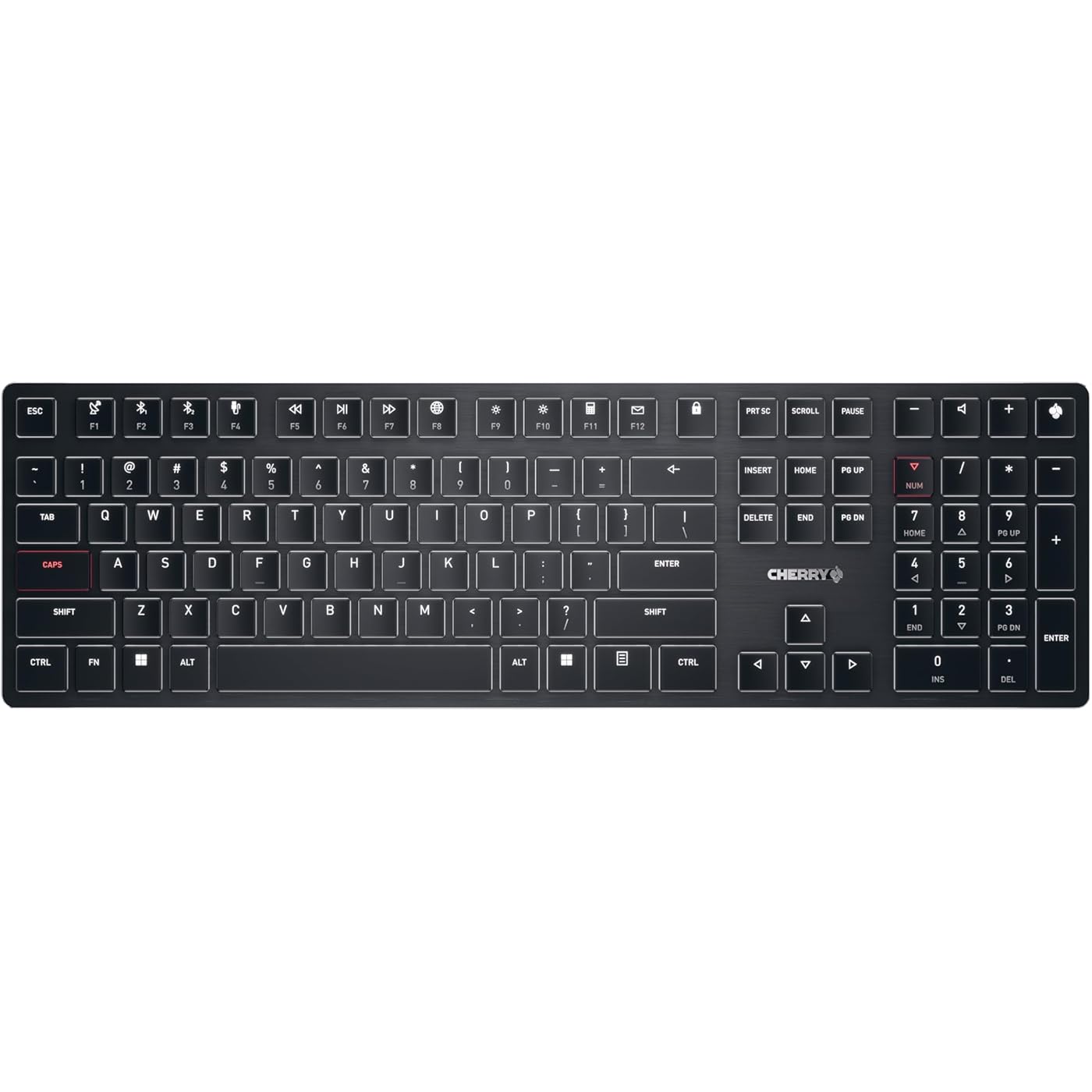
Cherry KW X ULP, Ultra Low Profile Mechanical Keyboard, Wireless Multi-Device Keyboard for up to 4 Devices, Bluetooth, 2.4 GHz & Wired Mode, Backlit, Black (Full Size)
  • Based on 24 reviews
Condition: New
Checking for the best price...
$192.17 Why this price?

Buy Now, Pay Later


As low as $32.03 / mo
  • – 6-month term
  • – No impact on credit to apply
  • – Instant approval decision
  • – Secure and straightforward checkout

Ready to go? Add this product to your cart and select a plan during checkout.

Payment plans are offered through our trusted finance partners Klarna, Affirm, Afterpay, Zip, Apple Pay, and Google Pay. No-credit-needed leasing options through Acima may also be available at checkout.

Learn more about financing & leasing here.

Selected Option

Free shipping on this product

FREE 30-day refund/replacement

To qualify for a full refund, items must be returned in their original, unused condition. If an item is returned in a used, damaged, or materially different state, you may be granted a partial refund.

To initiate a return, please visit our Returns Center.

View our full returns policy here.


Availability: In Stock.
Fulfilled by Amazon

Arrives Sunday, Jul 26
Order within 21 hours and 44 minutes
Available payment plans shown during checkout

Protection Plan Protect Your Purchase
Checking for protection plans...

Size: FULL SIZE


Features

  • Ultra-flat mechanical keyboard: As aesthetic and thin as slim keyboards, yet mechanical suitable for frequent typists, programmers, office use and gaming!
  • Multi-device keyboard for up to 4 different devices: Two Bluetooth 5.2 channels, one 2.4 GHz wireless channel (each with secure AES-128 encryption) and one cable channel
  • CHERRY MX ULTRA LOW PROFILE switches: Switches manufactured exclusively in Germany, up to 50 million keystrokes, absolute precision and unparalleled typing feel
  • Tasteful white key illumination and additional colored LEDs for status and special keys (+ RGB LED in the CHERRY key for displaying the charge level)
  • Rechargeable: Detachable USB-A to USB-C cable for charging and for use in wired mode (keyboard can also be charged easily during operation)

Product Dimensions: 1 x 18.1 x 1.6 inches


Item Weight: 2.05 pounds


Manufacturer: Cherry


Item model number: G8U-27000LTBUS-2


Date First Available: May 6, 2023


Frequently asked questions

If you place your order now, the estimated arrival date for this product is: Sunday, Jul 26

Yes, absolutely! You may return this product for a full refund within 30 days of receiving it.

To initiate a return, please visit our Returns Center.

View our full returns policy here.

  • Klarna Financing
  • Affirm Pay in 4
  • Affirm Financing
  • Afterpay Financing
  • Zip Pay in 4
  • Financing through Apple Pay
  • Financing through Google Pay
Leasing options through Acima may also be available during checkout.

Learn more about financing & leasing here.

Top Amazon Reviews


  • Feels PERFECT, but the price is hard to justify for most
Size: FULL SIZE
Context: I've been using this keyboard for a few months now, & I'm a fairly proficient typist; not a hunt-&-pecker. Pros: This keyboard types REALLY well. This can't be overstated. As a laptop person who doesn't like deep keys or loud clacks, it's my favorite ever. It switches between its 4 interface modes very quickly, has a 10-key (numpad), looks beautiful & professional, sound is satisfying without being too annoying for others (people can still hear you typing over Discord, but not across the house like some switches), you can instantly enable/disable the Windows keys by pressing the Cherry key at the top-right (useful during games), easy to clean, and no functional defects so far. This pros list is only shorter than cons because it's easier to explain; it's still worth it to me overall. Cons: - The price is stupid, obviously. For me, it's worth it to save up for one really nice thing that doesn't require replacement rather than moving from cheapo-to-cheapo & having a bad experience the whole way. - Nothing is customizable. *EDIT*: I learned that you can press CTRL+Shift+Fn to toggle Function Lock. That was my biggest complaint, but now I know better. Of course, there's still no Macro support, but that's not a big deal for me. - Keys aren't very replaceable. I've seen videos of people taking them off, but it looks a bit risky, and good luck finding replacements until the patent for ULP mechanical keys gets passed around like Cherry's other types of keys. This hasn't been an issue for me yet since nothing has broken, but I'm the type to buy something based largely on its serviceability, especially at such a relatively steep price. I made an exception for this because there's no real competition in ULP mechanical keyboards. ... show more
Reviewed in the United States on March 17, 2024 by Adam

  • Excellent keyboard for Mac and Windows, with some quirks
Size: COMPACT
Love this keyboard so far, works great with my dual Macos and Windows setup. I can quickly switch between Mac and Windows modes. The keys are tactile and low profile mechanical. Typing force is lower than the Corsair K100, so they're quieter. Very compact and easy to travel with. No issues during gaming. Backlight is set to white and it's bright enough for daylight use. Keys feel like Cherry brown switches Couple of quirks - 1. On bluetooth, the lights will turn off after 1 minute of inactivity. That said, the keyboard remains connected via bluetooth, so it doesn't miss keystrokes and doesn't need to reconnect to bluetooth. There's no way to control this behaviour. 2. There is no Fn lock key. To enable Fn lock, press the Ctrl + Fn keys to enable it. This is needed to avoid pressing the pairing buttons by accident to accesss the Fn keys. These combinations are not documented in the user guide, even though it is supported by the keyboard. Cherry should publish these key combinations somewhere to make it easier to use the extra features. ... show more
Reviewed in the United States on October 11, 2025 by Monil

  • Solid keyboard, but pricey.
Size: FULL SIZE
I really like chiclet-style keyboards and have never been able to find a nice mechanical one. This is a nice mechanical one. It's also wireless, which wasn't a big need for me but has been very, very nice. The keys are quite clicky and feel very consistent. The keyboard is sturdy and does not flex much for its thinness. The rubber feet keep it in place, and the flip-up feet offer a good base if you prefer that keyboard angle. The keyboard doesn't require any special software, though there is a macro software offered by Cherry. I haven't tried it. In particular I like the number of ways the keyboard can connect to things: wireless over the dongle, wireless over two different Bluetooth channels, and wired. I have the dongle plugged into my PC, and a Bluetooth connection to my work laptop. Pressing FN + F3 switches instantly to Bluetooth 2, and pressing FN + F1 switches instantly back to wireless. It's very convenient! The keyboard backlight is minimalist and clean, with a few colored keys which can display different colors. The Cherry icon on the top right corner goes from green to yellow to red to show battery status. The Wired/Wireless key is green, and the Bluetooth keys are blue. The FN, Caps, numlock, etc. keys are red. The status colors show even if the backlight is off. Battery life has been solid. The main downsides so far: * It's expensive. * The included user manual seems like it's generic to Cherry keyboards, so I had to go online for specific questions. * The Cherry key in the top right by default turns the Windows key on and off. I'm not really sure why this would be necessary, but with the software you should be able to remap the key to something else. * Locking the FN key on/off is a hidden keybinding with Ctrl + FN, which took a minute to find. It's also rather easy to accidentally press this since the keys are right next to each other. * The keys cannot, as far as I know, be serviced on their own. * The screws in the back use a small torx bit which could make disassembly less accessible. * Sometimes the wireless connectivity can be spotty. The only physical objects between the keyboard and the dongle are my desk surface and my PC's chassis, so I'm not sure if this is a problem with the keyboard or a problem with some sort of external signal interference. So if you're planning to play games where you need it to be reliable, maybe plug it in and use it in wired mode. ... show more
Reviewed in the United States on May 8, 2024 by Jeff

  • AWESOME!!! Better than K740!
Size: FULL SIZE
I rarely write 5-star reviews, because I understand how bell-curves work. To be 5 stars means that an item is exceptional. This Cherry Keyboard IS. My old Logitech Illuminated Keyboard K740 is getting really old. I tried to replace it about 5 years ago, but I couldn't find anything worthwhile to replace it with. Well, circumstances caused me to look again, and after some internet posts mentioning this Cherry KW X ULP, I decided to give it a go. I'm REALLY glad I did. This thing feels quality all-around. It's hefty for it's slim profile. It's got a clean, jet-black metal face, the classic white letters are wonderfully illuminated and pop with crispness. The keys feel wonderfully sleek and responsive to the touch. Keys snap into place, but do so smoothly, like a high-end old typewriter (but with much shorter key travel). It's classy looking, full-size, easy to type on for those of us made to take typing lessons on full-sized keyboards in youth, and just all-around great. I've paired it via bluetooth and USB to my laptop. Both works great. I paired via bluetooth to my android phone, and it worked wonderfully too! I haven't tried the dongle, and don't really plan to since 2.4ghz always gets interference from my other devices, but so far connectivity is excellent. Zero complaints whatsoever. There's nothing I DON'T love about this keyboard. It's all I was hoping for. It's actually WAY BETTER than my old Logitech k740! Two things to note that SOME might find unappealing (though I am perfectly content): 1) The function keys are defaulted to the media-control/shortcut functionality. To use the actual FUNCTION keys requires holding the FN key. To swap this, the press the key combo FN+CTRL (not the same as a lot of other keyboards). I Hope that helps. 2) It's a very loud, clicky keyboard. I love it. Very positive feedback when typing, both tactility and audibly - but I understand that isn't for everyone. ... show more
Reviewed in the United States on April 1, 2025 by Matthew

  • A Sleek and Satisfying Typing Experience
Size: FULL SIZE
The Cherry KW X ULP Ultra Slim Wireless Mechanical Keyboard has been an incredible addition to my home office setup. As someone who spends hours typing each day, I can confidently say that this keyboard has enhanced my overall work experience. Firstly, the tactile feel of the keys is simply unmatched. Each keypress is met with a satisfying response, allowing me to type with precision and comfort. The clicky sounds produced by the mechanical switches are not only pleasing to the ear but also serve as an auditory confirmation of my typing progress. Moreover, the clean lines and professional aesthetic of this keyboard perfectly complement my workspace. The ultra-slim design takes up minimal desk space while still providing a full-sized typing experience. The wireless connectivity is seamless, allowing me to maintain a clutter-free environment. In summary, the Cherry KW X ULP Ultra Slim Wireless Mechanical Keyboard is a top-tier product that combines functionality and style. It has made typing a genuinely enjoyable experience, and I highly recommend it to anyone seeking a premium, reliable, and visually appealing keyboard for their home office. ... show more
Reviewed in the United States on April 19, 2024 by F. Rothchild

  • Lemon: Left Ctrl + some other button shortcuts do not work in wired mode
Size: FULL SIZE
After receiving the keyboard, I have quickly discovered that some common shortcuts in the Chrome browser (Ctrl+W, Ctrl+R, Ctrl+T, Ctrl+P, Ctrl+-, Ctrl+PgUp, Ctrl+PgDn) do not work with the keyboard if I use them with the left Ctrl key. The shortcuts do work, however, with the right Ctrl key. First, I thought, that I was just unlucky to get a keyboard with a broken left Ctrl key. However, after experimenting with the keyboard more, I have realized that the left Ctrl does not work only if it is used without other modifier keys while, for example, the following shortcuts: Ctrl+Alt+F, Ctrl+Shift+1, or Ctrl+Fn work fine. This tells me that the left Ctrl key is perfectly functional but something else works incorrectly. Following the manual, both turning the keyboard on/off and resetting the keyboard to the factory settings (by inserting a pen into a small hole under the center foot of the keyboard) have not resolved the problem. Further experiments showed that the left Ctrl+Something shortcuts do not work if the keyboard is used in the wired mode, but if it is used wirelessly via the USB receiver, then the left Ctrl+Something shortcuts work fine. To test quickly if your keyboard has the same problem as mine: 1) connect the keyboard to a Windows PC/laptop via the USB cable, 2) start the Chrome browser, 3) try to open/close a new tab using Ctrl+T/Ctrl+W shortcuts using left Ctrl key. So, if you can live without using left Ctrl in simple Ctrl+Something shortcuts, it is a good keyboard. For me, however, it is a deal breaker since I do use keyboard shortcuts A LOT and planned to use the keyboard mostly via the USB cable, therefore, I have returned the keyboard. If I get some indication that the problem has been fixed, I will consider buying the keyboard again. My guess is that the internal wiring or firmware of the keyboard has some problem which was missed during testing. This problem makes the keyboard to interpret incorrectly presses of the left Ctrl plus some other non-modifier key in the wired mode. The keyboard takes very small amount of time to get used to - it feels strange in the beginning, but becomes natural and pleasant literally within 1-2 hours. The keyboard is rather loud and clicky, but otherwise typing on it is just delightful. It is useful to note that the keyboard manual says: "The magnet can wipe storage media and damage mechanical watches. Do not bring storage media, such as magnetic cards or external hard drives, or mechanical clocks closer than 10 cm to the receiver on the back of the keyboard". Apparently, if one puts the keyboard too close to a laptop or an external hard drive, the data on their storage could be wiped by the magnet in the keyboard (wireless USB receiver in the back of the keyboard is held in place by a magnet). Considering the above, I think, Cherry should come up with some other way of how to store the wireless USB receiver in the back of the keyboard. I wonder, who at Cherry thought it was a good idea to create a keyboard which could wipe data from a laptop if the keyboard is put too close to it? The keyboard manual also recommends connecting the wireless USB receiver to a USB 2.0 port of your PC/laptop, if possible, since "Malfunctions occasionally occur on USB 3.0 ports". I am not sure if any modern laptops still have USB 2.0 ports. I tried to use the keyboard via a USB-3 port on my laptop, and have not experienced any problems (except the problem with the left Ctrl key described above). ... show more
Reviewed in the United States on November 23, 2023 by Willa C.

  • Awesome keyboard with that satisfying click
Size: COMPACT
Love, love, love this keyboard. It's a little pricey, but the switches for which they are famous do not disappoint. It has that satisfying click and it is very comfortable to use. The keys are well defined and it is a pleasure to type on.
Reviewed in the United States on February 18, 2026 by Chris

  • Great Typing Keyboard, Not Ideal for Long Gaming Sessions
Size: COMPACT
I bought this keyboard for its ultra-thin design and the idea of an extremely short-travel mechanical switch. I’ve been searching for a mechanical keyboard with response speed close to a laptop membrane keyboard, and even low-profile switches didn’t feel fast enough. Most competitors, like the Corsair K100, are full-size keyboards, which I don’t need since I rarely use the numpad. This one gives me much more desk space. In practice, it really is impressively thin, with very short key travel and solid build quality. The switches have a pronounced tactile bump, making it excellent for typing—my error rate is noticeably lower compared to traditional mechanical keyboards. That said, the actuation force is on the heavier side. Typing feels great, but for long gaming sessions it can be a bit fatiguing. I’d love to see a lighter, red-switch-like version in the future. ... show more
Reviewed in the United States on December 12, 2025 by BBP

Can't find a product?

Find it on Amazon first, then paste the link below.
Checking for best price...