


Search  for anything...

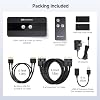
Cable Matters USB 3.0 KVM Switch, DisplayPort 1.4, for 2 Computers

Based on 320 reviews
Condition: New
Checking for the best price...
$87.99
Holiday Deal · 9% off was $96.98

Buy Now, Pay Later


As low as $14.67 / mo
  • – 6-month term
  • – No impact on credit to apply
  • – Instant approval decision
  • – Secure and straightforward checkout

Ready to go? Add this product to your cart and select a plan during checkout.

Payment plans are offered through our trusted finance partners Klarna, Affirm, Afterpay, Zip, Apple Pay, and Google Pay. No-credit-needed leasing options through Acima may also be available at checkout.

Learn more about financing & leasing here.

Free shipping on this product

FREE 30-day refund/replacement

To qualify for a full refund, items must be returned in their original, unused condition. If an item is returned in a used, damaged, or materially different state, you may be granted a partial refund.

To initiate a return, please visit our Returns Center.

View our full returns policy here.


Availability: Only 4 left in stock, order soon!
Fulfilled by Amazon

Arrives Thursday, Nov 26
Order within 23 hours and 54 minutes

Available payment plans shown during checkout

Protect Your Purchase

Easy claims online, fast replacements, no fees

Checking for protection plans...

At a glance

Condition
New
Weight
16 oz
Color
Black
Material
Zinc
Operation Mode
Push button
Current Rating
1 A
Operating Voltage
5 volts
Warranty
1-Year Warranty
Works with
Cellular Phones, Laptops, Monitors, Printers

Features 6

  • USB 3.0 & Displayport 1.4: Expand your workspace with the Cable Matters USB 3.0 DisplayPort KVM Switch; DP KVM Switches 4 port shares up to 3 USB peripherals and 1 DisplayPort 1.4 monitor with two input computers; Space-saving Display Port KVM switch controls multiple computers from a single keyboard, mouse, and monitor
  • Stunning 8K / 4K Resolution Support: USB KVM DisplayPort 1.4 features 3x USB-A 3.0 ports with 5Gbps bandwidth and 1x DisplayPort 1.4 monitor port for up to an 8K 60Hz / 4K 240Hz resolution and framerate; USB KVM switch 1 monitors 2 computers combines the latest USB and DisplayPort technologies for the ultimate speed and resolution support; Connect HD webcams and flash drives for ultra fast 5Gbps transfer speeds
  • Remote Control and Push Button to Switch: DisplayPort monitor switch for multiple computers can swap between two host PCs with the push of a button on the unit or wirelessly via a remote control; Wireless remote control enables quick wireless switching; Hide the computer switch for 2 computers out of the way with the included remote control
  • Utilize All DisplayPort 1.4 Features: USB switch 2 computers supports pass-through DisplayPort 1.4 with advanced features including HDR, DSC, and ultra-high resolution video. Enjoy up to 8K 60Hz, 4K 240Hz, 1440p 240Hz, and 1080p and below. macOS supports up to 4K@240Hz external display on compatible systems

Description

The Cable Matters USB KVM Switch is the ultimate space-saving accessory for the mobile worker. Share an 8K or 4K 240Hz monitor, a keyboard, a mouse, and a flash drive with up to 2 computers. Eliminate the need for separate pairs of monitors, keyboards, mice, printers for each computer. Is the DisplayPort 1.4 KVM switch compatible with macOS? Yes, the DP 1.4 KVM switch is compatible with macOS. Does the DisplayPort 1.4 KVM switch support 144Hz / 240Hz? Yes. This KVM switch will mimic the capabilities of the host that it is connected to. When connected to a DP 1.4 host that supports Display Stream Compression (DSC), this KVM switch will support 4K@144hz & 4K@240Hz with FreeSync, G-SYNC, and HDR. Is the DisplayPort 1.4 KVM Switch compatible with computers with a USB Type-C port? The Switch is not natively compatible with computers with a USB-C port. However, if the USB-C port on your host supports DP Alt Mode, then you can purchase an additional USB-C to DP adapter or cable to connect the product to your USB-C host. Does the DisplayPort 1.4 KVM switch support EDID Emulation? No Why does the screen go black, flicker, or take time to reconnect after switching? This switch has no EDID emulation. When switching, the display briefly reconnects. Windows 11 may rearrange windows after reconnection, while Windows 10 usually keeps the layout. Behavior may vary by PC, monitor, GPU, and OS. USB Switch with DP 1.4 4 Port USB 3.0 Switch Hub DisplayPort 1.4 Switch USB C Switch USB C Switch Cable Matters, with headquarters in Southborough, Massachusetts, offers a complete line of cables, adapters, docking stations, and networking products for the home, office, and data center. Cable Matters offers first-class, quality, and affordable products backed by an exceptional customer experience.

Specs 31

Operation Mode Push button
Current Rating 1 A
Operating Voltage 5 volts
Contact Type Normally Open
Connector Type DisplayPort, USB 3.0
Brand Cable Matters
Switch Type Remote Switch & Push Botton
Terminal Physical

Frequently asked questions

If you place your order now, the estimated arrival date for this product is: Thursday, Nov 26

Yes, absolutely! You may return this product for a full refund within 30 days of receiving it.

To initiate a return, please visit our Returns Center.

View our full returns policy here.

  • Klarna Financing
  • Affirm Pay in 4
  • Affirm Financing
  • Afterpay Financing
  • Zip Pay in 4
  • Financing through Apple Pay
  • Financing through Google Pay
Leasing options through Acima may also be available during checkout.

Learn more about financing & leasing here.

Top Amazon Reviews


Worked but its a little ackward
My main complaint with this is the port orientation. This thing is tiny, 4.25x2"x0.5", but when you add the cables sticking out, you need at least 5"x8" of space (12+" with stiff cables). This is not something you're going to sit on the desk. I ended up using double sided tape to hide it behind the desk. If they'd doubled the height, they could've put all the ports facing same direction, which would halve the total space added to manage the cables. Maybe make 1 or 2 of the 3 USB ports labeled as OUT when they're really IN (b/c USBs are INPUT devices to the machine they are plugged into vs DP which is IN from the computer and OUT to the monitor) in the front so the device can act as a hub for misc devices. As it is, the entire thing needs to be stored with the general cable management, so the extra ports aren't useful anyway. ... show more
Reviewed in the United States on March 6, 2023 by Sven Zethelius

great switch with some issues
The Cable Matters USB 3.0 and displayport switch is a great choice for anyone looking for a high-quality KVM switch. This switch is incredibly easy to install, and it provides excellent video quality and USB connectivity. However, I did notice some flickering when using this switch for gaming, so it may not be the best choice for serious gamers. Overall, I would recommend the Cable Matters USB 3.0 KVM Switch DisplayPort 1.4 switch to anyone looking for a decent quality KVM switch. ... show more
Reviewed in the United States on March 21, 2023 by Andrew Ozhyndovskyy

I have full resolution now!!
I had two different HDMI KVM's that I tested with my 49" and neither were capable of 5120x1440 resolution. Upgraded to this and I now have all the pixels. :) Only minor issue I've noticed is, one of the USB ports loses connection if it is wiggled. It's annoying, so I plugged my mouse into it since I use that the least. If it weren't for that, it would have been perfect for my needs. ... show more
Reviewed in the United States on March 16, 2023 by Andrew Chas. Keithan

Works perfectly for ultrawide 3440x1440 at 144 Hz
This is my dream KVM switch. Here's my use case: Computers - Windows PC with 10 series Nvidia GPU - M1 Macbook Pro Peripherals - 3440x1440 144 Hz monitor (requires proper DisplayPort 1.4 support to work at 144 Hz and 10 bit color) - USB mouse, keyboard, webcam, microphone, and DAC/amp/speakers (plugged into a USB 3.0 hub) Goal - Single cable and single button KVM solution for my Macbook With this Cable Matters KVM switch and the OWC Thunderbolt 4 Hub ($99), everything works perfectly. When I want to switch to my Macbook, I plug my Macbook in with a single Thunderbolt cable and press the remote button, and it flips seamlessly. I get full resolution and 144 Hz with no flickering on both the PC and the Macbook. My USB devices all work normally. Thanks to Thunderbolt 4 on the OWC Hub, I'm able to wake the Macbook with my keyboard--no lid opening needed at any point. This has all been working reliably. The setup is a little complicated: Macbook is plugged into the OWC Thundbolt Hub (Thunderbolt 4 cable). OWC Thunderbolt Hub is plugged into the KVM switch (USB-C to DisplayPort cable & USB 3.0 cable). PC is plugged into the KVM switch (DisplayPort cable & USB 3.0 cable). USB peripherals are plugged into a USB hub, which is plugged into the KVM switch. This mess of cables and hubs are hidden under my desk. The remote I have attached under my desk with some mounting putty. From what I understand, there is no EDID emulation on the switch, so it does take a few seconds to switch. MacOS seems to be a little slower at the switch than Windows, but both are fast enough for me to not care. If you need to switch rapidly and often, this may be a downside. For DisplayPort cables, I'm using one of the provided ones, an old one I was previously using, and a 6ft Cable Matters USB C to DP. Some reviews reported problems with flickering, which might be cable-related. FWIW my mish-mash of DP cables is working well. The remote is just ok. It's pretty light and cheap feeling, but I like having it mounted under my desk. I am glad it comes with RF control because you could probably copy the RF signal with a universal remote-smart device and hook it up to a hotkey on your computers, but that's overkill for me. Just a few years ago, this setup was much, much more expensive. Thunderbolt Hubs were $300+, and Displayport 1.4 switches were also in the $300+ range. I am VERY pleased that I could make this work at under $200. Highly recommend this Cable Matters switch! Also quick tip, they included a small ~4" USB 2.0 extension. Some wireless 2.4 GHz mice/devices have interference with USB 3.0 hubs, so this extension should help alleviate that. ... show more
Reviewed in the United States on March 30, 2023 by David

Does only half of what it is advertised to do
The USB switching works fine, with no issues. However, the DisplayPort switching only works on one device. This device does not maintain the Extended Display ID (EDID) to keep the signal active with certain devices. Others may run into this same issue. I would have paid more than double for this product if it actually does what it is advertised to do. I am trying a 3rd party EDID maintainer for $140 to get this device to work properly. On a positive note, I am pushing a Samsung Neo G9 at 5120x1440 @ 120hz with this device, using higher-end 3rd party cables found on Amazon. ... show more
Reviewed in the United States on April 5, 2023 by pc

Does not support 3440x1440p (1440p ultrawide) 144hz
If you are using 1440p ultrawide, do not expect to go past 100Hz without restricting the color space, it will flicker. It will not be useable. You can restrict your hdr color space to YBR422 in order to run 1440p ultrawide and 144hz, but you'll be missing the full beauty of your display and your games/movies. If you want to run a gaming machine through a high refresh rate monitor and your work laptop for WFH on the same keyboard+monitor, you will need to find an alternate solution. THAT SAID: I used this for months with a 4k@60hz display and switching between a work laptop and a gaming machine just fine. It handled it beautifully. It is only after upgrading to the ultrawide that I started to see issues. If you don't plan on going past 4k@60hz this will work beautifully and is one of the most economical options available. Just be aware of the bandwidth limitations. ... show more
Reviewed in the United States on January 31, 2023 by A. C. G.
Checking for best price...