




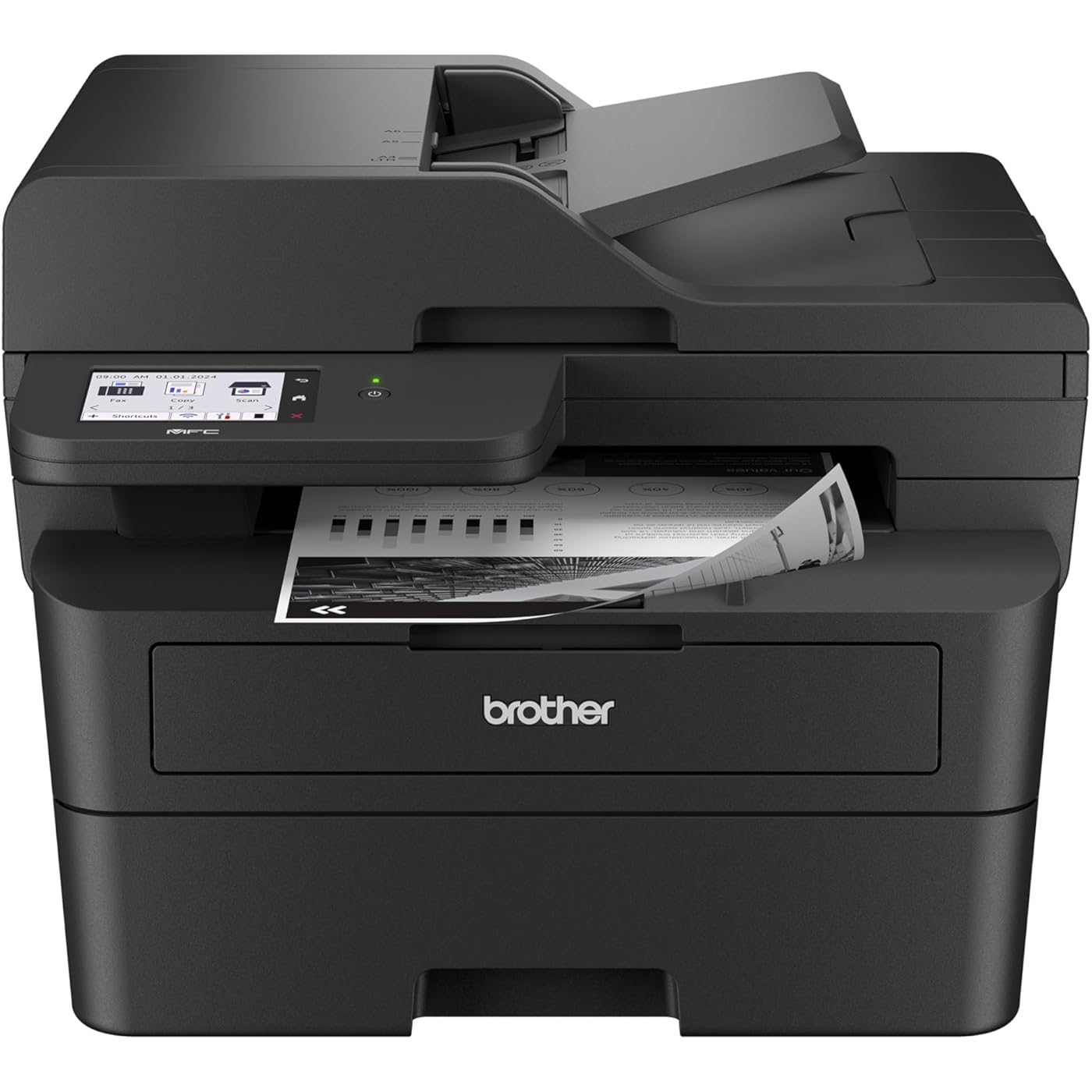
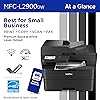
Brother Professional Laser Printer with Scanner, High-Speed 36 ppm Monochrome All-in-One, Wireless Duplex Printing and Scanning, Cloud-Ready 3.5 in Touchscreen for Small Business (MFC-L2900DW)



Buy Now, Pay Later
- – Up to 36-month term if approved
- – No impact on credit to apply
- – Instant approval decision
- – Secure and straightforward checkout
Ready to go? Add this product to your cart and select a plan during checkout.
Payment plans are offered through our trusted finance partners Klarna, Affirm, Afterpay, Zip, Apple Pay, and Google Pay. No-credit-needed leasing options through Acima may also be available at checkout.
Learn more about financing & leasing here.
Selected Option
30-day refund/replacement
To qualify for a full refund, items must be returned in their original, unused condition. If an item is returned in a used, damaged, or materially different state, you may be granted a partial refund.
To initiate a return, please visit our Returns Center.
View our full returns policy here.
Recently Viewed




Style: New
Pattern Name: MFCL2900DW
Features
- Professional Performance: Elevate your business efficiency with this Brother Genuine laser printer delivering lightning-fast 36 ppm output, crystal-clear monochrome documents, and advanced single-pass scanning for superior results
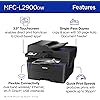
- Versatile Connectivity: Take command of your workflow with dual-band wireless (2.4GHz/5GHz), Ethernet, or USB connectivity options, plus seamless mobile printing and scanning through the Mobile Connect app from Brother Genuine
- Advanced Document Handling: Maximize productivity with the 50-page auto document feeder, automatic duplex printing to save paper, and convenient single-pass two-sided scanning for rapid document processing
- Smart Interface: Navigate effortlessly through printing, scanning, and cloud functions using the responsive 3.5 in touchscreen display, with direct access to popular services like Google Drive, Dropbox, and OneNote for seamless workflow integration
- Energy Efficient: Benefit from an enhanced fuser design that delivers 22% reduction in electricity consumption, faster warm-up times from sleep mode, and automatic duplex printing - all backed by Brother Genuine's commitment to sustainability
Description
The Brother MFC-L2900DW Wireless Compact Monochrome (Black & White) All-in-One Laser Printer is the affordable choice for highly efficient high-volume printing, copying, scanning, and faxing. Designed for powerful business printing, this quick, reliable 4-in-1 office printer consistently produces crisp, easy-to-read black & white prints at speeds up to 36 pages per minute(2) (ppm). Increase your productivity with time-saving features like single-pass duplex scanning and a 50-page automatic document feeder(4) to help you handle large multi-page double-sided copy, scan, and fax jobs. Convenient automatic duplex printing and a 250-sheet paper tray(4) reduce the frequency of paper refills and helps you save paper. The enhanced, highly efficient fuser design offers a 22% reduction in electricity consumption compared to its predecessor.(7) This also means a shorter warmup time from sleep mode so you can start printing in half the time.(7) With its small footprint, this compact printer can be placed almost anywhere on your desktop. Meanwhile, the integrated 3.5” touchscreen makes navigation easy and allows you to print-from and scan-to popular cloud-based apps.(6) Dual-band wireless, Ethernet, and USB 2.0 provide flexible options for connecting to your devices. Plus, complete more work on-the-go with the Brother Mobile Connect app – print remotely, order Brother Genuine Supplies, track toner usage, and more, all from your mobile device.(5) Advanced security features help safeguard your information and maintain secure connections while printing. Backed by Brother with a 1-year limited warranty and free online, call, or live chat support for the life of your printer. An efficient, time-saving addition to any workspace, this multi-function wireless office printer combines four critical business functions in one compact footprint. Use with Brother Genuine Supplies, expertly engineered by Brother to produce reliably sharp and smudge-free black & white prints in Brother laser printer: Replacement Toner TN830 (Standard), TN830XL (High Yield), and TN830XL 2PK (Twin-Pack); and Replacement Drum Unit DR830. 4. Disclaimers 1. Refresh Free Trial requires enrollment in a monthly billed Brother Refresh EZ Print Subscription service plan based on monthly printed page allotments. Unused pages roll over, limitations apply. Additional page set charges and taxes apply during trial. Plan, options offer, and pricing subject to change. Open to new subscribers located in the contiguous United States only. After the free trial period your credit card will be charged on a monthly basis for the Plan Fee, Overages, and Taxes in accordance with the Terms of Service. Overage fees will apply during free trial. Your service will continue on a month-to-month basis until you cancel it. May be canceled at any time. If your printer did not include a Refresh ready cartridge at purchase, upon cancellation, the subscription cartridge you received will be deactivated and must be replaced with a standard cartridge at your expense in order to continue printing. 2. Based on one-sided printing. Change from default setting required. 3. Monochrome scan speed in accordance with ISO/IEC 17991 with all advanced features turned off, letter at 300dpi. 4. Maximum capacity based on using 20-lb. paper. 5. Free app download and wireless connection required. Compatibility may vary by device and operating system. 6. Requires an Internet connection and an account with desired service. 7. Reduction in Typical Electricity Consumption (TEC) compared to MFC-L2750DW measured using ENERGY STAR Ver 3.2 test method. Reduction in First Page Out Time measured from Sleep Mode from standard tray. 8. Based on monthly subscription cost in U.S. for Mono Laser Power Plan vs. average cost per page of eligible like standard capacity cartridges. Savings will vary based on Refresh EZ Print Subscription plan selected. ENERGY STAR and the ENERGY STAR mark are registered trademarks owned by the U.S. Environmental Protection Agency. EPEAT is a trademark of the Green Electronics Council in the United States and other countries. Images are for illustrative purposes only. Specifications subject to change.
Brand: Brother
Connectivity Technology: Ethernet, USB, Wi-Fi
Printing Technology: Laser
Special Feature: Auto Document Feeder, Energy Star, Epeat Qualified, Single Pass Duplex Copy and Scan, Touch Screen
Color: Black
Model Name: MFCL2900DW
Printer Output: Monochrome
Maximum Print Speed (Color): 1 ppm
Max Printspeed Monochrome: 36 ppm
Item Weight: 11.8 Kilograms
Printer Type: Laser
Other Special Features of the Product: Auto Document Feeder, Energy Star, Epeat Qualified, Single Pass Duplex Copy and Scan, Touch Screen
Printer Output Type: Monochrome
Item Weight: 11.8 Kilograms
Item Dimensions D x W x H: 16.1"D x 12.5"W x 16.6"H
Controller Type: Android
Print media: Paper (plain)
Scanner Type: Flatbed
Compatible Devices: IPhone, Laptops, PC, Smartphones, Tablets
Warranty Type: Limited
Maximum Copies Per Run: 250
Ink Color: Black
Additional Printer Functions: All In One, Copy, Scan
Control Method: Touch
Compatible Cartridge: TN830, TN830XL, TN830V
Number of Trays: 1
Processor Count: 1
Resolution: 1200 x 1200
Display Type: LCD
Maximum Media Size: 8.5 x 14 inch
Maximum Sheet Capacity: 250
Paper Size: 8.5X14 Inches
Maximum print Resolution Color: 1200 x 1200 dpi Dots Per Inch
Maximum Print Resolution Black and White: 1200 x 1200 dpi Dots Per Inch
Dual-sided printing: Yes
Duplex: Automatic
Maximum Copy Resolution Color: 600 x 600 dpi
Maximum Copy Resolution Black and White: 600 x 600 dpi
Brand: Brother
Model Name: MFCL2900DW
Model Number: MFCL2900DW
Built-In Media: AC Power Cord and Telephone Line Cord, DR830 Drum Unit (15,000 pages), MFC-L2900DW Printer, Product Safety Guide, Reference Guide, Warranty Card, Quick Setup Guide, Starter Black Toner Cartridge (700 pages)
Series Number: 2900
Model Series: MFC-L
Specific Uses For Product: Office
UPC: 012502674085
Global Trade Identification Number: 85
Manufacturer: Brother
Warranty Description: 1 Year Limited Warranty
Item Type Name: Multifunction Printer
Unit Count: 1.0 Count
Color Pages per Minute: 1 ppm
B&W Pages per Minute: 36 ppm
Initial Page Print Time: 6.9 Seconds
Color: Black
Color Depth: 1 bpp
Printer Connectivity Type: Ethernet, USB, Wi-Fi
Hardware Interface: Ethernet, USB 2.0
Number of Ethernet Ports: 1
Total USB 2.0 Ports: 1
Total Usb Ports: 1
Frequently asked questions
To initiate a return, please visit our Returns Center.
View our full returns policy here.
- Klarna Financing
- Affirm Pay in 4
- Affirm Financing
- Afterpay Financing
- Zip Pay in 4
- Financing through Apple Pay
- Financing through Google Pay
Learn more about financing & leasing here.
Similar Products


Top Amazon Reviews
