




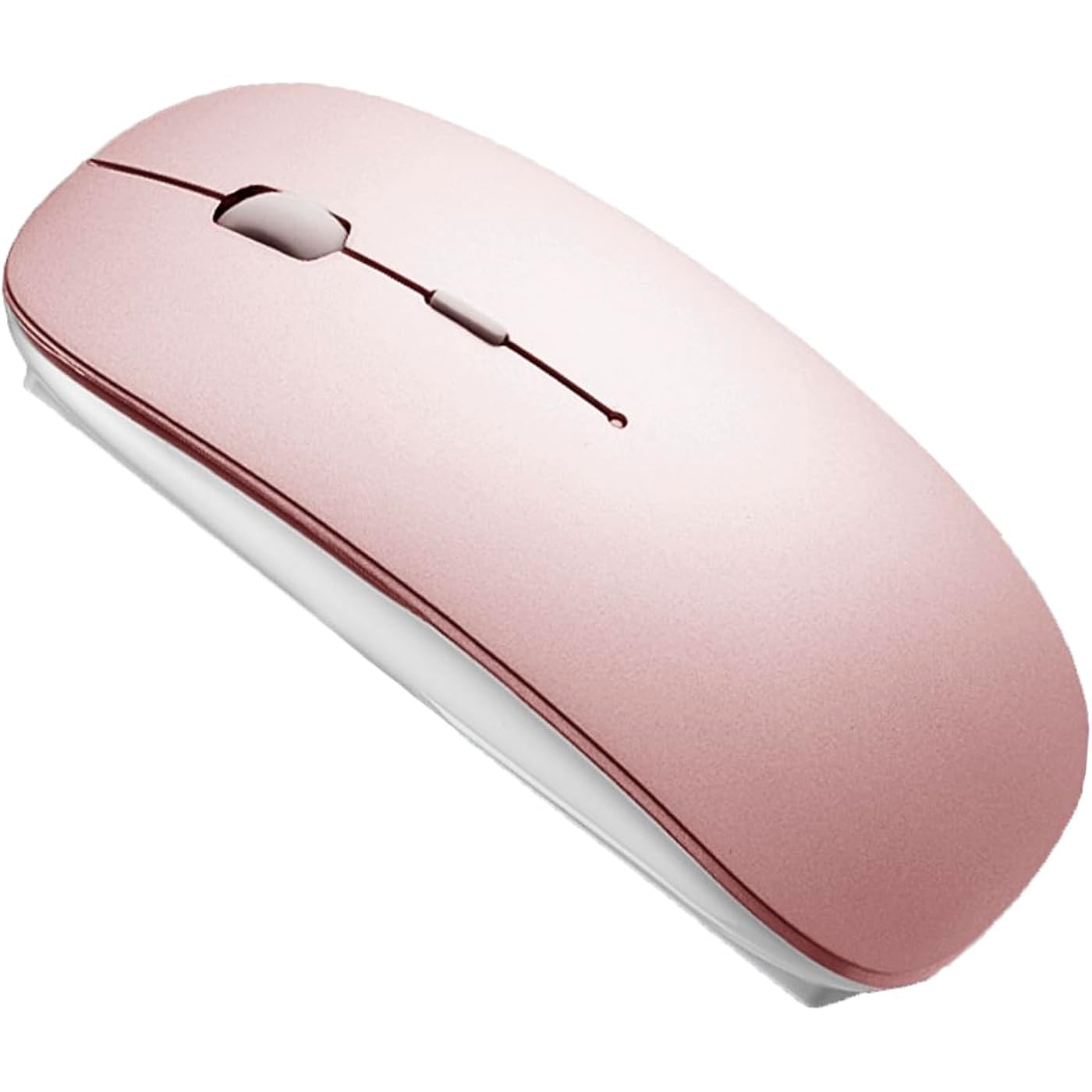
Bluetooth Wireless Mouse for Laptop mac MacBook ipad MacBook air MacBook pro pc Desktop Computer Windows Chromebook Notebook (Rose Gold)


Buy Now, Pay Later
- – 4-month term
- – No impact on credit to apply
- – Instant approval decision
- – Secure and straightforward checkout
Ready to go? Add this product to your cart and select a plan during checkout.
Payment plans are offered through our trusted finance partners Klarna, Affirm, Afterpay, Zip, Apple Pay, and Google Pay. No-credit-needed leasing options through Acima may also be available at checkout.
Learn more about financing & leasing here.
Selected Option
FREE 30-day refund/replacement
To qualify for a full refund, items must be returned in their original, unused condition. If an item is returned in a used, damaged, or materially different state, you may be granted a partial refund.
To initiate a return, please visit our Returns Center.
View our full returns policy here.
Recently Viewed


Color: ROSE GOLD
Features
- BLUETOOTH 5.2 + 3.0 +2.4G USB Receiver +USB C adapter Wireless Bluetooth Dual-Mode MouseYou can switch between Bluetooth mode or 2.4G mode,Compatible systems are: iPadOS macOSapple / Windows win7/8/10/11, UNIX, Linux, Chrome OS. Bluetooth mode is available for all Bluetooth-enabled laptops, MacBook pro macbook air macbook Mac iMac (ipad pro ipad air ipad mini ipad10th iPad9th, iPhone, iMac, tablet, all-in-one computer, etc. The 2.4G USB receiver mode is suitable for all laptops, desktops, all-in-ones, Dell, HP, Mac, iMAC, etc. with USB/USB C ports.plug and play.
- BUILT-IN BATTERY: Built-in battery,easy to charge by micro usb cable,no more need for extra AAA battery.please please keep the mouse power switch in "ON" position when charging .
- ERGONOMIC DESIGN: Good surface coating technology given you a skin-like touch feeling. User-friendly design provide all-day comfort for work and entertainment, portable and pocket-sized perfect for travel, Mute design keeps away annoying clicks.
- AUTO ENERGY-SAVINGSLEEPING MODE: Li-polymer batteries,high cycle life.the Auto Switch Off function will help you save energy as your bluetooth mouse will switch off when your PC is turned off or the receiver is disconnected. If you do not use the mouse for eight minutes, it will go to sleeping mode, you can press the any button to weak it up.
- PEIBO BLUETOOTH WIRELESS MOUSE works on all laptops and desktops
Description
Choose PEIBO dual-mode Bluetooth wireless mouse (BT5.2+BT3.0+2.4Greceiver+USB C adapter), which is more conducive to our connection and use on any computer device, HOW to use Bluetooth mouse mode: First, slide the mouse switch to Bluetooth mode (blue light) > open laptop system preferences settings> turn on Bluetooth function >, when laptop Bluetooth is searching for nearby Bluetooth devices> you need to press and hold the blue button at the bottom of the mouse '' for 3 -4 seconds, The blue light flashes . (If there is no Bluetooth button, you can skip this step and click the connection directly).> Bluetooth search there appears Bluetooth 5.2 mouse>click to connect "BT5.2 mouse or BT3.0 mouse (BT3.0 for old laptop)" > connection is successful How to use mouse 2.4G USB receiver mode: First, switch the mouse switch to 2.4G mode (green light)> Then remove the USB receiver from the slot on the bottom of the mouse > Plug the USB receiver into the USB port of your laptop,plug and play.(Works with all USB ports and USB c Laptop and desktop ports, (Note: Computers with usb c ports please use with usb c adapter)) How to use the bluetooth mouse on the ipadOS13 and above iPad pro 11/12.9inch ipad air 10.9inch ipad mini 8.3inch iPad 10th gen 9th gen 10.9inch : First, open iPad settings, find accessibility, turn on touch controls, find assistive touch controls, turn on assistive touch controls, then pull down to find the device, turn on the Bluetooth device, then turn on the mouse switch, press and hold the black button on the bottom of the mouse for 3-4 seconds, (If there is no Bluetooth button, you can skip this step and click the connection directly).your iPad will search for a Bluetooth 5.2 mouse and click "Connect". Pairing password: 0000, (if you can't find the Bluetooth mouse device, please restart the mouse or iPad Bluetooth function, or restart the iPad) How do I charge a wireless mouse? When your mouse pointer does not move or cannot be used, or suddenly disconnects continuously during use, this is the reminder that you need to charge the Bluetooth mouse for about 3 hours. Please use an adapter with an output of no more than 5v for charging, or a power bank, or a USB port on your laptop. (Charging is prohibited on chargers with output 10V or more) Packing list: instruction manual 1, rechargeable Bluetooth 5.2 + BT3.0 + 2.4G USB receiver dual-mode wireless mouse 1, (2.4G USB receiver hidden in the bottom slot of the mouse), USB charging cable 1, USB C adapter1, packaging box 1.
Brand: PEIBO
Color: ROSE GOLD
Connectivity Technology: Bluetooth Wireless USB/USB C Adapter
Special Feature: Bluetooth Wireless USB/USB C Adapter
Movement Detection Technology: Optical
Connectivity Technology: Bluetooth Wireless USB/USB C Adapter
Additional Features: Bluetooth Wireless USB/USB C Adapter
Movement Detection: Optical
Button Quantity: 1
Hand Orientation: Ambidextrous
Compatible Devices: Laptop, Desktop Computer, iPad
Operating System: Mac windows Laptop Tablet i pad PC Desktop computer Phone
Number of Batteries: 1 Lithium Polymer batteries required.
Hardware Platform: Laptop Tablet i pad PC Desktop computer Phone
Power Source: Battery Powered
Minimum Required Operating System Version: Windows 7
Range: 10.0 meters
Color: ROSE GOLD
Style Name: Modern
Theme: computer accessories
Enclosure Material: Plastic
Finish: Glossy
Brand: PEIBO
Antenna Location: Office Gaming
Model Number: K8
Included Components: instruction manual, rechargeable Bluetooth 5.2 + BT3.0 + 2.4G USB receiver dual-mode wireless mouse, USB charging cable, USB C adapter, packaging box
Manufacturer: PEIBO
UPC: 706597482921
Mfr Part Number: K8
Warranty Description: 1
Item Weight: 3.36 ounces
Item Dimensions L x W: 4.7"L x 2.8"W
Unit Count: 1 Count
Frequently asked questions
To initiate a return, please visit our Returns Center.
View our full returns policy here.
- Klarna Financing
- Affirm Pay in 4
- Affirm Financing
- Afterpay Financing
- Zip Pay in 4
- Financing through Apple Pay
- Financing through Google Pay
Learn more about financing & leasing here.
Similar Products

Logitech G PRO X Superlight Wireless Gaming Mouse - Black


Apple Magic Bluetooth Wireless Laser Mouse - A1296 (Renewed)


