Search  for anything...

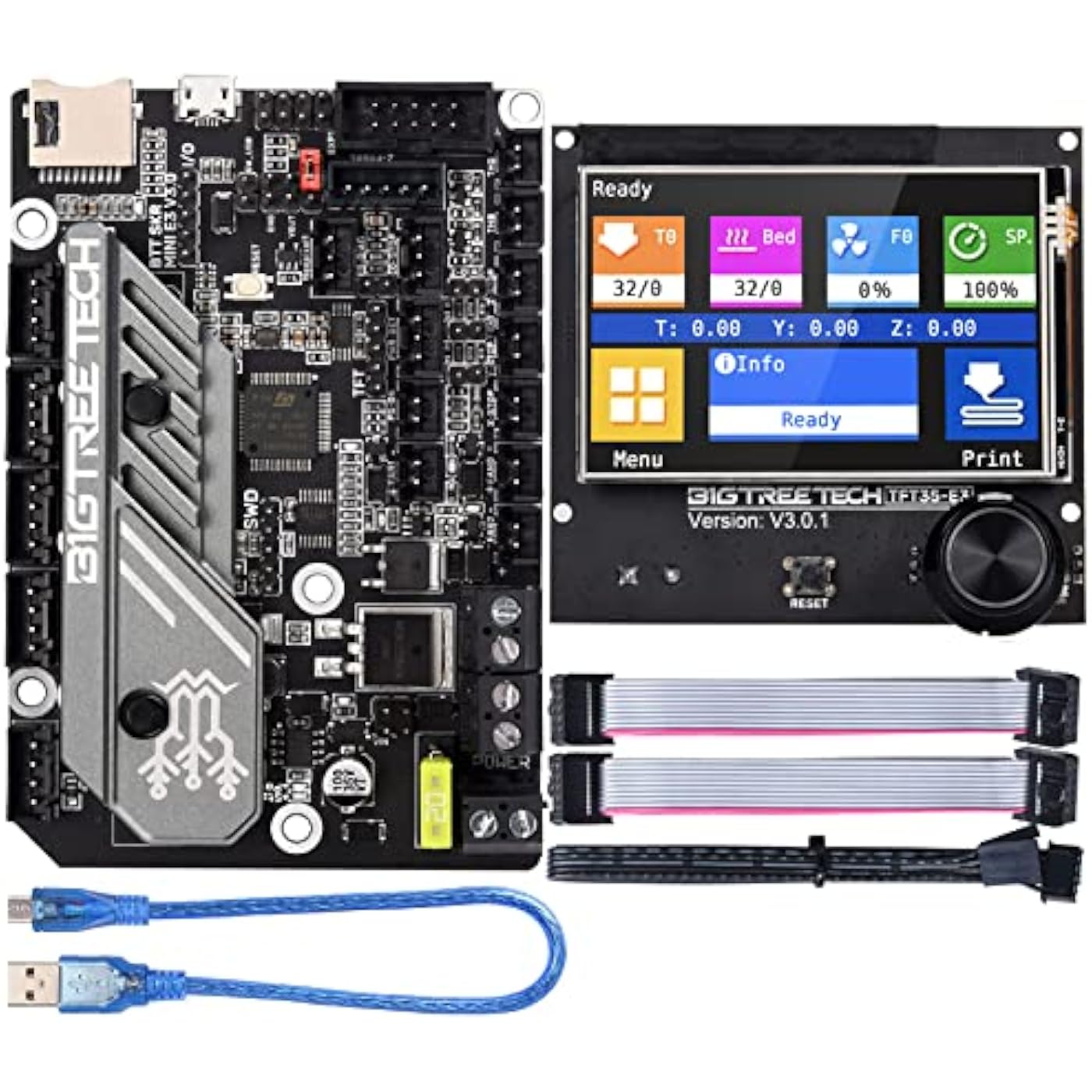
BIGTREETECH SKR Mini E3 V3.0 Control Board + TFT35 E3 V3.0.1 Graphic Smart Display Panel Board New Upgrade 3D Printer Parts for Ender 3, Ender3 Pro, Ender 3 V2
  • Based on 215 reviews
Condition: New
Checking for the best price...
$76.98 Why this price?
Save $73.01 was $149.99

Buy Now, Pay Later


As low as $12.83 / mo
  • – 6-month term
  • – No impact on credit to apply
  • – Instant approval decision
  • – Secure and straightforward checkout

Ready to go? Add this product to your cart and select a plan during checkout.

Payment plans are offered through our trusted finance partners Klarna, Affirm, Afterpay, Zip, Apple Pay, and Google Pay. No-credit-needed leasing options through Acima may also be available at checkout.

Learn more about financing & leasing here.

Selected Option

Free shipping on this product

FREE 30-day refund/replacement

To qualify for a full refund, items must be returned in their original, unused condition. If an item is returned in a used, damaged, or materially different state, you may be granted a partial refund.

To initiate a return, please visit our Returns Center.

View our full returns policy here.


Availability: 14 left in stock
Fulfilled by Amazon

Arrives Saturday, Oct 3
Order within 16 hours and 21 minutes
Available payment plans shown during checkout

Protection Plan Protect Your Purchase
Checking for protection plans...

Style: SKR Mini E3 V3.0+TFT35 E3 V3.0.1


Features

  • Three CNC Fan: Increase the heat dissipation controllable fan to reduce the printer temperature when the device is working
  • Increased Heat Sink: Redesign the drive heat sink, strengthen the drive heat dissipation capacity, and greatly improve the heat dissipation performance
  • Output Power Supply: Increase SPI output port +3.3V power supply, external SPI sensor power supply voltage +3.3V and +5V are optional, support the motherboard to directly supply power to peripherals
  • TFT35-E3 V3.0.1 Screen: This touch screen panel board has higher compatibility. Users can select two work modes: UART serial port screen mode and 12864 screen mode; Serial port screen mode supports two printing modes: SD card and U disk

Description

The ID design is newly upgraded to enhance the aesthetics of the motherboard and give you a cooler experience. Onboard TMC2209 mute driver UART mode, supports mute printing. New design of the drive heat sink enhances heat dissipation capacity of the drive. Reserve BLTouch leveling expansion interface, which is convenient for DIY. Increase the heat dissipation controllable fan to reduce the printer temperature when the device is working. Supports marlin2.0 and kilpper firmware, which is convenient for users to DIY and secondary development. Increase the SPI output port power supply to support the motherboard to directly supply power to the peripherals. The main aspects of SKR Mini E3 V3.0 controller board upgrade on the basis of V2.0 Our 3D control boards and 3D printer accessories products can not only provide a powerful aid to your 3D printing career, but also provide a challenge to your 3D printing technology experience. It can also increase your entertainment experience when you are playing 3D printing in your usual free time.

Color: Black


Brand: BIGTREETECH


Material: PCB


Display Type: LCD


Manufacturer: BIGTREETECH


Brand Name: BIGTREETECH


Manufacturer: BIGTREETECH


Number of Items: 1


Included Components: BIGTREETECH SKR Mini E3 V3.0+TFT35 E3 V3.0.1


Model: SKR Mini E3 V3.0+TFT35 E3 V3.0.1


Part Number: SKR Mini E3 V3.0 + TFT35 E3 V3.0.1


Display Type: LCD


Color: Black


Material Type: PCB


Frequently asked questions

If you place your order now, the estimated arrival date for this product is: Saturday, Oct 3

Yes, absolutely! You may return this product for a full refund within 30 days of receiving it.

To initiate a return, please visit our Returns Center.

View our full returns policy here.

  • Klarna Financing
  • Affirm Pay in 4
  • Affirm Financing
  • Afterpay Financing
  • Zip Pay in 4
  • Financing through Apple Pay
  • Financing through Google Pay
Leasing options through Acima may also be available during checkout.

Learn more about financing & leasing here.

Top Amazon Reviews


  • Great Upgrade for Ender 3
Style: SKR Mini E3 V3.0+TFT35 E3 V3.0.1
I bought this to replace the 8-bit board that was in my Ender 3(one of the first versions). The replacement wasn't hard and now my printer is running great. Just take your time and switch wires like-for-like. I'm loving the touch screen and the wonderful colors that go with it. A great update that my Ender 3 really needed to compete with today's printers. ... show more
Reviewed in the United States on March 20, 2023 by shc0088

  • BTT SKR mini E3 V3 and TFT35
Style: SKR Mini E3 V3.0+TFT35 E3 V3.0.1
Picked up an old Ender 3 as my first printer and I didn't have 3D printing experience, but had 2D and 3D modeling experience as well as an electrical background working as a service technician for over 10 years. The main board on the ender 3 was messed up at the card reader so the upgrade was a necessity. Spend a few more bucks and get a double z axis kit and direct drive extruder. Was able to do all the upgrades at once and get it all set up easily. The TFT cable needs to be re-pinned at the 5 terminal end, it's not right. There's a few guides on it. Haven't gotten the WiFi part figured out yet but I've only been printing stuff for 2 days, I'm sure it can be done without much trouble. ... show more
Reviewed in the United States on July 27, 2025 by Kory Brooks

  • Great Product
Style: SKR Mini E3 V3.0+TFT35 E3 V3.0.1
Very easy swap with the creality v4.2.2 board. Uses same location as stock ender 3 pro board location. Printer is super quiet. Having the touch screen is a must. Will be purchasing another combo for my other printer!
Reviewed in the United States on November 28, 2023 by josh

  • The screen sucks, the mainboard might work?
Style: SKR Mini E3 V3.0+TFT35 E3 V3.0.1
Avoid this waste of money. The screen is so insanely pathetically underpowered and slow to the point you can't even hardly baby step the z while printing. THAT IS HOW HORRIBLE IT IS. Get any other board and screen other than this lump of coal. This was a waste of $90 and who knows how many hours of my time now. I was impressed at first but the Screen code is horribly flawed. This thing destroys your bed. How? Well when you use the probe offset feature, if it rams the nozzle into the bed what do you do? There is no stopping it. The code sucks SOOOOOO BAADD that it doesn't bother to use your BL touch, NO WHY DO THAT JUST RAM THE PERSONS BED WITH THE DAMN NOZZLE. So you turn it off to stop it. Ok when you turn it on what do you think it does???? It runs your BL touch, then doesn't raze the nozzle. So you go into the Movement setting and try to raise the Z offset to not carve your bed, right. What does it do? It tells you that you can't move the damn hotend until you home the printer. OH JOY SO. So what do you think it does when you try to home it? It decides now is the perfect time to drag the damn nozzle over the bed and carve it up more. Isn't that just awesome. Why for the love of god not use the damn BL touch or allow the user to raise the Z without homing or atleast raise the bed before moving. So to sum it up. If your settings are off and you go to set the p offset feature, it first rams your nozzle so hard into the bed it actually knocks the whole assemble off. Then if you turn it off and on again, you are stuck with your nozzle rammed as hard as possible into the bed and no way at all to get the damn thing to stop. The only way I found to move the nozzle up when it is eating the bed is to turn off the printer, turn it back on and then choose the marlin screen, then choose Z offset wizard, which has the only smart code you will find in the screen and actually raises the damn bed first. Again the screen CODE IS SO HORRIBLE that instead of doing the smart thing and raising the hotend, it just prefers to eat your bed and ruin your nozzle instead. Isn't that nice? Isn't that what you want???????? So now my bed is SEVERELY RUINED and I need a new one.. The code for the Screen is 99 levels of amateur horrible code. AVOID THE SCREEN. Another super annoying issue with this kit is it just chooses a random printing speed every time, no matter what. Sometimes it is normal, other times it is 10%, and yet other times it is 160% SO AWESOME, SO COOL, JUST WHAT I WANT. I mean why use the Gcode settings I put in Cura when you can just do WTF ever you want. Yeah, woohoo . My runout sensor also doesn't work. I'm sure there is a setting in the configuration that needs to be changed. And that was another thing with this board, so many of the motor settings have to be inverted to make it work. The screen looks nice and works, but the underlying code is BARFTASTIC and Chock full o bugs. Want to load and unload filament using the built in feature??? TOO BAD SO SAD ERRORS FOR YOU!! I mean it goes on and on. Full of bugs. The screen makes working with the board easier than the stock Creality screens except for a the bugs/issues. The code for the screen in it's latest version has some irritating bugs. For example it keeps telling you that you need to home the bed before moving, even if you have already done that. What happens is if you do not interact with the printer for more than a minute it somehow forgets that it has been homed already and demands you rehome the printer. This gets SUPER ANNOYING when you are working on the printer. For example I moved the z axis up to change the nozzle, when i went to lower the damn thing it barfs at me that I must home the printer before moving. I think the issue is the fact that the screen is running it's own version of marlin and it connects to the printers mainboard, which is running it's own marlin. In this configuration, the screen is acting sort of like Klipper, it sends the instructions to the printer and displays what is going on. I think there is some setting that turns communication off after a minute. So it is like reconnecting to the mainboard all over again. Another issue is swapping the filament out with the option in the menu doesn't work. It just gives some stupid error that I haven't looked up yet. You have to manually control the extruder and reverse the filament out. I haven't had enough time to dig into the problem further. You can use this in many other printers other than the Ender 3. I am using it in an Ender 3 max which has a larger print bed. In order to do this I had to compile my own Marlin for the board, which is not hard at all, there are videos on youtube on compiling marlin. I'd actually suggest configuring and compiling your own marlin for the mainboard. I haven't messed with the screen code much, I downloaded and installed an updated version without compiling my own. I may in the future try compiling my own marlin for the screen to try to fix the bugs I found, but that will require actually editing code which I don't have time for right now. This mainboard will work with Klipper. So I plan on avoiding the overpriced screen of fail and replacing Marlin with Klipper on a Pi clone. But the screen is junk, it has too many bugs. I wish I knew this before I bought the combo. The mainboard is good, the screen sucks. I could have saved $45 and bought a pi clone if I knew how bad the screen was. Someone honestly needs to fix the screen code. I have yet to get this working properly. The z offset is always off for some reason and I have to baby step each print to even get close to a nice first layer. It has been a waste of $90 so far. Marlin for one sucks big time. I am thinking that is part of the z offset problem I'm having. I've had more failed prints than successful. I would switch back to the creality board but I have a Geetech board I want to try next. But I will buy a SBC to run klipper before I waste more time with Marlin. ... show more
Reviewed in the United States on November 29, 2023 by Robert Jackson

  • Almost great, but not quite.
Style: SKR Mini E3 V3.0+TFT35 E3 V3.0.1
The touch screen is gorgeous and the main board seems extremely well made. I had to knock a star off because this is definitely NOT just plug and play. You'd think that since these two units are made by the same company and come in the same package, that the two would work perfectly together right out of the box. Nope. When I first powered it on, the touch screen would not respond. Like at all. Even the knob wouldn't work unless I put it in Marlin mode. Turns out I had to put a blank text file called "reset.txt" onto an SD card and reset the touch screen. Great, so it works now, right? Nope. The touchscreen now says that no printer is detected. But when I switch to Marlin mode, it prints just fine. So as of right now, the graphical interface and touchscreen are useless. I've researched various solutions which just don't work. A little ridiculous to effectively have an MS-DOS interface with most of the advanced features simply unavailable. Well certainly the manufacturer, knowing that this issue has been extremely common for YEARS, must have an easy fix, right? Nope. In fact, if you check message boards, you'll see that not only are the manufacturer's reps useless in resolving this issue, they're pretty rude about it too. From what I can gather after hours of researching the issue, I have to reflash the main board software, edit the code myself, and then pray that it works. ... show more
Reviewed in the United States on June 13, 2022 by Paul Express

  • Great upgrade for Ender 3
Style: SKR Mini E3 V3.0+TFT35 E3 V3.0.1
Very impressive for out of the box. Very direct. Make sure you plug in both cables to the touchscreen. Opens up a lot of tuning and customization to the user. Very happy.
Reviewed in the United States on July 2, 2023 by Brittany Blue

  • Worked great ..ender 5
Style: SKR Mini E3 V3.0+TFT35 E3 V3.0.1
Worked out great.. some hiccups but Github worked me through it... .
Reviewed in the United States on February 18, 2023 by S.R.

  • Looks good but instructions are not good
Style: SKR Mini E3 V3.0+TFT35 E3 V3.0.1
Instructions are not the best , a lot of trial and error, still have 2 wires no clue where they go, took trial and error to get display working
Reviewed in the United States on December 10, 2022 by Terrance Carney

Can't find a product?

Find it on Amazon first, then paste the link below.
Checking for best price...