Search  for anything...

Basicolor Streaming Macro Keypad, Stream Controller Deck Gaming Shortcut Keyboard, with Customizable 6 LCD Shortcut Keys, 3 Buttons and 3 Knobs, Trigger Actions in OBS/Twitch/YouTube, Windows 10/Mac14.0 (N3 Black)

  • Based on 41 reviews
Condition: New
Checking for the best price...
$47.49 Why this price?
Holiday Deal · 21% off was $59.99

Buy Now, Pay Later


As low as $7.92 / mo
  • – 6-month term
  • – No impact on credit
  • – Instant approval decision
  • – Secure and straightforward checkout

Ready to go? Add this product to your cart and select a plan during checkout.

Payment plans are offered through our trusted finance partners Klarna, Affirm, Afterpay, Apple Pay, and PayTomorrow. No-credit-needed leasing options through Acima may also be available at checkout.

Learn more about financing & leasing here.

Selected Option

Free shipping on this product
This item's return window has been extended for the holiday season: FREE refund/replacement until Jan 31, 2026

To qualify for a full refund, items must be returned in their original, unused condition. If an item is returned in a used, damaged, or materially different state, you may be granted a partial refund.

To initiate a return, please visit our Returns Center.

View our full returns policy here.


Availability: In Stock.
Fulfilled by Amazon

Arrives Monday, Dec 29
Order within 12 hours and 37 seconds
Available payment plans shown during checkout

Protection Plan Protect Your Purchase
Checking for protection plans...

Color: Black


Features

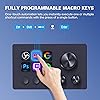
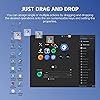
  • Freely customizableYou can assign single or multiple actions by dragging and dropping the desired operation onto the six customizable keys and setting the properties. The uses are endless, such as performing game combos, launching apps, controlling media, etc.In addition, you can add images and animations (JPG, PNG, GIF) to each LCD key to enhance button recognition and memorization. With three dials, you can easily adjust the volume, fast forward and rewind playback, etc.
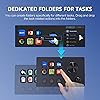
  • Perform any operation with one clickThe customizable macro keyboard allows you to work efficiently with one click. You can instantly perform any operation, such as launching macros, entering text, opening files and websites, controlling media, and switching OBS scenes, with one click. In addition, by utilizing the "Action Flow" function, you can perform multiple macro actions in a specific order and manage tasks freely.
  • Various Compatibility]This shortcut keyboard is compatible with both Windows and macOS. It works seamlessly with popular software such as OBS, PowerPoint, YouTube, Twitter, Discord, Excel, Word, Photoshop, and Adobe Premiere Pro to make your work even smoother.
  • Multifunctional to meet your needsThis Stream Controller Deck's application space offers hundreds of plugins such as schedule reminders, clocks, stopwatches, weather, calendars, etc., making it not only a productivity tool but also a great desktop companion. In addition, 60 types of icon packs are available for you to download and use according to your needs.
  • Customer Support If you are still unsure of how to set up or operate the product after reading the Quick Start Guide that comes with the product, you can get support in the following ways: Watch the tutorial video for each operation below the product image. Or select the "Ask a Question" button to contact us.
  • Warranty Period The product warranty period is 24 months from the date of purchase.
  • NOTE If you already have Stream Dock software installed on your computer, when you install and launch VSD Craft software, the Stream Dock operation screen is likely to appear in the software interface, so we suggest that uninstall Stream Dock software and then restart VSD Craft. VSD Craft is compatible with Stream Dock, so you can connect to compatible devices without installing Stream Dock.

Brand: Basicolor


Model Name: Stream Dock


Compatible Devices: Mac, PC


Controller Type: Push Button, Joystick


Connectivity Technology: USB


Product Dimensions: 5.11 x 3.15 x 1.96 inches


Item Weight: 5.9 ounces


Manufacturer: Shenzhen An Rui Xin Technology Co., Ltd.


Language: English


Item model number: N3


Date First Available: July 10, 2025


Frequently asked questions

If you place your order now, the estimated arrival date for this product is: Monday, Dec 29

Yes, absolutely! You may return this product for a full refund within 30 days of receiving it.

To initiate a return, please visit our Returns Center.

View our full returns policy here.

  • Klarna Financing
  • Affirm Pay in 4
  • Affirm Financing
  • Afterpay Financing
  • PayTomorrow Financing
  • Financing through Apple Pay
Leasing options through Acima may also be available during checkout.

Learn more about financing & leasing here.

Top Amazon Reviews


  • GREAT with a learning curve!!!
Color: White
So I got this little gadget not fully sure what I could do with it but as I work at my computer from 9-5 at least 5 days a week, I had a few ideas and thought I’d try something like this… I work on a Mac and day in and day out am saving PDF’s and uploading them to places so I do a lot of document editing in Adobe and was hoping I could give myself some easier “automated buttons” to make my life easier for the repetitiveness (and the fact that I apparently fat finger my keyboard and could have been way more productive to begin with)… I will say there are a few things to go with this review: I am not sure what ALL of the capabilities of this device are (or others like this) but as someone who spends way too much time screaming at a computer, this is nice to smooth out some of the repetitive things I do and make my life easier. You will have to figure out HOW to set up what you want. There is for sure some things you need to go into in your system settings on a Mac to make hotkeys work properly (Though if you use a non apple keyboard you’ve had to get creative with certain button functions anyways and this is KIND OF like that). There are videos on how to do things but honestly even with my very distinctly angry and impatient approach to technology and software, it took maybe 45 minutes of messing around. It seems like the things that could be done with this are endless and honestly it’s a useful gadget. I’m not sure how long this device will last as I did just get it but I was split between quite a few different ones and this seemed like a good place to start and I actually am glad I did. IF your looking at this and have any better tech skills than me, this is not a difficult device to set up and seems pretty handy! *will update if there are any quality/device issues that are pertinent but I do recommend this product for sure! ... show more
Reviewed in the United States on November 24, 2025 by Max

  • Great little controller for streaming and shortcuts
Color: Black
This macro keypad has been super handy for my setup. The LCD keys are clear and easy to customize, and the knobs work smoothly for volume or scene adjustments. It works well with OBS and my other apps, and setting up actions was straightforward. The size is perfect for keeping next to my keyboard without taking up a lot of space. Overall, a really useful tool for streaming or just adding quick shortcuts to your workflow. ... show more
Reviewed in the United States on November 22, 2025 by ari

  • Stream deck easy
Color: Black
The set this up it was genuinely simple, and the software makes assigning complex macros and custom icons super intuitive. I use it constantly for essential tasks like muting my mic, switching OBS scenes, and triggering quick sound effects. The keys have a great tactile feel, and the deck is heavy enough that it never slides around during intense gaming sessions. It handles gaming shortcuts just as well, giving me instant access to my most used in-game commands. For the price point, this is easily the best value stream controller if you don't want to shell out for the high-end brands. ... show more
Reviewed in the United States on October 27, 2025 by Tomas

  • A good alternative to the more expensive brands of stream controllers
Color: White
Let me preface my review by saying that I may not be the target audience for this device, so if it has limitations vs. the name brand devices, I probably won't be using it for those purposes. I set this up myself and it seems pretty intuitive and reliable so far. I work from home and every morning I have to pull up multiple browser tabs and programs to do my job. This stream controller allows me to open every thing I need with just a few clicks. As I make calls and contacts throughout my work day, I have buttons assigned to the most common notes I leave in our CRM software. I can trigger these faster than even with a clipboard program. I use it to control the most common Zoom functions like mute/unmute, camera on/off, screen share, record, and exit. I also have a few of my commonly used programs set up as buttons. I can also control the system volume and switch between my headset and speakers. I will admit I was hesitant to buy this brand as I thought it would be hard to configure. It can be laborious, but not that hard. The build quality seems solid enough. The buttons are bright and the knobs have good feedback. The black buttons below the lcd buttons are the weakest part of the set up, but the work just fine. Overall, I'd recommend this to someone looking for a lower cost alternative to the big name brands. ... show more
Reviewed in the United States on August 13, 2025 by Wesley and Stacey Delk Wesley and Stacey Delk

  • Poor Quality and Frustrating
Color: Black
Sometimes this works, mostly it doesn't. Setting it up isn't terrible, but it's not great either. It has options like matching the rotation of the scroll wheel, except it doesn't even come close and you have to use a high number in the option box to try and come close. The physical buttons also don't click that well, and the knob click is terrible. It works 1 out of 7 times if you press hard. I'm disappointed, I was hoping this would be functionally useful. ... show more
Reviewed in the United States on October 8, 2025 by KungFuJosh

  • Amazing streaming device !
Color: Black
Everything worked straight out of the box and the quality is amazing on the device. My favorite part from this device is the ability to use gifs on the key pads, looks very unique. All works as per the instructions , had no problems with the software on my computer.
Reviewed in the United States on November 5, 2025 by Junior

Can't find a product?

Find it on Amazon first, then paste the link below.
Checking for best price...