Search  for anything...

Autel MaxiTPMS TS508WF TPMS Programming Tool, 2026 Upgrade WiFi Ver. of TS508 TS501 TS408 TS601, Tire Pressure Monitor, Program MX-Sensors 315/433MHz, Relearn Activate All Sensors, TPMS Reset Diagnose

  • Based on 180 reviews
Condition: New
Checking for the best price...
$264.00 Why this price?
Save $15.00 was $279.00

Buy Now, Pay Later


As low as $44.00 / mo
  • – 6-month term
  • – No impact on credit to apply
  • – Instant approval decision
  • – Secure and straightforward checkout

Ready to go? Add this product to your cart and select a plan during checkout.

Payment plans are offered through our trusted finance partners Klarna, Affirm, Afterpay, Zip, Apple Pay, and Google Pay. No-credit-needed leasing options through Acima may also be available at checkout.

Learn more about financing & leasing here.

Free shipping on this product

FREE 30-day refund/replacement

To qualify for a full refund, items must be returned in their original, unused condition. If an item is returned in a used, damaged, or materially different state, you may be granted a partial refund.

To initiate a return, please visit our Returns Center.

View our full returns policy here.


Availability: In Stock.
Fulfilled by Amazon

Arrives Wednesday, Jul 29
Order within 7 hours and 50 minutes
Available payment plans shown during checkout

Protection Plan Protect Your Purchase
Checking for protection plans...

Features

  • Need Support? Co.ntact Us DirectlyIf you have any questions or need further help during use: Received a registered device/ Startup, Registration or Update issues, or Charging/ Authorized Language/ Function Performance/ Need additional accessories, etc., pls conta.ct us directly via Autelonline @ outlook. com, we will provide you a prompt and perfect solution. If you are unsure whether the product is suitable for your vehicle, please send your car VIN# via Autelonline @ outlook. com for tech support. Kindly note: Our TS508WF comes with a Rugged Blow-Molded Carrying Case to protect and store your device. Unlike other sell.ers, only with a cloth bag.
  • 2026 Upgraded WiFi Ver. of TS508 TS501 TS408 TS601Good News! Autel TS508WF TPMS scanner, Autel's First Non-tablet Tool providing Lifetime WiFi Updates is born! You can update it via WiFi directly, no need a P.C anymore. Autel TS508WF programming tool incorporates all features of TS508 TS501 Pro TS408 TS601, meets all your needs with all-around powerful functions: Autel MX-sensor programming, TPMS relearn, activation, and TPMS-related OBD2 diagnostics. Superior to competitors, TS508WF can diagnose the latest Models with frequent software updates. TS508WF must be registered before using it. Functions are not universal. Pls send us your car VIN to check compatibility first!
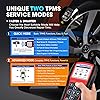
  • Quick Mode & Advanced Mode, Smart Your Repair WorkThe 2026 updated TS508 WiFi Version, as the new generation complete TPMS tool, offers the option to choose one of two service modes from the home screen for faster and smarter TPMS repairs. With Quick Mode and Advanced Mode options, you can save time and energy by choosing the most suitable way to complete TPMS work. And now, among Autel TPMS Tools, only TS508WF and TS508 have the efficient TWO TPMS SERVICE MODES.
  • 4 Ways to Program Autel MX-Sensors, Pls Update Your TS508WF to the Latest Ver.Autel TPMS programming tool TS508WF makes it possible to program the sensor at your fingertips rather than turn to the dealer. 4 ways to program Autel MX-Sensors (433MHz & 315MHz): Copy by OBD (TS408/ TS401 CANNOT) Auto Create 1-16 Sensors simultaneously (The Ave time is 6-8s/pcs, higher programming efficiency). Copy by Activation Copy by Manual Input. All these are easy to do and time-saving. Note: TS508WF can ONLY program Autel MX-Sensors. It can NOT program other brand sensors. For any problem requiring technical support, contact Autelonline @ outlook . com .
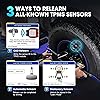
  • Relearn 99% of TPMS SensorsAlmost every TPMS sensor must be "relearned" to the vehicle after replacement, whether it's genuine OE or aftermarket. TPMS relearn tool TS508WF quickly relearns the sensors to the vehicle with as many as 3 ways, which are Stationary Relearn, Automatic Relearn, and OBD Relearn. Compared with TS408, TS508WF can directly write the sensor IDs to the ECU via OBD Relearn. Functions vary by vehicle make, model, year, please send us your car VIN to check compatibility before ordering via Autelonline @ outlook. com .
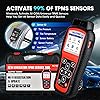
  • Activate All-Known TPMS SensorsWith Autel TPMS tool TS508WF, you can wirelessly activate all OEM/ Universal TPMS sensors on the market, helping you easily get sensor data like sensor ID, tire pressure, tire temperature, sensor battery, sensor position, frequency, etc. With the right Vehicle Make, Model and Year, sensor activation is a Flash for you. Functions vary by vehicle make, model, year, please send us your car VIN to check compatibility before ordering via Autelonline @ outlook. com .
  • Full TPMS Diagnostics & ServicesAs the 2026 new generation of TPMS diagnostic & service tool, Autel TS508WF TPMS Reset Tool can wirelessly activate 99% of TPMS sensors on the market, and enable you to quickly and accurately retrieve TPMS sensor data like Sensor ID, Tire Pressure, Tire Temperature, Sensor Battery, Sensor Position, Frequency, etc. Besides, TPMS TS508WF can read, clear TPMS DTCs, and reset TPMS warning lights, helping you solve 99.9% of TPMS issues. Worth every penny of it! Functions vary by vehicle make, model, year, please send us your car VIN to check compatibility before ordering via Autelonline @ outlook. com .
  • Lifetime Free Updates & Data Review & PrintingAutel TS508WF comes with frequent LIFETIME FREE software updates to support the newest car models & more new features via WIFI or USB. TS508WF comes with functions of Data Review & Data Printing, you can review the data recorded or print out the diagnostic report for further analysis and accurate repairs. Besides, TS508WF supports Multiple languages. If you need to change your language, you can send your S/N to our email Autelonline @ outlook . com and we will offer you help ASAP.

Brand: Autel


Power Source: Battery Powered


Operating System: Android 4.4


Screen Size: 2.8 Inches


UPC:


Power Source: Battery Powered


Operating System: Android 4.4


Screen Size: 2.8 Inches


Brand Name: Autel


UPC: 710882314323 792499843427


Manufacturer: Autel


Model Number: Autel


Manufacturer Part Number: Autel


Manufacturer Warranty Description: 12-Month Warranty


Included Components: Carrying Case


Frequently asked questions

If you place your order now, the estimated arrival date for this product is: Wednesday, Jul 29

Yes, absolutely! You may return this product for a full refund within 30 days of receiving it.

To initiate a return, please visit our Returns Center.

View our full returns policy here.

  • Klarna Financing
  • Affirm Pay in 4
  • Affirm Financing
  • Afterpay Financing
  • Zip Pay in 4
  • Financing through Apple Pay
  • Financing through Google Pay
Leasing options through Acima may also be available during checkout.

Learn more about financing & leasing here.

Top Amazon Reviews


  • Nice product and easy to use and read.
I always wanted one of these and finally got one. I had a problem with my truck and bought the new sensors and this tool and it walked me through the process for replacing TPMS sensors. This tool programs the Autel MX sensor. Will relearn other types of sensors but PROGRAMS the Autel sensor.
Reviewed in the United States on June 27, 2025 by roger larson

  • Tpms
WELL, MY SON LIKES THIS TOOL AND HE SAYS IT DOES THE JOB.
Reviewed in the United States on May 27, 2026 by Dale L.

  • Nice. Easy to use. May save you a trip to the shop.
When opening the packaging, follow the suggestion of registering and doing the updates first. Bought a new set up rims and tires for my Jeep. New MOPAR sensors as well. Got home after the tire shop and one showed dead. Thought I would have to go back, have the shop break the bead and replace. Took out this tool and scanned each one. They were working. However, when went to another option - it gave me something like, "all sensors triggered". Took the Jeep back on the road and in about five minutes the code went away and all the tires reading PSI as they should. NICE. Helped to pay for itself within the first week of ownership. ... show more
Reviewed in the United States on June 2, 2026 by WI_buyer

  • Love thisTool.
I was having a difficult time deciding which TPMS tool to purchase. This one cost a little bit more, but after reading the reviews I decided to bite the bullet … and am I glad I did. This unit was very easy to use, even though I find some of these electronics hard to figure out. I used this tool to assist in replacing the TPMS sensors on my wife’s Prius and it couldn’t have been easier. I liked that I could connect directly to the internet to register the unit and download updates. When I used it to diagnose the sensors, it was easy peasy. The vehicle is repaired and the wife is happy. What more could you ask for. ... show more
Reviewed in the United States on April 26, 2026 by Tracy A. Verheyen

  • Relearned new OEM sensors on 2006 Toyota tundra Relearned new OEM sensors on 2006 Toyota tundra
My 2006 tundra had 4 dead tire sensors and i wanted to restore the function of my TPMS. Instead of paying the dealer an insane amount of $ to replace and reprogram the truck for the new sensors I bought this and new DENSO(pacific) oe sensors and had the tire shop physically replace them for me while they were replacing the tires. 5 new sensors (including spare for my vehicle) and this tool was still very expensive but the tool works with a large variety of vehicles. TPMS terminology is kind of complicated with respect to programming and re-learning, etc. If you want to use OEM sensors with this tool, you will select the re-learn option under the advanced menu. Once I figured this out, it took all of about 5 minutes to let the tool do its thing while following the prompts. ... show more
Reviewed in the United States on December 18, 2025 Reviewed in the United States on December 18, 2025 by Matt

  • This is a preliminary review, since so far I haven't been able to use this tool (explained below)
This is a very well-made tool: sturdy, with a rubberized cover that protects it from bumps and provably falls. In addition to this, the Maxi TPMS comes in a very nice plastic storage and transport case. I believe that it should be a very durable product. But regardless of what most customers say about the MaxiTPMS TSF508WF I must tell the difficulties I have experienced just after receiving it today (June 26, 2024): a. I did both registering and updating the software via USB, using the Autel PC Suite for Macintosh (found in the Autel website). But whenever I turn it on to use it, a message appears on the screen telling that "This device has not been registered." The other option would be to update it via Wi-Fi. However, the TSF508WF's screen shows two options, both to "update" via USB using a computer, or Wi-Fi using the device itself, not to "register it." b. However, If I decide to update it using my home network (Wi-Fi), the TSF508WF's software has a glitch as follows: My network security password has a combination of different character (letters, symbols, and numbers). So assuming that my password (fictitious, of course) is, "tacoma123," this is how the software in the writes it: "tacoma 1 2 3," (places a space between the last letter and the number that follows, plus a space between each number. Re-edited my review as follows: It too me a lot of effort to figure how to use the Autel MaxiTPMS TS508WF TPMS Programming Tool. Using the buttons to update the tool via Wi-Fi is just too cumbersome and slow. The screen with all the information needed to register it is within the tool's software. In this case the software should be designed to automatically transmit this screen to Autel. The tool probably does that, but there aren't any provisions to both update and register the Autel MaxiTPMS TS508WF TPMS Programming Tool, just to "update" via Wi-Fi, and Via USB using the PC Suite app. I had to "register" it at Autel using my laptop, and then "update" it using the PC Suite app with the Autel MaxiTPMS TS508WF TPMS Programming Tool connected to my laptop. But whenever I decide to use the Maxi TPMS tool, the screen showed that "this device hasn't been registered." Only when I managed to "update" via Wi-F (after numerous tries) that the Maxi TPMS tool finally worked properly. A final note: for a tool that is so expensive, it should be provided with concise instructions the user could follow, plus more features such as programing both OM and other sensors. The user is left in the blind trying to figure how to scan and program sensors. It worn't program other than "Maxi?" TPM sensors, but one can at least scan and register OM sensors in the automobile's ECU. I am keeping the Autel MaxiTPMS TS508WF TPMS Programming Tool, built my advise to others is to consider buying other tools that don't cost as much. This "tool" would be great for mechanic or tire shops, but not so great for occasional use. ... show more
Reviewed in the United States on June 27, 2024 by Ray

  • Excellent tool! Easy to use with plenty of YouTube videos out there to assist!
This review is being updated to reflect the excellent Customer Service by the AUTEL product support team in addressing concerns I had expressed in my initial review. Their unsolicited follow-up email direct to my InBox provided clear and concise details explaining product description verbiage that I found confusing. Independent of this, the actual TS508WF Programming Tool has worked flawlessly supporting my 2015 Ford F150 Lariat and 2017 Lexus RX350. Strongly recommend you take the time to register and update your device as directed in the Owner's Manual to avoid any possible glitches. Additionally, there are numerous YouTube videos available that specifically target "ease of use" supporting this product. ... show more
Reviewed in the United States on March 1, 2026 by US Navy CWO

  • Works perfectly
Bought a set of One TPMS sensors to install to a winter set of tires and and programming them with the TS508WF was a snap.
Reviewed in the United States on March 19, 2026 by mrsteve7

Can't find a product?

Find it on Amazon first, then paste the link below.
Checking for best price...