Search  for anything...

ASUS ROG Strix G16 (2023) Gaming Laptop, 16” 16:10 FHD 165Hz, GeForce RTX 4070, Intel Core i9-13980HX, 16GB DDR5, 1TB PCIe SSD, Wi-Fi 6E, Windows 11, G614JI-AS94, Eclipse Gray

  • Based on 542 reviews
Condition: New
Checking for inventory...

Notify me when this product is back in stock

$1,999.99 Why this price?

Buy Now, Pay Later


As low as / mo
  • – Up to 36-month term if approved
  • – No impact on credit to apply
  • – Instant approval decision
  • – Secure and straightforward checkout

Payment plans are offered through our trusted finance partners Klarna, Affirm, Afterpay, Zip, Apple Pay, and Google Pay. No-credit-needed leasing options through Acima may also be available at checkout.

Learn more about financing & leasing here.

Selected Option

Free shipping on this product

FREE 30-day refund/replacement

To qualify for a full refund, items must be returned in their original, unused condition. If an item is returned in a used, damaged, or materially different state, you may be granted a partial refund.

To initiate a return, please visit our Returns Center.

View our full returns policy here.


Availability: Unavailable
Fulfilled by Amazon
Available payment plans shown during checkout

Capacity: 16GB DDR5 | 1TB PCIe SSD


Features

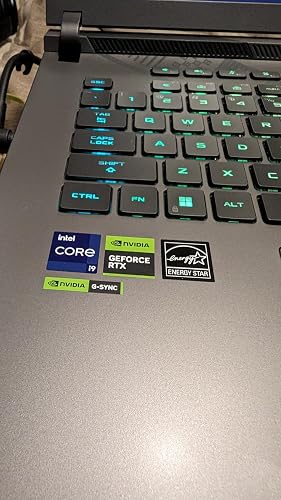
  • POWER UP YOUR PLAY - Draw more frames and win more games with Windows 11, a 13th Gen Intel Core i9-13980HX processor, and an NVIDIA GeForce RTX 4070 Laptop GPU at 140W Max TGP..Anti-glare display, Refresh Rate: 240Hz, Response Time: 3ms, 720P HD camera.
  • BLAZING FAST MEMORY AND STORAGE Multitask swiftly with 16GB of DDR5-4800MHz memory and speed up loading times with 1TB of PCIe 4x4.
  • ROG INTELLIGENT COOLING To put this amount of power in a gaming laptop, you need an even better cooling solution. The Strix features Thermal Grizzlys Conductonaut Extreme liquid metal on the CPU, and a third intake fan among other premium features, to allow for better sustained performance over long gaming sessions.
  • SWIFT VISUALS The Strix G16 has a fast FHD 165Hz panel to make sure you never miss a moment. It also covers 100% of the sRGB color space and feature Dolby Vision, Adaptive-Sync support, and an 90% screen-to-body ratio for a stellar gaming and viewing experience.
  • MUX SWITCH WITH ADVANCED OPTIMUS - A MUX Switch increases laptop gaming performance by 5-10% by routing frames directly from the dGPU to the display bypassing the iGPU. With Advanced Optimus the switch between iGPU and dGPU becomes automatic based on the task, optimizing battery life.

Description

Raise your game and carry your squad with the new ROG Strix G16, a powerful gaming laptop that features Windows 11, a 13th Gen Intel Core processor, and an NVIDIA GeForce RTX 40 Series Laptop GPU. With DDR5-4800MHz memory and PCIe 4x4, this laptop is designed to provide lightning-fast performance and minimize loading times. The ROG Intelligent Cooling system with upgraded liquid metal on the CPU and Tri-Fan Technology, ensures that the laptop can handle the power it can deliver. The fast FHD 165Hz panel makes sure you never miss a moment, and the MUX Switch with Advanced Optimus optimizes both gaming performance and battery life. The laptop's design is inspired by cyberpunk aesthetics and graffiti accents, and features unique elements such as a dot matrix design on the lid and cross-hatched vents.

Brand: ASUS


Model Name: ROG Strix G16


Screen Size: 16 Inches


Color: Eclipse Gray


Hard Disk Size: 1 TB


CPU Model: Intel Core i9


Ram Memory Installed Size: 16 GB


Operating System: Windows 11 Home


Special Feature: Anti Glare Coating


Graphics Card Description: Dedicated


Color: Eclipse Gray


Hard-Drive Size: 1 TB


Operating System: Windows 11 Home


Other Special Features of the Product: Anti Glare Coating


Graphics Description: Dedicated


Graphics Coprocessor: NVIDIA GeForce RTX 4070


Hard Disk Description: SSD


Item Weight: 5.51 Pounds


Video Processor: NVIDIA


Specific Uses For Product: Gaming


Webcam Capability: Yes


Graphics Card Ram: 6 GB


Form Factor: Laptop


Hard Disk Interface: PCIE x 8


Voltage: 20 Volts (DC)


Camera Description: Front


Graphics Ram Type: DDR5 SDRAM


Compatible Devices: External displays, mice, keyboards, storage devices, printers, and other accessories that use HDMI, USB, Wi-Fi, or Bluetooth connectivity.


Warranty Type: Limited


Item Dimensions L x W x Thickness: 13.94"L x 0.89"W x 10.39"Th


Hard Disk Rotational Speed: 7200 RPM


Optical Storage Device: No Drive


Video Output: HDMI


Virtual Reality Ready: Yes


RAM Memory Installed: 16 GB


RAM Memory Technology: DDR5


Memory Clock Speed: 4800 MHz


Ram Memory Maximum Size: 16 GB


Memory Speed: 4800 MHz


RAM Type: DDR5 RAM


Cache Memory Installed Size: 36 MB


RAM Memory Slot Total Count: 2


Memory Slots Available: 2


Battery Cell Type: Lithium Ion


Battery Life: 6 Hours


Lithium-Battery Energy Content: 90 Watt Hours


Human-Interface Input: Keyboard


Keyboard Description: Gaming


Notebook Pointing Device Description: Touchpad


Keyboard Layout: QWERTY


Control Method: Touch


Processor Series: Intel Core i9


Processor Speed: 5.6 GHz


Processor Count: 24


Processor Brand: Intel


CPU Model Number: Intel Core i9-13980HX


CPU Model Generation: 13th Gen


CPU Model Speed Maximum: 5 GHz


Brand: ASUS


Model Name: ROG Strix G16


Model Year: 2023


Model Number: G614JI-AS94


Built-In Media: G614JI-AS94, Powercord and Adapter, User Manual


Manufacturer: ASUS


UPC: 197105046788


Unit Count: 1.0 Count


Warranty Description: 1YR International*/Eligible for 1YR free Domestic ADP upon registration with 1-way free shipping/2-way FREE shipping for standard hardware warranty repair


Screen Size: 16 Inches


Resolution: ‎1920 x 1200 pixels


Native Resolution: 1920 x 1200 pixels


Display Type: WUXGA


Display Resolution Maximum: 1920x1200 Pixels


Display Technology: WUXGA


Has Color Screen: Yes


Connectivity Technology: USB, Wi-Fi


Wireless Technology: Bluetooth, Wi-Fi


Wireless Compability: 802.11ax, Bluetooth


Bluetooth support?: Yes


Total Usb Ports: 6


Hardware Interface: PCI Express x4


Number of Ports: 7


Total Thunderbolt Ports: 1


Total Number of HDMI Ports: 1


Audio Output Type: Headphones, Speakers


Audio Recording: No


Frequently asked questions

This product is currently out of stock. Please check back later for shipping info.

Yes, absolutely! You may return this product for a full refund within 30 days of receiving it.

To initiate a return, please visit our Returns Center.

View our full returns policy here.

  • Klarna Financing
  • Affirm Pay in 4
  • Affirm Financing
  • Afterpay Financing
  • Zip Pay in 4
  • Financing through Apple Pay
  • Financing through Google Pay
Leasing options through Acima may also be available during checkout.

Learn more about financing & leasing here.

Top Amazon Reviews


  • Good value and performance
Capacity: 16GB DDR5 | 1TB PCIe SSD
Product ID: G614JI-AS94. Price: $1649. Pros: - Value. The I9-13980HX + GeForce RTX 4070 are a step above mid-tier hardware and are offered here at a reasonable price compared to other "gaming laptops." - Performance. I've been able to play the newest and biggest games all on high / very high settings. I've had no issues, and I feel as if the games look and play great. - Upgradability. I've NOT upgraded my machine as I don't wish to void the warranty. However, and as there was confusion in other reviews, I have personally spoken directly with ASUS support ,as well as Crucial support, and I've confirmed that YES this machine can be upgraded to 64GB of Ram (2x 32GB sticks) and YES there is an available open SSD slot. As such, and considering current prices of Ram and SSDs, you can scale this up to 64GB Ram and add second SSD for a D-drive for a minimal additional investment to really finish out this machine. - Wifi. I get SIGNIFICANTLY better wireless Internet speeds on this device than the older gaming laptop I replaced. Did not expect that, but was pleasantly surprised. - Sounds. Speakers sound good enough. Music through Spotify is crisp and bass gets picked up okay too. Cons: - Battery life. When playing a video game on battery power, I get about only 45-minutes of game time, which is disappointing. However, performance seems to remain higher than expected. When general web browsing or doing home office tasks, I get about 3 hours. When streaming content, such as Netflix, I about about 2 hours, which is frustrating as you can't really watch a movie on a single charge. - Number pad. I was expecting a digital number pad or display as part of the track pad per the advertisement. This model number, G614JI-AS94, does not have that feature and that was very disappointing and seemed misleading. - Touchpad. Doesn't feel as responsive as the touchpad on the older gaming laptop I replaced. Additionally, oftentimes after exiting a video game the touchpad will outright not work and require a device restart. - Lights. As an adult, the multicolored lights are annoying and not something I'm interested in. It was not immediately intuitive on how to turn them off, but I found out that you can do so through the included software. - Startup sound. It's awful and ear piercing! I can't figure out how to turn it off. - Camera. Would have liked a better resolution here as it's not great. Indifferent: - Screen. I'm not a "gamer" so I don't really care or know anything about refresh rate. For me, it seems bright, clear, and things look good! However, I personally wish it was a 15.6 inch machine and not the 16 inch, as I'd prefer a slightly smaller and wider screen than this square. - Ports. Good enough for me and has everything I needed. However, some people might wish for more options. Conclusion: If you're not a real gamer, but want to play games, this is a great option that offers value and performance along with upgradability. ... show more
Reviewed in the United States on October 15, 2023 by Ryan

  • Exactly what I wanted (so far)
Capacity: 16GB DDR5 | 1TB PCIe SSD
Exactly what I wanted so far. Wanted something sturdy, reliable, and fast to replace my old dell G15. A lot of people have issues right out of the box and early on or with dead pixels. I haven’t had any of those issues. I’ve owned for almost a week and so far everything has been great, zero issues. Display looks great, sound is so so, performance is amazing. One thing is that the cpu temps are high because the i9 runs so hot, however you will not feel a thing because even when I was running 80C playing games, I couldn’t even feel it. Port selection is also awesome, I have everything I need. I do not use it on battery, so I cannot comment on that, however I have heard it’s not the best unless you specifically set it up for that. This thing should be able to handle basically any game you throw at it, you just might want to upgrade the ram so it’s on par with the other specs. I’m not sure if I’ll have issues in the near future, but so far the laptops been pretty perfect. NEED TO KNOWS FOR NEW BUYERS: 1: Manually select gpu only in nvidia control panel instead of integrated graphics which is on by default for whatever reason (haven’t had that happen for other laptops) 2: uninstall armory crate and install g-helper. Not only does this free up resources and battery life, g-helper is a much more lightweight and easy to use version of armory crate that has the same functionality (armory crate sucks) 3: You are buying a 13th gen i9 that runs very hot, UNDERVOLT! Download throttlestop (both this and g-helper are very safe and vetted don’t worry). Throttlestop and g helper are defaulted to not start on startup, so if you mess something up, just reboot and you should be fine. Search up what others did for their i9-13980HX and see what works for you. My undervolt did pretty amazing, going from constant 80C while playing an fps game, to only 60-65C mostly hovering between 61-63 while only taking a small performance hit(350-550 frames to 300-400). Not only will this help the longevity of the cpu, but your fans won’t be nearly as loud. And so far the high temps I’ve seen my gpu go up to undervolt or not, is 60C. ... show more
Reviewed in the United States on March 25, 2024 by Shawn Cannons

  • Good performance when it worked, but it failed a few months after the warranty ran out
Capacity: 16GB DDR5 | 1TB PCIe SSD
The CPU in this laptop was on the of the best available when I purchased it at the end of 2023, and it still is more than a year later. The GPU is reasonable too, and can easily handle external displays with higher resolution than the internal one. The laptop also supports up to 64 GiB of memory and has a spare SSD slot. Taken together, all of these features make it a great desktop replacement, which is what I bought it for. I was generally happy with the laptop for the first 15 months or so, although there were a few occasional stability issues. The crashes were almost all related to video, especially timeouts connecting to the external display, so I suspect that buggy Nvidia drivers were to blame. In any case, the problems were intermittent, probably linked to driver updates, and the system was fine most of the time. Since I bought this laptop as a desktop replacement, using external displays, keyboard, mouse, etc. I haven’t really used it in laptop mode. As a laptop, it might be okay for gaming, but the screen is mediocre for productivity work. They keyboard is pretty good and the touchpad seems fine. It’s fairly large and heavy for a productivity laptop, but for gaming that’s usually worth it, in exchange for performance. Having said that, the GPU seems a bit underpowered with compared with the CPU. As a gaming system, it seems rather unbalanced, but I bought it for CPU-intensive tasks, not gaming. Performance can be a bit erratic, especially for graphics. It’s probably because thermal issues. Performance does tend to be smoother in Performance or Turbo mode than in Quiet mode, but it still isn’t as smooth as, e.g., an Apple Silicon Mac. I have an M2 Pro-based Mac, and it’s must less powerful, both in CPU and GPU terms, but its performance is more consistent and it’s much quieter. The noise from the laptop is tolerable in ‘Silent’ mode, but it certainly isn’t silent. In Silent mode, it’s quieter when running on battery power, so it must throttle more and use the fans less than when connected to AC power. Since I use it as a desktop replacement, I almost always have it plugged in, and the noise is irritating, even in Silent mode. In Performance mode and especially Turbo mode, it’s much louder, and I’d say it calls for wearing noise-cancelling headphones or earbuds. I probably would have given this laptop a 4-star rating, but the quality has let it down. The manufacturer’s warranty is 12 months, and after 15 months, it simply failed during normal use. The screen froze and the fans continued to spin, but there was no response to input. I powered it off by holding down the power button, but when I turned it back on, it failed to boot. Troubleshooting with Asus support got nowhere. The power LED lights up and the keyboard LEDs show the startup sequence, but the fans remain low and the ROG boot screen never appears. I’ll be getting this laptop serviced soon, and the repair should be covered by an extended warranty from my credit card. If it turns out to be a minor issue, then I might add back a couple of stars, but even in that case, I’d expect better quality for a laptop in this class. Overall, this laptop excels in CPU performance, but the GPU is a bit underpowered by comparison, leaving a somewhat unbalanced system for gaming. For my purposes, as a desktop replacement for CPU-intensive work, it worked reasonably well and was a great value, until the hardware failed a few months after the warranty expired. ... show more
Reviewed in the United States on June 2, 2025 by Thomas

  • Mostly a review of the keyboard
Capacity: 16GB DDR5 | 1TB PCIe SSD
First a few short notes on things other than the keyboard: My least favorite thing about this laptop is the coil whine. At one point it sounded like a 19.2kbaud modem connecting, and I was considering returning it just because of that, but it was running the GPU off USB power, and I discovered that it's not nearly as bad when using the included power brick (which you want to do anyway because the GPU can't run at full power without it). I think it will be tolerable, but we'll see. It is not only when the dGPU is running. I have the 1200p 165kHz screen, and it does have some very noticeable backlight bleed, but it's totally fine for coding and web browsing, and I use an external monitor for content creation anyway. I've heard that it works fine to upgrade the RAM to 64GB, even though Asus says the limit is 32; I'll update this review in a few days when my upgrade kit arrives. UPDATE: It's working. There was a scary minute when it seemed like it wasn't going to turn on, but then it did; I have no idea what that was about. I wish it was thinner and lighter, but I decided I could compromise on that since I don't carry my laptops around all that much these days. Armoury Crate seemed to work ok for me, but it's very bloated. Luckily I discovered there is now a lightweight replacement called G-Helper. Asus ought to include this instead of Armoury Crate, or at least advertise its existence and make it easy to switch. It does everything at least as well, including controlling the fans and RGB lighting and remapping the customizable function keys. Ok, the keyboard. tl;dr: it's pretty good. Keyboards are important to me as a coder (and writer and other things), and although I spend the majority of my time at my desk with an external keyboard, mouse, and monitor, I do like to be able to work elsewhere, and sometimes I work in a client's office where I don't have access to a good external keyboard. The keyboard was an important factor in my choice of this laptop. For one thing, its layout is my favorite type: it has an extra column of keys at the right, but not a full keypad. On this one they're designed as media control keys (play/pause, stop, back, forward), but I map them to Home/End/PgUp/PgDn to match my desktop keyboard. (Asus advertised that there were customizable hot keys, but that turned out to mean only the 5 little keys at the top, so I'm using AutoHotKey, which I use for other things anyway.) The full-size arrow keys are also a good match. It would have been better if they didn't include the Fn and PrtSc keys in the bottom row; then they could have increased the size of the control keys and space bar. I'd suggest having Fn further off the the left, and PrtSc somewhere at the top. The F1-F12 function keys are smaller and not quite where I'm used to them, but I can adjust. They actually act as F1-F12 by default, and you have to use the Fn key to use their special functions like adjusting screen brightness. Fn+Esc doesn't seem to change this; I think there's a way but I like it this way anyway. There are five additional keys at the very top, which are the customizable hot keys Asus advertises. By default they are volume down, volume up, microphone mute, fan mode, and open Armoury Crate. If you don't have Armoury Crate or G-Helper installed, it seems like there's no way to make use of the 4th and 5th ones; they don't send a code that AutoHotKey can use. The first 3 continue to have their default functions. Per-key RGB seems silly to me, but I like that I can set it to some color other than white. It's hard to get it to do orange/amber or yellow; yellow ends up green, and orange is just a sort of yellowish-greenish-off-white. I'm leaving it on that color all the time, because the key labels are hard to see otherwise except in really good light. The lighting is a bit uneven, but it does the job. For some reason the F1-F12 labels on the function keys are just printed on and don't let light through, but it's easy to remember where they are. The keyboard feels good. Clicky but not terribly loud. Decent travel, and the key caps are very slightly concave (I didn't even consciously notice at first, but this does contribute to the nice feel). This version of the laptop does not have any transparent keys, nor does it have the touchpad that can turn into a keypad. I'm totally fine with this. ... show more
Reviewed in the United States on September 3, 2023 by Alan deLespinasse

  • Perfect laptop! Perfect laptop!
Capacity: 16GB DDR5 | 1TB PCIe SSD
So I had a fully upgraded Alienware M16 for about 3 months. Within those 3 months, I've had Dell replace the board twice and my issues still weren't resolved. To make a long story short, they did a full refund (thankfully) and after doing a lot of research and watching a ton of videos I decided to pull the trigger on the ROG STRIX G16 and I'm glad I did! I bought the I9 13980HX/RTX 4070/16GB ram and 1tb SSD. I upgraded it to 64gb of ram (yes it's compatible as you can see in the photo I posted) it's also compatible to run at 5200mhz instead of the slower 4800mhz. It also has a 2nd SSD slot so it has 2 of the crucial T500 2tb SSD's in it for a total of 4tb now. This laptop is fast and extremely solid and can run anything including games at high settings without a problem. I got the 165hz panel and I guess I was lucky because I don't have the infamous backlight bleed. It's vibrant, and very crisp. The keyboard is nice and highly customizable and nice and bright. It's not mechanical but still has a nice feel to it. The mouse pad is large and responsive. The speakers surprisingly sound really nice considering they're laptop speakers (I'm actually impressed) and as far as heat, it stays between 65-72 degrees under heavy load so I couldn't be happier about that! I love this laptop and it puts other "high quality" systems to shame! I really don't have any cons about it as of now. If something comes up, I'll come back and update my review but as of now, I'd definitely recommend buying it if you're in the market! I can't stress that enough! It's a beast and I love it! ... show more
Reviewed in the United States on December 11, 2023 Reviewed in the United States on December 11, 2023 by JGreen314

  • AN Incredible Machine for Creative Work AN Incredible Machine for Creative Work
Capacity: 16GB DDR5 | 1TB PCIe SSD
I have been struggling with upgrade all my hardware and for video post and cad design. I initially bought this machine to replace a laptop but its performance and value compete with desktops nearly double the price. First off it needs 64GB of RAM so get the upgrade RAM it's well worth it. It tears through rending video frames at 4k in Premier Pro, handles frame rendering in after effects extremely well, 3D rendering in Adobe Stager is pretty fast for even complex scenes (in 3D my desktop 4090 PC performs noticeably better) and it handles 3D design and rendering AutoDesk Fusion360 very well. In photoshop it handles neural filters with ease, even on huge files it processes on machine in minuets. I can setup very large illustrator files with ease making large designs a breeze. Overall its an impressive machine for designers and creators. As for cooling, it is processing a lot at max performance settings and does get hot, it needs to be on a stand with clean cool airflow to run at max power. For the price it is unbeatable imo and I am considering getting another to have as a desk top. ... show more
Reviewed in the United States on June 5, 2023 Reviewed in the United States on June 5, 2023 by Joshua B.

  • Fast, flawless, high gear mode! Fast, flawless, high gear mode!
Capacity: 16GB DDR5 | 1TB PCIe SSD
Well it performs so well on this laptop that run anything games it throws at. So the only slight thing is does indeed run a little bit warmth. Between 90-95C heavily loads intensive gaming that is demanding most cpu usage and gpu usage too. But that not all it can handle ultra and highest maximum graphic quality settings that involves RAY TRACING WHOOPING ON TOP. of that and you still get a solid performance frames averaging 67 fps to 80s range mid to 100s frames on average the most. And this laptop is unique so you have to keep in mind not to freak out the cpu temps hitting 90-95C which is normal for the i9 13980HX with 24 Cores…. And 32 frigging logical processor and that is a lot of darn cores to run it. And that take cpu temps at normal temperatures rates between 90-95C on heavy load which was designed to run a little hot. The graphic cards itself does have 8Gb vram if you are concerned about the size of vram saying as 6gb it is not it actually 8 GB dedicated VRam. ... show more
Reviewed in the United States on March 4, 2024 Reviewed in the United States on March 4, 2024 by Brandon

  • FIRST TIME Start Ups May Be Slow FIRST TIME Start Ups May Be Slow
Capacity: 16GB DDR5 | 1TB PCIe SSD
Overall a solid working product. I have the RTX 4070 version. Understand it may take time to fully boot up, the first review given for this laptop talked about the black screen and how it never displayed anything on boot up. That reviewer unfortunately may have gotten a defective unit which happens and sorry that person had to go through that. With my unit it did take 2-3 minutes to fully boot up and get working the first time, so GIVE IT TIME. I don’t know why ASUS laptops sometimes have long first time startups. Just be patient for a few minutes. Just note it may not work for everyone, take action at your own discretion. ... show more
Reviewed in the United States on March 8, 2023 Reviewed in the United States on March 8, 2023 by Thomas Turner

Can't find a product?

Find it on Amazon first, then paste the link below.
Checking for inventory...