Search  for anything...

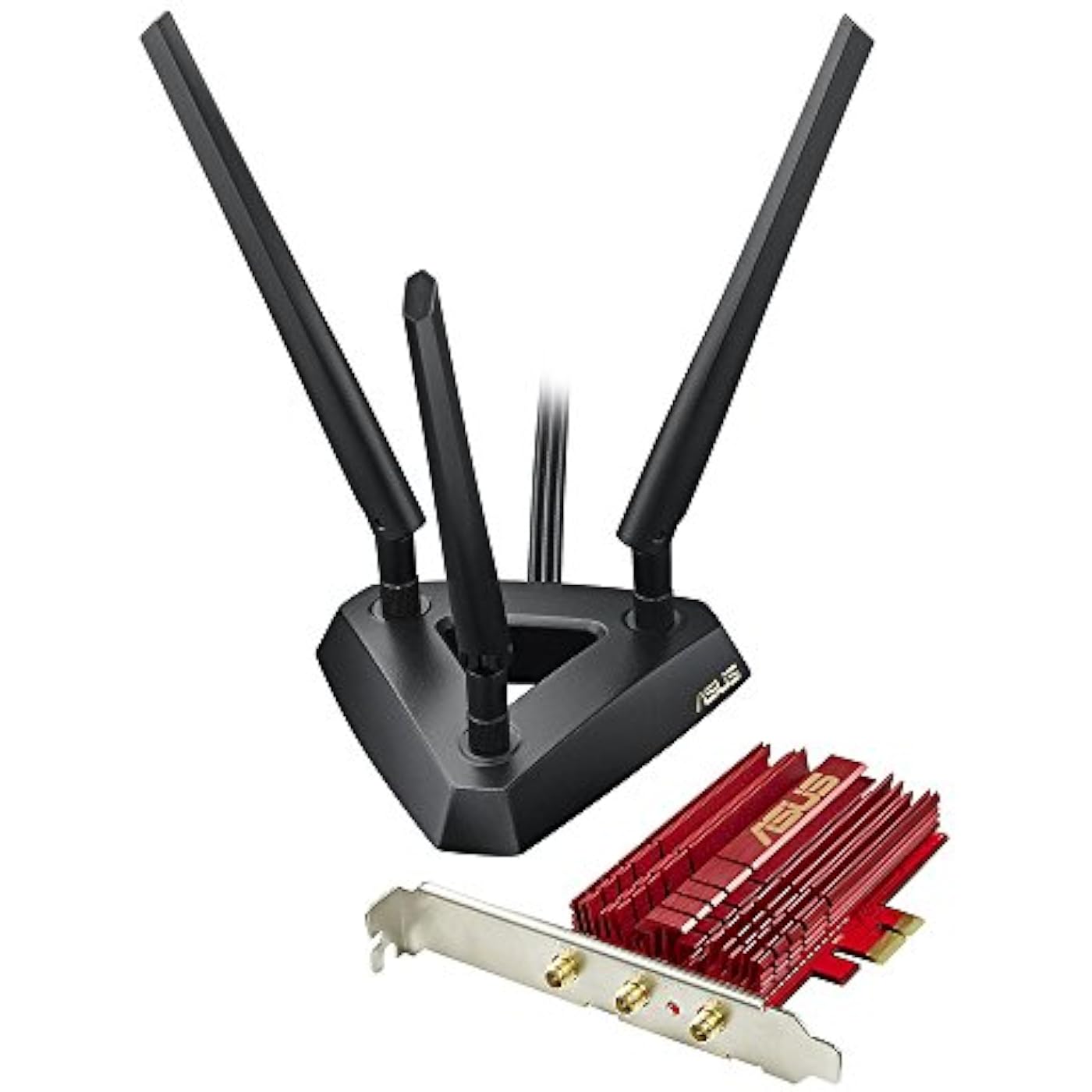
ASUS PCE-AC68 Dual-Band 3x3 AC1900 WiFi PCIe Adapter with Heat Sink and External Magnetic Antenna Base Allows Flexible Antenna Placement to Maximize Coverage
  • Based on 2,258 reviews
Condition: Used - Very Good
Checking for the best price...
$134.49 Why this price?

Buy Now, Pay Later


As low as $22.42 / mo
  • – 6-month term
  • – No impact on credit to apply
  • – Instant approval decision
  • – Secure and straightforward checkout

Ready to go? Add this product to your cart and select a plan during checkout.

Payment plans are offered through our trusted finance partners Klarna, Affirm, Afterpay, Zip, Apple Pay, and Google Pay. No-credit-needed leasing options through Acima may also be available at checkout.

Learn more about financing & leasing here.

Selected Option

Free shipping on this product

This item is eligible for return within 30 days of receipt

To qualify for a full refund, items must be returned in their original, unused condition. If an item is returned in a used, damaged, or materially different state, you may be granted a partial refund.

To initiate a return, please visit our Returns Center.

View our full returns policy here.


Availability: Only 1 left in stock, order soon!
Fulfilled by US Seller/We ship from USA

Arrives Oct 24 – Nov 8
Order within 32 minutes
Available payment plans shown during checkout

Protection Plan Protect Your Purchase
Checking for protection plans...

Size: PCE-AC68


Style: AC1900 | 3x3


Features

  • Provides an extensible design that enables service prioritization for data
  • Design that delivers high availability, scalability, and for maximum flexibility and price/performance
  • The country of origin is China. Os support: Windows 8.1 (32bit/64bit), Windows 8 (32bit/64bit), Windows 7 (32bit/64bit), Windows Vista (32bit/64bit), Windows XP (32bit/64bit)
  • High-power design Clear up dead zones with 150% greater coverage.
  • Custom heatsink dissipates heat for more stable and reliable non-stop operation.Operating Temperature: 0 C to 40 C ( F to oF)
  • 5th generation 802.11ac chipset gives you dual-band,2.4GHz/5GHz for up to super-fast 1.30Gbps
  • Flexible extended antenna placement helps you pinpoint the best reception in your environment.
  • Instant Wi-Fi upgrade for your desktop: no more messy Ethernet cables needed.
  • High-power design clears up dead zones with 150% greater coverage.
  • Custom heatsink dissipates heat for more stable and reliable non-stop operation.

Description

ASUS (PCE-AC68) Dual-Band wireless-ac1900 PCI-E adapter.

Brand: ASUS


Hardware Interface: PCIE x 1


Color: Black


Compatible Devices: Desktop


Product Dimensions: 8.4"L x 2.4"W x 11.2"H


Data Link Protocol: Ethernet


Data Transfer Rate: 1300 megabits_per_second


Item Weight: 1.3 pounds


Number of Packs: 1


UPC:


Brand: ASUS


Number of Packs: 1


UPC: 886227557790


Global Trade Identification Number: 90


Number of Items: 1


Manufacturer: ASUS Computer International Direct


External Testing Certification: CE, FCC, IC


Built-In Media: 1-Year Limited Warranty Period Labor, 1-Year Limited Warranty Period Parts, 5Th Generation 802.11Ac Chipset, Asus Dual-Band Wireless-Ac1900 Pci-E Adapter, Flexible Extended Antenna Placement


Item Type Name: ASUS PCE-AC68 Dual-Band 3x3 AC1900 WiFi PCIe adapter with Heat Sink and External magnetic antenna base allows flexible antenna placement to maximize coverage


Model Number: PCE-AC68


Mfr Part Number: PCE-AC68


Warranty Description: 2


Hardware Interface: PCIE x 1


Compatible Devices: Desktop


Data Link Protocol: Ethernet


Data Transfer Rate: 1300 megabits_per_second


Compatible Operating System Family: Windows


Minimum Required Operating System Version: Windows 8.1


Item Dimensions L x W x H: 8.4"L x 2.4"W x 11.2"H


Item Weight: 1.3 pounds


Color: Black


Frequently asked questions

If you place your order now, the estimated arrival date for this product is: Oct 24 – Nov 8

Yes, absolutely! You may return this product for a full refund within 30 days of receiving it.

To initiate a return, please visit our Returns Center.

View our full returns policy here.

  • Klarna Financing
  • Affirm Pay in 4
  • Affirm Financing
  • Afterpay Financing
  • Zip Pay in 4
  • Financing through Apple Pay
  • Financing through Google Pay
Leasing options through Acima may also be available during checkout.

Learn more about financing & leasing here.

Top Amazon Reviews


  • From an Old Gamer
Size: PCE-AC68 Style: AC1900 | 3x3
So. I was using a 2 antennae'd pci express network card from another company. My internet would cut out on occasion but it was relatively functional. However, I was invited to start playing videos again after a long break. Namely, Valorant. A fast paced first person shooter that requires solid internet. I did not have that with the old card. Bad experiences with the old card was: -losing connection -high ping -lag -time searching for other internet service providers -buying a 400 dollar hotspot (because I thought it was my internet) -losing discord calls -losing zoom calls -losing skype calls Okay. So it was horrible. And I thought I had to live with it. Various internet services (other wireless, satellite internet, even fiber optic) were not available, so I was stuck with what I had. When, it struck me that it could have been the network card, I downloaded and installed the newest driver. I SUPPOSE it helped, but it did not solve the issue. Enter this thing. I was actually torn between this and another model. There was a bad review on the 4 antennae model that scared me so I went with this one. It arrived quickly. Installation: -I downloaded the driver from the website (quickly found through a google search of "ASUS PCE-AC68" then going under the support tab at the Asus website.) -Shut down and unplugged my computer. -Exchanged the 2 cards (since they fit into the same slot.) -Plugged in and started my computer. -Uninstalled the old network card drivers (should have done this earlier but forgot) -Unzipped and installed the asus driver. -Restarted my computer -Logged into my wifi That's it. => I went from not being able to have discord and Valorant on at the same time. => I went from needing to close every single program that used bandwidth to STILL lag badly from playing Valorant. I'm talking that I have nothing else on. And I will still jump from one spot, to another in the game. My gaming was horribly choppy, and unacceptable. The number of times I would die for pure lag is more then I can count. All this solved! No lag. I can have discord and Valorant and even youtube without any issues. It was never my internet after all! It was like magic. I'm a believer. I'm a fan. AND I'm buying another! I know someone who has had some choppy internet issues and I'm thinking I know why! Now for the bad. Did my internet speed increase? No. It's the same. Speed test was exactly the same (or at least close enough.) But what this thing DOES give is a solid and stable internet connection that you can game with! What this thing does is give a solid and stable internet connect you can STREAM with! You read it right. Streamers on Wifi. If you're having issues. Try this first! Btw. This review has not been paid for, incentivized, requested, or another of the sort. No one gave me free product, or a discount. I just found an answer to my suffering and am sharing it to the world! ... show more
Reviewed in the United States on April 28, 2021 by DanTD

  • Best Wi-Fi 5 card I ever used.
Size: PCE-AC68 Style: AC1900 | 3x3
Sure it's old, but for the era, it was screaming fast. 802.11n added 5GHz band to consumer options, and the VHT80 mode which used quad-channel bonding to give you 80 MHz channels instead of the standard 40 MHz channels. This gave the adapter a 1300 Mbps speed over 5 Ghz. On the 2.4 GHz band, 802.11ac only allowed VHT40 dual-channel bonding for 600Mbps max. This card does both. This was a quality ASUS built unit Wi-Fi 5 (802.11ac with VHT80) dual-band (2.4 & 5GHz) card for 1.3 Gbps connection... better than Gigabit Ethernet (10/100/1000BaseT) wired connections. I still use this for testing at times, and installed its software package from the ASUS website today... 9 years after I purchased the card... and after installing the file, it worked perfect on an updated Windows 10 OS. Would I buy one now? probably not. I picked up a new Wi-Fi 7 card on Amazon for only $45 last week and it installed perfectly on an old HP Slimline S5-1214 computer with a Intel Sandy Bridge H61 motherboard. This was a machine built in 2012, and the Wi-Fi 7 card (which uses an Intel BE200 chip) gives me a tested 950+ Mbps over my Xfinity Xb8 modem/router unit... limited only by our Xfinity connection speed (800 Mbps plan, which regularly out performs that speed). The Wi-Fi 7 card 6Ghz band only showed up after upgrading to Windows 11 since Windows 10 doesn't support 6Ghz band (unless you have the older Intel Wi-Fi 6E AX210 160MHz chip using the OLD drivers of 22.45.1.1 or earlier)... but once you bypass the Windows 11 upgrade requirements, the new Wi-Fi 7 card will work like gangbusters on old hardware. Hense... these old Wi-Fi 5 cards are really only useful if you run an operating system that doesn't have drivers for the newer cards... and I mean OLD... since the Wi-Fi 7 cards will run in any 64-bit OS since Vista forward. But it WAS a great card for the era... if you need to outfit a Windows 95/XP/NT4 computer, I suppose its still an option. :) ... show more
Reviewed in the United States on March 8, 2024 by Steve in Seattle

  • Almost as good as a wire...
Size: PCE-AC68 Style: AC1900 | 3x3
Part I: When changing from one ISP to another, the new carrier, instead of using Ethernet, employed a wireless base station. I wasn't thrilled about it, since I prefer wired connections, but decided to try this Asus adapter in my desktop PC. After installing the card, antenna, and software, I fired it up and the provided application immediately found my ISP's network. I logged on and BOOM: 'Connected, Secured'. Speeds were generally comparable to cable, although prolonged use might see the occasional glitch. Given that I'm almost 60 feet from the WAP though, it's not bad. Part II: A few months later, went back to my old ISP. Not because of the wireless, but because of the incessant lying. With my old ISP, I was able to use my own router (NetGear NightHawk), configured my own way (no corporate identifiers in the SSID). Still using wireless throughout the house and it's all working great. This adapter in particular is fairly quick, pulling 200MB down and 35MBPS up on Ookla. Part III: My only gripe is not really with the Asus, but with Windows. A recent Windows update broke the provided wireless manager app. The wireless connection still works flawlessly, I just can't use some of advanced features in the manager. Not sure who should be fixing this, but think I know (I'm thinking negative thoughts at YOU, Microsoft). Overall, very pleased with this unit. Lots of range, lots of speed, simple to set up. HIGHLY RECOMMENDED. ... show more
Reviewed in the United States on June 20, 2020 by A. Mullen

  • Very Easy to Set Up and Works Great!
Size: PCE-AC68 Style: AC1900 | 3x3
I've had this only for a short while so I will update if anything breaks down, but as of right now I have had absolutely no issues. I purchased this after my old WiFi card died and using a couple of unreliable USB based adapters. My current desktop is almost 9 years old now, so things are starting to fall apart. I'm working on a new build and was trying to hold off until I had decided on everything I wanted to buy, but was getting frustrated with running cable. Eventually, I decided to get this card based on the reviews and the price. Installing was a piece of cake. It easily snapped right into place on my motherboard. I used the install disk that it came with and was online really quickly. I ended up updating my drivers with the newest ones online. It's quiet and has a blue indicator light on the back that makes it known that it is on and working. I live in a small apartment so my desktop is only separated from the router by about 20 feet and a wall. I was previously running a 50-foot ethernet cable along the baseboards, so this is a much better solution. Using this I get download speeds of ~120mbps on average. Works great for online gaming. Depending on the location of the server, I get a stable 20ms latency. Keep in mind your mileage may vary depending on quite a few other factors. My point is that this thing is very capable and easy to get set up. I would recommend it! ... show more
Reviewed in the United States on November 18, 2019 by Luis

  • Amazing speed! Not so Amazing price tag...
Size: PCE-AC68 Style: AC1900 | 3x3
As said in the title... This thing is a beast! Up against a performance test versus the Intel 7260AC and the Edimax EW-7822UAC this thing blew them out of the water! The intel NIC is absolute garbage, I would not recommend you buying that at all if you are dealing with 802.11AC, it was not a fair competition as how terrible that intel NIC is. While receiving a "stable" connection on the intel 7260AC through my Netgear Nighthawk R7000 router at about 110-290Mbps I was receiving spikes of full 1.3Gbps theoretical throughput with this Asus nic, and stabilizing at around 1.0Gbps... Up against the Edimax EW-7822UAC (which is a USB 3.0 adapter) it performed better.. obviously... but not enough to hold it's 100.00 price tag (IMO) the Edimax was providing me with a stable 790-867Mbps connection, and at the 30.00 price tag it was the keeper in my book. While I LOVED this NIC and would of loved to keep it, unless you NEED that extra push within your home network, or your running Google Fiber as a service, or you need some sort of WoWLAN capabilities, I wouldn't recommend this item solely to it's price tag. The Edimax performs well enough at a 30.00 price tag to stay with me as I wait for this bad boy to go down in price... I do plan on re-picking one of these up once the price tag reduces... Until then, I am extremely satisfied with the Edimax EW-7822UAC USB 3.0 NIC because of the 30.00 price. Pros: This thing delivers... It is, hands down, the best wireless NIC on the market right now (When dealing with 802.11AC) Can reach the highest theoretical throughput of 1.3Gbps(802.11AC) No loss of connectivity, and stable Cons: Not worth the price tag when comparing to the EW-7822UAC I can't stress enough, how darn expensive this thing is! Way too expensive for a wireless NIC. ... show more
Reviewed in the United States on March 1, 2014 by Green-tsani-Tea

  • UPDATE: Windows 11
Size: PCE-AC68 Style: AC1900 | 3x3
Windows 11 Update - March 2024 For anyone still running one of these adapters some eight years later (like me), there is another setting required to make it "stick" to 5GHz. Run Device Manager / Network Adapters / ASUS PCE-AC68 Right click and Select Properties / Advanced One of the listed Properties is Roaming Decision. The dropdown Value options will probably say Auto, select Optimize Bandwidth and OK (if necessary). Reboot recommended. Otherwise, the adapter continues to operate extremely reliably, albeit without Win11 drivers on the ASUS support website. Windows 11 Update (May, 2022) I bought this card in May, 2016 for my Windows 10 system. I recently upgraded to a new, more powerful system with Windows 11 and decided to try and use the same card. Initially it would not work, but I downloaded the most recent Windows 10 drivers from Asus and it installed fine. It has been stable, but I wasn't able to get it to shift from 2.4 to 5GHz (802.11ac, AC1900), which my router supports. As noted elsewhere, there is no setting in the Advanced driver settings that allows you to specify this protocol. However, there is a setting for Beamforming, which on my PCE-AC68 install was turned off. I turned it on, restarted, and the card is now connecting and working at 450/468 Mbps on the 5GHz band. I am still very happy with this card, six years later! Pretty good! I would like to see ASUS provide an update to the driver pack though. Windows 10 (May, 2016) Very easy to install and configure. Upgrading the drivers required de-installing the old software, a slight annoyance, and the utility was also removed leaving only the raw driver. This is actually more of a good thing in my opinion. Installing the card was very easy, having external antennas with a magnetic base is extremely convenient. The adapter is smoking fast, and very stable; much more so than my previous USB adapter. Read the other reviews for additional details, I found them useful.If you can utilize an internal card, I highly recommend this one. ... show more
Reviewed in the United States on May 29, 2016 by Robert Taylor

  • Disable any built-in wireless modules before installing drivers
Size: PCE-AC68 Style: AC1900 | 3x3
I've had this adapter for a little over a year now and it's a great adapter. It connects to my wireless router at the full advertised speed, 1.3Gbps, and with excellent signal quality. About my setup: Motherboard = Asus P8Z77-V DELUXE OS = Windows 7 Wireless Router = Asus RT-AC68R Physical installation of the card is pretty straightforward. PC enthusiasts will be able to get the card installed in 5 minutes or less. Software/driver installation was a bit tricky for me. I downloaded the latest drivers from Asus' website and the installation appeared to complete without a hitch. However, the wireless card utility software was stuck in some weird loop and kept restarting (wasn't finding any wireless networks at all). I eventually figured out that I needed to disable the wireless module built into my motherboard. A reboot and a BIOS change permanently fixed the problem. My wireless router is upstairs and my computer is on the main floor (1 floor below). I am using the external antenna that came with the adapter and I had to adjust it a bit to get the full advertised speed. I have a decent size desk so the antenna size doesn't bother me but it could be a problem for those worried about space. As for the performance, the card is excellent. I have hosted a good number of web conferences (video & voice) and haven't received any complaints about network lag. I'm sure a wired connection is still the best option but I haven't noticed a difference using this card. I would definitely recommend this card to others considering a purchase. ... show more
Reviewed in the United States on May 4, 2015 by DerinA

  • Best wireless AC networking solution
Size: PCE-AC68 Style: AC1900 | 3x3
Very high quality wireless networking solution. Allows me to fully saturate a 100 mbps downlink without any slowdowns whatsoever. Connected to my AC1900 wireless router I never run out of bandwidth, I can stream 4k content from my PC to multiple TVs and laptops while downloading updates, content, or whatever else at full speed or even gaming with zero increase in my ping. I chose this over Rosewill and TP-Link's own Broadcom BCM4360 cards because if I ever have a warranty claim, I'm sure Asus will be much easier to work with, and it looks nicer overall with the same super sturdy antennas Asus includes with their wireless routers and a nicely designed aluminum heatsink. The remote antenna stand will be a great help if you have the back of your PC facing away from your wireless router like most people do. One note on the heatsink, if you have a graphics card with a very thick backplate, installing this in the slot above it may be a very tight fit. The heatsink and backplate may rub, and the finishes may become damaged over time. If you have a micro ATX motherboard with PCI-e x1 in the first slot and PCI-e x16 in the second slot and you have a graphics card with a thick backplate, you may not be able to install this wireless card. It's probably a rare scenario, but it's very important to know if you have such a configuration. There is a VERY bright blue status indicator LED on the back of the card, which will light up your room in the dark. I covered mine with a piece of electrical tape. If you have a Fractal Design Core 1000 (also Core 1100, 1300, and 1500), you'll be happy to know that the included antennas do in fact extend past the edge of the PCI slot recess in the 90° position. This is shown in the pictures. ... show more
Reviewed in the United States on April 7, 2016 by B. Columbus

Can't find a product?

Find it on Amazon first, then paste the link below.
Checking for best price...