Search  for anything...

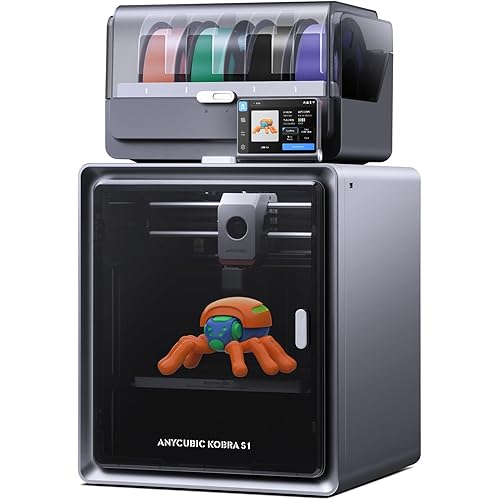
Anycubic Color Engine Pro, Not for Anycubic Kobra S1, Only Compatible with Kobra 3 3D Printer, Multi Color 3D Printer Automatically Filament System, Filament Dryer Nozzle Clog Detection

  • Based on 71 reviews
Condition: New
Checking for the best price...
$289.99 Why this price?
Holiday Deal · 7% off was $311.98

Buy Now, Pay Later


As low as $48.33 / mo
  • – 6-month term
  • – No impact on credit
  • – Instant approval decision
  • – Secure and straightforward checkout

Ready to go? Add this product to your cart and select a plan during checkout.

Payment plans are offered through our trusted finance partners Klarna, Affirm, Afterpay, Apple Pay, and PayTomorrow. No-credit-needed leasing options through Acima may also be available at checkout.

Learn more about financing & leasing here.

Free shipping on this product
This item's return window has been extended for the holiday season: FREE refund/replacement until Jan 31, 2026

To qualify for a full refund, items must be returned in their original, unused condition. If an item is returned in a used, damaged, or materially different state, you may be granted a partial refund.

To initiate a return, please visit our Returns Center.

View our full returns policy here.


Availability: Only 10 left in stock, order soon!
Fulfilled by Amazon

Arrives Saturday, Dec 20
Order within 4 hours and 55 minutes
Available payment plans shown during checkout

Protection Plan Protect Your Purchase
Checking for protection plans...

Features

  • Print in MultiColorsANYCUBIC ACE PRO allows printing in up to 4 colors, unleashing your creativity and enabling you to bring your designs to life in vivid hues
  • Smart PrintingFilament Runout and Winding Detection prevent mess and tangling, while the built-in buffer identifies nozzle clogs and pauses printing to protect the machine
  • Printing Automatically ContinueAnycubic Color Engine Pro maximizes filament use, automatically transitioning to the next spool of the same color and material, boosting printing efficiency
  • Filament Dryer BoxDual PTC heating system with 200W power efficiently circulates air and dries filament at a consistent temperature of up to 131F, ensuring your filament stays dry for up to 24 hours. Print with superior quality every time
  • Expert Color PartnershipCo-created with the Pantone Color Institute, giving you complete freedom to create unique and personalized designs
  • NoteAnycubic ACE Pro for Kobra 3 is not compatible with the Anycubic Kobra S1. If you already own the Anycubic ACE Pro for Kobra 3, you can choose to upgrade your accessory pack to make it work with the Kobra S1. The upgraded pack is expected to launch in April.

Brand: ANYCUBIC


Material: Metal


Product Dimensions: 5"D x 5"W x 5"H


Item Weight: 5.7 Kilograms


Compatible Devices: /


Product Dimensions: 5 x 5 x 5 inches


Item Weight: 12.54 pounds


Item model number: FBA-DSHZBK0A-Y-M-1


Date First Available: March 27, 2024


Manufacturer: ANYCUBIC


Frequently asked questions

If you place your order now, the estimated arrival date for this product is: Saturday, Dec 20

Yes, absolutely! You may return this product for a full refund within 30 days of receiving it.

To initiate a return, please visit our Returns Center.

View our full returns policy here.

  • Klarna Financing
  • Affirm Pay in 4
  • Affirm Financing
  • Afterpay Financing
  • PayTomorrow Financing
  • Financing through Apple Pay
Leasing options through Acima may also be available during checkout.

Learn more about financing & leasing here.

Top Amazon Reviews


  • Recommend - Also works as a secondary ACE unit if you already own a COMBO ACE - printer
Excellent and works as advertised. Used as a 2nd ACE unit for my S1 Combo. If you already have a printer and are using an ACE unit with it, this listing will work. What is needed is the filament return sensor (which you will already have 1 if you already own one of their ACE Combo units). If you are looking to upgrade from a 4 color to an 8 color setup I recommend this item, just go online and find a 8 to 1 or a 9 to 1 filament guide and print it out as you will need it to use all 8 colors. As a side note, the unit shipped was the older version of the ACE PRO, not the newer 2025 unit. ... show more
Reviewed in the United States on August 15, 2025 by JP

  • Great product!
They stand behind their products.
Reviewed in the United States on September 14, 2025 by joseph aragon

  • Anycubic, you should send me a new ACE!
Unfortunately, my device has issues with the filament intake sensor, and constantly "forgets" what filament it has loaded, so I am constantly "fighting" the loader (because as I try to back the filament out it redetects the filament and wants to drive it straight through a cold hot end! WTAF!) Wish I would have sent this one back during the return period :( Now I am stuck with an unpredictable ACE unit. Mind you, I have another that works great... and the one that comes with the S1 seems to be of even better quality, so these standalone units are probably older/originals before all the enhancements/upgrades made to the model along the way. Buyer beware! ... show more
Reviewed in the United States on June 25, 2025 by TatsuSaisei

  • Requires adapter for Kobra S1, but it works great.
So I didn't notice that this unit requires the filament hub connector in order to work with the Kobra S1, and I ordered it to use with my Kobra S1. I don't know if they edited the listing after I ordered it, or if I just screwed up, so . . . it sat for a couple of weeks waiting for the adapter to arrive from Anycubic (it's available on their website for around 25 bucks, when it's in stock). Once I received the adapter kit, I installed the Ace Pro - which takes about five minutes - and printed my first 4-color print. The little gnome came out prefect! Pros: The unit works well and is simple to install. There is no need to update firmware or anything - it just works out of the box. In addition to 4-color printing, you can use the Ace Pro to automatically switch over to a new spool when one spool is used up, or to print with multiple different filaments on the same models. So you can use PLA for support on your PETG print, and the supports will pop right off. Loading filament has never been easier. Just set the spool on the rollers and feed the filament into the guide until the Ace Pro picks it up and starts feeding it. The Ace Pro has a built in filament drying system. You can even set the dryer to run while printing, but I don't recommend it (see below). Anycubic support is first rate. It may take a day between each email, but they will take great care of you if you have issues. They even sent me a new extruder at no cost when I accidentally broke the one on my Kobra S1, even though the damage was my own fault. Cons: Multicolor printing with this system produces a LOT of waste. There are methods for minimizing the amount of waste (just search for "reduce waste in multicolor 3D printing"), but each color change requires a purge to clear out the nozzle before loading the next color. There are also some videos on YouTube showing potential uses for the purged filament - most recommend melting it into molds, which I'm going to try some day . . . The Ace Pro HATES some cardboard spools. And it's not too fond of some plastic spools, either. Some cardboard spools work fine, but others just will not turn when the machine tries to rewind filament. And if a plastic spool has a flat spot (I'm looking at you GST3D), it can get stuck, too. You can print adapters to help alleviate this, but finding the right diameter is a pain because each manufacturer uses a different sized spool, and the plastic rims don't always work. I keep a couple of empty spools in case I have to wind the filament onto a plastic spool, but for the most part I just avoid using cardboard spools in the Ace Pro. When I tried to dry some PLA while printing, the filament actually softened a little and jammed inside the feed mechanism. You can adjust the drying temperature to prevent that, but I just decided not to use the dryer while printing. Clearing jams inside the Ace Pro can be a nightmare. The filament buffer is on the bottom of the unit, so you have to turn the whole thing over to remove the buffer, then disassemble whichever part is jammed (be very careful you don't lose the internal spring or break any of the plastic parts), and remove the wadded up filament. Fortunately, I've only had one jam, but that nightmare is why I don't dry filament while printing any more. Some spools don't fit with the lid closed. I've had several 1kg spools of filament that are too large to fit inside the Ace Pro with the lid closed. Simple solution - print a lid prop to hold the lid partially open when using those spools. There are a LOT of models for them available online. Conclusion: The Ace Pro is a great way to get into multicolor \ multimaterial 3D printing. It's works well, it's easy to use, expandable by adding more units, and the price is comparable to similar machines. There are some weaknesses - which are common to these types of filament changers - but it's a great, inexpensive way to get into color printing. ... show more
Reviewed in the United States on May 5, 2025 by Denny Sawyer Denny Sawyer

  • Exactly the same as the ACE that came with my printer. Works great.
I bought this as a second ACE for my Kobra 3 Combo. Plugged the cable into the other ACE and it works perfectly fine in my setup to provide another 4 filament colors without having to physically change spools.
Reviewed in the United States on April 26, 2025 by stikle stikle

  • buy it its worth it easy set up
got this for my kobra 3 works amazing easy set up just follow the instructions and the set up is simple
Reviewed in the United States on November 25, 2024 by Ben S.

  • The best I’ve tried
I love my Anycubic printers and ACE pro’s they are great products, also a company that stands behind their products. They have been a great value, their speed is impressive, and they just function.
Reviewed in the United States on December 26, 2024 by Tony

  • Great buut
it printed great for about a month then i had vibration compensation problems and the ai camera either prematurly spotted a spagetti error or didnt catch one at all, i had to replace the print head 2 times now and there is little to no help online nor parts online to fix it
Reviewed in the United States on June 14, 2025 by Zacharygraham

Can't find a product?

Find it on Amazon first, then paste the link below.
Checking for best price...