Search  for anything...

Anker Prime Docking Station (DL7400) Black Myth: Wukong Limited Edition, 14-Port Triple Display, 140W Max, Triple 4K 60Hz, for macOS and Windows (The Latest DisplayLink Driver Required)

  • Based on 0 reviews
Condition: New
Checking for the best price...
$279.99 Why this price?
Save $60.00 was $339.99

Buy Now, Pay Later


As low as $46.67 / mo
  • – 6-month term
  • – No impact on credit to apply
  • – Instant approval decision
  • – Secure and straightforward checkout

Ready to go? Add this product to your cart and select a plan during checkout.

Payment plans are offered through our trusted finance partners Klarna, Affirm, Afterpay, Apple Pay, and PayTomorrow. No-credit-needed leasing options through Acima may also be available at checkout.

Learn more about financing & leasing here.

Selected Option

Free shipping on this product

FREE 30-day refund/replacement

To qualify for a full refund, items must be returned in their original, unused condition. If an item is returned in a used, damaged, or materially different state, you may be granted a partial refund.

To initiate a return, please visit our Returns Center.

View our full returns policy here.


Availability: In Stock.
Fulfilled by Amazon

Arrives Sunday, May 17
Order within 17 hours and 17 minutes
Available payment plans shown during checkout

Protection Plan Protect Your Purchase
Checking for protection plans...

Color: Phantom Black


Features

  • 14 Powerful Connections: Designed for modern setups, featuring a 140W 10Gbps USB-C upstream port, two 100W 10Gbps USB-C ports, one 100W 5Gbps USB-C port, two HDMI ports, one DisplayPort, two 5Gbps USB-A ports, one 480Mbps USB-A port, a 2.5Gbps Ethernet port, a headphone and mic combo jack, plus SD and TF card slots for complete desktop connectivity. It is recommended to plug the mouse/keyboard receiver into the 480Mbps USB A port.(Note: always use the included USB-C 3.2Gen 2 cable; other cables may cause issues.)
  • One 8K Output, Triple Display Versatility: Power up three external monitors at once, including one in 8K, for ultra-efficient multitasking. Compatible with both MacOS 13.5 or later and Windows 10/11.(Note: The latest DisplayLink driver installation is required.)
  • Each Port Powers and Performs: Every USB-C port supports both charging and data transfer. Power your laptop with up to 140W via the upstream port, while each front USB-C port delivers 100W of high-speed charging. (Note: The front USB-C ports do not support media display.)
  • Always Cool, Always in Control: View real-time updates on charging power, display performance, fan cooling mode, and settings directly from the smart display. The built-in fan and ActiveShield 3.0 help keep your device running cool and stable.
  • Forged for Legends, Designed for Power: The product's exterior features advanced 3D printing and hot-stamping techniques that go beyond traditional 2D designs, creating a mural-style relief with battle-worn textures that blend tactile and visual expression. The user interface merges product functions with the game's narrative and visual elements to deliver an immersive, interactive experience.
  • What You Get: Anker Prime Docking Station (14-in-1, Triple Display, DisplayLink), 3.3 ft USB-C to USB-C 3.2 Gen 2 Cable for Upstream (10 Gbps), 6 ft AC power cord, co-branded cable organizer, safety sheet with QR code for user manual, 24-month warranty, and our friendly customer service.

Brand: Anker


Color: Phantom Black


Hardware Interface: 3.5mm Audio, DisplayPort, Ethernet, HDMI, MicroSD, USB


Compatible Devices: MacBooks, USB C Windows laptops


Total USB Ports: 7


Product Dimensions: 3.62"L x 1.85"W x 7.68"H


Number of Ports: 14


Total HDMI Ports: 2


Wattage: 160


UPC:


Hardware Interface: 3.5mm Audio, DisplayPort, Ethernet, HDMI, MicroSD, USB


Compatible Devices: MacBooks, USB C Windows laptops


Total Usb Ports: 7


Number of Ports: 14


Total Number of HDMI Ports: 2


Wattage: 160


Item Dimensions L x W x H: 3.62"L x 1.85"W x 7.68"H


Color: Phantom Black


Brand: Anker


UPC: 194644246907


Manufacturer: Anker


Warranty Description: 24.00


Frequently asked questions

If you place your order now, the estimated arrival date for this product is: Sunday, May 17

Yes, absolutely! You may return this product for a full refund within 30 days of receiving it.

To initiate a return, please visit our Returns Center.

View our full returns policy here.

  • Klarna Financing
  • Affirm Pay in 4
  • Affirm Financing
  • Afterpay Financing
  • PayTomorrow Financing
  • Financing through Apple Pay
Leasing options through Acima may also be available during checkout.

Learn more about financing & leasing here.
Top Amazon Reviews


  • Simple, Easy to use Dock!
Color: Phantom Gray
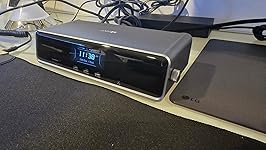
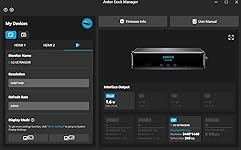
This dock is a must-have for those looking for a simple, easy-to-use interface to connect their laptops to an external monitor. I must admit, I was on the fence about this one when it came to gauging the value I would get out of this, but I was proven wrong. It is designed well with good weight and build quality. Setup was relatively easy, and it was nice that they threw in a DisplayPort and HDMI cable in the box. It does not take up a lot of space on my desk and the clock feature is a nice touch. Note that the clock is only customizable after you install a firmware update via the Anker Dock Manager PC application, which you can download from the Anker website. The dial is another welcomed addtion as this is present on their Anker Prime Charger 250w. Maneuvering through the settings was a breeze. The device runs cool and does not heat up to such high temps. Anker has done a great job at managing temperatures across it's devices. There are plenty of ports for connectivity, including 3 front USB-C data/charging ports, a SD + TF card reader. The back ports include 1 DisplayPort, 2 HDMI ports, 2 USB-A 3.2 ports, 1 USB-A 2.0 port, an ethernet port, and your standard upstream data/charging port. Upstream charging to the device is max 140w (unfortunately my gaming laptop supports only 100w), and the connection was relatively simple. This device also supports PPS PD charging for Android devices such as the Samsung Galaxy via the front 3 ports. You can also establish a data connection from your phone to your PC. For display, keep in mind that you need to download the Synaptics DisplayLink driver for your pc/laptop to output via DisplayPort to an external monitor. It is a relatively quick and simple download. Once the driver was installed, and I restarted my pc and reset the dock,the video display was seamless. I am currently outputting a resolution of 3440 x 1440 @240Hz with no stutter and no artifacts. This has improved my gaming setup tremendously, and I have not noticed any issues during hardcore gaming. The Anker Dock Manager application is a nice touch and allows you to see the multiple connections that you have on your setup. You can change from Mirroring to Extended display, even change the display direction if you have your monitor set up vertically. Refresh rate and resolution can also be customized. Overall, this is a solid addition to anyone's future laptop/desktop to monitor setup. Though there are other docks out there with more ports and features, the Anker Prime does a great job of incorporating functionality and simplicity for the everyday user. ... show more
Reviewed in the United States on December 24, 2025 by Glen K

  • fantastc dock for MBPro + 3 external monitors
Color: Phantom Gray
I use this docking station for connecting my MBPro to 3 external monitors, 2 HDMI and 1 DP. The DisplayLink functionality works great but does have some limitations. To dock the MBPro, if you want to use the external monitors with the lid closed, you have to connect it to the dock with the lid open first, then close it to only use the monitors. Not a big deal if you're docked most of the time, but kind of annoying if you undock frequently. The dock itself is very well made and unique. I like having the screen on the front displaying the time and the wheel on the side allows for easy navigation to the different menus and information. The layout of the ports is great and allows you to access them easily without having to move things around often. The incorporated power supply is great which means there's no external brick to try and hide or have sit on the floor collecting dust, just one power cable from the wall to the dock. Anker did well with this dock and I'll definitely be looking to their Thunderbolt dock when monitors with thunderbolt eventually drop in price. ... show more
Reviewed in the United States on February 18, 2026 by Jayson Parker

  • Great upgrade for a multi-monitor desk
Color: Phantom Gray
I picked this up for my work-from-home setup, and it was mostly plug and play. I did run into a small issue at first where my laptop wouldn’t connect to the monitors, but after updating my laptop software, everything worked as expected. I use this dock to run three monitors, and it’s been reliable with no lag or display issues. The build quality stood out right away—it feels sturdy and well-made, not flimsy like some other docking stations I’ve used. I also appreciate the number of ports available. I regularly plug in my phone and AirPods at my desk, and it’s convenient having everything connected in one place. I picked this up during a Black Friday sale, which made it a great value, and it’s now an essential part of my WFH setup. If you need a solid, well-built dock for a multi-monitor setup, this one has worked well for me. ... show more
Reviewed in the United States on January 4, 2026 by Trenton De Leon

  • Its a no for me
Color: Phantom Gray
I really want to like Anker products, but they strike out for me more than they win. This dock is not great. First, you have to have DisplayLink installed on your computer, which makes no sense because it doesn't do anything different than your built-in display settings. The Ethernet port isn't a true 2.5G. I get download speeds of 700-900, and upload speeds of over 2300 (I have 3 GB). There is a bottleneck somewhere in the download speeds, but Anker claims it is not the dock and that they've tested this with the exact two laptops that I currently use, and they have no issues. When I remove the monitors and just use the dock for Ethernet, the speeds do not change. When I remove the Ethernet cord and plug it into an external 2.5G plug, I get full up and down speeds. The dock itself doesn't seem to fully support two monitors. Intermittently, it will lose monitor connection, and my monitors and the dock will start flashing. I have to then unplug and plug the dock back in to get it to reset itself. All in all, it is NOT worth $200+ and does not do what the specs say it does. It looks sleek, has a good number of ports and charging capabilities, and a decent interface, but my biggest issues are the bottlenecked download speeds and the intermittent connectivity with my monitors. ... show more
Reviewed in the United States on April 1, 2026 by Lamar

  • Not great out the box but rocks once set up to preference!
Color: Phantom Gray
Had to fuumle a bit with the settings and the updates, downloads etc.. It also made my Apple magic mouse very slow. Solved with a console command. Also had to search through trial an error the best reosultion x Refresh rate combination. Once the set up is done (Took me like 20 minutes) it works amazingly and even has 3 super fast charging ports in front. An all rounder devce to make the centerpiece of a setup! Display link connection is great, and had 2 other HDMI ports to boot. You can also tell the materials have a certain quality and weight that feels premium, just like its price. ... show more
Reviewed in the United States on January 27, 2026 by Hector I. Trevino

Can't find a product?

Find it on Amazon first, then paste the link below.
Checking for best price...