Search  for anything...

Ambient Weather WS-5000 Ultrasonic Smart Weather Station

  • Based on 739 reviews
Condition: New
Checking for the best price...
$382.49 Why this price?
Save $67.50 was $449.99

Buy Now, Pay Later


As low as / mo
  • – Up to 36-month term if approved
  • – No impact on credit to apply
  • – Instant approval decision
  • – Secure and straightforward checkout

Ready to go? Add this product to your cart and select a plan during checkout.

Payment plans are offered through our trusted finance partners Klarna, Affirm, Afterpay, Apple Pay, and PayTomorrow. No-credit-needed leasing options through Acima may also be available at checkout.

Learn more about financing & leasing here.

Selected Option

Free shipping on this product

FREE 30-day refund/replacement

To qualify for a full refund, items must be returned in their original, unused condition. If an item is returned in a used, damaged, or materially different state, you may be granted a partial refund.

To initiate a return, please visit our Returns Center.

View our full returns policy here.


Availability: In Stock.
Fulfilled by Amazon

Arrives Wednesday, May 6
Order within 18 hours and 27 minutes
Available payment plans shown during checkout

Protection Plan Protect Your Purchase
Checking for protection plans...

Style: Display Console + Ultrasonic + Raincup


Features

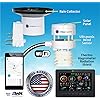
  • COMPLETE WEATHER STATION: (1) Ultrasonic Sensor Array, (1) Rain Cup, (1) Indoor/Outdoor Thermo-hygrometer-barometer, and (1) TFT Full Color LCD Display
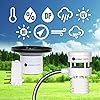
  • ALL-IN-ONE SENSOR ARRAY: No moving parts, fast and easy set-up, and real-time updates to weather conditions every five seconds
  • SMART HOME READY: Set up alerts, access your data remotely, and program your home based on weather conditions using IFTT, Google Home, Alexa, and more
  • ENHANCED WIFI: Enables your station to transmit its data wirelessly to the world's largest personal weather station network (optional setting)
  • JOIN THE COMMUNITY: Connect to Ambient Weather Network to customize your dashboard tiles, share hyperlocal weather conditions via social feeds and create your own forecasts (coming soon)

Brand: Ambient Weather


Recommended Uses For Product: Garden


Specific Uses For Product: Precipitation


Power Source: Solar Powered


Special Feature: Barometer, Hygrometer


Material: Metal


Connectivity Technology: Radio Freqeuncy


Number of Batteries: 5 AA batteries required.


Style: Display Console + Ultrasonic + Raincup


Color: Display Console + Ultrasonic + Raincup


Power Source: Solar Powered


Additional Features: Barometer, Hygrometer


Connectivity Technology: Radio Freqeuncy


Number of Batteries: 5 AA batteries required.


Temperature Accuracy: ± 2 Degrees Fahrenheit


Are batteries included?: No


Sensor Technology: Ultrasonic


Upper Temperature Range: 149 Degrees Fahrenheit


Display Type: LCD


Frequency: 915 MHz


Style Name: Display Console + Ultrasonic + Raincup


Color: Display Console + Ultrasonic + Raincup


Shape: Rectangular


Item Dimensions D x W x H: 0.75"D x 7.75"W x 5.75"H


Brand Name: Ambient Weather


Recommended Uses For Product: Garden


Specific Uses For Product: Precipitation


Included Components: Ultrasonic Sensor Array,Rain Cup,Indoor/Outdoor Thermo-Hygrometer-Barometer,Tft Full Color Lcd Display,Wireless Sensor Array With Pagoda Thermo-Hygrometer Radiation Shield,Bubble Level,And Solar Panel


Manufacturer: Ambient Weather


UPC: 816982018465


Model: WS-5000


Part Number: WS-5000


Material Type: Metal


Frequently asked questions

If you place your order now, the estimated arrival date for this product is: Wednesday, May 6

Yes, absolutely! You may return this product for a full refund within 30 days of receiving it.

To initiate a return, please visit our Returns Center.

View our full returns policy here.

  • Klarna Financing
  • Affirm Pay in 4
  • Affirm Financing
  • Afterpay Financing
  • PayTomorrow Financing
  • Financing through Apple Pay
Leasing options through Acima may also be available during checkout.

Learn more about financing & leasing here.

Top Amazon Reviews


  • Great product!!
Style: IP Module + Ultrasonic
Super happy with this weather station. Easy to set up and seems to be very accurate compared with my neighbors. I travel a lot, but I always know what the weather in my back yard is thanks to this weather station.
Reviewed in the United States on December 27, 2025 by Jon Clahan

  • After year of use I'm very happy
Style: Display Console + Ultrasonic + Raincup
This unit has been excellent for me. Set up was easy, intuitive. I purchased the Lightning sensor and it works perfectly. I did a little checking and I didn't need to calibrate as it still seemed to be giving me accurate results compared to other trusted sensors near me. The rain gauge lines up perfectly with my analog 24' tube model. I wasn't able to get the Weather Underground system to engage but I give my friends the AWN app and that works. I didn't spend much time trying to get WU going. Indeed, the articles and directions are correct; placement is important for precise readings. I have alot of trees, a tree line and house to deal with. I put it in the most open area but wind readings from the south are reduced by the obstructions. Oh well. The rain gauge stopped after about six months and I cleaning it to trouble shooting standards. It worked in a few minutes. After about a year of use it worked but paused regularly. Another quick look at Troubleshooting and resetting both the sensor and the display (and new batteries) had it going again in a few minutes. Resetting did not require network/Wifi set up again. A year in, I finally sprung for the 65' heater cord. What a terrific enhancement. It was regularly dropping the signal and giving me blank info. Now it seems to be running 100%. That was a win. I love it and use it multiple times daily. My 6 year old grandson got the name "Weatherman" and he engages with it. I'm a happy owner. ... show more
Reviewed in the United States on November 21, 2025 by ScottS1W

  • I've died and gone to weather nerd heaven!
Style: Display Console + Ultrasonic + Raincup
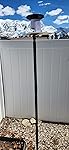
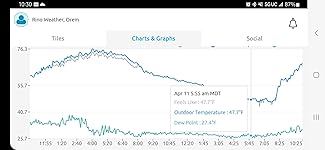
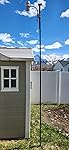
The only reason I didn't give this 5 stars is the setup. Several people talk about the difficulty with setup. I thought this would impact sensor detection or WIFI. The sensors are detected very easily. The difficulty is entering IDs and passwords for WIFI and other setup. I was not sure how to do this from the manual. I found some Ambient produced You Tube videos that were very helpful. The console does not have a touch screen. Everything is done with buttons that control direction or upper/lower case. It is quite tedious. Once you get through that, the system is WONDERFUL! I debated about the WS-5000 or a model with a combined sensor including the mechanical wind sensor. I decided to go top of the line. I am glad I did. The wind sensor works well. I have had a weather station for about 17 years. I replaced a La Crosse Technology setup where I had two consoles, one on a desk in the family room and one in the office. The consoles had built in temperature sensors for indoor temperatures. The WS-5000 comes with one indoor sensor that is separate from the console. I ordered a second sensor - https://www.amazon.com/dp/B01MG4HW8C?ref=ppx_yo2ov_dt_b_product_details&th=1 . I also ordered a second console https://www.amazon.com/dp/B08F6PGMJP?psc=1&ref=ppx_yo2ov_dt_b_product_details . Be careful you get the correct sensor. I originally ordered another indoor sensor. You can only have one of those. The one I am using is an indoor/outdoor sensor. The console doesn't list the WS-5000 but it works. I was able to label both of the indoor sensors the way I want on the WS-2000 console. I could only change the name for one of them on the WS-5000 console. I don't know why Ambient doesn't allow a name change on the WS-5000 console. Not a big deal. I never bought a Davis system because I don't like the console. The Ambient consoles aren't as graphically rich as some of the cheaper systems. The screens are very clear and nice to look at. There is a lot of data on the screen. You can have a light or dark background. You switch by pushing a button. You can turn off the screen with a button as will so it won't bother you at night if you have it your bedroom I had the rain sensor for the La Crosse system on bird feeder pole with a cheap plastic cutting board on top. I put the WS-5000 rain sensor on this same platform. Here is the link to the pole https://www.amazon.com/gp/product/B01J4QGDK6/ref=ppx_yo_dt_b_search_asin_title?ie=UTF8&psc=1 The WS-5000 temperature/wind sensor needs to be mounted in direct sunlight. I ordered two of these - https://www.amazon.com/gp/product/B08Z72XMP7/ref=ppx_yo_dt_b_search_asin_title?ie=UTF8&th=1 and used poles from them both to get enough height. I only have one place in my yard that stays in direct sunlight. I did not want to do a roof mount because of radiant heat and because at my age, it's not prudent to climb that high. The pole is too small to bolt the sensor to. I taped one of the pole sections to the top and used a small piece of plastic to make it big enough. I would have liked to have used the Ambient pole with the large base. It would have taken too much space in the lawn and would have required weights. This setup has prongs that go into the ground and works great. The manual isn't clear on what app to download. I found the correct one and included a screen shot. The app is great. It has a lot of detail. You can see tiles of your data as well as graphs. It shows other stations in the area and gives a forecast. Data loads very quickly. I think the temperature is more accurate than the La Crosse units. We have some small displays from La Crosse. I have looked at those before going out for a walk and then wished I had a warmer jacket. It turned out to be colder than the unit measured. The Ambient unit has measured colder the the La Crosse (I got this in March 2023. It has been very cold in Utah this year. I don't have much reference for warmer temperatures yet.) I connected to Alexa very easily. I can get an Ambient report by asking for it. You cannot just get temperature or another data element. You get them all. I spent a lot more money on this that any other weather station I have purchased. This is definitely a premium product. If you can afford it, this is the system to choose. ... show more
Reviewed in the United States on April 11, 2023 by Big Dog

  • Could have easily been 5 STARS!
Style: Display Console + Ultrasonic + Raincup
This is a great weather station, perhaps even the best on the market, according to the review videos I've watched. So why one star? PRO'S The equipment has no moving parts, for the most part. The rain gauge has what appears to be cheap plastic inside - a spoon type thing that collects rain and periodically empties what it has collected. Nowhere did I see even the slightest about this, but it is - in my opinion - one of the biggest sales features about this unit. The Ambient Weather online web page displaying this weather station's information is outstanding. The page is mobile responsive - it looks as good, if not better on a phone as it does on a browser page. The display provided with the unit doesn't have to be plugged in to make the browser page work. There is an entire Ambient Weather social media feature that allows you to comment on others weather station data, or to share you, IF you've made your weather data public. CONS This could have been so easy to assemble but easy things are made so blooming difficult. For example, the bolt holes used to secure the aluminum bar to the wind sensor, didn't line up. I ended up having to call Ambient Weather to send me one that did. There is a little heater dongle that is attached with a thin wire to the wind sensor. The dongle is supposedly designed to slide down the inside of the aluminum bar. Problem is, it doesn't easily do this. I tied a little thin ribbon on the dongle and fished it through the bar. This added about 20 min. to the assembly process. Ridiculous. The instructions are so laborious - nobody got time for that – that they are not useful. Ambient Weather would be well served to produce a simple 5 X 7 card that has the "fast start" assembly/set up instructions. Here is what I wish had been included on a card, that I hope will save you a ton of time. – The display device is supposed to come with a power supply. The first unit I ordered (and returned) did not. This display could easily, and I mean easily, be powered by AA batteries. It is only powered by electricity. – There really is not much setup to do on the display device. The sensors automatically connect/sync to the display device. The ALARM page on the display can totally be skipped unless you want to be alerted to extremes outside of the norm for you – such as when a temperature sensor falls below a certain threshold. – START by connecting the display unit to your home router. It detects and displays this fairly quickly. However, it is not intuitive how to make a keypad appear on the screen to click in (arrow up down left right) the numbers/characters you use for a router password. – The magnifying glass icon with the plus sign is the "enter" key by the way. This is not intuitive and instructions that explain that is no where to be found. – On the CALIBRATION page, you can bring the temperature sensor, for example, in line with your indoor thermostat. I asked Alexa what the temperature is in here and then set the Ambient Weather to display that temperature. To change the numbers (calibrate), that's done one number at a time by selecting the number, arrowing over to select the first number, arrowing up and down to change the digit, then arrowing over for each digit. A pain. – The time zone can be set. That is on the first page, under SERVER. There is a list to scroll through for every time zone in the world - dozens of them. A hint: if you use the - (negative) button, you'll get to Eastern, Central, Pacific, and Mountain a little quicker. –There are TWO Ambient Weather apps in the app store. One is just for setup. You really don't need that if you used your computer/browser which is much easier to use that the app, which the inverse should be true. You can find the MAC ADDRESS (not to be confused with an Apple Computer) by arrowing over to the SERVER setting, choosing it (positive arrow magnifying glass) and looking at the bottom of the screen. Enter the MAC address on YOUR Ambient Weather Account Page that you're going to set up. Once you enter the MAC address, your weather data will instantly appear on your browser page. To repeat, the set up app is not necessary to do this. Use your laptop. The SECOND app allows you to look at your weather data on your phone. But so will sharing (copying and pasting) your Ambient Weather data page. – Outside, nowhere quickly does Ambient explain there is a little arrow above the aluminum bar port that is supposed to point north, so the wind detector direction works correctly. In summary, I am enjoying the display and looking at the weather data using.both the supplied display and my computer web browser. Sometimes, I use the Ambient Weather app. I'm sure the Ambient Weather people are good folks, but they have made both the technical setup needlessly difficult, and the physical set up so difficult, aligning bolt holes and manipulating the clunky supplied brackets. – BONUS! Here's my best tip. If you're looking for a pole to mount your station, go to the big box hardware store and look for the crossbar (top bar) for a chain link fence. You can get a 10 ft one (what I did) or one longer, OR combine to if you want your equipment really high. I did not cement the pole so I can pull it out of the ground so I can easily change the batteries when hopefully in a year or so I need to change batteries. I hope this information is very helpful for you. ... show more
Reviewed in the United States on December 30, 2024 by Plain man

Can't find a product?

Find it on Amazon first, then paste the link below.
Checking for best price...