




Amazon Smart Thermostat for Home, Save money and energy, WiFi thermostat, Works with Alexa and Ring (Pack of 2)
Condition: New


$135.97
Holiday Deal
· 15% off
was $159.98
Buy Now, Pay Later
As low as
$22.66
/ mo
Learn more
- – 6-month term
- – No impact on credit to apply
- – Instant approval decision
- – Secure and straightforward checkout
Ready to go? Add this product to your cart and select a plan during checkout.
Payment plans are offered through our trusted finance partners Klarna, Affirm, Afterpay, Zip, Apple Pay, and Google Pay. No-credit-needed leasing options through Acima may also be available at checkout.
Learn more about financing & leasing here.
Selected Option
Free shipping on this product
30-day returns
Learn more
This item is eligible for return within 30 days of receipt
To qualify for a full refund, items must be returned in their original, unused condition. If an item is returned in a used, damaged, or materially different state, you may be granted a partial refund.
To initiate a return, please visit our Returns Center.
View our full returns policy here.
Availability:
Only 1 left in stock, order soon!
Arrives
Saturday, Nov 21
Recently Viewed



At a glance
- Condition
- New
- Size
- 2 Pack
- Style
- Thermostat only
- Model
- 53-026123
Features 8
- The information below is per-pack only
- Create comfort zones throughout your home by connecting to select Alexa devices to automatically adjust heating and cooling based on temperature readings or presence detection.
- Save energy - According to EPA estimates, ENERGY STAR certified thermostats save an average of $50 on yearly energy bills.
- Programmable thermostat and automatic control - Create your own home, away and sleep schedules, or have Alexa automatically control the temperature with Alexa+ advanced features.
- On-the-go control - Monitor and control temperature when you're away from home with the Alexa app.
- Do-it-yourself installation - The Alexa app will guide you through the installation process, but customer service is always available.
- Reliable - Made with Honeywell Home Thermostat Technology and backed by 130 years of experience.
- Create your Alexa+ home: With Alexa+, set routines using just your voice, control multiple devices at once, and chat casually to make requests.
Frequently asked questions
If you place your order now, the estimated arrival date for this product is:
Saturday, Nov 21
Yes, absolutely! You may return this product for a full refund within 30 days of receiving it.
To initiate a return, please visit our Returns Center.
View our full returns policy here.
To initiate a return, please visit our Returns Center.
View our full returns policy here.
- Klarna Financing
- Affirm Pay in 4
- Affirm Financing
- Afterpay Financing
- Zip Pay in 4
- Financing through Apple Pay
- Financing through Google Pay
Learn more about financing & leasing here.
Similar Products









Top Amazon Reviews
Amazon Smart t-stat honest review
Size: 1 Pack
Style: Thermostat only
Configuration: Thermostat only
I’m a big Nest fan had it on my old house the problem that I have with them it’s the cost, and even with gas company great rebate didn’t justify the cost especially with my new home having a total of 5 thermostats (t-stat). I was excited when I found that Amazon partner with Honeywell to get this t-stat created as Honeywell has been creating t-stat for years which make me feel better when making the purchase. ---COST--- Now let go over the details for cost it’s good and I got two of them which at the end of the day will be free due to the electric company rebate for a smart t-stat. I didn’t get a C- adapter and I will explain later (INSTALL session) why I purchase a 24-volt transformer for my first-floor unit. ---INSTALL--- Love the package it reminds me of the NEST when it first starts came with everything that you needed the only additional tools, I need was a harmer, and drill but this is normal for these installations. Now the biggest question that everyone has is the C (common) wire. This is where you need to do your research regardless of what company you go with when upgrading to a smart thermostat, due your homework on what you need. For me I have a spill unit (boiler & A/C) first for my second-floor unit it was super easy I had an extra wire and I use it for Common the t-stat startup and finish within 30 min. Now for my first floor I utilize a 24-volt transformer because I didn’t have spare cables and I didn’t want to run a new cable which drove me to make the purchase again do your homework before and see what option best works for your use case. I connected the transformer to the C wire and the other end to Rc and that works like a champ. This is critical if you have a split unit since Honeywell power their t-stat via Rc only when you have two RED Wire (R (heater) and Rc(cooling)) and the blue tab (internal jumper is down position. If you only have one RED Wire you are fine just keep the blue tab up and your t-stat will turn on without any problems. I did reach out to Honeywell and explain to them they need to explain this on their site and white papers that when you have split units’ power for the t-stat will come from Rc and not from R this is critical because my house previous owner installed a switch to keep the A/C unit down through the winter to avoid accident turning on the unit which is great idea. Please keep in mind this is NOT an Amazon problem that is Honeywell they did acknowledge their mistake and agree to update their site and documentation. Running my transformer cable and installing the unit took me about 60 minutes because I wanted to look perfect with the transformer cable going through the wall this make the installation look cleaner. ----SETUP---- Once all wire were connected the setup of the t-stat was simply and when I say simple it was super didn’t have input the WiFi password or anything else since it automatic joined my account that was amazing and simply just like setting a fire table that was a great experience. Amazon did an amazing job doing this some users this my not be as good, but I look automation the less click I must do the less chances of mistake A+ ---LOOK--- The t-stat looks great after the final install the wall panel (included but optional for install) made it easier for me since I didn’t have to paint (if you had a different color paint I would recommend adjusting before completing the install but that is just me) ---Interface (GUI)---- For me the GUI is great for some it my but I’m one of those people that like to have one application on my phone or tablet rather than 2 and this is where Amazon did another amazing job. Please keep in mind that Google who purchase NEST is doing the same thing I see the NEST application going away in the future all new NEST is configure from Google Home and they also did a great job The GUI it’s simple and allows you to setup multiple schedules and copy them to different days or week. Huge plus on my book because for the NEST I had to do manually per day I can setup one day and copy to another. You can setup away and home schedule or utilize your current Amazon device to tell the t-stat that you are home or away. Another item that I love from the Amazon you can setup MAX cooling or heating this allows for mistake not to happen and getting your house too hot or cool really go option to have and you can set filter replacements without your assistance (optional) for me this is great no more remembering air filter as they will show up at my footsteps. Energy saving incentives can also be done via the application. The dashboard its great too it tells you how much energy you utilize each day and where you can save. Now the only downside for that I experience is only scheduling session on Android because it forces close my Alexa application all the time, I don’t have this problem with anything else on the application just the scheduling session. This option works perfect on my wife new iPhone and iPad pro and new Android phone. My old Android is the one with this problem, but I experience this kind of thing on and off since it’s an older device. -------Final judgment ---- The device is good option for a smart t-stat and would recommend for anyone some of the problems that were reported it was on day one which is expected with any new launch overall I see this t-stat giving Google (NEST) and others a run for their money as now you have a great option for smart t-stat and you don’t require to break your budget to acquire one. In addition, love the one application for everything as previously mentioned all big companies are doing this model to stop the install of some many other applications. In a scale from 0 -10 this t-stat gets a 9 please note that the NEST 3rd gen got a 9 from me. Hope this helps everyone make the correct decision and I will update this review in a few weeks to report back.
...
show more
Reviewed in the United States on April 13, 2022 by funnytennisman
Easy to install! Great price!!
Size: 1 Pack
Style: Thermostat only
Configuration: Thermostat only

100% recommend this thermostat. It comes with everything you need to install it. They even tell you from the beginning to check your current thermostat before making your purchase and from there it tells you all. Never in my life installed something like this and honestly was super easy, follow the instruction steps on the app, they are SUPER CLEAR! It even comes with stickers to label your wires! I wasn’t even aware it came with the mountain plate was about to purchase separately. If you’re looking for something nice looking and affordable this is the item to go for. Still figuring out how it works with the Alexa app but, so far it doesn’t look difficult, I am so pleased with my purchase.
...
show more
Reviewed in the United States on August 27, 2026 by Talia L.
Good thermostat, but not ready for primetime yet (Updated)
Size: 1 Pack
Style: Thermostat only
Configuration: Thermostat only
UPDATE 12/27/21: After a month it would fail to turn on the outside unit of my heat pump, only the inside unit, despite audibly clicking twice, and the Alexa app would say "Delayed start", as if it were on a cooldown timer, which the unit was not. This would happen both on scheduled times of temperature change and when manually changing it. Turning the breaker off and on would resolve the issue for a few hours before it would reappear. I ordered a replacement unit thinking that was the problem, but it did the same thing. I put my old "dumb" digital thermostat, the Lux TX9100E, for which there is a newer version (Amazon ID B00CX2QA3Y), back on and I haven't had a problem since. Changed star rating to 1 and will say to avoid this thermostat, it's not worth potentially risking damage to your system, especially when all of the issues mentioned in my original review were not addressed before the much larger issue occurred. ----------------------------------------------------------- ORIGINAL REVIEW: This review pertains to the unit with Device Software Version 16843520 and Manufacturer Software Version 16844544. This is my first venture into a smart thermostat. I've wanted a Nest or one from Honeywell for a while, but their high price tags put me off. Enter the $60 Amazon Smart Thermostat. Installation was fairly easy, I say fairly because since the thermostat is small, the wiring can get cramped. The optional included backplate is quite large, which is a GOOD THING in my case as it easily covered several holes from previous thermostats. Connecting it to Alexa is also easy, just tell it to discover devices and it proceeds smoothly. There are a few negatives though. I waited 10 days to write this review hoping they would release an update that would fix them, but so far they have not. 1) It has issue reconnecting to the network after a power loss. I had to pull it off the wall (it clips on to the mounting bracket) and put it back on to get it to reconnect after a few seconds long power failure today due to storms. My router is connected to a battery backup so it never lost power. 2) The scheduling is very basic. You can only set 4 fixed temperature types (Work, Home, Away, Asleep) and assign them to certain times, and you can't adjust them differently. For example, you can't set 5AM and 5PM as "at home" and set the 5AM to 65°F and the 5PM one to 68°F, they both have to be the same. Also, as of this review anything you put in the Heat and Cool choices is changed by whatever you put in the Auto section, so it's only really possible to use it with Auto. 3) Voice commands don't work well, or at all. When you say "Alexa, what's the inside temperature", it will often say "Thermostat does not support this function" when it does, same goes with humidity. Also when you say "Alexa, raise the temperature by 2 degrees", it may not work correctly, the last time I did that I wanted to raise it from 66°F to 68°F and the air conditioning came on because it had set the temperature to 64°F. There are also functions which are unable to (yet) be controlled with voice commands, such as turning the fan from Auto to On or Circulate, you have to use the Alexa app to do it. 4) The display. Currently it will cycle between the Active and Inactive brightness at random, even when there is nobody and no sound in the room. 5) This is a critical bug. About half the time when the heat is engaged it will also use supplementary heat (I have an electric heat pump with electric aux heat), even if the temperature outside is above 50°F, and it is just coming on to maintain temperature and been raised multiple degrees manually. Disconnecting the W2 wire fixes this, but also disables auxiliary and supplemental heat completely. 6) There is no display for auxiliary heat in use on the thermostat nor in the Alexa app. Considering aux heat, especially on electric heat pumps, uses a large amount of energy, there should be some kind of display or, preferably, a popup notification.
...
show more
Reviewed in the United States on December 7, 2021 by Matt
Replacing NEST So far happy with Thermostat
Size: 1 Pack
Style: Thermostat only
Configuration: Thermostat only
Had an older Gen3.2 Nest and the only Google device, everything else was Amazon Alexa. Temperature stopped working it showing incorrect temperatures, and they updated OS and auto enrolled us in power saving rush hour and it took a factor my reset to reset turning off power saving rush hour. So we order this thermostat and pleased so far have not set schedule or routine but it seem to work much better. accurate easy to setup install switch out. configure etc. We love the recirculating fan feature the temperature accuracy falls short when on recirculate feature you really don’t know it it’s charging temp or recirculating temp by the graph we set AC to 67 at night and chart shows low temp as 64 in house. I guess that’s better than 76 lol because that means our house is holding and cooling well.
...
show more
Reviewed in the United States on July 24, 2026 by Chris McBride
Works very well to configure the temperature for my place
Size: 1 Pack
Style: Thermostat only
Configuration: Thermostat only
Not a lot of instruction with the product but it works out. I don't know if the key/code actually works but the unit is smart enough to get it installed. It works with Alexa. The thermostat itself has limited options but I get around by using features in Alexa. Alexa is not very intuitive and has too many possibilities making it actually harder to use.
...
show more
Reviewed in the United States on September 5, 2026 by mamahong
2026 Amateur Electrician’s Review & Comparison to Google Nest Thermostat
Size: 1 Pack
Style: Thermostat only
Configuration: Thermostat only
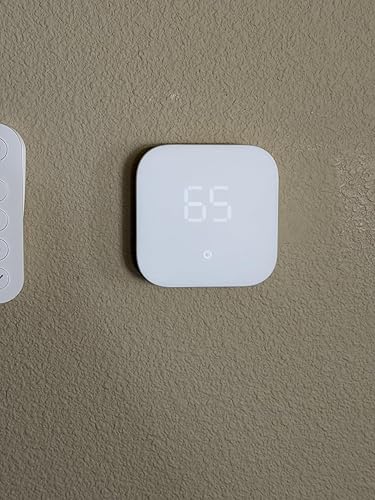
The Alexa thermostat is the 4th thermostat I’ve had installed in my house – one with Forced air, gas furnace and a C-wire — including a basic thermostat, WiFi Honeywell , Google Nest and now Alexa Smart Thermostat. I learned a lot about HVAC wiring and thermostats , and realized Alexa is the best smart thermostat package right now because of it’s more traditional wiring & switching hardware ( for those using C-wire connection), high contrast & responsive display, broad smart home features and sleek fit & finish. For $80 you can’t go wrong. For those with or without Alexa, I believe it’s the best thermostat when you look at the clean fit & finish, convenient smart home / remote features & reliable , traditional wiring system. Google Nest uses creative circuitry to accommodate more wiring setups, which can affect longevity. Nearly all of the complaints from earlier reviews have been addressed, with the inclusion of multi-room temperature measurements, daily schedules, device sharing , reliability and more. In 2026, you can be confident this is a reliable and mature smart home device. Hardware Installation Hardware is very easy for any DIY’er. Use a piece of paper template and your fingernail to trace out the screw holes so you can mount and align placement on the wall. Mine was aligned next to a security keypad so I wanted the leveling to be perfect. It can be challenging to fit & bend all of the wires into the tiny terminal pocket , but once enclosed the wall installation is very clean. Smart Home Setup Software setup is easy, even when bypassing the QR code. I recommend skipping to the test phase and doing the complicated setup steps after you get accustomed to the device. Alexa app & setup has become very reliable and polished. I did the “hard” setup flow and it took about 2 minutes end to end to configure the WiFi, wiring, thermostat ranges and more. I recommend turning on fan circulate in any home less than 20 years old , which is usually required by code. That helps bring in 10% fresh air periodically. Support for CIRC / circulate on this thermostat allowed me to remove a legacy mechanical fan blower timer that had been unreliable . Fit & Finish Despite being a more humble build, I found the installation to be more preferable to my Google Nest. Alexa Thermostat is a simple matte white, with very clear , colored icons for Auto , cool, heat & fan-circulate. It’s very easy to read and the touch buttons are intuitive. Although Nest thermostat’s mirror finish is fancier, the UI is overly complex with counter intuitive swiping. Software Experience. The Alexa App UI can be a bit complex with many layers of settings, but once the device is setup with temperature ranges, fan setting, hunches and more – your primary experience is a virtual thermostat screen. It works well throughout and away from home. It’s especially convenient with other Alexa devices. Voice commands and queries via Alexa are trivial. It’s nice to change temps at night via whisper. Electrical Concerns Electrical connectivity & longevity is the most important advantage of the Alexa Thermostat. You can hear the traditional relays that click on and off in the thermostat, though they are more subtle than a budget device (I tested the sound before vs after). This design should last 10+ years compared to other smart thermostats, and maintain the life of your furnace/HVAC logic board. other smart devices “steal” power over the circuit , which generates heat and wear . 2026 Conclusion I held off due to some mixed reviews, but all of those issues have since been worked out. For the price, you won’t find a better feature set, and I’m expecting reliability to be very good at least on the HVAC wiring.
...
show more
Reviewed in the United States on May 17, 2026 by Tony M.
Works with 2-wire systems w/ C wire transformer (but could be better as a smart thermostat)
Size: 1 Pack
Style: Thermostat only
Configuration: Thermostat only
I'll first talk about installation, and then the actual review. Overall, this smart thermostat is fine. I wouldn't give it an A+ but wouldn't give it an F, either. It maintains the temperature, and passes that initial test well. But you generally want more out of a smart thermostat, and this one is just sort of okay on that front. It's cheap, and very basic, and you get what you pay for. INSTALLATION WITH 2-WIRE SYSTEM (NO C WIRE) So, I was unsure whether this would work with our ancient wall heater, which runs on a 2 wire system with no C wire. But after doing some digging around, I figured out that it might work, and indeed, it does. Quite well, in fact. Which is great, because the simple mercury thermostat our landlord installed was terrible, and couldn't read temperature correctly, so it was always boiling hot or freezing cold, and if we forget to turn off the heater at night, we're screwed. What you need to install this with a simple 2-wire system without a C wire is a C wire transformer/adapter. Don't get the C wire adapter option offered with this device, that's not what you need if like me you live in a house that just has a single wall heater with a thermostat, and that's it. You need a transformer to take the place of a C wire to power the device. You can get these on Amazon. The brand/model I got is Viivria 24 volt Transformer, C Wire Adapter, with a 30 foot cable, and it was about $14-15. Any similar transformer adapter should work. Yes, the cable is a bit ugly, but it's necessary and it works. You can always tuck it away next to molding or otherwise camouflage it. The transformer has two raw metal cable ends. These need to be secured into the C and Rc ports (you will need to slide down the little blue cover to expose the Rc port). This will power the thermostat. Then secure your red cable to the R port and the white cable to the W port. These usually are literally colored red (or red stripe) and white, but just make a note of which cables you disconnect from the old thermostat. One is usually connected to a port that connects to a literally red wire in old style analog thermostats, that wire coming out of the wall is your R cable. Once all these wires are connected, secure it to the wall, plug in the adapter, and go through normal set up. If you have a wall heater like I do, have Alexa treat it as a forced air heater. It works perfectly fine. PROS & CONS REVIEW Pros - Really the main pro is being able to control temperature pretty effectively. I haven't tried to change the temperature while out of the house yet, and am not yet sure if I'll be able to do so. For example, if we leave the house and want to shut off the heater manually, I'm not sure yet if that'll work. - It is indeed adaptable for simpler heating systems, and given that I got it for $40 on sale, I didn't mind spending an extra $15 for a transformer to make it work. Cons - There are a few cons. For example, the mounting plate, which is needlessly huge and wide, with no option for changing the orientation of the plate. I suppose this is to cover those giant, wide thermostat footprints, but there's no option to make it vertical, so it didn't work in the spot our thermostat is in, which is right next to a door frame. I might look for a third party mounting plate just to make it a bit nicer. - The controls for brightness, etc., are buried deep in the Alexa app, and it's annoying to go through so many steps to get to them. - The controls in general are really limited. For example, I'd like to have the room cool down gradually over the course of the evening, and set it quite cold at night while asleep, to save energy. But you can only choose three temperature settings, you can't set temperature for individual times. - Alexa voice controls are not great. They are extremely limited, and there's not really a good list of commands that will be recognized. There are some things that Alexa inexplicably won't do. Alexa will also turn the thermostat OFF but won't turn it ON. If you ask Alexa to turn the display brightness to 0, Alexa will turn the whole thing off, and then won't turn it back on. There's no real way to adjust the brightness without going many layers deep into the app. I definitely wouldn't pay any more than $40 for this thing, and that's about the price I paid. It's the cheapest of the smart thermostats, and it shows in usage, but it gets the job done. If you want a smart thermostat to save some money on heating, have a simple two wire system, and you are already using the Alexa environment, and you're on a budget, then if you can find it on sale and get a 24 volt transformer adapter, it'll work fairly well, albeit simply. If you want more robust controls, then it might be worth looking into more expensive devices like the Nest or Ecobee, etc.
...
show more
Reviewed in the United States on December 12, 2022 by Kaulika
Wonderful thermostat
Size: 1 Pack
Style: Thermostat only
Configuration: Thermostat only
Wow, plug and play from my 3 year old Honeywell that was installed in the home when it was built. Unfortunately the Honeywell thermostat that came with my home was integrated into the proprietary hub system that requires a subscription through some stupid security company called alarm.com. Yeah that thing was junk basically because they wanted me to pay for a monthly subscription so I could access thermostat setting via my phone or smart hub. Just junk all around. Plug and play from original hardware on wall and boy oh boy was it easy to setup! I ordered this one specifically so I could use it on my ring app. Works like a charm! Thank you Amazon!
...
show more
Reviewed in the United States on August 17, 2026 by drew butler