Search  for anything...

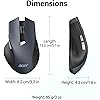
Acer Wireless Mouse for Laptop, 2.4GHz Computer Mouse 3 Adjustable 1600 DPI | Office Cordless USB Mice with USBA Receiver, 6 Buttons, Medium to Large Sized Hands Compatible with PC, Laptop, Desktop

  • Based on 6,521 reviews
Condition: New
Checking for the best price...
$9.98 Why this price?
Save $4.01 was $13.99

Buy Now, Pay Later


As low as $2 / mo
  • – 4-month term
  • – No impact on credit to apply
  • – Instant approval decision
  • – Secure and straightforward checkout

Ready to go? Add this product to your cart and select a plan during checkout.

Payment plans are offered through our trusted finance partners Klarna, Affirm, Afterpay, Zip, Apple Pay, and Google Pay. No-credit-needed leasing options through Acima may also be available at checkout.

Learn more about financing & leasing here.

Selected Option

Free shipping on this product

FREE 30-day refund/replacement

To qualify for a full refund, items must be returned in their original, unused condition. If an item is returned in a used, damaged, or materially different state, you may be granted a partial refund.

To initiate a return, please visit our Returns Center.

View our full returns policy here.


Availability: In Stock.
Fulfilled by Amazon

Arrives Sunday, Aug 23
Order within 16 hours and 5 minutes
Available payment plans shown during checkout

Protection Plan Protect Your Purchase
Checking for protection plans...

Color: Black


Features

  • Plug and Play for Home OfficeThe wireless computer mouse features 2.4GHz connectivity, delivering a stable, interference-free connection up to 32ft. Designed for medium to large sized hands, it ensures comfortable use all day. Simply plug in the USB-A receiver for instant pairingno drivers needed. If the mouse isnt suitable, place the USB receiver in the battery compartment and return both.
  • 3 Levels Adjustable DPIThis travel USB mouse offers 3 adjustable DPI settings (800, 1200, 1600), allowing you to customize sensitivity for precise design work. Effortlessly switch to match your task and elevate your productivity. Please remove the film at the bottom of the mouse before use.
  • Effortless BrowsingEquipped with forward and backward buttons, this computer mice streamlines your workflow, making it easy to navigate through web pages and files with a simple click. Side button does not work on Mac.
  • Visible Indicator Light The pc mouse features a visual indicator for DPI levels and low battery alerts. The red light flashes once for 800 DPI, twice for 1200 DPI, and three times for 1600 DPI. When the battery level is below 10%, the light flashes red until the mouse is completely out of power.
  • Click to WakeWith smart sleep mode, it saves power by standby after 10 inactive minutes, just 2-3 clicks to wake. This efficient design delivers 3x longer battery life than motion-wake mice. Engineered for durability, its buttons and scroll wheel are tested for 10 million clicks, ensuring long-term reliability and consistent performance.
  • NOTE: The AAA batteries are not included. The USB-A receiver is conveniently stored in the battery compartment at the back of the mouse. Make sure that the positive and negative terminals of the battery are installed correctly.

Description

Wireless Mouse OMR266 Wireless Mouse OMR339 Ergonomic Mouse OMR272 Ergonomic Mouse OMR290 Ergonomic Mouse OCC314 Ergonomic Mouse OMR241 Gaming Mouse OMR279

Brand: Acer


Color: Black


Connectivity Technology: USB A


Special Feature: Not Bluetooth, Not Rechargeable, 𝐌𝐞𝐝𝐢𝐮𝐦 𝐭𝐨 𝐋𝐚𝐫𝐠𝐞 𝐒𝐢𝐳𝐞𝐝 𝐇𝐚𝐧𝐝𝐬, light 3oz(86g), 【Requires 2 AAA batteries (Not Included)】 See more


Movement Detection Technology: Optical


Connectivity Technology: USB A


Additional Features: Not Bluetooth, Not Rechargeable, 𝐌𝐞𝐝𝐢𝐮𝐦 𝐭𝐨 𝐋𝐚𝐫𝐠𝐞 𝐒𝐢𝐳𝐞𝐝 𝐇𝐚𝐧𝐝𝐬, light 3oz(86g), 【Requires 2 AAA batteries (Not Included)】


Movement Detection: Optical


Button Quantity: 6


Hand Orientation: Right


Compatible Devices: Desktop, Laptop, Personal Computer, Tablet


Operating System: Windows, macOS, Linux, Andriod


Number of Batteries: 2 AAA batteries required.


Hardware Platform: PC


Power Source: Battery Powered


Mouse Maximum Sensitivity: 1600 dots_per_inch


Minimum Required Operating System Version: Linux Mint 1, Mac OS X 10.0 Cheetah, Windows 1


Range: 32 feet


Item Weight: 85 g


Item Dimensions L x W: 5.1"L x 3.2"W


Unit Count: 1 Count


Brand: Acer


Antenna Location: Office


Model Number: OMR266


Manufacturer: acer


UPC: 195133316934


Mfr Part Number: OMR266


Warranty Description: 1 Year Manufacturer


Color: Black


Style Name: Modern


Enclosure Material: Plastic


Frequently asked questions

If you place your order now, the estimated arrival date for this product is: Sunday, Aug 23

Yes, absolutely! You may return this product for a full refund within 30 days of receiving it.

To initiate a return, please visit our Returns Center.

View our full returns policy here.

  • Klarna Financing
  • Affirm Pay in 4
  • Affirm Financing
  • Afterpay Financing
  • Zip Pay in 4
  • Financing through Apple Pay
  • Financing through Google Pay
Leasing options through Acima may also be available during checkout.

Learn more about financing & leasing here.

Top Amazon Reviews


  • Great backup/on the go mouse
Color: Black
I got this as a backup/on the go mouse that I could bring to and from work without worrying if it broke (which happened to my super expensive gaming mouse recently 😭). For ~$12 I think it’s a pretty solid deal. It doesn’t look or feel cheap and honestly I’ve seen mice costing three times this that felt worse. If I didn’t know any better you could probably convince me that this is a $20-25 mice. It fits comfortably in my hand and the side buttons are nice to have. Also having an adjustable dpi is a great feature especially considering the price, though I do wish it had some sort of indicator to tell you what dpi it’s on as I often find myself cycling through the dpi options to try to figure outa what it’s at. My only other gripe is that the sensor sometimes needs a second to wake up if it’s been idle for a while but this honestly isn't significant enough to impact the mouse’s usability for most people (just don’t expect much if you’re hoping to play any fast paced fps games, although I have gotten plenty of kills in battlefield with this mouse so your mileage may vary). Overall though, this mouse is perfect for travel, office work, and even a little light gaming. ... show more
Reviewed in the United States on June 29, 2026 by NEIN2558

  • "My Emergency Mouse Turned Into My New Favorite!"
Color: Black
My old mouse finally gave up the ghost, and I needed a replacement fast. I spotted this Acer wireless mouse, and since it was super affordable and had Prime shipping for next-day delivery, I figured why not? And honestly, I'm really happy with it! It works great right out of the box. I just plugged in the USB-A receiver, and it was good to go – no fussing with drivers or anything. The 2.4GHz connection feels really stable, and I haven't experienced any lag or dropped signals, which is a huge plus for productivity. I also appreciate that it has 3 adjustable DPI settings (up to 1600 DPI), so I can easily switch between precise work and faster browsing. The 6 buttons are also a nice touch, giving me a bit more functionality than my old basic mouse. The product description says it's compatible with medium to large-sized hands, and I'd say that's accurate. It feels comfortable in my hand, not too small or too bulky. For the price, the quality feels pretty solid too. It doesn't feel flimsy, which is sometimes a concern with budget-friendly peripherals. The only "con" I can think of, and it's a minor one, is that it uses a USB-A receiver. While that's fine for most of my devices, if you have a newer laptop with only USB-C ports, you'd need an adapter. But for the price and the quick delivery, it's a small trade-off. Overall, if you're looking for an inexpensive, reliable, and comfortable wireless mouse that gets the job done, this Acer one is a fantastic option. It's been a lifesaver for me! Hope this helps! ... show more
Reviewed in the United States on May 12, 2026 by Steve Hall

  • Amazing customer service & a great mouse.
Color: Black
There was a problem with my mouse but customer service was beyond great. They got in touch with me and offered me another mouse, plus they checked it prior to sending it out, so I was guaranteed a working mouse. Wow, that's never happened before. I'm amazed. I think the reason the battery is supposed to last so long is because the mouse puts itself into standby mode, so it's not sucking down your battery. To wake it up just tape the middle scroll button and it wakes up. It's taking a bit to get used to this, but that's just muscle memory that will come. It's useful. The mouse initially felt too large for my hand (women's medium), but as I am using it, it's feeling more and more comfortable. I don't usually use the extra mouse buttons but these are placed so conveniently I'm starting to. The thing I like a lot is the big on/off button. I turn my mouse off when not in use and most of those buttons are ridiculously small, not meant to be used. This one has a large, easy to use switch. It's especially nice when using it on the TV, because I only need it once in a great while. It's so much easier than using the LG magic remote. Don't think about it, just order this mouse, it's great. ... show more
Reviewed in the United States on March 18, 2026 by mkg

  • Real Good Mouse For The Money
Color: Black
Good mouse, but goes to sleep too easily and it is not obvious how to make it turn back on. I have seen several people not understand how to make it work. Just moving the mouse will not wake it up, you have to hit a button. Battery life seems okay, but requires two AAA batteries instead of one AA.
Reviewed in the United States on June 15, 2026 by Dsotm!883

  • Comfortable and quality ergonomic mouse
Color: Black
I needed a more ergonomic mouse since I work on my computer for 8-10 hours a day. This mouse is so much more comfortable than my old one. It's Bluetooth. Just plug in the dongle and it connects to your pc automatically. It does not come with batteries so you will need to pick up some AAA's for it. I like that it has a dpi button for quickly adjusting mouse movement and muti function buttons on the area where your thumb goes. Great mouse for the price! ... show more
Reviewed in the United States on July 12, 2026 by lance b

  • Awesome upgrade from my 5.5 year old "free" Dell mouse who's scrollwheel had died!
Color: Black
The Dell mouse that I got for free with my Dell laptop purchase 5.5 years ago's scroll wheel stopped working and I needed a replacement. Online reviews had good things to say about this mouse for the value, ergonomics and fit for larger hand sizes. They were all right! I have very large hands and this is the size I've been needing all along. I actually have to retrain myself to use a mouse that fits my hand like this one does vs the tiny Dell mouse I got 5.5 years ago! Silly me. The buttons are also much nicer, they are like touch sensors instead of clicky buttons, which is taking getting used to meaning trusting that they clicked without the audible button pushing mechanical "CLICK" feedback, which I always thought was loud and obnoxious on my Dell mouse anyway! "CLICK, CLICK, CLICK, CLICK, CLICK" all day long. This mouse is very quiet. I like the colors as well. It feels durable and has 3 DPI settings, which without researching ahead of time I found that in using the mouse myself on setting 1 the screen cursor movement was slowest, and setting 3 made the mouse move less on the desk and the cursor moved more on screen. I like setting 3 the best. Super easy to setup and use, just plug in the USB dongle to the computer and put batteries in the mouse, turn the mouse power button to ON and that's all there is to it. Great value for the money the mouse is spot-on responsive on any surface I've put it on so far including a mouse pad, a light color laminate countertop, and a dark color hardwood table. I'm not using it for gaming though, just paperwork, filing, and editing documents and online research and video streaming. I HATE track pads, so getting a new mouse was my only option. ... show more
Reviewed in the United States on April 22, 2026 by NCBirdman

  • Great, budget-friendly mouse
Color: Black
Really great mouse for the price! I bought this for our family computer that was using a wired mouse. I wanted something cheap but good quality. This mouse is really nice! The ergonomics of the mouse are pretty good. Scrolling is smooth. The clicks are quiet. The weight is heavier than I would have liked (probably due to the battery), but it's not deal breaker. It goes to sleep mode after a while. However, clicking a button wakes up the mouse instantly. It has forward and backward buttons on the side, which are very nice and convenient to have. Overall, for the price, this is an amazing wireless mouse and I would definitely recommend it for those who want a budget-friendly mouse for general/productivity use. If you are going to be gaming, I would recommend looking for a different mouse instead (one that is lighter and more responsive). ... show more
Reviewed in the United States on April 26, 2026 by Rin

  • This Blue Mouse
Color: Blue
This ACER Model is the Lamborghini or Mercedes in the Mouse Category, Fits your hand perfectly and out-performs the others ! You can feel the 5 Star Quality ! Worth every Penny !
Reviewed in the United States on July 4, 2026 by SVT Diamond

Can't find a product?

Find it on Amazon first, then paste the link below.
Checking for best price...