Search  for anything...

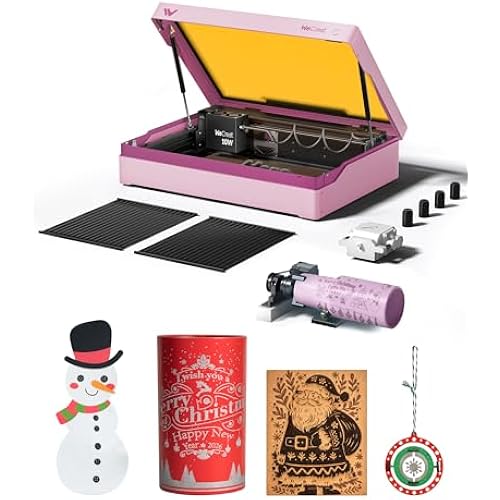
xTool P2S 55W CO2 Laser Cutter, Smart Desktop CO2 Laser Engraver and Cutter Machine, Dual Smart 16MP Cameras, 3D Curved Cylinder Engraving, Create with Wood and Metal Acrylic Glass Fabric Leather

  • Based on 93 reviews
Condition: New
Checking for the best price...
$3,269.00 Why this price?
Holiday Deal · 29% off was $4,605.99

Buy Now, Pay Later


As low as / mo
  • – Up to 36-month term if approved
  • – No impact on credit
  • – Instant approval decision
  • – Secure and straightforward checkout

Ready to go? Add this product to your cart and select a plan during checkout.

Payment plans are offered through our trusted finance partners Klarna, Affirm, Afterpay, Apple Pay, and PayTomorrow. No-credit-needed leasing options through Acima may also be available at checkout.

Learn more about financing & leasing here.

Selected Option

Free shipping on this product
This item's return window has been extended for the holiday season: Returnable until Jan 31, 2026

To qualify for a full refund, items must be returned in their original, unused condition. If an item is returned in a used, damaged, or materially different state, you may be granted a partial refund.

To initiate a return, please visit our Returns Center.

View our full returns policy here.


Availability: Only 10 left in stock, order soon!
Fulfilled by Amazon

Arrives Thursday, Dec 25
Order within 11 hours and 15 minutes
Available payment plans shown during checkout

Protection Plan Protect Your Purchase
Checking for protection plans...

Color: Gray


Size: xTool P2S


Features

  • Enhanced Performance: The xTool P2S provides stronger airflow with more powerful exhaust fans and a dual-cylinder air pump, delivering sharper, cleaner cuts and engravings. It offers optical path indicators, and easier daily maintenance. With upgraded hardware and software, making the best desktop CO2 laser cutter become better.
  • Supercharged Productivity: With engraving speeds of up to 600mm/s and upgraded smart fill batch processing, the xTool P2S easily handles serial numbers, names, and custom designs in one go. Dual 16MP cameras provide high-resolution, real-time previews, while the LiDAR Ranging System ensures precise 0.001'' autofocus, delivering faster, simpler, and error-free results for this CO2 laser engraver.
  • Expandable Working Area: xTool P2S features a large 26" x 14" bed, Auto-Passthrough for materials up to 118 long, and a Riser Base for engraving objects up to 8.4 high, offering flexibility for long, wide, or tall projects. Its 3D Curve Engraving automatically creates accurate 3D models, enabling flawless results on curved cylinder objects. Compatible with the RA2 Pro Rotary, its perfect for engraving tumblers, mugs, and rings, expanding your creative possibilities.
  • Effortless Cutting & Precise Engraving: With industry-leading 55W output and a custom CO2 laser tube, the xTool P2S cuts through all colors of acrylic up to 20mm thick and black walnut up to 18mm in a single pass. Its also perfect for precise engravings on glass, ceramic, slate, coated metals, anodized aluminum and more, thanks to its high absorption efficiency.
  • Safety First: xTool P2S ensures safety with AI fire detection, automatic lock, and emergency stop. Its enclosed design, adjustable air assist, and 233.3 CFM exhaust fan provide efficient smoke removal for cleaner, safer operations in this advanced laser engraver and cutter machine.xTool P2S is the Class 4 laser engraver, the laser output power is 55000mW.

Manufacturer: ‎xTool


Part Number: ‎P1030630


Item Weight: ‎130.7 pounds


Product Dimensions: ‎44.09 x 29.13 x 13.78 inches


Item model number: ‎MXP-K011-004


Size: ‎xTool P2S


Color: ‎Gray


Material: ‎aluminum alloy


Item Package Quantity: ‎1


Batteries Included?: ‎No


Batteries Required?: ‎No


Warranty Description: ‎1 Year


Date First Available: October 29, 2024


Frequently asked questions

If you place your order now, the estimated arrival date for this product is: Thursday, Dec 25

Yes, absolutely! You may return this product for a full refund within 30 days of receiving it.

To initiate a return, please visit our Returns Center.

View our full returns policy here.

  • Klarna Financing
  • Affirm Pay in 4
  • Affirm Financing
  • Afterpay Financing
  • PayTomorrow Financing
  • Financing through Apple Pay
Leasing options through Acima may also be available during checkout.

Learn more about financing & leasing here.

Top Amazon Reviews


  • Fantastic laser, easy to set up and use with minimal experience
Color: Gray Size: xTool P2S
Prior to purchasing this laser cutter, i had used both a Diode laser, as well as a Xtool F1 galvo laser, and this has to be far and above the easiest, most reliable laser i've experienced to date. Setup: The setup was extremely simple with very clear instructions, i was up and using it within 30 minutes. Software: I've used both Lightburn as well as Xtool Creative Suite, and while Lightburn has more flexibility typically, XCS is extremely easy to use and beginner-friendly. I believe the P2S loses some functionality if you use lightburn, notably the use of a rotary, but i rarely need to start up lightburn, except for the occasion where i need to vector trace a bitmap (come on Xtool! Get this added to your software!). One thing i appreciate is the built in ability to do a laser test grid similar to Lightburn for your material, you can even do it for a custom shape which is a nice touch. Functionality: The speed of this laser is probably one of the better you're going to get in this price range. I believe the OneLaser is the new sexy up and comer, which i would probably say is the android of the laser world, whereas xtool is the iPhone. The OneLaser is likely a bit better value for the money if you are a heavy user, but if you just want to set it and forget it, the P2S can't be beat, especially with the addon of the SafetyPro AP2 smoke purifier, which also just works out of the box with the laser. I was able to load up files and start cutting right away. And have been doing so for a few months almost daily. One thing i appreciate a lot about this laser is the working area, which is 12 inches by 24 inches roughly, which is on the larger size of the other devices in this class. Maintenance: This is where i'm quite impressed with the hardware, all the mirrors are magnetically attached and easy to clean. Although the first mirror does require the back panel removed to access which is like 11 screws. This is the same area you fill the water reservoir for the cooling system. The lens is very easy to access and clean, with 2 screws, and one retaining gasket to access, although i kinked the air assist hose the first time i cleaned it, and triggered an error. After unkinking the air hose it worked normally again. Accessing the rear fan for cleaning is extremely easy, and i appreciate that you can remove the fan from it's housing to clean further. Calibrating the laser dot is simple as well, and the software walks you through it. Final Impressions: I love this laser. The price you pay is a bit of a premium for the brand and Xtool ecosystem, but for someone just looking to unbox and start using, i find it worth the cost. If you're an experienced user, you might want to look into OneLaser, or if you have a bit more to spend, a Thunder Bolt laser. For me, i have no doubt this will be a great workhorse for years to come. ... show more
Reviewed in the United States on April 2, 2025 by Matt M

  • Simply The Best
Color: Gray Size: xTool P2S
First I have to praise the Amazon room of choice delivery service. They put the machine exactly where I wanted it in a second floor room, on a table. This service is the main reason I ordered the machine through Amazon and not directly from xTool. Having the box on its table made one man unpacking possible for me. So it was well worth the added cost. If you follow the unpacking and initial setup instructions, it’s a breeze to do. Once out of the box, it took much less than an hour to have it powered up and ready to run. The first thing I did after unpacking and setting up the machine is I placed a 24x12 sheet of black acrylic in the upper left corner of the machine. In the software I placed a box that was the size of the working area in the 0,0 position and cut it out on the laser. I left the resulting right angle piece in the upper left corner, this gives a stop for a repeatable 0,0 position of material every time. Next was the test of what I wanted this machine for, cutting and engraving clear/transparent acrylic. I loaded one of the many user submitted projects from xTool, an LED illuminated Christmas item. Once loaded I ran the project. The included photo is the end result. It’s almost needless to say that the machine performed this task perfectly. Note that the clear acrylic blocks in the photo were not done with the P2S, they were a totally different experiment a few days ago. Now it was time to do material cutting test arrays which the xTool Studio software makes easy to set up. I ran the test cuts on several colors of acrylic, including white, several different blues, clear, black and more. Doing this allows me to know common speed and power settings for any acrylic I choose. One thing I would suggest is if you don’t already have one, get an air purifier, or a vent to the outside for the laser. If you don’t you’ll quickly find you need one. And finally there’s the build quality of the machine. In my opinion xTool has some of the best built machines available. I was first impressed with the D1 Pro, then the F1 and F1 Ultra. Now the build quality of the P2S is far beyond anything I expected. Would I buy the P2S again? Absolutely! Would I recommend the P2S? Most definitely. ... show more
Reviewed in the United States on December 10, 2025 by Jim D Jim D

  • P2 DISTANT CAMERA FAILS TO CALIBRATE
Color: Gray Size: xTool P2
My P2 worked beautifully, until it didnt. It started after a firmware update and XTOOL studio update. I noticed the distant camera was now out of focus. So I proceeded to download the calibration tool to run that to reset the camera. This failed miserably. Now when I start a project and the distant camera captures an image of the inside of the P2, it is completely distorted and unworkable. I connected with ctool support and after some back and forth via email they advised me I needed to replace the distant camera. So I dish out $114 for the new camera and it took nearly 2 weeks to arrive. I followed the instructions on replacement of the camera then attempted to run a new project only to have the same issue. I have been down now over a month and support from xtool has been abysmal to say the least. I have updated my ticket online numerous times and initially I get a response, then they disappear and become non responsive. This is completely unsatisfactory for service... Follow-up: A team member from xTool ultimately reached out and helped resolve the issue. For others experiencing similar problems, please note: Do not attempt to calibrate the camera with your device connected via WiFi—the calibration process requires a USB-C connection to work correctly. After reconnecting via USB-C and completing a few additional calibration steps, my device is now functioning properly. I would like to thank Wendy from xTool for her assistance. Please note that I have changed from one star to 5 due to the help I received from Wendy from xTool in this matter. ... show more
Reviewed in the United States on October 24, 2025 by Denise Garcia

Can't find a product?

Find it on Amazon first, then paste the link below.
Checking for best price...