Search  for anything...
WD

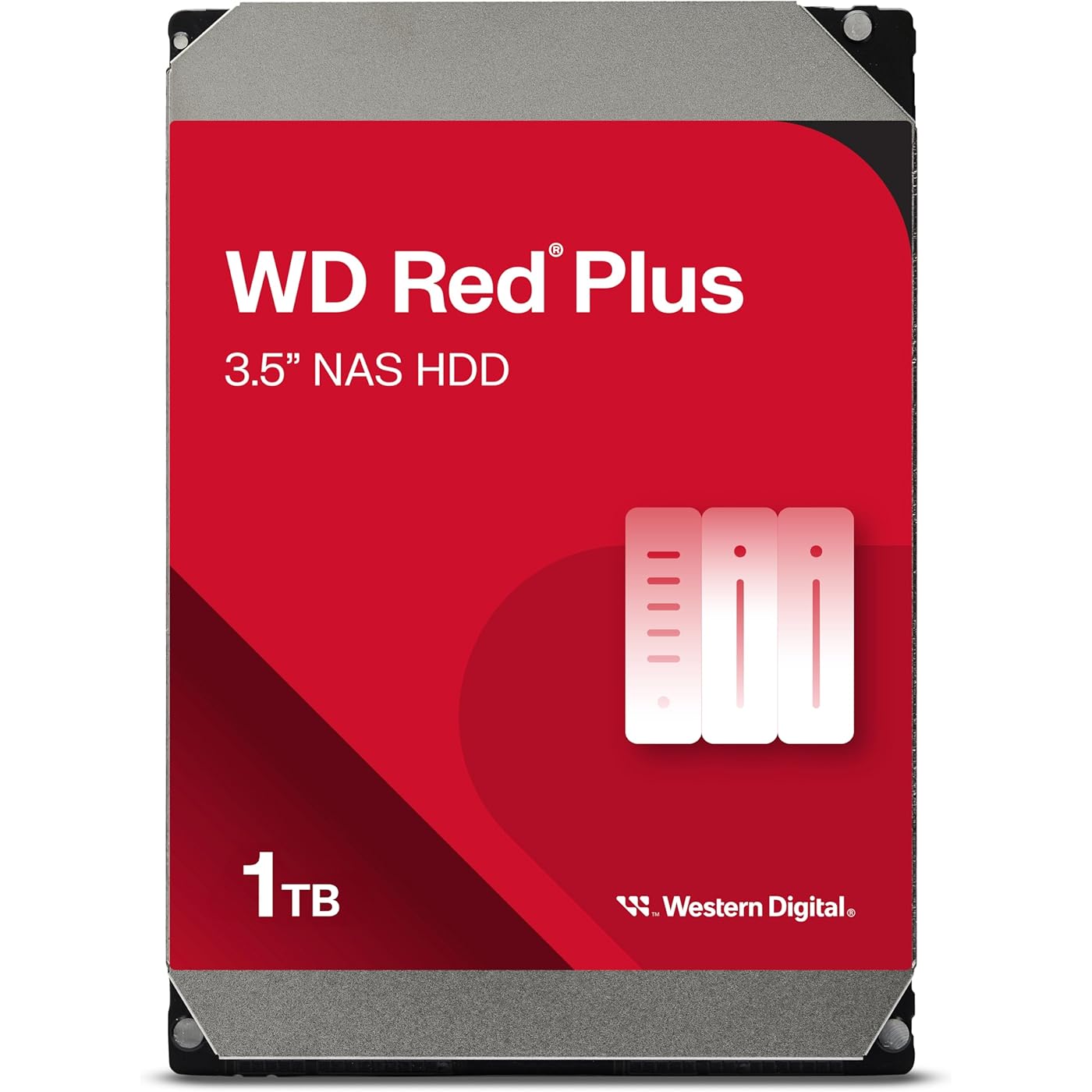
Western Digital 1TB WD Red Plus NAS Internal Hard Drive HDD - 5400 RPM, SATA 6 Gb/s, CMR, 64 MB Cache, 3.5" - WD10EFRX
  • Based on 2,758 reviews
Condition: New
Checking for the best price...

Buy Now, Pay Later


As low as $14.83 / mo
  • – 6-month term
  • – No impact on credit to apply
  • – Instant approval decision
  • – Secure and straightforward checkout

Ready to go? Add this product to your cart and select a plan during checkout.

Payment plans are offered through our trusted finance partners Klarna, Affirm, Afterpay, Apple Pay, and PayTomorrow. No-credit-needed leasing options through Acima may also be available at checkout.

Learn more about financing & leasing here.

Selected Option

Free shipping on this product

This item is eligible for return within 30 days of receipt

To qualify for a full refund, items must be returned in their original, unused condition. If an item is returned in a used, damaged, or materially different state, you may be granted a partial refund.

To initiate a return, please visit our Returns Center.

View our full returns policy here.


Availability: Only 1 left in stock, order soon!
Fulfilled by Neural Net USA

Arrives May 14 – May 16
Order within 4 hours and 59 minutes
Available payment plans shown during checkout

Protection Plan Protect Your Purchase
Checking for protection plans...

Capacity: 1TB


Style: 64 MB Cache


Features

  • Available in capacities ranging from 1-14TB with support for up to 8 bays
  • 5400RPM performance class
  • Supports up to 180 TB/yr workload rate*| * Workload Rate is defined as the amount of user data transferred to or from the hard drive. Workload Rate is annualized (TB transferred (8760 / recorded power-on hours))
  • NASware firmware for compatibility
  • Small or medium business NAS systems in a 24x7 environment
  • 3-year limited warranty
  • This model uses CMR technology and is being renamed WD Red Plus to distinguish it from the current WD Red product, which uses SMR technology
  • During this transition period, WD Red Plus devices may be delivered with a WD Red label, but rest assured the device you are receiving will be the CMR-version of WD Red and can be confirmed by the model number

Description

Packed with power to handle the small- to medium-sized business NAS environments and increased workloads for SOHO customers, WD Red Plus is ideal for archiving and sharing, as well as RAID array rebuilding on systems using ZFS and other file systems. Built and tested for up to 8-bay NAS systems, these drives give you the flexibility, versatility, and confidence in storing and sharing your precious home and work files.

Digital Storage Capacity: 1 TB


Hard Disk Interface: Serial ATA-600


Connectivity Technology: SATA


Brand: WD


Hard Disk Form Factor: 3.5 Inches


Hard Disk Description: Raid


Compatible Devices: Desktop


Installation Type: Internal Hard Drive


Color: Red


Hard Disk Size: 1 TB


Standing screen display size: ‎3.5 Inches


RAM: ‎1 GB


Hard Drive: ‎1 TB Raid


National Stock Number: ‎7025-01-618-5191


Brand: ‎WD


Series: ‎WD Red Plus


Item model number: ‎WD10EFRX


Hardware Platform: ‎PC; Mac


Operating System: ‎NASware firmware


Item Weight: ‎15.9 ounces


Product Dimensions: ‎5.8 x 4 x 1 inches


Item Dimensions LxWxH: ‎5.8 x 4 x 1 inches


Color: ‎Red


Flash Memory Size: ‎1 TB


Hard Drive Interface: ‎Serial ATA-600


Hard Drive Rotational Speed: ‎5400 RPM


Manufacturer: ‎Western Digital


Is Discontinued By Manufacturer: ‎No


Date First Available: ‎July 11, 2012


Frequently asked questions

If you place your order now, the estimated arrival date for this product is: May 14 – May 16

Yes, absolutely! You may return this product for a full refund within 30 days of receiving it.

To initiate a return, please visit our Returns Center.

View our full returns policy here.

  • Klarna Financing
  • Affirm Pay in 4
  • Affirm Financing
  • Afterpay Financing
  • PayTomorrow Financing
  • Financing through Apple Pay
Leasing options through Acima may also be available during checkout.

Learn more about financing & leasing here.

Top Amazon Reviews


  • Fully met my expectations. Excellent NAS drive for RAID
Capacity: 1TB Style: 64 MB Cache
The WD 1TB WDBMMA0010HNC-NRSN drive kit fully met my expectations. I bought this drive to make a RAID1 pair. The drive performed well in my home-built FreeNAS server and provided better network storage performance than expected without any glitches or issues. When compared with 750GB WD Black drives in the same server the RED drives appeared to give slightly better perforance in NAS. Maybe the NAS specific firmware isn't just marketing. For more, read on... I wanted to build a NAS server for windows sharing, iSCSI, and nfs sharing. I had an old 1U "pizza box" server with a core 2 dual CPU and 4GB of ram available plus SATA II (300MBPS) channels. I got one of the WDBMMA0010HNC-NRSN WD-red drives through the vine programs and I bought a second through Amazon to build this NAS server. This drive is the retail package. It came in a nice box with 4 screws for mounting and a little bit of very fine printed material which I didn't bother to read. If a "bare drive" is fine and you don't care about packaging you might want to consider another listing for the 1TB WD Red drives which may be at a lower price for essentially the same thing. The software I used to drive the NAS is the excellent (especially at the price) FreeNAS server. It installs on a USB stick of at least 2GB. My old box had several USB 2.1 ports, so no problem. I configured the drives in a RAID 1 mirrored array using software RAID (instead of the FRAID (fake raid) built into the motherboard chip set. I first built the server with the WD Red drives first and ran some casual tests with windows shares and iSCSI. Using windows network or iSCSI I could saturate my Gigabit Ethernet with no problem. Performance was not an issue. They ran great and I had no complaints over several days of use. This isn't too surprising as many NAS boxes use little Intel Atom processors. Next I did a comparison by replacing the WD Red drives with WD Black 750GB drives I had on the shelf. I didn't see much difference but I felt that copies of lots of small/medium files completed more quickly with the Red drives. Maybe the caching algorithm of drive was just better tuned for NAS on the Red drives. A plus is the Time Limited Error Recovery (TLER) which is an important part of drives that are designed for RAID deployment. And having a drive that is designed to be on 24X7 is great. I've switched back to the WD Red drives in my home-built NAS and I'll update this review as I live with the drives and report if there are any problems or notable excellence that stands out. Hope this bit of experience helps someone. Update: Dec 3, 2013 I have recently gotten a Buffalo LinkStation 420 2TB 2-DriveNAS Personal Cloud Storage and Media Server In comparing my home built FreeNAS system (on old core duo hardware) with two of these drives to the LinkStation with 2 Toshiba drives was interesting. The FreeNAS system with the WD NAS drives (both systems with RAID1) ran about 50% faster than the LinkStation. You can check my review on the LinkStation for more information about my comparison. The LinkStation might be a better option to get diskless for a very low price use these drives inside it. The small footprint and low power make it an attractive option. Bottom-line it seems there may be something to the NAS specific firmware of these drives. ... show more
Reviewed in the United States on October 8, 2013 by Stephanie Sullivan

  • Good drive poor shipping
Capacity: 4TB Style: 256 MB Cache
Good drive. Poor shipping. The drive itself works fine. However the shipping was terrible. I ordered two 4T drives and a NAS. It took 2 weeks to arrive then one of those drives was damaged and in operable. I returned it and order another. The replacement came 3 weeks later. Just in original packaging with no over box or padding. Lucky this one worked but could have been damaged easily the way it was shipped. Definitely not what i expected from an Amazon retailer. ... show more
Reviewed in the United States on January 20, 2026 by Jeff

  • Works great for a home NAS
Capacity: 4TB Style: 256 MB Cache
I rebuilt a failing TrueNAS server using four of these in a RAIDZ1. I'm using 2.5Gbps and the drives are plenty fast for a couple of file shares and as storage for a small home Proxmox cluster. They run cool and consistent between 22 and 31 degrees Celsius with minimal direct cooling. Do yourself a favor and label the drives with the SNs so you can easily identify a drive when one fails. I bought these to replace 6 year old WD Reds so they should be reliable and good for the price. ... show more
Reviewed in the United States on December 3, 2025 by Brian Hayward

  • 10/10
Capacity: 10TB Style: 512 MB Cache
Fantastic, great speeds. So far noise is low but well see after continued use. Found it right away on my linux machine.
Reviewed in the United States on February 12, 2026 by JCferret

  • Worth buying for RAID configurations for improved data security
Capacity: 1TB Style: 64 MB Cache
Pros: Time Limited Error Recovery (TLER) for NAS/RAID usage. Price premium much lower/insignificant compared to what it used to be for NAS/RAID drives. Low power/Low temp. Cons: Warranty only 3 years (What happened to the 5-year warranties, WD?) I've seen failures in many drives from Seagate, WD, and other vendors in the past. Hard drives fail. Even SSDs fail sometimes. That's why RAID configurations are so popular. All versions of RAID configuration (except for RAID 0) introduce redundancy, such that if any single drive fails, no data need be lost. Full redundancy can be regained by rebuilding the array with a replacement drive, theoretically keeping your data safe from single single points of hardware failure indefinitely. These NAS drives go one step further in that their behavior is optimized for a RAID environment. In particular, Time Limited Error Recovery (TLER) allows them to rely on the redundancy built into the RAID controller and the overall array to handle the sorts of errors which will inevitably pop up at some point. This reduces risks to data that can be caused by the behaviors of regular desktop disks, whose designers optimized them for environments where there is no RAID array backup. I have been running RAID arrays regularly with desktop drives for over 6 years now, and it's been a pretty frequent occurrence where a drive would suddenly have to be rebuilt for no apparent reason. In all likelihood, the reason was just a few bad sectors on the disk, which happens all the time. The total failure rate of drives in a RAID has been a little above normal, but the total rebuild rate without total failure has been very high. Read up on TLER, and you'll understand why that is expected behavior with desktop drives but not with NAS drives. The total drive rebuild process is actually fairly risky to the integrity of the data, considering that in most configurations there is no redundancy while this is happening. Therefore, making sure that a total rebuild doesn't happen unless necessary is a pretty good idea if you want to protect your data. That's why I am upgrading my RAID arrays with these drives. In response to the reviewer who complained that the WDIDLE3 issue affects these drives: I just bought 4 of these drives in the 1TB version from Amazon. (July 2015) All are model WD10EFRX. I ran WDIDLE3 /R to read the current value of the timer on all four of them before connecting them to my RAID controller. All four came set to 300 seconds (5 minutes.) This is a very reasonable value for most NAS/RAID usage, and certainly not as problematic as the 8 second timer that caused the well-known problems on some previous WD drives. If you're using these to mount an OS drive or a drive in Windows, that 5 minute timer will probably never be invoked. If you're using these on a 24/7 NAS or for non-OS storage in Linux like I do, that timer could lead to considerable power savings and reduced average temperatures, the latter of which will probably extend the life of the drive, not shorten it. The only way I could see the 300 second idle timer being a problem is if you're running a script that causes disk access every 6 minutes (or 10 or 15.) i.e. if there's something that regularly forces spin-up right after the disk idle has gone into effect. In that case, WDIDLE3 is included on the ultimate boot CD version 5.3.5 and can be used to disable the timer. An idle timeout of 300 seconds is a pretty good feature in most cases, though. P.S. I have four more 3TB versions of this drive in transit for my NAS (the 1TBs were for my linux desktop) I will check the default WDIDLE3 values on them as well and post here if they prove to be different. ... show more
Reviewed in the United States on July 10, 2015 by Raltar

Can't find a product?

Find it on Amazon first, then paste the link below.
Checking for best price...