



Search  for anything...

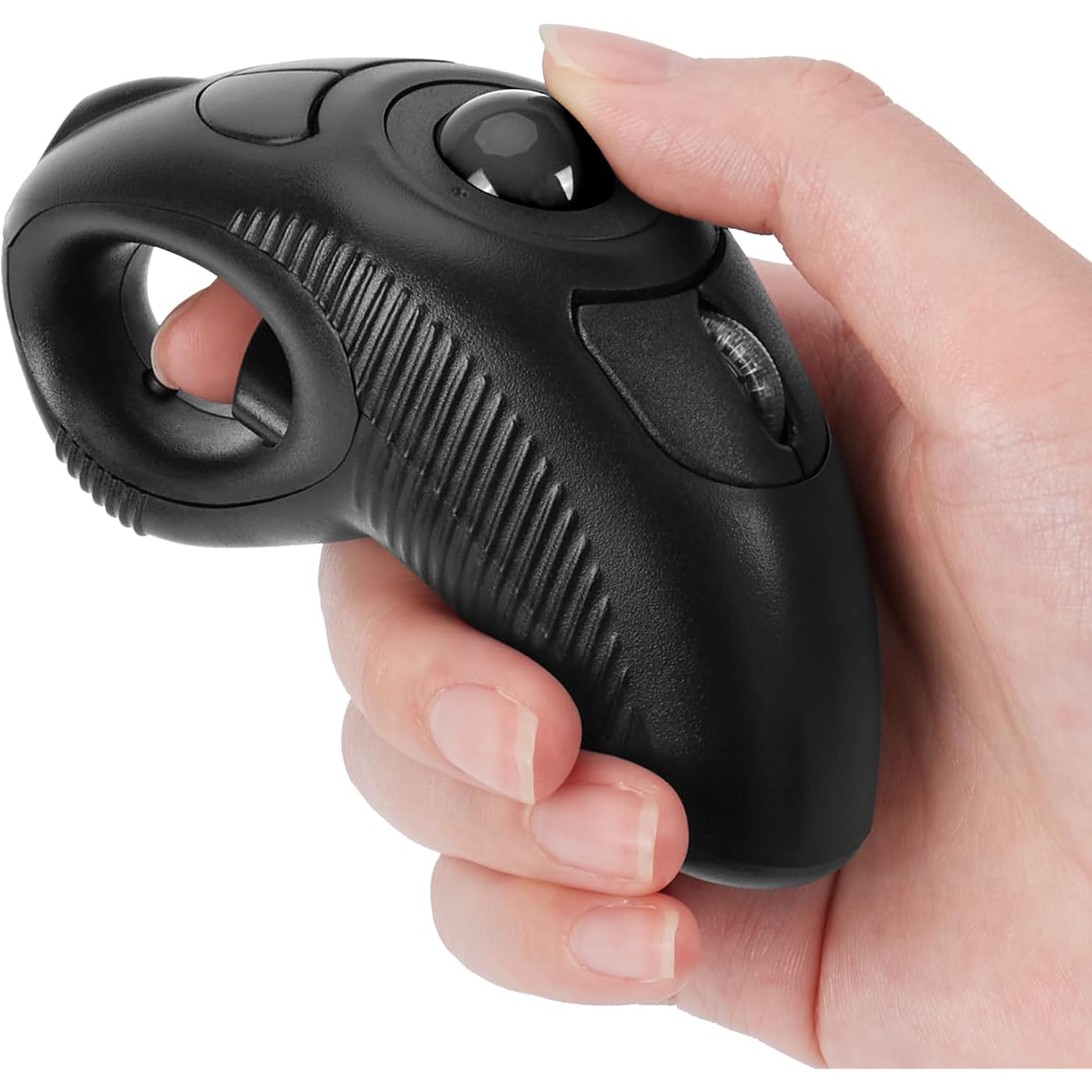
welspo Wireless USB Handheld Finger Trackball(Black) Mouse with Laser Pointer

  • Based on 2,208 reviews
Condition: New
Checking for the best price...
$32.99 Why this price?
Save $12.00 was $44.99

Buy Now, Pay Later


As low as $8 / mo
  • – 4-month term
  • – No impact on credit to apply
  • – Instant approval decision
  • – Secure and straightforward checkout

Ready to go? Add this product to your cart and select a plan during checkout.

Payment plans are offered through our trusted finance partners Klarna, Affirm, Afterpay, Apple Pay, and PayTomorrow. No-credit-needed leasing options through Acima may also be available at checkout.

Learn more about financing & leasing here.

Selected Option

Free shipping on this product

FREE 30-day refund/replacement

To qualify for a full refund, items must be returned in their original, unused condition. If an item is returned in a used, damaged, or materially different state, you may be granted a partial refund.

To initiate a return, please visit our Returns Center.

View our full returns policy here.


Availability: In Stock.
Fulfilled by Amazon

Arrives Thursday, Jun 18
Order within 15 hours and 10 minutes
Available payment plans shown during checkout

Protection Plan Protect Your Purchase
Checking for protection plans...

Color: black ball


Features

  • Wireless - Charged by AAA battery, plug and play, easy to install.Easy to use - left or right hand, or cradled between both. Press then appear laser pointer for presentation. Please use your own batteries instead of the ones included in the package.
  • Off table and without limitation of operational space. Scrolling function can be controlled simply by your thumb. USB 2.0 interface, plug and play, no software required
  • Ergonomic Design - handheld trackball mouse wireless, which can avoid any harm on your wrist and muscle, greatly reducing the chances for Arthritis and CTS suffers
  • Ideal for both laptops and desktops. Place end of index or middle finger on trigger button & thumb on roller ball
  • Package Included - 1 x Wireless Finger HandHeld USB Trackball Mouse with Laser Pointer, 1 x USB Receiver, 1 x bag

Brand: welspo


Color: black ball


Connectivity Technology: USB


Special Feature: Ergonomic Design, Handheld, Wireless


Movement Detection Technology: Trackball


Connectivity Technology: USB


Additional Features: Ergonomic Design, Handheld, Wireless


Movement Detection: Trackball


Button Quantity: 2


Hand Orientation: Ambidextrous


Compatible Devices: Laptop, PC, Mac


Operating System: Linux, Unix, Windows XP


Range: 10.0 meters


Number of Batteries: 1 AAA batteries required.


Hardware Platform: Laptop, PC


Power Source: Battery Powered


Color: black ball


Style Name: Modern


Item Weight: 155 Grams


Item Dimensions L x W: 4.3"L x 1.9"W


Unit Count: 1.0 Count


Brand: welspo


Model Name: Finger Trackball Mouse


Antenna Location: Home, Office


Model Number: iF6B


Built-In Media: Wireless Finger HandHeld USB Trackball Mouse with Laser Pointer, USB Receiver, bag


Are Batteries Included: No


Are Batteries Required: Yes


Manufacturer: BrainyTrade


Item Type Name: Finger Trackball Mouse


Warranty Description: 1 year


Enclosure Material: Plastic


Frequently asked questions

If you place your order now, the estimated arrival date for this product is: Thursday, Jun 18

Yes, absolutely! You may return this product for a full refund within 30 days of receiving it.

To initiate a return, please visit our Returns Center.

View our full returns policy here.

  • Klarna Financing
  • Affirm Pay in 4
  • Affirm Financing
  • Afterpay Financing
  • PayTomorrow Financing
  • Financing through Apple Pay
Leasing options through Acima may also be available during checkout.

Learn more about financing & leasing here.

Top Amazon Reviews


  • Works well
Color: green ball
Works great. It's replacing a high end gaming mouse that freezes and is very laggy. This one doesn't have any stutter or freezes . It responds immediately with no lag and makes a better gaming mouse than the gaming mouse did. Unbelievable, I see complaints about the track ball falling out and how it doesn't work well when tilted on its side. I've tried everything ( short of dropping it ) to dislodge the ball and make it quit working when tilted on its side and have been unsuccessful at doing such. Now it doesn't have a premium quality feel to it .it's not very robust and I don't think it can take a drop to the the ground well . So if you drop it that's on you .don't hate the device . Get a lanyard or necklace or some kind of tether or something if you are clumsy because this mouse ain't having any rough housing. ... show more
Reviewed in the United States on October 30, 2025 by minataur

  • Works Well Enough
Color: green ball
It works like you’d expect. The battery slot is a bit snug, so after putting a battery in, it took a good whack on a hard surface to shift the battery down against the contact. It does light up blue under the scroll wheel when you flip the on-switch, so you know immediately if the battery is making contact or not. Apart from that, my only complaint is it’s a thumb-trackball, and a right-click has to be done with the thumb. If you ever have to right-click and drag (3D printing slicers, 3D Cad, etc.) this design is not so good. I’d prefer a design with a split trigger, so left and right click are both done with the index finger, but haven’t found one yet. Overall, I ding them a star for the finicky battery issue. ... show more
Reviewed in the United States on October 18, 2025 by Amber Neufeld

  • Has so much potential to be great... But it isn't.
Color: black ball
Let me preface by sharing the following information:. • I do extensive work on my PC so having a mouse that's comfortable to use is of extreme importance. • I also obscure away from sitting at a desk as much as possible so having a mouse that is able to be used on a variety of different surfaces (including my own body) is ideal. • I have owned several different trackball style mice (?) in the past which I have enjoyed for the most part. Considering the above I think it's clear why thie welspo Wireless USB handheld Finger Trackball Mouse with Laser Pointer was an attractive option. On the surface it's a wonderful concept and theoretically seems like it should be highly ergonomic; however, I found this device to be mediocre at best and frankly a bit dangerous which I will elaborate on further down in this review. I believe there are a few design changes that would make this finger trackball mouse a superior choice above similar products in this niche of the mouse world but of course this is just my opinion and may not align with the point of view of others but I digress. First impressions upon unboxing the mouse were that the outer shell is made of very low quality plastic (3D printer maybe) and not only that but the surface is rather slick making it difficult to hold onto. Getting the cover for the battery compartment reinstalled was more difficult than it should have been and frankly why is this powered by batteries anyways? USB C charging port would be a better option and likely free up space internally which could open the door to many other possibilities. Functionally, this thing is great in some aspects but not so great in other. I do enjoy the trigger style button as the left click analog and the trackball is nested in almost the perfect position but that's about where the functionality of the thing ends. Having the laser pointer button and 'whatever the one next to it does' button doesn't work for me. In my mind having the scroll wheel and right click button above the trackball would be a much better layout as I often times found myself squeezing the trigger button while either attempting to click the scroll wheel or either of the two right click buttons below. Speaking of why exactly are there two right click buttons anyways? With a different button layout I think this thing would be great but as it is now I have ahead time using it efficiently. A word of caution: DO NOT DROP THIS DEVICE unless you desire to undergo impromptu laser eye corrective surgery. I accidentally dropped the mouse one the carpeted floor in my office and reached down to grab it without looking. After I retrieve the device I discovered that the trackball had dislodged from its perch. Unfortunately, I made this discovery by looking at the device itself as my thumb brushed over the empty Crater which sent a beam of brilliant blue light straight into my left eye. Yeah I know I should be careful around laser and whatnot but is it farfetched to think that there should be some sort of safety measure in place that prevents the laser from lasing whenever the trackball isn't present? I'm sure I'm not the only person that this will happen to and that laser is fairly powerful. For the next day or two after this incident I had a difficult time seeing things clearly which gave me a wicked migraine. I'm also fairly confident that my overall vision has degraded since that event as well as there is a faint blue cloak over everything I look at..... I had high hopes for this mouse but it just doesn't do it for me. Too many poor design choices to be ergonomic or useful for a person who uses their PC heavily. Plus it's potentially hazardous to your eyesight.... With some major changes I'm sure this mouse could be the next big thing though ... show more
Reviewed in the United States on November 19, 2025 by Vick Lagina

  • Soo close to awesome.
Color: green ball
I want to love this. I have been using it for weeks and it does almost everything I want. Its light and portable, and fits in my hand nicely. The trackball works great, until it looses connection. Which it does a LOT. I haven't figured out a way to get it to reconnect properly short of unplugging the usb and plugging it back in, then it works fine till i close my laptop and then its a toss up if it will be connected when I open it again. It would be soo much better if it had bluetooth connectivity. Then i wouldn't even need the dongle that gets lost every time i drop it while trying to unplug and plug it back in because there s nothing to hold it by. You can left click and drag, but you will need a second thumb to right click and drag unfortunately. I wish they would put the right click where the DPI button is so i can do both, move the dpi button up to where the laser is or something. I want to give this 5 stars it could get 5 stars with a few changes. ... show more
Reviewed in the United States on August 23, 2025 by Joseph Shmosely

Can't find a product?

Find it on Amazon first, then paste the link below.
Checking for best price...