Search  for anything...

WALI Monitor Arm Mount for Desk, Single Extra Tall Computer Desk Mount, Monitor Bracket Mount Stand Single, up to 32 inch, 22 lbs (M001XL), Black

  • Based on 4,714 reviews
Condition: New
Checking for the best price...
$35.14 Why this price?
Save $1.85 was $36.99

Buy Now, Pay Later


As low as $8 / mo
  • – 4-month term
  • – No impact on credit to apply
  • – Instant approval decision
  • – Secure and straightforward checkout

Ready to go? Add this product to your cart and select a plan during checkout.

Payment plans are offered through our trusted finance partners Klarna, Affirm, Afterpay, Apple Pay, and PayTomorrow. No-credit-needed leasing options through Acima may also be available at checkout.

Learn more about financing & leasing here.

Selected Option

Free shipping on this product

FREE 30-day refund/replacement

To qualify for a full refund, items must be returned in their original, unused condition. If an item is returned in a used, damaged, or materially different state, you may be granted a partial refund.

To initiate a return, please visit our Returns Center.

View our full returns policy here.


Availability: In Stock.
Fulfilled by Amazon

Arrives Sunday, Jun 7
Order within 21 minutes
Available payment plans shown during checkout

Protection Plan Protect Your Purchase
Checking for protection plans...

Size: 13"-32"


Style: Single


Features

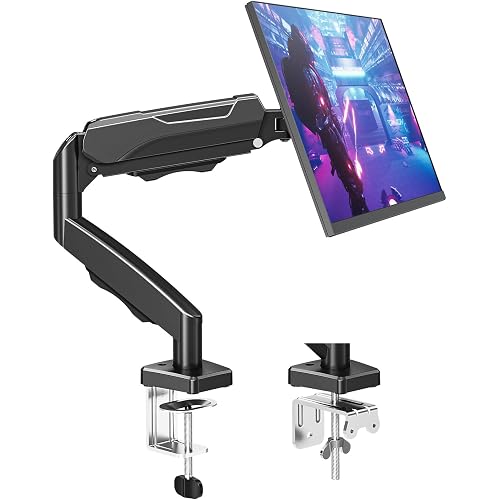
  • Application: Fits most flat panel monitor up to 32 and supports weight up to 22lbs. Mount plates detachable and height adjustable for mounting holes 75x75mm and 100x100mm.
  • Multiple Options: Two-stage locking system C-Clamp and 3.5 diameter Grommet-Base, both systems applied to 3 thick desk.
  • Multiple Adjustment: The high-grade arms extend and retract, +/-90 tilt and swivel to change reading angles, and 360 rotate from landscape to portrait mode.
  • Double Benefits: Monitor arm is easily adjustable on the 31.5 height pole. Double efficiency and productivity by opening up desk space allow working in a more comfortable, ergonomically correct position to reduce neck and eye strain.
  • Package Includes: 1 x WALI Extra Tall Single Monitor Mount (Black), 1 x Mounting Hardware Kit, 1 x User Manual, experienced and friendly US based customer support available to assist 7 days a week.

Mounting Type: Tabletop Mount


Movement Type: Articulating


Brand: WALI


Material: Alloy Steel


Color: Black


Compatible Devices: Monitor


Maximum Tilt Angle: 90 Degrees


Global Trade Identification Number: 03


UPC:


Unit Count: 1.0 Count


Mounting Type: Tabletop Mount


Movement Type: Articulating


Compatible Devices: Monitor


Maximum Tilt Angle: 90 Degrees


Enclosure Material: Alloy Steel


Color: Black


Minimum-Supported Screen Size: 13 Inches


Maximum-Supported Screen Size: 32 Inches


Brand: WALI


Global Trade Identification Number: 03


UPC: 811278020603


Manufacturer: WALI


Mfr Part Number: M001XL


Model Number: WL-M001XL


Warranty Description: 10 Year


Item Type Name: Single Mount


Unit Count: 1.0 Count


Built-In Media: mount, hardware kit and installation instructions


Frequently asked questions

If you place your order now, the estimated arrival date for this product is: Sunday, Jun 7

Yes, absolutely! You may return this product for a full refund within 30 days of receiving it.

To initiate a return, please visit our Returns Center.

View our full returns policy here.

  • Klarna Financing
  • Affirm Pay in 4
  • Affirm Financing
  • Afterpay Financing
  • PayTomorrow Financing
  • Financing through Apple Pay
Leasing options through Acima may also be available during checkout.

Learn more about financing & leasing here.

Top Amazon Reviews


  • Rock-solid tall mount to hold a monitor above a large monitor Rock-solid tall mount to hold a monitor above a large monitor
Size: 13"-32" Style: Single
I bought the 31.5 model to mount a 27" monitor above a 32" monitor on my desk. This is the first monitor mount I have ever purchased and I am thrilled with the entire mount! The installation instructions were simple to follow. All hardware was clearly notated and packaged by part number. The mount holds the 27" monitor (which isn't all that light) perfectly above my desk monitor and is very stable. Adjustment is easy and effective and It doesn't wobble one bit. The cable routing clips work well and are literally a snap to install. I used the clamp mount but a screw-down desk mount is included. ... show more
Reviewed in the United States on October 31, 2025 Reviewed in the United States on October 31, 2025 by Kirk Tinsley

  • Excellent mount, especially if you want your monitor mounted higher above the desk.
Size: 13"-32" Style: Single
This is the monitor mount I should have had all along. The extra tall pole allowed me to mount my 32" monitor at the correct height (something I couldn't do with the spring-mount I previously had. It came with good directions, everything needed for install except for a Phillips head screwdriver and a 10mm wrench for one cap nut. The arm that holds the monitor is highly adjustable, and once everything is tightened down, very sturdy. I recommend this one without reservations. ... show more
Reviewed in the United States on March 1, 2026 by J. Masotti

  • Sturdy & Flexible Quad Monitor Mount — Perfect for a Multi-Screen Setup
Size: 13"-49" Style: Quad
I recently installed the WALI Quad Monitor Mount (model M004S-P) on my desk, and it’s been a game changer for my multi-monitor setup. Here’s how it’s performed and what to know: What I Love: • Capacity & Compatibility: The top bracket supports a massive 49″ ultrawide monitor (up to 44 lbs), and the three lower arms each handle up to 27″ monitors.  That gives me a ton of screen real estate. • Strong Build Quality: The arms and center pole are made of steel, which feels very solid. Even after a week of adjusting positions, everything stays stable and doesn’t sag. • Excellent Adjustability: You get great tilt (top: +20° to –20°, lower arms: +45° to –45°), swivel (180°), and full 360° rotation.  This makes it very flexible to position screens exactly how I want. • Cable Management: Built-in channels help hide and route my cables cleanly. That made my desk much neater. • Easy Installation: Comes with all the tools and hardware. I mounted it via a C-clamp on my 2.5″-thick desk, and the instructions were pretty straightforward. Things to Consider: • Desk Thickness Limitation: The C-clamp works well up to certain desk thickness (0.39″ to 3.15″), so check your desk before ordering.  • Heavy: Because it’s steel and supports heavy monitors, the mount itself is not lightweight. Make sure your desk can handle the weight. • Complex Setup: With four monitors, aligning everything takes some time. Be patient during installation — it’s not a “plug and play” mount. • Space Needed: The center pole is “extra tall,” so make sure you have enough vertical clearance (consider under-shelf or overhead obstructions). Use Case / My Setup: • I have a 49″ ultrawide as my primary screen for trading / work, and three 24″ monitors below for dashboards, communication, and reference material. • This mount helps me keep everything at eye level, reduces neck strain, and frees up a ton of space on my desk. • I also like that I can tilt or swivel individual monitors depending on whether I’m watching, coding, or reviewing charts. Overall: If you’re running a multi-monitor setup or planning to, especially with a large ultrawide + additional screens, this WALI mount is a very strong, durable, and flexible option. It’s well worth the investment for serious productivity. ... show more
Reviewed in the United States on November 18, 2025 by Mark Bond

  • Overall, very good for the price. Overall, very good for the price.
Size: 13"-32" Style: Single
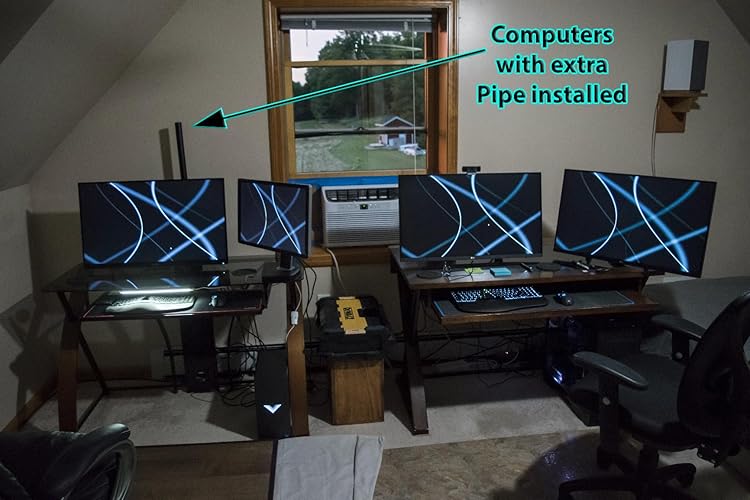
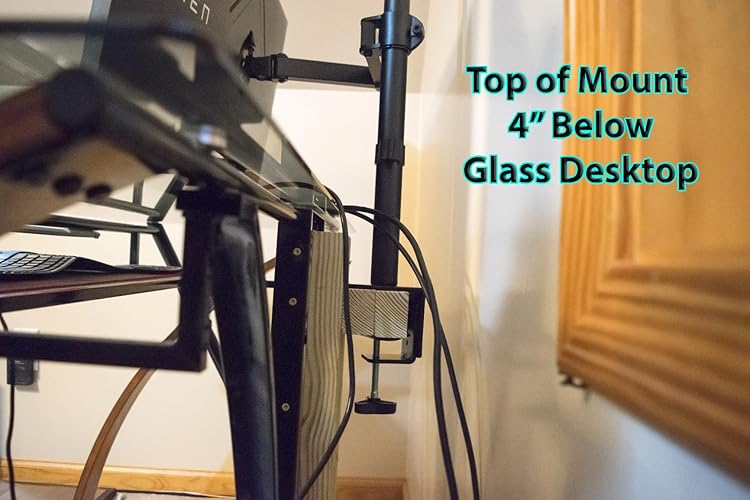
For the price, I’m pleased with it. Overall, it’s a sturdy stand with quality machining. All the screws went in easily, poorly machined products have crooked holes or bad threads. The mount base comes with 2 types, standard mount for a desktops surface. The other one is for desktops with monitor holes/cabling drilled through them. All the parts are heavy gauge and I encountered no difficulty during assembling. There seems to be a tension screw for the tilt feature. I had to tighten the screw that holds the tilt joint together because out of the box, the monitor flopped forward hard. I had to be mindful while mounting it to the main arm so it wouldn’t slam into my glass desktop. The 2 arms that allow you to move the monitor forwards and back, left and right were a little stiff, I loosened the screw a bit on the main arm, at the pole. That seemed to be all that was required. I tried to loosen the bolt where the 2 arms meet, and it wouldn’t budge. I didn’t force the issue. The instructions were adequate for assembly without covering anything else, like adjusting the tilt bolt for the weight of the monitor. So, while I think this was a good mount for the investment, there are tradeoffs to mention. I’m accustomed to swinging my monitors upward and dusting underneath them. Height is fixed by a screw on this one. I was struggling to install the monitor cables when I realized you can tilt the bottom toward you until the top or the monitor hits the pole, or, until it’s sitting nearly flat like a table. Elevated several inches above the desktop. I consider this a Pro / Con feature. Where the arm ties into the VESA mount, the fit is a little sloppy. It’s not a safety concern but I can wiggle the monitor backwards and forwards at the outer edges “About ¾ inch “before feeling any resistance from the mount. Same goes for tilting. I don’t see this as much of an issue. Normally, I don’t foresee any outside forces acting in the monitor to create a problem. However, there’s room for improvement. The rest of the machining seemed steller. I have multiple computers in different rooms. 32” monitors are used as primary monitors with 32” to 23” as secondaries. I like mine roughly 1” above the desk. That places the top of the monitor at my eye level and the ideal viewing angle. I have fully articulated, hydraulic mounts on most of my monitors. Nice ones for large heavy monitors run $75 to $100 and up. I paid $36 for this one. The……… WALI Monitor Arm Mount for Desk, Single Extra Tall Computer Desk Mount, Monitor Bracket Mount Stand Single, up to 32 inch, 22 lbs (M001XL), Black. Amazon lumps the reviews of similar products together, so I specified which mount I purchased. I’m using this one on a glass desktop, I’m attaching it to the same point I constructed from wood for a different mount. It didn’t lower the monitor low enough either. So, the top of that mounting point is 4” lower than the surface of the glass top. Despite being that low, I didn’t actually need the 32” pole / monitor mount, the 16” model would have worked. There’s still 2” of pipe available above the arm. The 32” was on sale & I didn’t know if the 16” would suffice. The pole is a screw together 2 piece. I unscrewed / removed the other pole as it looked out of place in my dual computer setup. That leaves a hole in the top of the pipe / mount. I wish they included a cap for that. The top pipe has a cap but of a different diameter. I’d like to give it 4 ½ Stars but Amazon won’t let me. I’ve got to go with 4. Height adjustments with heavy monitors and an Allen wrench can present a challenge, it’s the nature of the beast and I won’t give it 5 stars for a few reasons. The sloppy VESA mount and loose tilt motion. No instructions that cover that, or if I was supposed to loosen the arm at the pole to improve motion. I would recommend this mount to others. ... show more
Reviewed in the United States on July 18, 2024 Reviewed in the United States on July 18, 2024 by terry

  • Pole Type Monitor Mount Worth Buying Pole Type Monitor Mount Worth Buying
Size: 13"-32" Style: Single
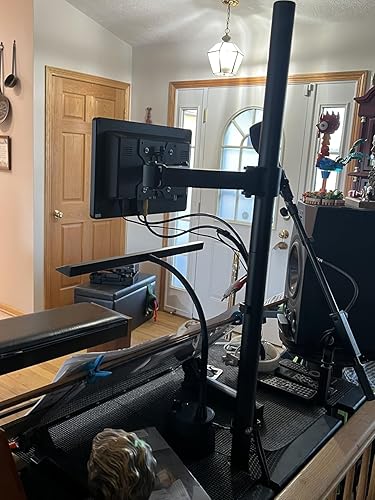
This monitor mount is heavy duty! Sturdy, well built, and can mount two different ways. I have a keyboard stand with an upper shelf. I installed the monitor mount using a center slot I had cut into the shelf and it was a breeze installing it. My video monitor is small and I wanted it just above my music rack which sits toward the front of the shelf. I have a video system combined with my keyboard so I can watch movies while practicing. I highly recommend this monitor pole mount. Great value for the money. Monitor can be moved in a plethora of positions. ... show more
Reviewed in the United States on April 21, 2026 Reviewed in the United States on April 21, 2026 by Scott Sr

  • Good value, well made, easy assembly.
Size: 13"-32" Style: Single
Well made, easy assembly, very versatile and cable management included.
Reviewed in the United States on May 11, 2026 by Mark L. S.

  • Overdo is what I do
Size: 13"-32" Style: Single
Since my 50" monitor is under the 22lb weight limit, I decided to give this arm a shot. Nobody seems to make an arm for something as big as a 50-inch even if they don't actually weigh that much. So what happened? The arm CAN support that weight and size. The manufacturer did a great job on the materials and it assembles very easily. For a regular monitor, this arm should work great. But the clamp design is not exactly sturdy enough for my bigger screen that exceeds the intended use. Clamped to the table top alone, the pole had a serious and unsafe lean to it. I ended up reinforcing my table with three layers of plywood secured with lag bolts right through the table top. Between the layers of plywood is the table top and a steel beam that the table top sits on. So this is a ridiculously strong base. With that in place, the arm does hold the monitor in the fully retracted position. Extended, there is way too much leverage and the arm starts to lean. So don't do that. It needs to stay totally retracted to the pole. To fit my monitor, I had to get VESA extension wings and those worked fine. This provides the solution I am going to use: angle irons bolted to the wings and running down to the table. I have room to do this. The angle irons will take up most of the weight and let the arm stay vertical and let me move it around. So it will be a three-legged mount instead of one. Eh. It will work fine for me until I come up with something better. Very tempted to drill holes in the clamp base and lag bolt that to the table. Nothing is going to beat that except welding it. ... show more
Reviewed in the United States on September 6, 2022 by Patrick

  • Easy and Functional for 3 Monitor Setup
Size: 13"-27" Style: Triple
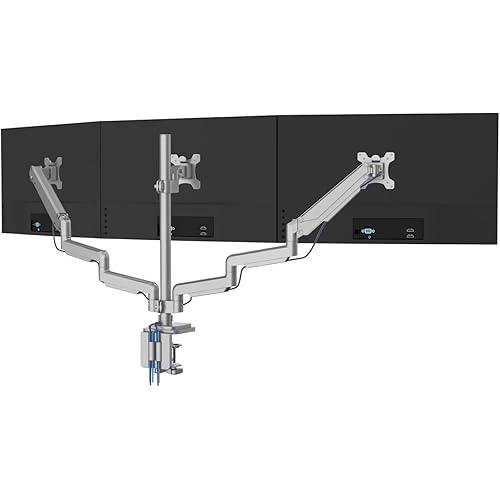
Some assembly required. Used this to re-configure my 3 monitor setup. 2 27" monitors across the bottom and a 20-ish" monitor up top. First and foremost, anything bigger than 27" on the bottom two and it will not work. The span was just barely long enough for my application and still allow for any articulation of the monitors. I would prefer to have them angle towards me just a little more, but it works. Assembly was straight-forward. Instructions were pretty clear as far as the pictures go. I didnt actually read the text, but thats pretty much how obvious it is to assemble and mount the monitors. The tubing and clamps feel heavy-duty. With the exception of a drill, drill bits, and phillips head screw driver, they provide the tools and hardware necessary to assemble, mount and adjust the monitors, to include longer screws and offsets for the monitors if required. Installation on my desk went well. I used the through hole option strictly due to the desk not being able to accomodate the clamp. Word of caution... with all three monitors hung on the mount, this thing is HEAVY and all supported by just the main tube. If you use the clamp option, make sure your desktop/tabletop will allow the clamp to fully seat. Otherwise, you run the risk of it slipping loose and you'll be wearing the monitors if you happen to be sitting in front of them when it comes down. Once all the monitors are mounted, the overall setup is surprisingly sturdy considering the size of the main support tube. Yes, it will wobble some, but overall, it works pretty well and once the clamps are locked into place the monitors stay in place. Took a couple of hours for me to get it all set up, but it could be done quicker I'm sure. All in all, me likey! ... show more
Reviewed in the United States on December 13, 2022 by Ron

Can't find a product?

Find it on Amazon first, then paste the link below.
Checking for best price...