Search  for anything...

HDMI KVM Switch 1 Monitor 2 Computers 4K@60HZ 2 Port KVM Switcher

  • Based on 563 reviews
Condition: New
Checking for the best price...
$32.99 Why this price?
Save $4.00 was $36.99

Buy Now, Pay Later


As low as $8 / mo
  • – 4-month term
  • – No impact on credit to apply
  • – Instant approval decision
  • – Secure and straightforward checkout

Ready to go? Add this product to your cart and select a plan during checkout.

Payment plans are offered through our trusted finance partners Klarna, Affirm, Afterpay, Zip, Apple Pay, and Google Pay. No-credit-needed leasing options through Acima may also be available at checkout.

Learn more about financing & leasing here.

Selected Option

Free shipping on this product

FREE 30-day refund/replacement

To qualify for a full refund, items must be returned in their original, unused condition. If an item is returned in a used, damaged, or materially different state, you may be granted a partial refund.

To initiate a return, please visit our Returns Center.

View our full returns policy here.


Availability: In Stock.
Fulfilled by Amazon

Arrives Thursday, Oct 22
Order within 20 hours and 44 minutes
Available payment plans shown during checkout

Protection Plan Protect Your Purchase
Checking for protection plans...

Color: ink Blue


Features

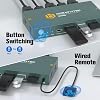
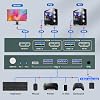
  • USB 3.0 KVM Switch with 2 Switching MethodsThis KVM Switch 2 Port HDMI can control 2 PCs to share 1 monitor with 1 set of USB 3.0 keyboard and mouse. You can quickly switch between 2 computers, and the KVM switch supports 2 switching methods: wired remote and button switching. Please Note: This product does not support hotkey switching.
  • KVM Switch HDMI with 3 USB 3.0 PortsThis HDMI KVM Switch comes with 3 USB 3.0 ports for sharing USB devices, such as keybaord, mouse, scanners, printers, U disks and more other USB devices, automatically recognize and match various display devices. This KVM Switches also supports a variety of input devices, such as PC, Laptop, PS4, etc. Compatible with a variety of computer systems like Windows 7/8/10/Vista/xp, Linux, Mac, and so on.
  • Support Ultra HD 4K ResolutionThis KVM Switch 1 monitor 2 computer can support the resolution up to 3840*2160@60Hz, and can also be backward compatible with 3840*2160@30Hz, 1920*1080P@60Hz etc., which will bring you ultra-high-definition visual senses. The 4K KVM Switch can support a maximum refresh rate of 60Hz, please pay attention to the setting of this parameter when you use it.
  • Adaptive EDID & Plug and PlayThis USB 3.0 HDMI KVM Switch can adaptive to EDID, which makes image transmission more stable and more smoothly. Support HDMI 2.0, HDCP2.2 standards. This KVM Switch 2 computers 1 monitor can be easily to install, just plug it in, no power and driver software required. When using this product, please connect all the cables.
  • After-sales ServiceThis KVM Switch 2 Port is equipped with USB 3.0 cables(1.2m)*2 , 3.5mm remote control cable (1m)*1, wired remote*1. You need to prepare the 3 HDMI cables required to connect 2 computers and 1 monitor. Our products provide lifetime warranty service. If you have any questions or concerns about our products, please contact us directly through the order number. We will provide you with a solution.

Description

This USB 3.0 KVM switch 2 port allows 2 computers to share 1 monitor and three USB 3.0 devices. You can switch between 2 computers through a button or a wired remote control. Compatible with multiple systems, such as Windows, Mac, Unix, etc. It is easy to connect and plug and play. Kind reminder: The product packaging is equipped with 2 USB3.0 cables, and you need to use your 3 HDMI2.0 cables to complete the complete connection. The "Ctrl" port is limited to connecting a wired remote control and does not support audio output. Why is the remote control not working? Please check if the remote control cable is securely connected. Note: Make sure the cable is fully inserted into the port until it is firmly seated. Why is the USB device not working? Please ensure both USB cables between each PC and the KVM switch are connected. Missing or loose connections may cause the USB devices to be unrecognized. Why is the monitor not displaying an image? Please make sure all HDMI cables between the PCs, the switch, and the monitor are properly connected. Each PC must be connected to the switch with one HDMI cable and one USB cable. 4K HDMI KVM (2 In 1 Out) 8K HDMI KVM (2 In 1 Out) 4K HDMI KVM (4 In 1 Out) 8K HDMI KVM (2 In 2 Out) 4K HDMI KVM (8 In 1 Out) 4K HDMI KVM (4 In 2 Out)

Operation Mode: Manual


Current Rating: 4 A


Operating Voltage: 5 volts


Contact Type: Normally Open


Connector Type: Usb 3.0, Hdmi


Brand: GREATHTEK


Switch Type: Push Button


Terminal: Physical


Item dimensions L x W x H: 5.2 x 2.24 x 0.71 inches


Circuit Type: 2-way


Operation Mode: Manual


Current Rating: 4 A


Operating Voltage: 5 volts


Contact Type: Normally Open


Connector Type: Usb 3.0, Hdmi


Switch Type: Push Button


Terminal: Physical


Circuit Type: 2-way


Mounting Type: Surface Mount


Actuator Type: Push Button


Number of Positions: 2


Upper Temperature Rating: 70 °C


Controller Type: Push Button


Control Method: Remote


Connectivity Protocol: Usb


Control Type: source selection, peripheral sharing


Compatible Devices: PC, Laptop, PS4, Windows 7/8/10/Vista/xp, Linux, Mac


Color: ink Blue


Item Dimensions: 5.2 x 2.24 x 0.71 inches


Unit Count: 1 Count


Number of Items: 1


Contact Material: Copper


International Protection Rating: IP00


Specification Met: Plug and Play, Hdmi 2.0, Hdcp2.2


Brand Name: GREATHTEK


Model: S7232H-A


Manufacturer: GREATHTEK


Part Number: S7232H-01


Frequently asked questions

If you place your order now, the estimated arrival date for this product is: Thursday, Oct 22

Yes, absolutely! You may return this product for a full refund within 30 days of receiving it.

To initiate a return, please visit our Returns Center.

View our full returns policy here.

  • Klarna Financing
  • Affirm Pay in 4
  • Affirm Financing
  • Afterpay Financing
  • Zip Pay in 4
  • Financing through Apple Pay
  • Financing through Google Pay
Leasing options through Acima may also be available during checkout.

Learn more about financing & leasing here.

Top Amazon Reviews


  • A
Color: ink Blue
Great product out of the box, and it continues to impress! I've been waiting a bit to write this review in order to give the product a thorough workout. I can now confidently say that this is the best KVM switch I've tried so far and is definitely a keeper. I've tried a few others, but the main issues I experienced with those were that they inconsistently seemed to stop working, or perhaps more accurately, stopped recognizing the "active" system, requiring me to execute a "switch" to the 2nd computer, even if that system was not currently powered on, and then a switch back to get the keyboard to be recognized by the active system once again. In other words, at random moments, I'd suddenly find that the keyboard stopped working. Switching away from, then back to the active system fixed the problem each time, but it was definitely an annoyance at best, and depending on what was going on / what I was doing at the time, a major hassle. I have NOT experienced that problem with this switch in several months of use ... not once, not ever. A related, though less frequent problem with some of the other KVMs ... on boot up, the monitor would not be recognized. It would feel like the computer was booting up, but the monitor would just sit there blank, the power light pulsing as it does when it's "asleep" and there is no input. Once again, cycling the "switch" would fix the problem, but I shouldn't have to do that! And once again, THIS KVM switch has not misbehaved in this fashion. In contract to those "others" ... this KVM switch includes a remote button which is a SUPER nice feature and allows me to stash the box out of sight and off my desktop. A small, unobtrusive button is all that needs to be visible and easily accessible. This is a big plus towards much neater cable management. Additionally, the "shared" USB ports have proven to be surprisingly useful. At first, I didn't expect these to come into play very much since both systems are on the local network and it's not a big deal to transfer files, etc. between them. I didn't think I'd be using the USB ports very much. But once I got this KVM, I discovered that the ports have actually been quite useful. There are times when I'm working on something that I would like to use on my other 'puter, but if it isn't booted up at the moment, I'd have to either start it up, or make a mental note to complete the transfer at a later time. No longer. Just save to a plugged in removable drive / USB stick, and access it on the other system whenever it's convenient. I've also been using this feature a lot to access media files, or portable programs that I don't necessarily want or need to have installed on both systems. The shared USB ports are fast and reliable. All in all, I've been very happy with my purchase and have recommended it to others who are in similar -- i.e., multi-computer setup -- situations. I'm delighted to have found a product that "Just Works" as it is supposed to, without minor, but annoying hiccups. And I've found that having the ability to share USB resources is actually a lot more useful than I thought it would be. Build quality is very good, and I do like the size, the metal case instead of plastic, and the clearness of indicator lights and controls. Again, a great product and one I'm happy to recommend wholeheartedly. ... show more
Reviewed in the United States on March 15, 2025 by Victor Zaveduk

  • Great KVM Switch with the Right Setup.
Color: ink Blue
For those having issues, let me start with a primer on how to setup your devices to ensure this or any USB switch works properly for you. First, ensure that Wake on USB is enabled. This may be a default setting in your bios, so nothing more for you to do, but what it does is, allow a USB device to wake the computer. Next, if you have a Dell pc or laptop, ensure that USB Power Share is enabled. What this does is that it ensures that the switch is powered through USB when switched on that device even if that device is powered off, hibernating or in sleep mode. For Dell PCs these Power Share USB ports will be distinguished by a lightning bolt or battery symbol. If your pc or laptop is another make refer to online documentation to determine if the USB ports are powered when the device is asleep, hibernating, or off. In most cases, these features will only be available on USB 3 ports. The second one is really the most important one. You absolutely need one USB port on each device that can provide power to switch. If you do not have that, on one or more devices, this switch will not work as you would expect and you will need to manually wake your devices. The wake on USB just ensures that your pc, when turned off, will wake when you move the mouse or touch the keyboard. In many cases, this may not work with USB 2 ports if those ports cannot supply power to the switch in sleep or hibernate modes. You will know if you have the correct port selected if, when your device is off, asleep or hibernating, the light on the switch is on when switched to that device. If it is off, that USB port has no power when the device is in a low power mode or off. That said, my biggest complaint is that there is a slight delay when switching. Eventually I will get used to it. The wire length fir the included wires was perfect, the remote control, once properly connected worked great, and overall once I got the issues resolved with USB power on both systems, it worked as expected. It's a small box, so it looks small. A little weight to the box would be nice because the wires manipulate the box so it doesn't sit flat. I don't yet see flickering, but I had flickering with my set-up before the switch was introduced. The monitor light level is fine, the box light level is OK. I general, barring any other issues, I would purchase this switch again. ... show more
Reviewed in the United States on November 27, 2025 by LB

  • my current kvm switch
Color: ink Blue
this is my current kvm switch. it works fairly well. i run a setup with 2 laptops in clamshell mode. it is usually able to wake the laptops from sleep. every once in a while i have to disconnect and reconnect the kvm connection to wake my laptop from sleep via a peripheral connected to the kvm switch. also, every once in a while, when the laptop wakes from sleep, the resolution on the display is totally wrong and the only fix i've found for it has been to disconnect and reconnect the kvm connection. since both of these issues happen pretty intermittently, i consider this kvm switch usable. one thing to keep in mind is that this kvm switch is going to have a ton of cables connecting to it, so i don't think it's possible to have it in plain sight without making your desk look cluttered and disorganized. if all the ports were on the backside of the kvm switch, then at least it could sit on the desk with a clean front and all the wires coming out the back, but this switch has 3 usb ports on the front, so unless those 3 ports are occupied by small, wireless usb dongles, you'll have wires coming out the front and back of the switch. i got around this by mounting the switch out of sight so i dont have to look at it. but because there's no wired/remote button, i also have to mount it within arms reach. adding a wired/remote button would have been a feature for this product; or at the very least, moving the 3 usb ports on the front to the back so that there's a better chance of hiding and managing the cables that way. since i found workarounds/solutions to my issues with this product, i consider this a viable kvm switch and would recommend it, given the caveats listed. ... show more
Reviewed in the United States on January 4, 2024 by L. C.

  • Great value for such a handy device. Eliminates redundant monitors, keyboards and mice.
Color: ink Blue
This is a fantastic product. Works great for switching between my desktop and my work laptop so that I can utilize my desktop's large monitor, keyboard, and mouse. Switching between the two computers is fast and seamless and I can't recommend this enough if you have a similar situation, where you need to switch between two CPUs and don't want to crowd your desk with redundant or excessive equipment. Set up is easy and the included button/switch can easily be mounted in some out of the way location. I can't speak towards Apple products, but this works flawlessly with my Windows PCs. ... show more
Reviewed in the United States on July 26, 2026 by Mr. Noles

  • Worked for less than a month, suddenly died
Color: ink Blue
This KVM has had very light use and it's already broken. When attempting to wake the display or when switching from one display to another the image flickers, the monitor disconnects in device manager and this basically repeats until you unplug both USB inputs and both HDMI inputs. While this flickering behavior is happening, I also observe that my USB keyboard is lagging heavily during keystroke entry. Unplugging the KVM from all cables, and waiting, will allow you to eventually bring up ONE of the PCs -after much flicker from the display while it tries to bring up the image. I've tried known good cables different mouse and keyboard, a different display- SAME RESULT. This thing cooked itself. Going back to a passive HDMI switcher and manually moving the mouse and keyboard resolves the issue completely -I tested over several hours to confirm. Something inside the KVM died.whixh suggests a manufacturing defect. I'll reach out to the seller for supper and update here if/when I hear back. ... show more
Reviewed in the United States on August 13, 2026 by AmazonAnonCash$$

  • Solid, high quality unit
Color: ink Blue
I love this. It works so well. The remote button to switch computers works very well. High quality, nice feel, silent. I sent back a couple different switches before I found this gem. High quality, attractive, makes my life easier. I've had it for several months and use it everyday.
Reviewed in the United States on September 4, 2026 by John Smith

  • Great KVM Switch for Dual Computers
Color: ink Blue
This KVM switch works exactly as expected! It was easy to set up, and switching between two computers is quick and seamless. The 4K display quality looks great, and I haven’t noticed any lag with my keyboard, mouse, or HDMI connection. It saves a lot of desk space and makes working with multiple devices much more convenient. Overall, it’s a great value for the price, and I would definitely recommend it to anyone who needs to switch between two computers easily. ... show more
Reviewed in the United States on July 30, 2026 by Djanella

  • great little KVM switch
Color: ink Blue
Worked like a charm, switched out between Linux and Windows workstations with ease. Be sure your monitors have HDMI (most newer ones do).
Reviewed in the United States on September 2, 2026 by Jim Sage

Can't find a product?

Find it on Amazon first, then paste the link below.
Checking for best price...