Search  for anything...

GhostCover Original Premium Ultra Thin Keyboard Cover Protector, Compatible with 2021-2026 MacBook Pro 14"/16" M1-M5 Pro/Max, 2022-2026 M2-M5 MacBook Air 13"/15", US ANSI Layout, Translucent

  • Based on 4,169 reviews
Condition: New
Checking for the best price...
$12.92 Why this price?
Save $9.03 was $21.95

Buy Now, Pay Later


As low as $3 / mo
  • – 4-month term
  • – No impact on credit to apply
  • – Instant approval decision
  • – Secure and straightforward checkout

Ready to go? Add this product to your cart and select a plan during checkout.

Payment plans are offered through our trusted finance partners Klarna, Affirm, Afterpay, Zip, Apple Pay, and Google Pay. No-credit-needed leasing options through Acima may also be available at checkout.

Learn more about financing & leasing here.

Selected Option

Free shipping on this product

FREE 30-day refund/replacement

To qualify for a full refund, items must be returned in their original, unused condition. If an item is returned in a used, damaged, or materially different state, you may be granted a partial refund.

To initiate a return, please visit our Returns Center.

View our full returns policy here.


Availability: In Stock.
Fulfilled by Amazon

Arrives Friday, Jul 24
Order within 15 hours and 55 minutes
Available payment plans shown during checkout

Protection Plan Protect Your Purchase
Checking for protection plans...

Color: Translucent Tinted


Features

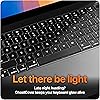
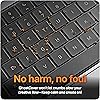
  • New! Industry's first tinted protector with high transparency to preserve the elegance of your MacBook, and allows keyboard backlight to shine through.
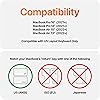
  • Designed for 2021 2022 2023 2024 2025 2026 Apple Silicon M1/M2/M3/M4/M5 Pro/Max MacBook Pro 14"/16", 2022 2023 2024 2025 2026 M2/M3/M4/M5 MacBook Air 13"/15", US Keyboard Layout Only
  • Industry Leading 0.12mm (0.005 in.) thickness to minimize typing interference
  • Round cutout for Touch ID button
  • Made with premium engineering grade TPU material. Completely washable and reusable

Description

Introducing industry's first tinted keyboard protector! Made with gray tinted Thermoplastic Polyurethane (not silicone), GhostCover provides unobstructed protection for your Macbook keyboard against spills, dust, and other contaminants.

Brand: UPPERCASE


Color: Translucent Tinted


Compatible Devices: MacBook Pro 14" with M1/M2/M3/M4 Pro/Max (A2442 A2779 A2918 A2992)


Compatible Phone Models: MacBook Pro 14" with M1/M2/M3/M4 Pro/Max, MacBook Pro 16" with M1/M2/M3/M4 Pro/Max, MacBook Air 13" with M2/M3 See more


Material: Thermoplastic Polyurethane


Brand: UPPERCASE


Manufacturer: UPPERCASE Designs


Unit Count: 1.0 Count


Size: M1/M2/M3/M4 Pro/Max MBP 14/16 and MBA 13/15


Color: Translucent Tinted


Pattern: Solid


Shape: rectangular prism


Finish: Matte with Slight Gloss


Compatible Devices: MacBook Pro 14" with M1/M2/M3/M4 Pro/Max (A2442 A2779 A2918 A2992)


Compatible Phone Models: MacBook Pro 14" with M1/M2/M3/M4 Pro/Max, MacBook Pro 16" with M1/M2/M3/M4 Pro/Max, MacBook Air 13" with M2/M3


Additional Features: Reusable


Enclosure Material: Thermoplastic Polyurethane


Frequently asked questions

If you place your order now, the estimated arrival date for this product is: Friday, Jul 24

Yes, absolutely! You may return this product for a full refund within 30 days of receiving it.

To initiate a return, please visit our Returns Center.

View our full returns policy here.

  • Klarna Financing
  • Affirm Pay in 4
  • Affirm Financing
  • Afterpay Financing
  • Zip Pay in 4
  • Financing through Apple Pay
  • Financing through Google Pay
Leasing options through Acima may also be available during checkout.

Learn more about financing & leasing here.

Top Amazon Reviews


  • Good keyboard cover
Color: Clear
Many years ago I literally wore out the markings on the keys on my keyboard. Ever since then, I've used a keyboard cover to protect my keys. If it gets worn out, I replace it. And when I buy a new computer, of course, I must get a new keyboard cover, as the old one never fits. This one seems very sturdy in spite of the fact that it's very thin. I've had this one almost two years now, and it still looks new. It fits my MacBook perfectly, and my keyboard still looks like new. I am very, very happy with it; and I hope to be able to get another just like it if/when I replace my laptop. ... show more
Reviewed in the United States on June 13, 2026 by Rae-Rae

  • BEST CASE FOR YOUR M1 MB PRO RIGHT NOW
Color: Clear
First I would like to say thanks to the UPPERCASE customer support. I initially bought the keyboard cover for my butterfly keyboard 2019 MB pro and was pleased with how it worked for me over the years and so when I got this new M1 pro MB I came straight to ghostcover for this laptop as well. Initially I purchased it from this same listing and when I got it I was not satisfied. The edges around the individual keys felt very rigid and curved and I was having an ABSOLOUTELY TERRIBLE typing experience. I checked the other reviews here and I saw I wasn't the only one who was feeling this way. So I reached out to the customer service and told them I was not satisfied with their product this time around as I was with the 13 inch MP pro. They explained that the keys on the new MB Pro were slightly curved by default and that they aren't flat like the butterfly keyboard so the cover is also slightly curved to fit the keys but still sent a replacement from their warehouse which I got in three days to see if I will have a better typing experience. I would like to say that this new one feels PERFECT. Its everything the one before wasn't. It's a perfect fit. It doesn't wobble when typing. I tried tilting the laptop upside down it doesn't fall off unless u try really hard to make it fall. I blow air to remove tiny dust around the laptop and the 2019 cover sometimes used to come off. This time it doesn't even move. Most importantly, the edges of the keys are NO LONGER RIGID OR CURVED/RAISED. Really great typing experience and I am extremely satisfied. But if u want the best typing experience then I would still recommend no cover at all. These new keyboards are no longer butterfly keys and sometimes trying to protect your laptop too much comes in the way of your luxury experience that this expensive machine has to offer since MBs are made of quality materials that feel amazing to the touch. But if u must get one, this is the one. Go for it! ... show more
Reviewed in the United States on April 4, 2022 by Reddysaketh47

  • Perfect Fit, Keeps Keyboard Clean protected Without Interference
Color: Translucent Tinted
This keyboard cover is perfect for keeping my computer clean while still allowing full use of the keyboard. It’s sturdy but ultra-thin, so it doesn’t interfere with typing at all. I can still clearly see the keys, and the cover doesn’t affect responsiveness. It fits well and stays in place, providing good protection from dust, crumbs, and everyday wear without feeling bulky. Overall, it does exactly what it’s supposed to do and works great. I’m very happy with this purchase and would definitely recommend it if you want to protect your keyboard without changing how it feels or functions. ... show more
Reviewed in the United States on February 7, 2026 by Terri

  • It's not perfect, but I believe it's the best out there.
Color: Translucent Tinted
I had a Ghostcover on my 2017 MBP for over 4 years. It got cloudy slowly over time, but it never warped or got stiff. Typing was a breeze and it kept my keyboard working WAY longer than most 2017 models because dust/dirt couldn't get into the mechanisms. I got a new MBP this year and chose the tinted cover this time around. It looks great on the keyboard and fits perfectly; however, it's not as good of an experience. Because the newer macs have taller keys, the ghostcover has to bend a lot more to depress the keys. This is a much poorer typing experience than with my old macbook. It feels gummy and it's so easy to mistype. There isn't really anything wrong with the keyboard cover itself, it's more just the way the new macs are designed. I use a mechanical keyboard 90% of the time, and you're really not supposed to use keyboard/camera covers with these new macs anyways. I only keep the cover on when I'm working at my desk and the computer is open. I try my best to remove the cover anytime I shut the laptop, but the couple of times I've forgotten the screen has been fine. I don't use it at all when I'm on the go and relying on the Macbook keyboard for typing. Overall I still think it's the best keyboard cover you can get for Macs and it's already kept a lot of dust and cat hair out of my lovely new machine. If you plan to keep this on 24/7 though you're going to be disappointed. ... show more
Reviewed in the United States on December 11, 2022 by Sam

  • Don't buy cheap -- buy THIS!
Color: Clear
I ordered this "clear color" protector for my Macbook Air M4 13" laptop. Also ordered others from another popular manufacturer that were less expensive. Compared to the others, this GhostCover Premium Ultra Thin Keyboard protector was just that -- premium quality and ultra thin! Don't even know it's on the keys. Aligns perfectly with the keys and is pretty much invisible other than making the keys appear slightly less black. I read complaints about some who described it as "stiff plastic." Pretty sure they simply placed the (also clear) HOLDER of the cover right onto their keyboard and never bothered to peel the actual thin cover OFF of the holder it was shipped in! Because of this, I was tempted to give this a 1-star rating so that people (like me) who generally only read the 1-star ratings when making purchases would more likely dismiss the inaccurate evaluations. The keys seem to have no loss in sensitivity when typing. I could detect absolutely no evidence that the cover failed to close any less than without the keyboard cover. Surprisingly, following many closures of the laptop cover I can''t even see any keyboard patterns leaving smudges on the screen. Despite this being the thinnest protector I could find online, I suspect with many days of use I may start to see "impressions" on the screen from the oils on my fingers. Periodic cleaning of the keyboard cover would be easy enough to prevent such an issue should it arise. Others have suggested taking off your keyboard cover whenever you close the laptop -- a suggestion I find impractical and unnecessary for this product. I will edit this review after long term use if I find otherwise but I expect the durability and appearance to remain exceptional. Others have warned about overheating possibilities caused by keyboard covers. After hours of use, my battery is at 75°F. I don't see the problem. ... show more
Reviewed in the United States on May 18, 2026 by WinterCamper

  • This is a necessity!
Color: Clear
I'm very impressed by this keyboard cover! I've gone years without using one but, after having multiple Macbook Airs suffer keyboard failures (even on models that allegedly don't have the problematic butterfly keys), I decided that I needed to try a preventative measure. My expectations weren't that high, but the Ghost Cover immediately amazed me! Installation was almost too easy! I laid it on my M3 Macbook Air keyboard and it immediately fell into place almost as if there magnetism. I didn't use the stickers or any kind of adhesive and don't feel like it's necessary. The cover fits like a glove and is barely visible. The only visual difference is that the keys look more gray than before, but anyone not familiar with Macbooks would never know there's a cover without looking closely. Yes, the feel of typing is affected by the cover. No keyboard cover is going to have the same feel as if there's no cover at all. That said, this cover really doesn't get in the way of typing. If I really needed to whip out an essay ASAP, I *might* remove the cover, but for day to day purposes the typing is totally comfortable. It just takes a bit getting used to because the cover makes the keys feel a little more stiff. I'm able to type at 95 WPM without having to struggle or be conscious of the cover. As mentioned in the title, I'm now convinced that a keyboard cover is a necessity. Since it doesn't allow random dirt and dust to fall into the keyboard, it's very obvious how much dirt can get in there and potentially mess things up. Honestly, I don't understand what the naysayers are talking about. This seems about as good as it gets in terms of protecting your Macbook keyboard. ... show more
Reviewed in the United States on October 27, 2024 by Ten Bitcomb

  • Space Black M3 M4 Max? Best thing you'll buy for it!
Color: Clear
We have Space Black M3 & M4 Max MacBook Pros and my team loves them - we use Parallels & Windows 11 Pro on them to make our clients in aviation and radio frequency work very happy. But in just weeks on some and now all after 2 months + normal use have ugly very noticeable shiny wear on spacebars, and keys WAY before there should be any at all. For a $4k laptop. (With SDD drives that are an introduction to extortion pricing in retail) It's not ok, even with Space Black. Ghost Cover, said two of our pilots. Both sad they wouldn't go back to not having them I had low to no hopes but sometimes you find a simple, excellent solution for a problem. This Ghost Cover is the BEST thing I've bought for our Macs. (and I love Thunderbolt external drives, displays) All Ghost Covers we have fit every M3/M4 16" keyboard presicely - literally like they were made by Apple. No slipping or movment when typing, the cover stays down on the keys even with my clumsy hit and miss typing and no edges or corners are sticking up or inconsistent. It instantly is down with they keypress travel and return up and does this without feeling slow or flimsy or changing the feel to any significance. Nothing to notice even watching it work. The feel and material is just excellent - no cheesy, cheap or plasticky anything. Still feels like the cool machined solid Apple keys to me. Zero stickiness and I mean none whatsover. It's thin enough to get out of the way and I can easily feel the desired tactile, crisp and fast reponse of the Apple keyboard. I forget it's there working which I would not have believed possible and I am seriously selective. No issues closing the display, we've checked that for any impacts, normal closing etc contact to the display and no issues at all. Do these covers impact air flow cooling or cause heat? These M3 & M4 Max machines don't really get hot even running full flight models, simulations, antenna modelling in Matlab etc. or even warm plugged in usually. They can feel a little warm if in settings, Battery you change it from Automatic to High Power but checking temps with cover and without at High Power and Automatic there is no impact. Outstanding product, Apple quality and we have no affilation with Ghost Cover just an outstanding solution! Hope this is useful, stay well and safe! ... show more
Reviewed in the United States on August 20, 2025 by Knotsofast

  • Perfect Fit, Protects Keyboard, Slows Typing, Screen Protector Compatibility WARNING
Color: Translucent Tinted
This is my first keyboard cover. I purchased it for a brand new M4 and have been using it daily for FIVE months. It works well for me and I purchased several more (buy 3, save 15%) today to have on hand. The keyboards on my last few MacBooks looked terrible after a few years of daily use. When I peel off this cover, my M4 keys look brand new! The cover itself is NOT perfect though. If you want this badly enough, you can make it work for you. Here are the details... This keyboard cover is a perfect fit for my 2024 14-inch MacBook Pro M4 (US Keyboard). Be aware you may need a different version of the cover if you have a different keyboard layout. This keyboard cover has a short break-in period. I am a 100+ WPM touch-typing software developer. Huge impact and adjustment the first week, but this cover DOES soften up over time. Just took a Typing Racer test and scored 99 WPM 100% accuracy with this keyboard cover. Many reviews mentioned the cover leaving marks and dirt on the screen. I can see why. The keyboard cover collects oils and debris (instead of the keyboard), which is what I want. The center of each key that I use most frequently now has a bubble in the cover. I imagine those raised bubbles would also leave marks on my keyboard. I tried to avoid this by adding the following screen protector: Supershieldz MBP 14 M4 Tempered Glass Screen Protector http://amazon.com/dp/B09P8VW85B WARNING: This keyboard cover is NOT compatible with the screen protector listed above when used on a 2024 MBP 14-inch M4. After I installed BOTH products together, I discovered that my MacBook would TURN OFF when the lid was closed and the laptop was in my backpack. I determined that the screen protector and keyboard cover were pushing down on the power button enough to shut off the laptop. I could probably cut out the keyboard cover for the power button to resolve this, but I prefer to keep all keys covered. Instead, I take two sheets of letter-sized paper, fold them in half, and drape the folded sheets over the top of my screen before I close my screen. Folding and draping keeps the paper near the outer edge of the screen (furthest from the screen hinge). Two pieces of paper between the screen and the keyboard still allow the MacBook to fall asleep while completely eliminating the accidental power off issue. While this hack goes against everything Mac, so does adding a keyboard cover and a screen protector. I'll keep using the folded paper method until I come up with a better option. The glare took getting used to, but the screen protector itself does work well. The combination of this keyboard cover and that screen protector work for me as long as I'm willing to use the folded paper hack. I might look for a think palm protector instead. The extra thickness could potentially help keep the screen from closing far enough to push down on the keyboard cover and power button? HTH and Good luck! Jason ... show more
Reviewed in the United States on February 1, 2026 by J. Klein

Can't find a product?

Find it on Amazon first, then paste the link below.
Checking for best price...