Search  for anything...

UGREEN 8K Displayport KVM Switch 2 in 1 Out DP1.4 with 4 USB 3.0 Ports(3 USB-A + 1 USB-C) Support 8K@60Hz 4K@240Hz Share 1 Monitor Keyboard Mouse U-Disk Printer, with 2 DP Cables, 2 USB A to C Cables

  • Based on 595 reviews
Condition: New
Checking for the best price...
$69.98 Why this price?
Save $16.01 was $85.99

Buy Now, Pay Later


As low as $11.66 / mo
  • – 6-month term
  • – No impact on credit to apply
  • – Instant approval decision
  • – Secure and straightforward checkout

Ready to go? Add this product to your cart and select a plan during checkout.

Payment plans are offered through our trusted finance partners Klarna, Affirm, Afterpay, Apple Pay, and PayTomorrow. No-credit-needed leasing options through Acima may also be available at checkout.

Learn more about financing & leasing here.

Free shipping on this product

FREE 30-day refund/replacement

To qualify for a full refund, items must be returned in their original, unused condition. If an item is returned in a used, damaged, or materially different state, you may be granted a partial refund.

To initiate a return, please visit our Returns Center.

View our full returns policy here.


Availability: 20 left in stock
Fulfilled by Amazon

Arrives Sunday, Jul 19
Order within 12 hours and 16 minutes
Available payment plans shown during checkout

Protection Plan Protect Your Purchase
Checking for protection plans...

Features

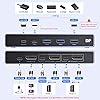
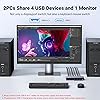
  • Displayport KVM Switch 1 Monitor 2 Computers: This DP KVM switch allows 2 computers to share a monitor and 4 USB 3.0 devices such as a set keyboard, mouse, hard drives, U disk and printer, it's not only a DisplayPort Switch, but also is a keyboard mouse switch. You can easily switch between two hosts, which helps to maximize productivity. NOTE: Must Connect two USB A to C cables for the Power Supply and data transfer. It is NOT a USB-C KVM Switch
  • UHD 8K@60Hz Resolution: This DP 1.4 KVM switches 2 port supports resolution up to 8K@60Hz and backward compatible 4k@240Hz, 4k@120Hz, 4K@60Hz, 2560*1440@60Hz, 1080p and below. Providing clear picture quality images, and lag-free transmission. It also supports DP1.4. NOTE: If need to achieve 8K@60Hz resolution, in addition to the computers and monitors needing to support 8K, your 8K DP1.4 cable input and output should be within 3.3FT/1m AWG30
  • KVM Switch Displayport with 4 USB 3.0 Ports: This KVM DisplayPort 8K has 4 USB 3.0 ports (3 USB-A+1 USB-C) for sharing USB flash drives, printers, mobile hard drives, U disk, and other USB 2.0 and USB 3.0 devices. USB 3.0 offers data transfer speeds up to 5Gbps, while USB 2.0 is only 480Mbps. It allows faster file and picture transfer to make work and life easier and more convenient. NOTE: Please Ensure USB C Charging to the power source when connecting high-power equipment such as hard drive
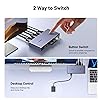
  • Driver-Free & Package List: This DisplayPort KVM switch 2 port box supports Windows 11/10/8.1/8/7, Mac OS, and Linux(Ubuntu) systems. Just plug and play, driver-free. It is widely applied for Enterprise, Office, Multimedia Teaching, Meeting Rooms, Gaming Rooms, Research Tests, etc. Package List: 1* DP KVM Switch, 2* USB A to C Cables, 2* DP Cables, 1* Desktop Controller, 1* User Guide
  • Important Notes: 1, Please Must connect both two USB A to C cables for the power supply. 2, USB-C power cable or power adapter is NOT INCLUDED. 3, To avoid incompatibility, we recommend that you do not use it with the docking station. 4, It is NOT a USB-C KVM SWITCH. 5. It is NOT an HDMI KVM switch and it does NOT have HDMI interface

Color: black


Connector Type: DisplayPort


Brand: UGREEN


Compatible Devices: keyboard, mouse, U disk, printer, hard drives, USB 3.0 devices, monitor


Cable Type: DisplayPort


Connector Type Used on Cable: DisplayPort


Compatible Devices: keyboard, mouse, U disk, printer, hard drives, USB 3.0 devices, monitor


Cable Type: DisplayPort


Number of Ports: 5


Power Source: USB


Smart Home Compatibility: Not Smart Home Compatible


Color: black


Brand: UGREEN


Manufacturer: UGREEN GROUP LIMITED


Mfr Part Number: 25962


Model Number: 25962


Unit Count: 1.0 Count


Frequently asked questions

If you place your order now, the estimated arrival date for this product is: Sunday, Jul 19

Yes, absolutely! You may return this product for a full refund within 30 days of receiving it.

To initiate a return, please visit our Returns Center.

View our full returns policy here.

  • Klarna Financing
  • Affirm Pay in 4
  • Affirm Financing
  • Afterpay Financing
  • PayTomorrow Financing
  • Financing through Apple Pay
Leasing options through Acima may also be available during checkout.

Learn more about financing & leasing here.

Top Amazon Reviews


  • Capable little KVM
Can confirm that this KVM works with the following setup: M1 Max MacBook Pro and Lenovo laptop both running usbc to dp 1.4 (ugreen) to the KVM. Mac is connected via an anker thunderbolt 4 cable to the KVM while the Lenovo is using the included usb a to c cable. Juicing it with 18w is sufficient it seems since I get picture and surprisingly, the usb a ports output enough power that my MX Master 3S detects a charge! KVM is connected using a standard DP 1.4 cable to the monitor. I didn’t use the included one because it’s way too short and too thick. The KVM is metal, is surprisingly small compared to my 4 in 1 out HDMI 2.1 switch but is comparable in weight. Looks and feels well made but only time will tell. My monitor is a Lenovo curved ultrawide with 3440 x 1440 pixels and both machines are able to hit the max 144hz via this KVM with DP 1.4 cables. The wired remote is a single button with no indicator so you have to look at the dock itself to see which device you have switched to. The indicator lights on the decide itself is very small and too close together which might be an issue for some. Very pleased with the product so far. Will update if anything else changes. Update: the KVM pulls around 0.027A from the outlet and I was not able to get it to pull anymore by loading up the USB ports with peripherals. It also seems to work just fine with it unplugged. The KVM does get its power from the connected laptops because if I dont connect it to the laptop via USB C, the KVM will not charge my mouse, even if I connect it to the outlet. Since my setup only needs it to drive a 3440 x 1440 @ 144hz monitor, I suspect that higher definition/ refresh rate might result in power draw from the outlet. The product can certainly do with more detailed documentation. ... show more
Reviewed in the United States on March 3, 2024 by WY.C

  • Works Perfectly!
First Day of Use: This little guy is so far perfect for my setup! Extremely easy install for connecting my iMac and MacBook Pro to a LG Ultragear 38" monitor, along with an apple keyboard (wired via USB-C), a G502 gaming mouse, and a Wacom Intuos Pro tablet. Now I can use all my best/fav peripherals seamlessly between both computers. As a bonus, the LG monitor has a built-in USB hub, so I was able to plug that into the KVM switch via USB-A and have my desktop speakers plugged into the back of the monitor, and now I can play music from either computer thru the speakers via the switch/monitor hookup. I did go ahead and get a USB-C cable and wall plug to power the switch as it does not come with its own power cable, and some reviews mentioned that it didn't get enough juice from just the two computers to power it properly. I also had to get an extra USB-C to Displayport cable because the MacBook doesn't have a standard Displayport plug. In total I spent $90 for the switch and 2 extra cables, totally worth it and way less than a lot of KVM switches out there. I'm able to get full resolution at 144Hz on both machines with no issues (so far). As long as the switch continues to work as well as it has out of the box, this thing is a huge time and headache saver. No more multiple keyboards or mice, and no more unplugging/plugging cables!* ... show more
Reviewed in the United States on April 1, 2025 by Markelm

  • Great when it was working.
This KVM works great when it was working. This KVM switch draws power via its USB C connections to the either host PC/laptop. This is good b/c you don't need to connect an external power supply to the switch. However, IMO, it probably was the same reason it started acting up just after a few months. The KVM switch all sudden seems starting losing power and drop the connection. It even switched back-and-forth between two ports at times until the power sources (USB C) were removed. I have contacted the manufacture to see if they could provide a warranty replacement. At the moment, I don't recommend this product. ... show more
Reviewed in the United States on January 3, 2025 by Alex

  • Great KVM, but with some long term durability concerns.
I purchased this KVM switch to streamline my setup, allowing me to use two computers with dual monitors and several USB peripherals. Initially, the switch worked as expected, seamlessly enabling me to switch between machines while sharing the same keyboards, mice, and monitors. For anyone with a multi-computer setup, this KVM switch is a convenient, space-saving solution. However, after about seven months, I've noticed some issues that raise concerns about its durability. My primary computer has recently started to get stuck in a continuous VGA boot sequence whenever the KVM switch is connected, preventing it from booting up properly. Disconnecting the KVM is the only workaround I've found, which is inconvenient and defeats the purpose of having the switch. Additionally, my USB headset’s receiver has started producing crackling sounds when plugged into the KVM. Moving it directly to my motherboard’s I/O panel resolved the issue, indicating that the KVM's USB ports might be the cause. Windows has also begun to issue warnings about USB connectivity issues with the KVM, which is worrisome for long-term use. **Overall:** It’s a functional product, especially for those needing a streamlined setup, but I’m concerned about its longevity and reliability over time. If you’re looking for a durable KVM switch that you can rely on for years, you might want to consider other options. ... show more
Reviewed in the United States on November 11, 2024 by Lee Clay Co

  • Works great with some minor troubleshooting required for users switching between iMac and PC.
Overall, a great product with a minor caveat. The KVM switch can switch between my PC and iMac and supports all my peripherals (Keyboard, Mouse, Macropad, USB-C Speaker), allowing them to be shared between the two computers. The only issue I ran across was when switching from PC to iMac. The display would not recognize the KVM being connected. I had to unplug and replug the usb-c/display port cable from my Mac to regain a picture. Eventually, I solved this by connecting the iMac to a powered hub (the Ugreen Revodok Max, to be exact) and then connecting the hub to the KVM. Now the switch from PC to iMac works seamlessly. Despite a very minimal delay. Otherwise, switching from my iMac to PC is flawless. Just keep this in mind if you're an iMac user and don't want to reach behind your iMac to unplug and replug your cable for every switch back to iMac. Besides that, it's very responsive on both computers, and the video output on my display is exactly as advertised. ... show more
Reviewed in the United States on October 4, 2025 by Michael

  • Works great for PC, Mac and Chromebook - perfect upgrade from my TESmart HDMI (with one caveat)
I had been using an HDMI and USB-A (2.0) KVM from TESmart but after upgrading my monitor and computers, I wanted to have a USB-C and DisplayPort solution. This worked perfectly. Feels well built - metal construction. The included cables seem to be quality. The only caveat is that the USB-C does not seem to accept DP signal so you need to use the included DIsplayPort cables and the USB-C rather than just the USB-C cable. But since my laptops go through a hub first, it was not a problem. The remote switch is great as well as I can put the switch button in the most convenient place while having the KVM is the most appropriate place. ... show more
Reviewed in the United States on October 24, 2024 by Robert Horvick

  • ok for the money.
So I bought this to switch between my school (Macbook) and play computer (Windows gaming PC). I was a little skeptical, given that usually at this price, KVMs are hit or miss when it comes to quality. Especially since I was going to output to a larger, high-resolution and high refresh rate monitor (G9 OLED). While everything works (for the most part), setting up this KVM was terrible. I spent almost two hours troubleshooting problems, from no display outputting from both my Mac and PC, my peripherals not connecting, and adjusting monitor settings. It finally worked in the end. When it comes to visual quality, I can't seem to find any loss in quality. All my games look the same as before, so no complaints there. When it comes to flickering or the screen going black, it only happens intermittently. It happens most when switching between computers. It happens very rarely, but when it does happen, it goes away quickly. I have also noticed it is very evident when taking the display cables out of the KVM itself and reconnecting. The KVM itself is built well, and the included cables are solid. I feel, for the value, I think it's good if you don't mind the possibility of tinkering here and there. ... show more
Reviewed in the United States on January 26, 2025 by Marriom

  • EXCELLENT! especially if you're switching between mac & pc
all the other kvm's i've tried (including one that was 3x more expensive) have all kinds of issues with syncing and cabling, most especially in my situation where i'm sycing a mac and pc to a monitor. This is the ONLY one that worked FLAWLESSLY immediately out of the box. Before switching to this one i made sure to replace my cables to see if that was the issue, and i invested in expensive certified cables. Nothing solved the problem until i got this specific kvm. This is the one you're looking for, especially if you're syncing across two completely different OS's like mac and pc. make sure to use certified cables (actually certified) no matter which kvm you buy. They are more expensive but are completely worth it. Here are links to 3 different cables i personally tested and they work perfectly between my mac and pc and this kvm. I'm currently using the first one. side note: I intentionally am using the 16k cables even though I have no need for that high of a cable transmission speed for two reasons: 1. Future proofing. When i replace either the monitor or the KVM I won't have to replace cabling for many years to come 2. It's not that much more expensive 3. Those cables are built absolutely rock solid when you get the really thick, braided kind https://www.amazon.com/gp/product/B0BTMB42VQ/ref=ppx_yo_dt_b_search_asin_title?ie=UTF8&th=1 https://www.amazon.com/gp/product/B0CBMKRXDX/ref=ppx_yo_dt_b_search_asin_title?ie=UTF8&th=1 https://www.amazon.com/gp/product/B078HVDMW2/ref=ppx_yo_dt_b_search_asin_title?ie=UTF8&th=1 ... show more
Reviewed in the United States on December 1, 2024 by Ray Junior

Can't find a product?

Find it on Amazon first, then paste the link below.
Checking for best price...