Search  for anything...

TreasLin VSD Stream Dock Stream Controller Deck with 12 Customizable Macro Keys to Trigger Actions in OBS Twitch YouTube for Content Creators Streaming Gaming Compatible with PC & Mac N3 White

  • Based on 22 reviews
Condition: New
Checking for inventory...

Notify me when this product is back in stock

$49.99 Why this price?
New Year Deal · 17% off was $59.99

Buy Now, Pay Later


As low as $8.33 / mo
  • – 6-month term
  • – No impact on credit
  • – Instant approval decision
  • – Secure and straightforward checkout

Payment plans are offered through our trusted finance partners Klarna, Affirm, Afterpay, Apple Pay, and PayTomorrow. No-credit-needed leasing options through Acima may also be available at checkout.

Learn more about financing & leasing here.

Free shipping on this product

FREE refund/replacement until Jan 31, 2026

To qualify for a full refund, items must be returned in their original, unused condition. If an item is returned in a used, damaged, or materially different state, you may be granted a partial refund.

To initiate a return, please visit our Returns Center.

View our full returns policy here.


Availability: Unavailable
Fulfilled by Amazon
Available payment plans shown during checkout

Features

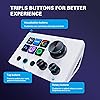
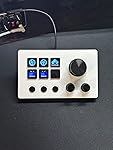
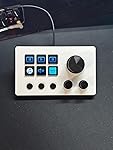
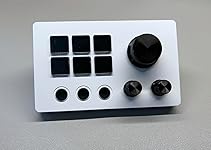
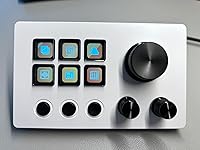
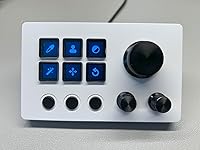
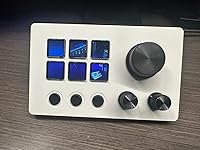
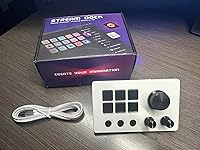
  • Customizable Stream Control Deck N3 Stream Controller equipped with 12 customizable macro keys (6 visual LCD button, 3 tap button and 3 rotary button ), it lets you effortlessly trigger endless actions and take control of apps, tools, and platformsno need to switch window to access the functions you want.
  • One-Touch Operation The customizable USB macro keypad/Stream Controller delivers instant efficiency with its one-touch functionality. A single click triggers unlimited actionsfrom launching macros, text input, file/website access, media control, and OBS scene switching to social post launches, audio adjustments, mic muting, and light control (single or multiple actions). Designed for gamers, streamers, professionals, creatives, and anyone needing quick hotkey access, it streamlines tasks intuitively.
  • Wide Compatible N3 Streaming Deck works seamlessly with PC, Windows, and macOS, plus integrates effortlessly with leading software including OBS Studio (Windows 10 64-bit+/macOS Catalina 10.15+), Streamlabs, Twitch, YouTube, Twitter, Discord, Spotify, Voicemod, Excel, Word, and Photoshop. Simply connect via USB-C to start using in seconds and the included software is very easy to install and operate.
  • Extensive Plugins Marketplace The Stream Dock equiped with VSDinside marketplace for you to download, It offers thousands of free and premium options, including 200+ plugins, icons profiles and scenes for controlling apps like Discord, Twitch, and OBS for streamers and podcasters.
  • Supports dynamic icons While most stream dock on the market are limited to static image icons, the N3 breaks new groundgoing beyond basic picture icons to support dynamic animated ones. Whats more, you can even use your favorite animations to create custom animated icon scenes for your device, transforming your interface from dull and static to uniquely vibrant and full of personality.
  • Please Note If you want use Spotify integration, you must have an active Spotify Premium account.
  • Technical Support If you encounter any issues during use, our dedicated engineering team is ready to assist you promptly.

Package Dimensions: 6.5 x 4.8 x 2.76 inches; 10.56 ounces


Item Weight: 10.6 ounces


Manufacturer: Shenzhen An Rui Xin Technology Co.,Ltd.


Date First Available: June 26, 2025


Frequently asked questions

This product is currently out of stock. Please check back later for shipping info.

Yes, absolutely! You may return this product for a full refund within 30 days of receiving it.

To initiate a return, please visit our Returns Center.

View our full returns policy here.

  • Klarna Financing
  • Affirm Pay in 4
  • Affirm Financing
  • Afterpay Financing
  • PayTomorrow Financing
  • Financing through Apple Pay
Leasing options through Acima may also be available during checkout.

Learn more about financing & leasing here.

Top Amazon Reviews

  • Smaller than it looks but also way more capable than it looks!
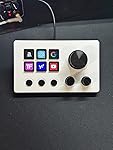
As close to a five-star rating I could give, definitely has a steep learning curve but can be very useful when you get the hang of it. I mostly use it as a bookmark/shortcut for websites - applications - networks and as a media player controller. Takes a few steps away from your day-to-day tasks in front of a computer. Still more things to use it for that I have not fully figured out yet like application specific shortcuts or macros. (I'll get there soon enough) A few notes on the software, I do agree with other reviewers that the manual that comes with the controller provides some sketchy directions to download the software, but I found a quick google search for VSD Inside will lead you to the official website where you can safely download the software and a more generic but updated manual that looks to be for every product in their lineup, which makes sense since its software driven. I did not get any virus notifications or warnings when downloading. It will still be up to you as the consumer if you choose to go this route. I provided some pics that shows what I use it for. ... show more
Reviewed in the United States on September 20, 2025 by Avtek9 Avtek9

  • Software wouldn't work with my MAC
I really was looking forward to using this on my MAC but the software wouldn't install for me due to security warnings/issues. The hardware looks good, the buttons are smooth when pressing and the knobs turn easily and also act as multi-function buttons by pressing in on the knob. The unit is small and wouldn't take up much desk space. The cable that came with the unit is a USB C to A, so I had to grab a C to C cable when trying to connect it to my MAC. It has a base/stand that's friction fit on the back, unlike my StreamDeck that uses magnets to keep the base attached. I tried connecting it to my work laptop but our IT software blocked the download, so at this point, I'll give it to a friend who uses a PC to see if they can get it working. ... show more
Reviewed in the United States on November 11, 2025 by Mike Mike

  • Not for the average user; it works but feels like a project more than a product
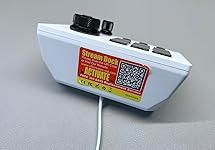
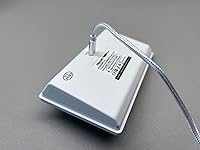
In many ways this thing is great. It looks like just thing thing I was looking for: a simple device with a few programmable buttons and knobs that I could use to control various apps (in my case, Logic Pro, Final Cut Pro, and other creative Mac apps). The hardware itself is pretty decent for the price. The best part is the square buttons. They feel solid when pressed and make little to no noise. The tiny embedded LCD screens look surprisingly good and the dynamic images on the buttons are extremely helpful for illustrating the function the buttons have as you change applications. (Note, however, that the product images provided by the seller are not truly representative of the look of the button LCDs. Check my photos and others for a better idea of what to expect.) The round buttons and knobs are pretty good, if not quite as impressive as the square buttons. The round buttons have a pronounced click that is both felt to the touch and audible. They work fine, but just feel a little cheap. The rotary knobs seem to be made of a light metal, such as aluminum, that would feel higher quality if it weren't for the cheaper feel of the stepped pots/encoders they control. I was looking forward to using the device sitting flat on the desktop without the plastic cradle that hold it at a steeper angle. Unfortunately, even thought the cradle is easy to remove, the stream dock cannot sit flat on a desk because of the placement of the USB-C port. You can find cables with very flat connectors, but you would still have to add rubber feet to the bottom for the device to not rock side to side because of the connector. Lastly on the hardware, I absolutely hate that this elegantly designed white and black device has a relatively large difficult-to-remove sticker slapped on the back of it (not on the bottom where it would be fully hidden). I have to decide between the half-removed (possibly sticky) remnants of a sticker or a red and yellow sticker with QR code that has no use after the initial activation of the device. The most frustrating thing about the Stream Dock has been the software necessary to make it do anything. I have tried to use this on two different Macs, one with an Intel processor and one with Apple Silicon. Other reviewers have mentioned the download being flagged. I decided to override the OS, which involved diving into the Privacy & Security settings. (This is already more than should be asked of an end user for a consumer product.) I was able to get the Stream Dock recognized by the VSD Craft app and set up a few actions on the Apple Silicon-based Mac. Despite no requirement being mentioned other than macOS 10.15, I was never able to run VSD Craft on an Intel-nased Mac running macOS13. The application was crossed out in the Applications folder and the Inspector showed it as Apple Silicon only. Reaching out to VSD through the web chat and Discord led to no response to my inquiry about an Intel-compatible version. The VSD software itself feels very DIY and there are not a lot of ready-made sets of actions to install in a simple way. I suspect that I will be able to use the device, at least on my newer machine that is not the one I intended to use it with, but at this time I cannot recommend this to the average computer user. If you like to fiddle with computer stuff, you will probably get some use out of it. ... show more
Reviewed in the United States on August 8, 2025 by emw emw

  • Great for sim racing
We liked it so much we got another for my son I will say the download seemed sketchy as its a url to type but once we downloaded everything was so simple to use The set up was great and my son and husband are able to use them for iracing as well as other things with easy It took some changing between my husband's windows 10 and my sons windows 11 as upgraded things didnt allow things to go exactly the same but we are super happy with what we have We also had a button with a line down it, and after speaking with the customer support they took care of helping find the best solution for us! ... show more
Reviewed in the United States on August 28, 2025 by Amanda Chereek Amanda Chereek

  • Beautiful controller but lacks compatibility for the Mac M4 Mini running Sequoia so be careful!
I like the look and feel of it and the controls feel very nice; unfortunately while it does power up and I can see the screens behind the squares I cannot make it work on my Mac M4 mini running Sequoia - the software simply wouldn't install. So while it may be a great device I cannot give it a good review as for my setup it is not compatible. ... show more
Reviewed in the United States on September 12, 2025 by Scott Scott

  • Works well
Got this for my boyfriend to stream. He said it works better than the one he had. It did everything he wanted it to do and it was a great price.
Reviewed in the United States on October 25, 2025 by Kaye

Can't find a product?

Find it on Amazon first, then paste the link below.
Checking for inventory...