Search  for anything...

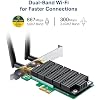
TP-Link AC1200 PCIe WiFi Card(Archer T4E)- 2.4G/5G Dual Band Wireless PCI Express Adapter, Low Profile, Long Range Beamforming, Heat Sink Technology, Supports Windows 11/10/8.1/8/7/XP

  • Based on 4,222 reviews
Condition: New
Checking for the best price...
$29.99 Why this price?
Save $10.00 was $39.99

Buy Now, Pay Later


As low as $7 / mo
  • – 4-month term
  • – No impact on credit to apply
  • – Instant approval decision
  • – Secure and straightforward checkout

Ready to go? Add this product to your cart and select a plan during checkout.

Payment plans are offered through our trusted finance partners Klarna, Affirm, Afterpay, Zip, Apple Pay, and Google Pay. No-credit-needed leasing options through Acima may also be available at checkout.

Learn more about financing & leasing here.

Selected Option

Free shipping on this product

FREE 30-day refund/replacement

To qualify for a full refund, items must be returned in their original, unused condition. If an item is returned in a used, damaged, or materially different state, you may be granted a partial refund.

To initiate a return, please visit our Returns Center.

View our full returns policy here.


Availability: In Stock.
Fulfilled by Amazon

Arrives Oct 4 – Oct 5
Order within 10 hours and 56 minutes
Available payment plans shown during checkout

Protection Plan Protect Your Purchase
Checking for protection plans...

Style: AC1200, Wi-Fi 5


Features

  • Lightning Fast Speed: upgrade your Wi-Fi Card to 1200Mbps Wi-Fi speeds
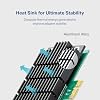
  • More Stable Performance: heat sink technology distributes heat away from core components to improve reliability and performance; Built for high-performance computing, such as online gaming and 4K Ultra HD video streaming
  • Extended Range: increased wireless range with 2x external antennas to ensure a greater range of Wi-Fi connection and stability. Detachable antennas
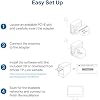
  • Wide Compatibility: Supports Windows 10 and 11 Please upgrade to 190108 insider preview build/ 8.1/ 8/ 7/ XP
  • Industry Leading Support: 2-year warranty and free 24/7 technical support

Description

AC1200 PCIe WiFi Card for Desktop 802.11ac - The Next Generation of WiFi TP- Link's Archer T4E supports the next generation WiFi standard - IEEE 802.11ac, offering transfer rates that are 3 times faster than wireless N speeds. Easily upgrade your desktop system by simply slotting the Wi-Fi adapter into an available PCIE slot. Heat Sink for Better Stability Heat Sink helps to dissipate heat generated by the adapter, which in turn increases performance and improves stability. Additionally, lower temperatures ensure an increased adapter lifespan. Additional Feature Sets: External Antennas External antennas for easy alignment to achieve the best signal. Advanced Security WPA/WPA2 encryption standards ensure your wireless connection is safe from intruders.

Brand: TP-Link


Hardware Interface: PCI


Color: Green,Black


Compatible Devices: Desktop, Laptop


Product Dimensions: 4.76"L x 4.54"W x 0.85"H


Data Link Protocol: IEEE 802.11ac


Data Transfer Rate: 867 megabits_per_second


Item Weight: 4.32 ounces


UPC:


Compatible Operating System Family: Windows


Brand: TP-Link


UPC: 840030700040 810142824101


Global Trade Identification Number: 40


Number of Items: 1


Manufacturer: TP-LINK


External Testing Certification: CE, FCC


Built-In Media: Archer T4E


Item Type Name: PCI-E Adapter


Model Number: Archer T4E


Mfr Part Number: Archer T4E


Warranty Description: 2 year manufacturer


Hardware Interface: PCI


Compatible Devices: Desktop, Laptop


Data Link Protocol: IEEE 802.11ac


Data Transfer Rate: 867 megabits_per_second


Compatible Operating System Family: Windows


Minimum Required Operating System Version: Windows 7


Item Dimensions L x W x H: 4.76"L x 4.54"W x 0.85"H


Item Weight: 4.32 ounces


Color: Green,Black


Frequently asked questions

If you place your order now, the estimated arrival date for this product is: Oct 4 – Oct 5

Yes, absolutely! You may return this product for a full refund within 30 days of receiving it.

To initiate a return, please visit our Returns Center.

View our full returns policy here.

  • Klarna Financing
  • Affirm Pay in 4
  • Affirm Financing
  • Afterpay Financing
  • Zip Pay in 4
  • Financing through Apple Pay
  • Financing through Google Pay
Leasing options through Acima may also be available during checkout.

Learn more about financing & leasing here.

Top Amazon Reviews


  • Drastically improves internet speeds compared to a USB network adapter.
Style: AC1200, Wi-Fi 5
It's easy to install, but honestly, I don't like the antennas in the back. Though, I'm just nit-picking at that point. If you have any DNS issues that troubleshooter has detected or if your internet disconnects after you launch a website, etc., this may help out a lot. I went from 40 mb/s to 120 mb/s. No more DNS issues either, but I HIGHLY recommend trying out everything else before buying and check if you can fix the problem yourself. Maybe even contact your network provider and get help from them. I used to lag A LOT with my USC adapter, and this does alleviate a lot of lag. But I still notice that I slightly lag, and I may lose connection to the lobby. This might be an issue with the firewall settings or Wi-Fi provider, at least from my experience. Is it worth $30? I think if your Wi-Fi adapter is not working properly and is bothering you for some time, and if you have the money, sure. It's worth it. Otherwise, I don't think it is worth spending money for something that you could possibly fix. I tried everything I could and decided to spend the $30 so that I don't have to have any more problems afterwards and it seems to be going well. ... show more
Reviewed in the United States on January 24, 2022 by LittleLight

  • Now VERY satisfied...
Style: AC1200, Wi-Fi 5
This is an update of my previous post and comment... First, I have had relatively positive effort from TP-Link's chat session help. However, it pretty much seemed like each one (and I tried this three times) had a script to follow and that was the extent of the capability. I tried the e-mail and was given the same menu of options. However the problem was quickly escalated to a resident engineer who made additional recommendations for troubleshooting. Second, during all of this (and before I had the time to attempt the engineer's recommendations) I also replaced my router/gateway. Wow, what a difference. This card now connects solidly and is very responsive. I am certainly very happy with the performance of the Archer T4E. The problem appears to have been with the previous router instead of the adapter. I would definitely recommend this card to someone looking to attach to a WIFI network in their home. Thanks to TP-Link for the effort and support while trying to troubleshoot! Previous post below... ~~~~~~~~~~~~~~~~~~~~~~~~~~~~~~~~~~~~~~~~~~~~~~~~~~~~~~~~~~~~~~~ Installation was a breeze. Hardware fit perfectly. Beyond that, I can't say it is any good. When I connect to my home WIFI with it, the signal strength shows "strong". In spite of that I can't reach any web sites with it. Strangest thing. I would return it, but I currently in the process of switching my home internet system around a bit and hope that relocating the attach point closer will help. If that does not I am pretty sure it will be going back. I may see if there is an technical support that I can try. I would sure like to not have the hassle of returning. ... show more
Reviewed in the United States on May 30, 2020 by Matt

  • Best product for low profile PCs
Style: AC1200, Wi-Fi 5
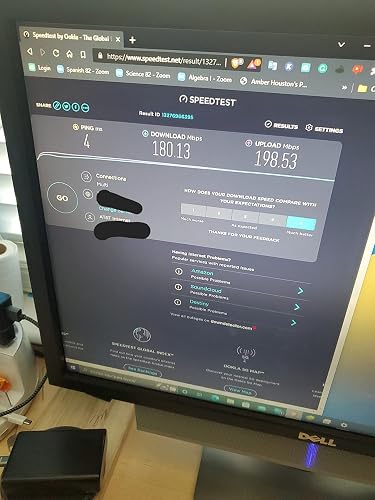
This product the best to use even faster than usb which I have dell optiplex 7050 sff. On usb mostly get 450 mbps On this new one is most 520 mbps which better if you are a bedroom, the router is on the living room. On the speed test shows 180.13 mbps download On upload is 198.53 mbps which is twice as fast I will buy this again if another pc needs this product Also it show led which good for me if the product has status on. One I mentioned was the driver was installed quick which is the older version but with disk was installed the latest also driver easy to install. The windows device manager program says is up-to-date which it is newer version. Update Always is on 100% percent on my bedroom the speed is 520mgbs way more responsive than usd wifi is that is completly good but sometimes it's disconnects after waking up the pc Update since it lasted longer over year now getting better connection, and getting a 866 megabytes and more faster than is should be, cd drive still looks new, still we need driver updates on this PCI-E wifi. ... show more
Reviewed in the United States on June 13, 2022 by Cesar Josue Espinosa

  • ***UPDATED*** (after 2 weeks) TP-Link T4E - Great Card for the price!
Style: AC1200, Wi-Fi 5
***UPDATED*** I originally purchased 2 of these T4Es. Unfortunately for me, both had to be returned. I was really happy with them initially, I just wish there was some sort of support, or even more importantly to me, acknowledgement from TP-LINK. No such luck, they just recommended disable, uninstall, delete, and reinstall the drivers. I'm sure in the near future there will be a solution, but I spent frustrating hours trying my hardest to enjoy my purchase. ***PROBLEM(s)*** So, After about 10 days or so, one of the cards starts dropping, then reconnecting to, the 5G signal, over, and over, and over. Sometimes taking 10 minutes to reconnect, only to disconnect again within a few minutes. "Driver Disconnected While Associating" "Driver Disconnected While Associating" "Driver Disconnected While Associating" The 2.4G signal - no problem - "steady as a rock" Uninstalled, disabled, deleted, reinstalled the 1 and only driver TP-Link provides, many times over. After a few days of this nonsense, I plugged in a USB 5G adapter I had laying around - (TP-Link Archer T2U) Installed the drivers for that.... No problems whatsoever. Holds the 5G signal without a hitch. No errors. 2 days after that, on a different machine, the other card starts doing the exact same thing! "Driver Disconnected While Associating" "Driver Disconnected While Associating" "Driver Disconnected While Associating" Once again.... The 2.4G signal - no problem - "steady as a rock" Pulled them both out of the machines. What good is buying a 5G card that only works on 2.4G? Reinstalled my "tried-and-true" TL-WN881ND (2.4G only) in the other machine. So I sent them both back. Ain't gonna' deal with this unnecessary BS in my life. Purchased (2) TP-Link Archer T4U USB adapters for the time being. Will be watching for updated drivers (and reviews) and maybe purchase again. Maybe a Rosewill RNX-AC1900PCE, ASUS PCE-AC68 / AC88, or the TP-Link T9E. ***ORIGINAL REVIEW*** Purchased 2 of these to upgrade desktops with crappy built-in cards. Both installs quick & as easy as pie. Averages 220Mbps on the 5GHz band. (Spectrum 200Mbps Service, NETGEAR AC1900 Gateway) Purchased on sale for $23.99. Everyone's happy! Great product! Great upgrade! ... show more
Reviewed in the United States on April 17, 2019 by Mr. J. J.

  • Couldn’t be happier
Style: AC1200, Wi-Fi 5
I’ve had this for about two hours now and it was a much needed improvement. I was worried that it would stick out like a sore thumb but I plugged it in the PCIe port right under my graphics card and it barely fit but it did, and it’s completely hidden; important for me because I have a tempered glass side panel. I even made sure that when the gpu fans turn on that they don’t hit and they don’t. I was also worried that the antennas would be big and stick out as well but there short and actually pretty low profile. They stick out as much as the plugs for my mouse and keyboard. And most importantly of all, much faster upload and download speeds. I failed to take a picture of the old speeds but I don’t feel like plugging it back in and seeing it but I can assure you it’s much faster. I’ve been slowly upgrading my pc over the years and just recently I did a full rebuild and all these years only one component has stayed untouched; the WiFi adapter. I had an old usb 2.0 thing from a bestbuy computer I bought and I never really thought about it but it’s great. I also got this because I ram out of usb plugs on my motherboard and I needed it to control my rgb fans and this does not need a plug like my old one did. Just plug and play. Easy as that I will update if anything happens. ... show more
Reviewed in the United States on November 17, 2020 by Matt

  • IGNORE BAD REVIEWS - It's plug and play and performs extremely well!!
Style: AC1200, Wi-Fi 5
This is the kind of product that requires a *TINY* bit of knowledge to install and configure, so naturally there are a ton of negative reviews on Amazon because people don't know what they're doing. Old versions of windows 10 had issues with this card - this has since been fixed. So if you have a newer build of windows 10 (1809 or newer) you just plug it in and it works. No driver install, you don't need the disc, windows 10 already has the driver for it out of the box and it works great. Been using it for a week without a single problem. I bought this because I got fiber and wanted to take advantage of it. I can download at 45MB/s (megabytes, not megabits...) which is the same speed I get on LAN. Connections are rock solid for large downloads (downloaded over 200GB on it so far without a hiccup) and pings when gaming are within 1-2ms of my PC on LAN when playing competitive games and shooters. Not sure what all the complainers are talking about, because this card is perfect. Easy to install, speeds are high, and it works great for gaming. VERY happy with the purchase!! ... show more
Reviewed in the United States on December 3, 2019 by David Umina

  • Windows 10 problems, but there are workarounds for stable operation.
Style: AC1200, Wi-Fi 5
I bought 2 of these cards and have identical problems on both installs, one at my house (Linksys EA8500 router) and one elsewhere with a different Wi-Fi router installed (an Asus, not sure of the model). The cards would seem to work fine for web browsing and other low bandwidth operations, such as retrieving email, etc. But after you've been online for a while it would drop, and it would drop even faster if you were doing a bandwidth intensive task such as watching HD videos or downloading large files. In troubleshooting the problem I found two workarounds that give me a solid connect and no more drops. For both workarounds you want the latest drivers from TP-Link for the card, but should it be able to work with the default driver that Windows 10 installed as well I discovered that the problem occurs when you are connected to a 802.11ac network (5gHz band), which it will select by default if available. The first and simplest work around was to set the card to only operate on 802.11n or 802.11a when on the 5gHz band. Operation is much more reliable and can be set in the device manager options for the card in Windows. While I did not test this as thoroughly as workaround #2 below, I could make it fail consistently when connected to a 802.11ac by installing large games thru Steam, but was able to complete the 50GB to 100GB downloads when connected to 802.11n. The second install of this card is using this workaround as well and I've heard no complaints from the user. The second workaround involves making changes to the router to allow this card to operate on 802.11ac reliably. The particular issue has to do with the channel width, for whatever reason this AC1200 card will NOT operate reliably on a channel width of 80MHz, ESPECIALLY if there are other 5gHz routers in the area using a channel that's close to the one you're using! On my Linksys EA8500 router I had to change to the WPA2 Personal security mode and fix the channel width to 40MHz only. I still let the card connect to the 802.11ac network on the 5gHz band, and with these settings the connect is rock solid and reliable. This one I've tested both by using large game installations on Steam and by file sharing over the local network for the past few weeks, and it is working great with hundreds of gigabyte of files exchanged. These are workaround, not fixes! The only way these can be fixed is by TP-Link themselves addressing this problem with channel width problems! But these workarounds WILL get you running reliably if you have one of these cards. The downside of both workarounds is that the Wi-Fi link is a lot slower, and workaround #1 is a LOT slower than #2 though. With no changes, I would get download speeds of around 24MBps on Steam (before it inevitably failed), but after implementing workaround #2 and changing the channel width speeds dropped to around 15MBps (but would not drop), though this was faster than the 8MBps I was getting under workaround #1 (802.11n). Of course reliability trumps speed, but there is no reason why we should need workarounds! TP-Link needs to fix this hence only 3 stars for this card. ... show more
Reviewed in the United States on April 5, 2020 by James Lummel

  • A good, basic, hassle-free Wifi card
Style: AC1200, Wi-Fi 5
For people who don't want to spend unnecessary amounts of money on a Wifi card for their desktop build, this is a very good option. On my Windows 11 build, it came right up without needing additional drivers; it seems that Windows 11 has support for the chipset in question included in a standard install. If you are a Linux user, you'll want to know in advance that the chipset in this adapter is the Realtek RTL8812AE. Check your distro for driver support using the chipset, rather than the TP-Link model number, to find the right driver. TP-Link does not directly offer its own Linux driver. I found no problems with build quality or the included antennas. Everything fit without having to force or slightly bend backplates, etc., and if you prefer to use a different pair of antennas just order a pair of the very common RP-SMA Male Wifi antennas that almost all Wifi cards use these days. That said, the included antennas do the job nicely, getting almost as good throughput from opposite my house though multiple walls as when in the same room as the WiFi router. You probably won't need to get other antennas. Please keep in mind that this card does WiFi, but NOT Bluetooth. If you need that, either a more expensive dual-purpose card or getting an inexpensive USB Bluetooth dongel (no reason you should spend more than 6 or 7 dollars on such a dongel) would fit the bill. ... show more
Reviewed in the United States on September 12, 2024 by Buyer of Strange And Random Things

Can't find a product?

Find it on Amazon first, then paste the link below.
Checking for best price...