


Search  for anything...

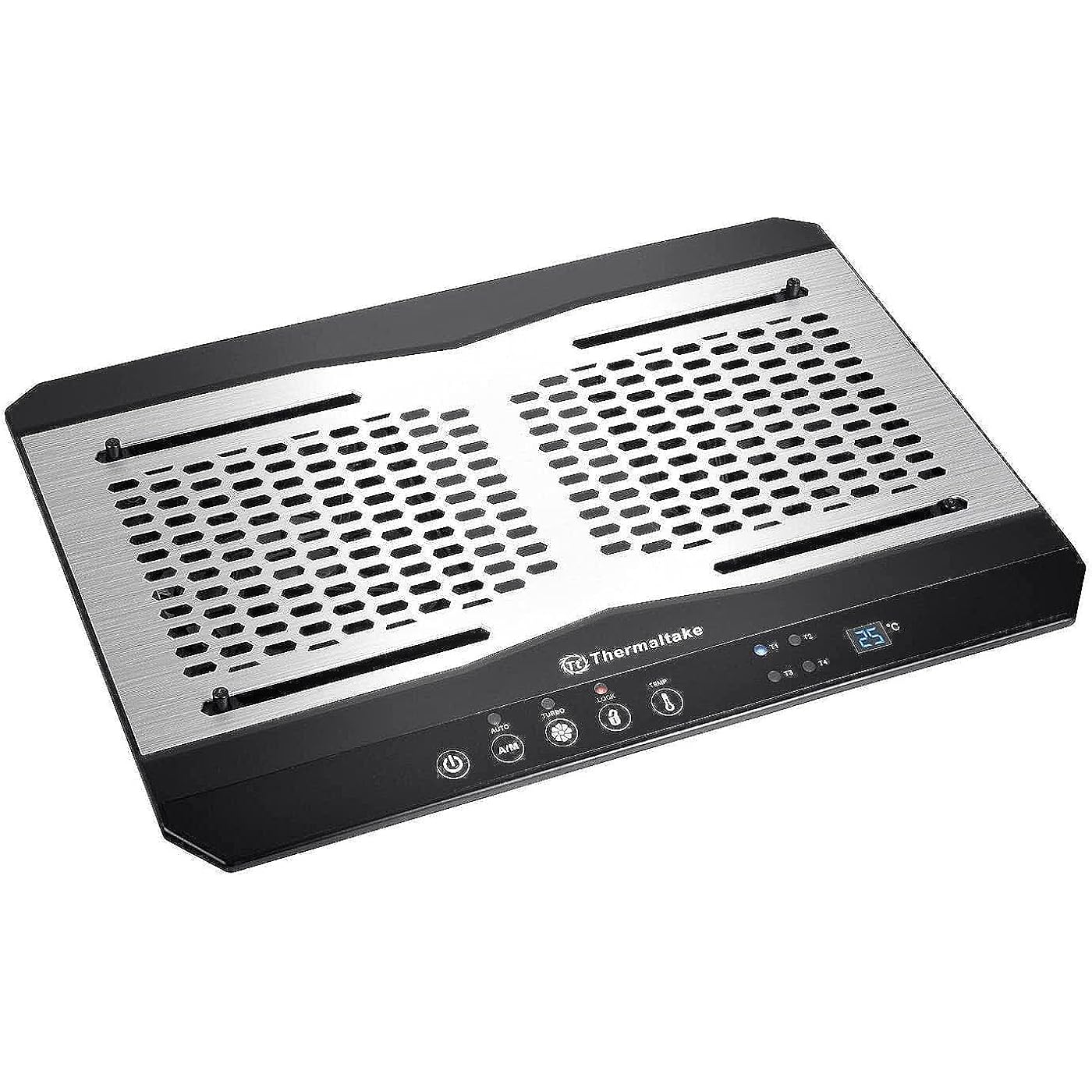
Thermaltake Massive TM Aluminum Panel Dual 120mm Fans Adjustable Temperature Sensor 10"-17" Laptop Notebook Cooling Pad CL-N002-PL12BL-A
Based on 1,139 reviews
Condition: New
Checking for the best price...
$59.99
Save $110.00 was $169.99

Buy Now, Pay Later


As low as $10.00 / mo
  • – 6-month term
  • – No impact on credit to apply
  • – Instant approval decision
  • – Secure and straightforward checkout

Ready to go? Add this product to your cart and select a plan during checkout.

Payment plans are offered through our trusted finance partners Klarna, Affirm, Afterpay, Zip, Apple Pay, and Google Pay. No-credit-needed leasing options through Acima may also be available at checkout.

Learn more about financing & leasing here.

Selected Option

Free shipping on this product

FREE 30-day refund/replacement

To qualify for a full refund, items must be returned in their original, unused condition. If an item is returned in a used, damaged, or materially different state, you may be granted a partial refund.

To initiate a return, please visit our Returns Center.

View our full returns policy here.


Availability: In Stock.
Fulfilled by Amazon

Arrives Sunday, Nov 1
Order within 20 hours and 12 minutes

Available payment plans shown during checkout

Protect Your Purchase

Easy claims online, fast replacements, no fees

Checking for protection plans...

At a glance

Condition
New
Style
Temperature Sensor
Model
CL-N002-PL12BL-A
Dimensions
15.35"L x 10.93"W x 1.94"H
Weight
16 oz
Color
Black
Material
Aluminum
Warranty
3 YEAR

Features 8

  • EXTREME VENTILATION: Dual 120mm temperature regulated fans allowing manual/automatic adjust the fan speed
  • TEMPERATURE SENSOR: Adjustable temperature sensor monitoring up to 4 different areas.
  • DISPLAY CONTROL PANEL: Easy and smart multi-function display panel include lock button and and fan control.
  • WARRANTY: 3 years for parts and labor.

Description

Thermaltake Massive TM Notebook Cooler Massive TM notebook cooler, thin and light, designed with Thermaltake the first ever adjustable temperature sensor, display control panel, aluminum design and dual 120mm temperature regulated fans to suit user’s preference in accordance with the laptop size or various heat generated points to create the best thermal performance. The excellent ergonomic design makes the most comfortable viewing angle and hand position. P/N: CL-N002-PL12BL-A Compatibility: For 10”~ 17”Notebook Dimension: 390 x 277.5 x 49.3 mm Fan Dimension: 120 x 120 x 18 mm x2 Color: Black Material: Aluminum + Plastic Rated Current: 0.46 A Rated Voltage: 5V Fan Speed: 1000 R.P.M ( Turbo 1300 R.P.M ) Noise: 31 dBA Air Flow: 61.27 CFM Air Pressure: 1.59 mm-H2O Sensor: 0 ~99 F.

Specs 17

Color Black
Brand Thermaltake
Material Aluminum
Item Weight 16 ounces
Product Dimensions 15.35"L x 10.93"W x 1.94"H
Number of Packs 1
Unit Count 1 Count
Manufacturer Thermaltake USA Direct

Frequently asked questions

If you place your order now, the estimated arrival date for this product is: Sunday, Nov 1

Yes, absolutely! You may return this product for a full refund within 30 days of receiving it.

To initiate a return, please visit our Returns Center.

View our full returns policy here.

  • Klarna Financing
  • Affirm Pay in 4
  • Affirm Financing
  • Afterpay Financing
  • Zip Pay in 4
  • Financing through Apple Pay
  • Financing through Google Pay
Leasing options through Acima may also be available during checkout.

Learn more about financing & leasing here.

Top Amazon Reviews


Keeps things cool
Style: Temperature Sensor
For the most part, this is a great product. Is it worth the extra cost? Well if you're looking for something to travel with this isn't the product you may want it's very big and bulky. But if you really just want to use it at home or something like that, this will do the trick. Especially for all day work of gaming, this definitely keeps your laptop cool and the temperature sensors are a neat addition. This is pretty much only useful if you sit and your laptop on a desk. Does the trick for me though so I would definitely recommend this for hardcore users trying to preserve their laptops integrity. Pros: Definitely does was it set out to do. Keeps laptop cool. Really great that you can actually see the temperature. Cons: Can be fairly loud in turbo mode Bulky Does not travel well Overall best laptop cooling pad I've ever purchased. Definitely worth the price if you know what you're looking for. ... show more
Reviewed in the United States on December 22, 2015 by Malex87

Prob. the best out there (but a little noisy)
Style: Temperature Sensor
The most effective laptop cooling stands will cost you a penny. They're probably all overpriced, but in my experience you're going to have to spend *at least* $20. If you want/need an effective cooling product, I'd suggest, however, splurging a bit. This product is definitely worth it. So far it is the best I've encountered, whether high end or low end. If you are expecting a "silent" machine, however, you'll be disappointed. I don't quite see how you can get a silent or near silent cooling stand AND have a powerful fan motor. If your primary goal is to ensure your laptop doesn't get hot, however you will not be disappointed! Period. And it's not like this sounds like a Harley or an old Model T or something. No. But it does have a noticeable light "whizzing" sound. Another higher end product had a bit more of an "airy" sound--i.e., it was a lower decibel sound. *However* this product here proved superior. Life's about trade-offs. If you are content with a distinct "whizzing" sound (which will obviously be more pronounced on the "Turbo" mode) and can afford to drop $50ish . . . I would highly suggest this product. I'll close with this reassurance--at first I thought I would not get used to the buzz/whizz . . . but I did. I don't even think about it. I'm considering all of this from a home use perspective. I have ZERO idea what contemporary office workers would expect--the only communal / shared office spaces I've worked in all had desktops and now I split my time between a temporary basic office and a home office to meet clients. So I can't help you there. But if it's just you and you have realistic expectations of how much noise may be required to produce an **ultra-cool** effect . . . I'd say go for it! ... show more
Reviewed in the United States on August 5, 2025 by Adam Saxe

AMAZINGLY proficient, effectual, economical, quality built cooling pad - HIGHLY RECOMMEND
Style: Temperature Sensor
This is certainly one of the best investments that I have ever made regarding the care of my LAN nodes. I was skeptical after reading the OEM ad for the product. However, I have entrusted the welfare of a LOT of my IT related equipment to the quality cooling care of ThermalTake for a long while and have yet to be disappointed. This product is certainly no exception!! This ThermalTake MASSIVE (TM) laptop cooling pad exceeds my EVERY expectation! Interestingly, the dual fans run at a very high RPM without producing very much air volume, CFM. However, the combination of the aluminum surface and the large air ventilation footprint are EXTREMELY effective at pulling out the heat and sending in the KOOL. The control console offers both automatic and manual options for controlling the base temp. and, thus, the fan RPM. I set the base temp. and then select the auto setting. The pad thermally monitors the base temp and runs through the four turbo fan settings as needed in order to maintain the optimum temp. that I locked into the config panel. I set the base at 80 and it stays within 2 degrees either side of that temp. This marvelous ThermalTake MASSIVE (TM) cooling pad immediately went to work on lowering the operating temp of my laptop that is situated atop the cooling pad. My laptop houses a Gen. 11, i7 CPU that typically operates at between 120 and 150 Fahrenheit. The exhaust air from my Dell PC normally fluctuates from 112 up to 117, as the normative operating temp. Within minutes of activating this cooling pad, it effectively reduced the exhaust temp by 30 degrees, down to 85!!! AMAZING!! My PC's fan doesn't even cycle at all! No matter at what setting the turbo is running, I CAN NOT HEAR THE FANS over the basic normative room ambiance in my home. The ThermalTake MASSIVE (TM) cooling pad features two USB ports. One to provide power to the pad and the other is an aux. Out, for running I/O peripherals. Hence, I didn't loose any valuable USB ports. There are two retractable supports on the rear of the pad that have two settings. These avail me three options from flat to a 2" lift in the rear for angling the cooling pad. Without employing the rear supports the cooling pad is 1" high in the front and 1.75" in the rear. With the rear supports extended, the cooling pad raises up to a 3.75" height in the rear. The aluminum top surface is VERY slippery. There are 4 pegs that protrude up through the aluminum surface. Two positioned forward and two near the back of the aluminum surface. They are spring tensioned so that they can be manipulated up and down, yet provide resistance in order to prevent the laptop from sliding. All four also adjust laterally from left to right. These are supposed to engage the bottom of the laptop in order to secure it. In my case, they do very little in the way of accomplishing that. Hence, I keep the pad surface level and have employed a thin textured rubber film, that adheres to the aluminum surface, all around the aluminum perimeter as well as down its center. This accomplishes much toward stabilizing my laptop upon the cooling pad. The ThermalTake MASSIVE (TM) is a VERY well engineered device that is manufactured with high quality materials. Yet, it is deceptively lightweight for being as sturdy and robust as it is. Pros: 1) Lightweight, yet very well built 2) QUIET 3) EXTREMELY effective cooling device 4) 2 USB ports 5) Either self regulating or manually controlled 6) Sturdy, two position, support extensions for angling the surface Cons: 1) The aluminum surface offers nothing toward preventing the laptop from sliding around 2) There is no static positioned front barrier that would prevent the laptop from sliding forward when the rear supports are utilized ... show more
Reviewed in the United States on April 19, 2023 by Edward S.

Sometimes sad is all you need
Style: Temperature Sensor
It sucks, but it does work. It's very bulky, this will elevate your laptop nicely. The aluminium panel is a "nice" touch, but doesn't feel like metal at all. There is just enough clearance to hide a few cables underneath without needing to unfold the kickstands at the back & prop it up. The 4 (flimsy) adjustable clips are more in the way than anything else. The pad in general is adequately sturdy & doesn't wobble on a solid surface like others I've had in the past. The fans are noisy, but I just use turbo all the time because the drone sounds even worse at lower speeds. I haven't figured out what the T1/T2/T3/T4 options actually change, aside from lighting up the corresponding LED indicator - I just left it on T1 since that's what the product is. Maybe I'll like it a bit more once I've managed to dismantle the unit without breaking the cheap plastic frame, and installed quieter fans (the built-in ones seem a bit slimmer than the typical 120mm PC fan, so make sure to double check that if planning to try the same). I knew what to expect when I ordered one of these, but am still quite disappointed as it cost $59. It does cool my laptop down by a few degrees, which I do appreciate. At least it's not extremely ugly. ... show more
Reviewed in the United States on June 22, 2026 by Dizzy D

EPIC FAIL - Cools 2-3 degrees at MOST
Style: Temperature Sensor
Impressions - All of the fans on Amazon are listed as having strong blowing power, but for my MacBook that runs EXTREMELY HOT while gaming I was more concerned with purchasing a product that offered extreme cooling ability rather than something flashy or cosmetically appealing. I didn’t care that it was plain or even if it were bulky, as long as it worked I would have been thrilled. But it doesn’t. Value- The price was mid range as I was able to find cooling pads for a lot cheaper, but also some that were much more expensive. I had very real expectations for this product, since it wasn’t the top dollar laptop cooler I wasn’t expecting top dollar results, but the product still falls REALLY short of my expectations. Perhaps my expectation was led to be a bit higher after seeing such amazing reviews?? I purchased this particular model after doing my research online and finding it land in a bunch of Top 5 lists by product reviewers - one of them even listed this as the #1 Cooling Device on the internet. This leads me to believe whoever reviewed and gave such high praise must have been offered a kick back of some sort. Performance - Well I’ll start by saying that I’m sorely disappointed in the overall functionality of the product. While the fans do run very quietly- I needed something that was really going to cool my laptop down. Even at the cost of being loud. I gave the noise level 3 stars since the product was advertised as being very quiet, and it is just that. Since this laptop offers a temperature indicator I’ve been able to accurately test how well the product performs, and let me tell you, it doesn’t. I’ve included an image of the temperature reading on my MacBook. While running at “Turbo” for 30 whole minutes my laptop only cools to 80 degrees from 82-83 degrees Fahrenheit. The “hot zone” is actually much warmer and is closer to 85 degrees even with the fans running at turbo. Firstly, the speed of the fans can only be set to one of a whopping (sarcasm) two settings - ON and TURBO. While set to ON my laptop cools 1-2 degrees, and while using turbo I got my laptop to cool a whole 3 degrees Fahrenheit. My device still runs super hot and the fan makes very little difference. I would be happy to sacrifice some noise level for a little more cooling power! Design- As you can see in the image I marked up the design is somewhat flawed. While this fan advertised being suitable for the size of my laptop - it clearly does not fit the way it should. I’m unable to use the clamps to keep the laptop in place, however, that doesn’t concern me much, my laptop seems to stay in place fine just using the sticky pads on the bottom of the laptop for grip. But you can see that not only are the user controls completely covered while my laptop is on it, but the fans are a very small part of the actual device. In fact, I’ve marked the area on my laptop the seems to produce extra heat - I call this the Hot Zone - and the vents are actually closed off to that part of the laptop so it’s really only blowing at a blocked off underside of my laptop. One thing I did like about the design was that it features 4 different temperature sensors so it can actually tell you which zones of your laptop are running hotter than others, but with only 2 fans it’s not like this function actually serves a purpose other than for giving you some extra information. The product would be greatly improved if it had 4 small fans (one per each zone) that could turn on to cool a specific zone that needed extra cooling power- rather than just 2 large fans in the center. Of course again this would be even more improved if there were more than 2 settings. I mean...there isn’t even Low, Medium, High......just On and Turbo. It would be really cool to see any hot zones run the fan at Turbo Speed to cool everything evenly, but it doesn’t do that either. There’s an Auto/Manual button that do nothing other than change which zone the temp reading comes from. On auto it will scroll through the zones and display each of the 4 zones temperature for a few seconds before displaying the next zone and cycling through them. On manual it only displays one temperature zone - which is the zone of your choosing. Summary- I was grossly disappointed with this product. It’s not a good fit for my laptop and most of the features fall very short of even being useful, the ones that are useful are poorly executed and work at a very small capacity of what I had expected them to. The fans aren’t very strong at all, and cooling just 1-2 degrees isn’t going to cut it when I’m trying to game and stream without frying my device. That being said if I had a different laptop this may have worked a bit better, but for my MacBook it just doesn’t cut it. The laptop still has a huge hot spot that doesn’t decrease in temperature at all and when the overall device is only cooling 3 degrees max on the highest setting I’d call this an EPIC FAIL. I’m still on the hunt for a better product. ... show more
Reviewed in the United States on April 13, 2021 by Felicia G

Ran continuously for 11 years
Style: Temperature Sensor
I had one of these live running constantly for 11 years, only reason I replaced it was that 1 fan got a little noisy and one button had worn through since its like a film over the button. It so good I bought 2 more mainly just to fix the squeak it developed after 11 years of continuous use. It also measures the temperature in 4 places in your laptop so you set these spring loaded push pins on the hottest area of bottom so it proves to you it works. Used with 4 types of MacBooks. ... show more
Reviewed in the United States on July 10, 2026 by justin morgan

Great for laptop used as a desktop
Style: Temperature Sensor
I can't yet speak for the longevity of this product, but it works quite well. I've been using my laptop as essentially a desktop for a while (so I don't use this in my lap), and have had to throttle it to keep the fan from constantly ramping up to jet aircraft mode. With this thing I've turned off the throttling. This keeps idle temperatures about 8c lower, and it makes it difficult to get the CPU hot enough for the fan to ramp all the way up. It seems to just make the internal cooling more efficient. The cons: 1. The temperature readout is a joke, so this thing never speeds up on its own. I've left it on "auto" which seems to keep it running on the lowest speed (which is plenty for me). It's possible the temperature readout would work better on laptops with aluminum cases. But for me it just reads 24c all the time. 2. The vibrations are greater than I'd like to see, but they're in line with desktop computer fans. I wouldn't worry about spinny hard disks. But if you actually used your laptop keyboard this might be annoying. 3. There's no actual manual. You're left to guess about how to control it... ... show more
Reviewed in the United States on March 21, 2017 by Mr. C

Love exta usb port for this other cooler!
Style: Temperature Sensor
Edit: One year later and I still love this setup! I even got a new proper desk. Cut a hole in it. And I am buying a second one If you have a DELL that overheats. This, plus the fan below. Plus cutting a hole in your desk. This is a must-buy! It cools ok. Others are probably better. But once I cut a hole in my desk, it works great! The gap between this and the desk just wasn’t enough. It still worked ok. https://www.amazon.com/gp/aw/d/B0991V82S3 - the side cooler you see in my picture. Together with this cooler, it works fantastic! I can tune the air speed down on both devices. Making it a much quieter solution than on its own. ... show more
Reviewed in the United States on June 17, 2023 by TamusJRoyce
Checking for best price...