Search  for anything...
Couldn't find selected product

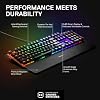
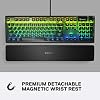
SteelSeries USB Apex 5 Hybrid Mechanical Gaming Keyboard – Per-Key RGB Illumination – Aircraft Grade Aluminum Alloy Frame – OLED Smart Display (Hybrid Blue Switch)

  • Based on 4,195 reviews
Condition: New
Checking for the best price...
$98.97 Why this price?
Save $1.02 was $99.99

Buy Now, Pay Later


As low as $16.50 / mo
  • – 6-month term
  • – No impact on credit to apply
  • – Instant approval decision
  • – Secure and straightforward checkout

Ready to go? Add this product to your cart and select a plan during checkout.

Payment plans are offered through our trusted finance partners Klarna, Affirm, Afterpay, Apple Pay, and PayTomorrow. No-credit-needed leasing options through Acima may also be available at checkout.

Learn more about financing & leasing here.

Selected Option

Free shipping on this product

FREE 30-day refund/replacement

To qualify for a full refund, items must be returned in their original, unused condition. If an item is returned in a used, damaged, or materially different state, you may be granted a partial refund.

To initiate a return, please visit our Returns Center.

View our full returns policy here.


Availability: In Stock.
Fulfilled by Amazon

Arrives Tuesday, Jul 21
Order within 21 hours and 16 minutes
Available payment plans shown during checkout

Protection Plan Protect Your Purchase
Checking for protection plans...

Color: Black


Size: Apex 5


Style: Hybrid Blue – Tactile & Clicky


Features

  • Hybrid blue mechanical gaming switches The tactile click of a blue mechanical switch plus a smooth membrane guaranteed for 20 million keypresses
  • OLED smart display Customize with gifs, game info, discord messages, and more.
  • Aircraft-grade aluminum alloy frame Manufactured for unbreakable durability and sturdiness
  • Dynamic per-key RGB illumination Gorgeous color schemes and reactive effects for every key
  • Premium magnetic wrist rest Provides full palm support and comfort
  • 900 x 300 x 4 millimeter / 35.43 inches x 11.81 inches

Description

The apex 5 combines the high performance and click tactile feel of a mechanical keyboard with the extreme durability and convenience of ip32 water resistance. Built from the ground up for gaming, it also includes a premium magnetic wrist rest, OLED smart display, and per-key rgb. The apex 5 is the perfect hybrid between gaming and real life.

Brand: SteelSeries


Compatible Devices: Gaming Console


Connectivity Technology: USB


Keyboard Description: Gaming


Recommended Uses For Product: Gaming


Special Feature: Wrist Rest


Color: Black


Keyboard backlighting color support: RGB


Style: Hybrid Blue – Tactile & Clicky


Product Dimensions: 35.43"L x 11.81"W x 0.16"H


Compatible Devices: Gaming Console


Connectivity Technology: USB


Additional Features: Wrist Rest


Keyboard Backlighting Color Support: RGB


Power Source: Corded Electric


Switch Type: Tactile


Keyboard Layout: QWERTY


Hand Orientation: Ambidextrous


Button Quantity: 64


Water Resistance Level: Water Resistant


Mechanical Keyboard Switch Model: steelseries_omnipoint


Minimum Required Operating System Version: Mac OS 10.12 Sierra, Windows 10


Compatible Operating System Family: MacOS, Windows


Processor Count: 1


Is Electric: Yes


Number of Keys: 104


Number of Sections: 3


Color: Black


Style Name: Hybrid Blue – Tactile & Clicky


Theme: gaming


Brand: SteelSeries


Keyboard Description: Gaming


Antenna Location: Gaming


Built-In Media: Item


Model Number: 64539


Model Name: SteelSeries Apex 5 Hybrid Mechanical Gaming Keyboard – Per-Key RGB Illumina


Series Number: 81368202


Unit Count: 1.0 Count


Manufacturer: SteelSeries


UPC: 813682028442


Mfr Part Number: 64532


Item Type Name: SteelSeries Apex 5 Hybrid Mechanical Gaming Keyboard – Per-Key RGB Illumination – Aircraft Grade Aluminum Alloy Frame – OLED Smart Display (Hybrid Blue Switch)


Item Weight: 2.04 Pounds


Warranty Description: 1 Year Warranty


Item Dimensions L x W x H: 35.43"L x 11.81"W x 0.16"H


Enclosure Material: Aluminum


Keyboard Plate Material: Aluminum


Frequently asked questions

If you place your order now, the estimated arrival date for this product is: Tuesday, Jul 21

Yes, absolutely! You may return this product for a full refund within 30 days of receiving it.

To initiate a return, please visit our Returns Center.

View our full returns policy here.

  • Klarna Financing
  • Affirm Pay in 4
  • Affirm Financing
  • Afterpay Financing
  • PayTomorrow Financing
  • Financing through Apple Pay
Leasing options through Acima may also be available during checkout.

Learn more about financing & leasing here.

Top Amazon Reviews


  • Outstanding, with a possible caveat
Color: Black Size: Apex 5 Style: Hybrid Blue – Tactile & Clicky
Five months into owning this keyboard and it's easily my favorite keyboard I've ever had. Reasonably heavy so it easily stays in place even banging out page after page of typing documents, but doesn't feel like a slab of lead. The entire assembly is well put together; the keyboard has a nice, satin texture across the body and the keys, which feels great under the fingers, though it does show some oils more easily so I recommend regular cleaning/wipedowns. This keyboard uses an odd hybrid system between mechanical/membrane, some proprietary/trade secret Steelseries BS, though honestly, if this wasn't pointed out to me after the fact I probably wouldn't have caught on. This uses cherry stems and switches, and the keys are naturally a cherry profile, so finding aftermarket replacements/decorative keycaps is easy as well. The keys feel responsive and clicky, delightfully so, when gaming or typing for general purpose. But there's a catch; it's a hybrid, so not truly mechanical. It does feel very good, but I have concerns that the membrane will wear down in time as opposed to a true blue mechanical keyboard, which will stay responsive and snappy for a lesser eternity where membranes begin to show wear after a year of heavy use. Time will tell. The lighting is phenomenal - the LEDs are bright, responsive, and have great color depth and range compared to a lot of RGB hardware out there. You can use Steelseries' own software to customize and program this keyboard outside of the 5 existing presets saved onto the board's memory, but you can also use other third-party RGB control software like SignalRGB. All in, it's a quality keyboard for a great price; one wire connects everything, you have a stop/start button, a wheel for volume, and a built in profile-swap button, which is entirely unnecessary but quite nice. ... show more
Reviewed in the United States on January 17, 2025 by Ken

  • Great entry mechanical keyboard with solid feel and comfort
Color: Black Size: Apex 5 Style: Hybrid Blue – Tactile & Clicky
I bought this for my 14-year-old, and it’s been a great keyboard for both gaming and schoolwork. The hybrid switches feel clicky and responsive without being overly loud, and the RGB is bright and customizable enough for their setup. The included wrist rest adds real comfort and doesn’t slide around. No issues with software or macros so far. It’s a well-rounded keyboard that feels more premium than its price suggests. ... show more
Reviewed in the United States on December 8, 2025 by Ibrahim Amir

  • Great Keyboard and Great Features!
Color: Black Size: Apex 5 Style: Hybrid Blue – Tactile & Clicky
This keyboard is probably the best one I've ever had. It is built so well. It is made mostly of some sort of aluminum. It does not bend at all and it just feels very nice. I have had a keyboard that was so cheap that it bent even when I was typing normally (I don't type very hard), so this was a nice change. The metal volume dial is very high quality, and yet again, just feels well-built. There is also a little button that controls 4 things. It will pause and play your music, skip to the next song, go to the previous song, and open up menus in the OLED display. The OLED screen is very nice. It could be a little brighter, and the larger pixels make it harder to display certain things. But, what makes up for that is that with the program you can install, you can download apps that will change what the screen says. My 2 favorites are Discord and System Monitor. They RGB lighting is really nice. Each light can be its own color and with the program, you can make your own lighting configurations. The keys sound very nice. They are clicky, but too clicky. They are also easy to press, but not so easy that I could see myself accidentally pressing one. It also comes with a wrist rest. It magnetically attaches and feels very smooth and high quality. Overall this keyboard just feels very premium and super high quality. I would recommend it to someone who wants a good keyboard with some very nice features from a good brand and does not mind spending the premium cost. ... show more
Reviewed in the United States on August 19, 2024 by Barbara Smoyer

  • Great keybaord!
Color: Black Size: Apex 5 Style: Hybrid Blue – Tactile & Clicky
Got this to replace a $250 Razor keyboard that went out after four years with largely only work-related use. I have keyboards from the '90s that still work. Razor customer service didn't even respond to me. That being said, I'm happy with this one. Less than half the price and works just as well. So much, I bough one for my son as well! ... show more
Reviewed in the United States on July 2, 2026 by NonDescript

  • Best mid-range keyboard for gaming
Color: Black Size: Apex 5 Style: Hybrid Blue – Tactile & Clicky
The Apex 5 Hybrid keyboard is an amazing choice for those looking to put together a decent gaming setup or a much needed needed upgrade from a cheaper membrane keyboard. While this is NOT a mechanical keyboard, the tactile feel and responsiveness of the keys is incredible and will definitely give you that mechanical feel without shelling out the extra $50-$100 or more to get an actual mechanical keyboard. The Apex 5 also has very nice rgb lighting, with multiple presets and tons of options to make your keyboard glow in any way you please (or not glow at all, if that's your thing). There's also a multimedia button, a volume wheel and a tiny LCD display that can display images, gifs and can even be used to monitor the status of your hardware in real time, plus much more. Finally, this keyboard is a dream to type and game with. All of the keys are on an angle, which feels so natural to rests your fingers on. It also comes with a pretty sturdy set of feet to raise the keyboard, and it feels wonderful in combination with the detachable wristbar. Even as someone who is less experienced with pc gaming I have no issue reaching any of the keys without comfort while playing games (That's a pretty big deal for me, since on most average keyboards the ctrl button is just a bit too far away and is uncomfortable to press, especially in first person games where crouch is assigned to it) Overall, the Apex 5 is a great keyboard and delivers on everything it promises. At it's current price there really isn't much other keyboards that can compete with this one. If you're looking to do some serious gaming and want a good all around keyboard that will be up to the task, the Apex 5 has you covered. ... show more
Reviewed in the United States on April 29, 2021 by Aaron G

  • Nice keyboard - Amazon Refurbished just sucks
Color: Black Size: Apex 5 Style: Hybrid Blue – Tactile & Clicky
I have only had this keyboard for a few days at the time of this review, but from what I can tell it is a solidly built keyboard with a nice feel and decently responsive keys. I did have to knock off a star though as the keyboard I received was in poor condition with two of the keys having keypress detection issues. This however was NOT the fault of SteelSeries as I bought this one from Amazon Refurbished. Do NOT buy this keyboard from Amazon Refurbished. They do only the bare minimum to make the keyboard presentable, and do not open it to check the internals before shipping it. Or else they would have seen the gunk inside that was causing the key press detection issue. Thankfully, user maintenance was easy. Simple matter of taking off the key caps, taking out the cover screws, and the mainboard screws. Then I was able to clean it with a little alcohol and reassemble it. Works like it was new. Just didn't expect that I would have to be the one doing the refurbishing on day one. But that's why I gave it 4 stars, pretty easy to perform user maintenance on it to ensure that it continues to function. Which boggles me why Amazon didn't do that. ... show more
Reviewed in the United States on November 27, 2025 by James Kitelinger

  • SteelSeries Apex 5 – Almost a 5-Star Keyboard, but Not Quite (4.76 on My Scale)
Color: Black Size: Apex 5 Style: Hybrid Blue – Tactile & Clicky
The SteelSeries Apex 5 left a strong impression. It’s a well-built keyboard with some excellent features and clever design choices. The cable is thick, long, and even has a nice touch — the SteelSeries logo on the USB plug. The RGB effects are top-notch, with smooth transitions both on keypress and when idle. I was genuinely excited about all of this... until I noticed what was missing. And for me, that’s a big deal. Let’s break it down.😁 ### What Makes It (Almost) 5 Stars – The Good:😃 - Excellent Media Controls: The volume wheel is fantastic: easy to reach, smooth to use, and includes a click-to-mute function. The menu button also works similarly to the playback controls found on many headsets with built-in microphones or hands-free kits. Super convenient. - Onboard Controls – No Software Needed: You can manage brightness, RGB colors, effects, profiles, and more — all from the keyboard itself. No software required. Only macros can’t be directly viewed or edited in menu, which is a small detail worth noting. - Smart OLED Display: It shows the status of Num Lock, Caps Lock, Scroll Lock, and whether the Windows key is disabled. Very handy (though there’s a small catch — more on that below). - Customization & Visual Feedback: Besides full per-key RGB customization and reactive effects, pressing the “Fn” key (the SteelSeries logo key) lights up related function keys in red for quick reference. It’s super helpful… but again, not perfect (you can’t change the color — more on that too). - Profile Memory Built-In: You can save up to 5 profiles directly on the keyboard and toggle them on/off without cycling through all of them. I personally use just two: one for gaming and one for productivity. ### The Not-So-Good – My Gripes😒: - No Dedicated Context Menu Key: This is my biggest issue. A full-size keyboard should include the dedicated menu key (the "right-click menu" key). SteelSeries replaced it with their custom “Fn” key, which really disrupted my usual workflow. I ended up switching to Shift + F10 to keep things consistent across devices. - Fn Key Can’t Be Reassigned: The SteelSeries logo key, which replaces the context menu key, is fixed — it can’t be remapped. Personally, I’d have preferred having the Windows key only on the left, and using the right one for Fn, keeping the menu key in its usual place. - OLED Button Always Lit: The brightness of the button next to the OLED screen cannot be dimmed or turned off. If you’re working in a dark room or watching movies, this little light will keep shining at you — kind of annoying. - OLED Icons Overlap Custom Logos: If you upload a custom image to the OLED screen, the status icons for Num Lock, Caps, etc. may overlap your logo. Not a dealbreaker, but it limits how creative you can get with personalization. - No Visual Feedback When Windows Key Is Locked: Unlike other lock states (like Caps Lock), there’s no lighting change or visual indicator on the keyboard itself when the Windows key is disabled — just a small icon on the OLED. Feels inconsistent. - Function Key Highlight Color Can’t Be Changed: When pressing “Fn,” the related keys light up red — but that red is not customizable. If your RGB theme is red, this effect becomes basically invisible. - Slight Input Delay: There’s a small delay in key activation. I don’t notice it while typing or working, but for competitive gaming, it might matter. Rtings.com confirmed this in their testing too. - Non-Replaceable Hybrid Switches This is the most serious issue. The switches aren’t standard and can’t be replaced by the user. If a key fails, you’re stuck with relying on warranty, support… or scavenging another board. Not great. ### Neutral Points – Might Be Good or Bad Depending on You🤷🏻♂️: - Actuation Distance: I switched from a keyboard with ultra-light 0.8 mm actuation, and I kept typing extra characters. The Apex 5 feels much more precise and helped reduce typos — a big plus for me. - Key Feel & Keycaps: The keycaps aren’t made from premium material, but they feel decent. Coming from linear switches, the tactile feel took a bit of getting used to — but I adjusted quickly. - Magnetic Wrist Rest: I don’t use it much, but the magnets are strong and hold it firmly in place. - Macro Labeling (M1, M2, etc.): Some keys are labeled as macro keys (M1, M2...), which can be confusing at first — but you’ll get used to it. - Customization Without Software: You can change basic RGB effects and profiles directly from the keyboard. The software adds more depth, but it’s nice that you’re not forced to use it. - USB Plug with Logo: A small but smart touch: the SteelSeries logo on the USB plug helps you spot which device you’re plugging in. - No Physical Lock LEDs: The lock indicators (Num Lock, Caps, Scroll) have been moved to the OLED screen, and you can set those keys to change color when active. Some might miss the old-school LED lights, but I’m fine with it. ### Final Verdict 💸😇 The SteelSeries Apex 5 is a well-built, visually polished keyboard with great RGB, useful media controls, and a solid set of features for gamers and professionals alike. Still, a few oversights — especially the missing context menu key and the non-replaceable switches — keep it from being a perfect 5-star device in my eyes. If those flaws don’t bother you, then this keyboard is an easy recommendation. Just know what you're getting — and what you're not ... show more
Reviewed in the United States on June 30, 2025 by Camilo Salazar

  • Great Quality Keyboard
Color: Black Size: Apex 5 Style: Hybrid Blue – Tactile & Clicky
This keyboard compared to my last two is better in every way. Software is exactly what I need. The lighting and lighting scheme is excellent. It gives me exactly what I was missing from my last keybds. GREAT responsiveness. Plugs into USB 3.0 port. This is a gaming keyboard. ALUMINUM FTW! I bought 2 IO Gear Kaliber aluminum gaming keyboards in the past. Terrible lighting scheme; lights went out on one and dimmed on the other keybd. Software is TRASH AND NOT WORTH THE HDD SPACE. Mechanics were ok but electronics were POOP! Not buying those again. ... show more
Reviewed in the United States on October 24, 2024 by Hoagie

Can't find a product?

Find it on Amazon first, then paste the link below.
Checking for best price...