Search  for anything...

SlimQ 1TB SSD Compatible for Mac mini M4 - Internal M.2 SSD Upgrade Kit

  • Based on 36 reviews
Condition: New
Checking for the best price...
$261.99 Why this price?

Buy Now, Pay Later


As low as $43.67 / mo
  • – 6-month term
  • – No impact on credit to apply
  • – Instant approval decision
  • – Secure and straightforward checkout

Ready to go? Add this product to your cart and select a plan during checkout.

Payment plans are offered through our trusted finance partners Klarna, Affirm, Afterpay, Zip, Apple Pay, and Google Pay. No-credit-needed leasing options through Acima may also be available at checkout.

Learn more about financing & leasing here.

Free shipping on this product

FREE 30-day refund/replacement

To qualify for a full refund, items must be returned in their original, unused condition. If an item is returned in a used, damaged, or materially different state, you may be granted a partial refund.

To initiate a return, please visit our Returns Center.

View our full returns policy here.


Availability: Only 10 left in stock, order soon!
Fulfilled by Amazon

Arrives within 30 days
Order within 5 hours and 40 minutes
Available payment plans shown during checkout

Protection Plan Protect Your Purchase
Checking for protection plans...

Features

  • High-Speed Performance Up to 3000 MB/s write and 2950 MB/s read speeds for faster boot times, quick app launches, and smooth file transfers.
  • 1TB Storage Upgrade Add 1TB of fast SSD storage to devices compatible with Mac mini M4, ideal for apps, files, and daily work.
  • Compatible Design M.2 internal SSD compatible with Mac mini M4 for stable performance and seamless internal replacement.
  • Easy Internal Upgrade A simple way to improve storage and system responsiveness on compatible with Mac mini M4 devices.
  • SlimQ Supported Backed by a 1-year warranty for reliable use and peace of mind.

Description

Visit the Store Visit the Store Is this SSD module compatible with the Mac mini M4 Pro? No. This module is only designed for compatible Mac mini M4 models and does not support the Mac mini M4 Pro. Please confirm your exact Mac model before purchasing or installing it. What equipment and conditions are required before flashing? Use a physical Mac, not a virtual machine. Use a USB-C cable that supports Thunderbolt 4 and data transfer, and make sure the host Mac has at least 200 GB of available storage. What should I do if flashing stops, DFU is not recognized, or the LED flashes? The SSD may not be fully seated. Reinstall the SSD firmly, close all other applications on the host computer, and try again using a Thunderbolt 4 cable. What should I do if the local restore fails? Try an online restore with Apple Configurator. Enter DFU mode, right-click the device, and select “Restore.” If a prompt appears, do not select “Update.” Continue with “Restore.” Can I use another computer if the restore keeps failing? Older Macs may have compatibility issues, causing about 3%–5% of restore attempts to fail. Try a newer Mac, such as a Mac mini M4. You may also use a Windows PC with iTunes if a second Mac is unavailable.

Digital Storage Capacity: 1 TB


Connectivity Technology: Assembly required


Brand: SlimQ


Special Feature: Portable


Hard Disk Description: Solid State Drive


Compatible Devices: Desktop


Installation Type: Internal Hard Drive


Hard Disk Size: 1 TB


Specific Uses For Product: Personal


Included Components: 2TB Drive


Digital Storage Capacity: 1 TB


Connectivity Technology: Assembly required


Additional Features: Portable


Compatible Devices: Desktop


Specific Uses For Product: Personal


Read Speed: 2950 megabytes_per_second


Media Speed: 3000 MB/s


Data Transfer Rate: 2950 megabytes_per_second


Form Factor: M2


Hardware Connectivity: SATA 6.0 Gb/s


Hard-Drive Size: 1 TB


Item Weight: 50 g


Number of Items: 1


Unit Count: 1 Count


Brand: SlimQ


Model Number: 7


Hard Disk Description: Solid State Drive


Built-In Media: 2TB Drive


Model Name: 7


Manufacturer: YimitongTechnology(Shenzhen)Co.LTD


UPC: 758650974607


Warranty Description: 1 year


Installation Type: Internal Hard Drive


Frequently asked questions

If you place your order now, the estimated arrival date for this product is: within 30 days

Yes, absolutely! You may return this product for a full refund within 30 days of receiving it.

To initiate a return, please visit our Returns Center.

View our full returns policy here.

  • Klarna Financing
  • Affirm Pay in 4
  • Affirm Financing
  • Afterpay Financing
  • Zip Pay in 4
  • Financing through Apple Pay
  • Financing through Google Pay
Leasing options through Acima may also be available during checkout.

Learn more about financing & leasing here.

Top Amazon Reviews

  • Best upgrade for your m4 mini!
I've had this for a few months now and all is working well. Best upgrade for my 256 gig mac mini! I kept running out of room before this. The installation was a lot easier than I expected it to be plus came with all the tools needed to install it. Keep your original drive somewhere safe just in case but so far this has been pretty reliable. ... show more
Reviewed in the United States on July 10, 2026 by Spid3rman

  • Works perfect so far on my Mac Mini M4.
So far so good on my Mac Mini M4! I upgraded from a 256 GB drive which was causing me a lot of headaches running out of space. This was a much better alternative to buying a different model with a bigger drive. The upgrade wasn't tough at all but I have done many computer upgrades in the past so your mileage may vary. ... show more
Reviewed in the United States on July 20, 2026 by fonewiz

  • Easy Install, but you need a 2nd Mac.
Worked like a charm. Install was quite easy.
Reviewed in the United States on June 27, 2026 by Kindle Customer

  • Caution: see review Super Simple installation but Be careful not to brick your Mac.
Update to my initial review: after 5 months my Mac Mini has stopped working. It goes into a slow blinking white error light and there is no way to reset or restart. I have to unplug the Mac and wait maybe a day or 4 then plug in again. After that it may or may not turn on. When it does I have to go through a reset and the Mac has to reinstall the OS. Luckily all my information is there. My next step is to get it to turn on, make a Time Machine backup on another drive then deregister the Mac and reinstall the original memory. I hope this solves the problem. Old review:GREAT upgrade for my new Mac Mini m4. Upgrading my Mac was supper simple, even a caveman could do it. This was an affordable way to give me 1TB for my Mac, so no more external drive to bother with. The installation was super simple with the included tools. The included screwdriver was a great touch. I installed this on a new Mac, so I was able to reset my computer before installation so I could start fresh. Before installing you should watch a few videos on YouTube. Some are better than others. ALSO IMPORTANT>>> make sure that the Mac is unregistered to you iCloud account and reset to factory settings before switching the drive, otherwise your Mac will be bricked!!! ... show more
Reviewed in the United States on April 8, 2026 by Smartin684

  • Excellent upgrade
Easy to install. Just a little high in tolerance to fit properly, however doable without breaking anything.
Reviewed in the United States on July 7, 2026 by Amazon Customer

  • Flawless
Worked great. I purchased an iFixit kit separately so did not use the included tools. Mac has been running for a week no problem.
Reviewed in the United States on July 4, 2026 by A. Carr

  • Drive Failed but seller made it right
SSD failed just past the 30 day mark. The seller was great and gave me a refund even though I was past the Amazon return window.
Reviewed in the United States on May 21, 2026 by Nick Bliesner

  • A few issues with the process, but the drive itself seems fine
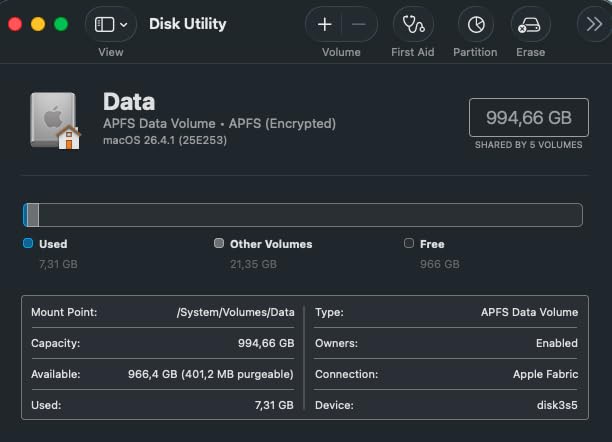
Physical installation of the device was easy, but it took a while to get through the full install, mostly because I ran into several issues related to the process (not the drive itself). Here are the hurdles I had to overcome to get macOS fully installed. Note, that I refer to the host system as the second device you need for this process (i.e. not the one you are trying to upgrade). 1) To get the Mac Mini into DFU mode, connect an HDMI cord to a monitor, press and hold the power button, then plug in the power cord. Release the power button once a light starts flashing orange on the front. Then, plug in the USB cable to the host Mac 2) Unlike what the SlimQ website says, you CANNOT use a Windows PC as the host PC. It must be another Mac (laptop / desktop) running the latest macOS. This is why I knocked the rating down to 4 stars. 3) Use Apple Configurator to perform the installation process as it seems to be more reliable 4) The host Mac must have significant free storage available. I'm not sure of the exact amount, but it is more than 25GB and less than 65GB (our installation failed when the host Mac only had 25GB free). It also appears that the free space must be on the main storage of the host device, not an external drive. 5) If the installation fails, you may need to clear out old files. Do this with caution, but it worked for me. Use the EasyFind app and search for ipsw files. We were eventually led to a directory with over 50GB of data from failed attempts. 6) The type of USB cable you use matters - the installation failed when using a Thunderbolt-compatible cable, but the standard white USB-C cable that comes with iPhones worked fine. Once we worked through all these, everything succeeded and our Mac shows ~1TB available data. I don't have long-term data on the reliability of the drive yet. ... show more
Reviewed in the United States on March 19, 2026 by J. Hirsch

Can't find a product?

Find it on Amazon first, then paste the link below.
Checking for best price...