Search  for anything...

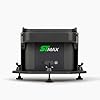
SkyTrak ST MAX Launch Monitor and Protective Shield Bundle – Dual Radar & Photometric Precision, Speed Training Powered by GOLFTEC, Tour-Level Accuracy for Indoor Golf Simulators

  • Based on 0 reviews
Condition: New
Checking for the best price...
$3,094.00 Why this price?

Buy Now, Pay Later


As low as / mo
  • – Up to 36-month term if approved
  • – No impact on credit
  • – Instant approval decision
  • – Secure and straightforward checkout

Ready to go? Add this product to your cart and select a plan during checkout.

Payment plans are offered through our trusted finance partners Klarna, Affirm, Afterpay, Apple Pay, and PayTomorrow. No-credit-needed leasing options through Acima may also be available at checkout.

Learn more about financing & leasing here.

Free shipping on this product

FREE 30-day refund/replacement

To qualify for a full refund, items must be returned in their original, unused condition. If an item is returned in a used, damaged, or materially different state, you may be granted a partial refund.

To initiate a return, please visit our Returns Center.

View our full returns policy here.


Availability: Only 8 left in stock, order soon!
Fulfilled by Amazon

Arrives Friday, Feb 20
Order within 22 hours and 18 minutes
Available payment plans shown during checkout

Protection Plan Protect Your Purchase
Checking for protection plans...

Features

  • Pro-grade accuracy: Dual Doppler radar + photometric cameras measure ball & club data like carry distance, spin, launch angle, club head speed, smash factor and more.
  • Speed Training powered by GOLFTEC: Guided drills and measurable improvement routines built into the ST MAX to help you build swing speed and drive more distance.
  • Premium build & connectivity: Modular internal design ensures stability and calibration. Dual USB ports support simultaneous charging & data transfer for uninterrupted training.
  • Ready for simulation or practice: Ideal for indoor home studio, garage setups or performance bayssupporting both fun rounds and serious improvement work.
  • Rugged protection included: The HDPE Protective Case is made to withstand ball impacts (up to 100 mph+), ensuring your monitor stays safe from mishits and wear.
  • Plug-and-play simplicity: From unboxing to your first swing, this bundle is optimized for ease: set up your monitor, insert into protective case, and get swinging.
  • One-bundle value: Get both the advanced launch monitor and high-quality case in one purchaseso youre covered on performance and protection from day one.

Description

Elevate your golf simulation and training setup with this premium bundle — the SKYTRAK ST MAX Launch Monitor paired with the rugged Protective Case. Designed to deliver tour-level data, immersive indoors or outdoors, and protect your investment every swing of the way. Whether you’re sharpening your game at home, in the garage, or at your performance studio, this combo gives you the gear to train smarter, hit harder and stay confident in your tech. The ST MAX monitor leverages dual Doppler radar and photometric cameras to capture ball and club data with remarkable precision: carry distance, ball speed, spin rates, launch angle, club path, face-to-path, and more. With exclusive Speed Training powered by GOLFTEC drills built in, you’ll get guided routines and measurable insights to build swing speed and unlock more distance. The modular internal design and dual USB ports mean reliable calibration, uninterrupted sessions, and pro-level convenience. Pairing that with the Protective Case ensures your monitor stays safe from accidental strikes or mishandling. Crafted from high-density polyethylene (HDPE) for serious impact resistance, the case is precision-engineered to fit your device and provide a secure shell — preserving your warranty and protecting your tech investment.

Brand: SkyTrak


Model Name: SKYTRAK MAX and Shield Bundle


Special Feature: Dual Doppler Radar & Photometric Cameras


Connectivity Technology: USB


Included Components: Protective Case, ST MAX Monitor


Mounting Type: Handheld


Touch Screen Type: Capacitive


Display Type: Screen


Human Interface Input: Buttons, Touchscreen


Control Method: Push Button, Touch


Item Weight: ‎8.33 pounds


Product Dimensions: ‎6 x 6 x 10 inches


Item model number: ‎STMAX-BDL-SHLD


Batteries: ‎1 Lithium Polymer batteries required. (included)


Warranty: ‎Manufacturer


Voice command: ‎Buttons, Touchscreen


Date First Available: November 5, 2025


Frequently asked questions

If you place your order now, the estimated arrival date for this product is: Friday, Feb 20

Yes, absolutely! You may return this product for a full refund within 30 days of receiving it.

To initiate a return, please visit our Returns Center.

View our full returns policy here.

  • Klarna Financing
  • Affirm Pay in 4
  • Affirm Financing
  • Afterpay Financing
  • PayTomorrow Financing
  • Financing through Apple Pay
Leasing options through Acima may also be available during checkout.

Learn more about financing & leasing here.

Top Amazon Reviews


  • So far it’s met expectations
Out of the box set up - we followed their website step by step instructions and it was pretty straight forward and easy. -1-Software We downloaded the software from the Skytrak website. It was easy to download and install on our computer. Logging in was easy. I have 2 minor issues so far we’ve noticed- 1. You HAVE to download each range or course to your computer before you can play it. The benefit is you can use this with no internet, the downside is if you do not have tons of available open hard drive space you’ll run into issues with that. 2. You cannot look at any courses or ranges or do any exploring in the software unless the monitor is powered on and connected to the computer. I do understand that the connection process validates the software and the membership of the monitor and the users account but you can’t even review data of shots you’ve done or anything you’ve done unless it’s all connected and powered on. Not attributed to the rating but it would be neat to see some games included that aren’t course play or driving range. Also something that maybe kids can also participate in, I say this because we have one kid that enjoys playing golf and would love to have something fun that they could play as well. -2-Connecting monitor to Computer There are 3 connection options for the monitor to a device (ie computer/laptop/tablet/phone) for software. For our use this is review is for the monitor being used with a iMac desktop computer. 1-“Direct” - monitor creates its own “WIFI” network. 2-“Network” - monitor connects to your existing WiFi network 3-“USB-c” (“hardwired” cable connection between computer and monitor) 1-Direct- we have the best experience with this method. It’s really straightforward connection set up and provides out set up the best data speeds between monitor, swing and relaying information to our computer. 2-Network- this connectivity will be largely dependent on your personal internet speeds and WiFi reception at your location. For us we already struggle with WiFi reception around our house so although I’m sure this is a great connection type for people for us personally this provided the mode data “lag” between swing and showing the result on the screen. 3- USB-C connection was by far the fastest most smooth data connection and relay between monitor and the screen. The only downside is that you are limited to the length of the cable you use and the distance between the monitor and the computer screen. For this reason we decided to stick to the direct connection to limit the amount of risk of a ball hitting our computer during use. -3-Monitor itself The monitor is set on the side of your ball, so you are swinging in front of the monitor. It has a red laser light that it puts out and this gives you the area where you need to set your ball for the monitor to register your swing. Your ball needs to be within 1-2” of the red laser light on the mat. Comparing the results of the monitor to real life it is very accurate to in real life golf play for us at least. It does not seem to give any or take anything away to our game. If you do a practice swing the monitor more common than not picks up the club in the path and will throw up a notice on the screen saying it was unable to compute the swing speed. That said the monitor is quick to “reset” itself so that you can take a swing and not have a long delay. The monitor does seem to not like when you “top” a ball. The monitor tends to not read a swing was even attempted. For some this may be irritating for others it may be a welcome “free” mulligan. -4- Monitor Battery We are able to use the monitor in “Direct” connection with a computer 90% of battery usage lasts about 3 hours. You can use it while charging, however it is slow to charge while also being in use. I would say we get about 10% of battery charge in an hour while also actively using the monitor. When not in use it charges pretty fast. Maybe a couple of hours. -5- Monitor Protective Case It is a decently thick plastic. The leveling feet are easy to adjust and set. It is VERY effective at protecting the monitor itself which is its job. Our monitor has been hit by a ricochet ball a few times already and the case has done its job. My complaint that takes away the 2 stars is purely because the back leveling foot is positioned exactly aligned to where it blocks easy access to the charging port and the direct connection port. -6-actual use of the monitor This monitor provides a great resource for practice and fun wrapped into one unit. There are multiple data points it provides and it breaks it down by club, giving you information on averages for each club and where your swing lays within the average ranges. The graphics in our opinion are pretty crisp. -7-Course play If you land in a bunker and have a lip you need to get over you do actually have to clear the lip. If your ball lands near or in a bush your swing is from within or near the bush. Shots by or near trees you have to clear the tree. Your ball will bounce off of a cart path. Your ball will react to hitting a rock. ... show more
Reviewed in the United States on December 8, 2025 by WanderingWildWife

  • A Strong First Impression for My Very First Launch Monitor
I have never owned a launch monitor before, but I had been eyeing a home golf simulator setup for a while and was genuinely excited to finally try one out. I picked up the SkyTrak ST MAX Launch Monitor with the goal of building a full simulation system at home, and it has exceeded what I expected for a first experience. Right out of the box, the unit looks sharp and professional. The color scheme feels modern and premium without being flashy, and the size is just right. It feels solid and well built without taking up a ton of space, which is perfect for a garage or indoor setup. The included protective shield is a huge plus. It fits perfectly, looks clean, and gives real peace of mind when you are swinging indoors and still dialing things in. Setup was much easier than I expected. From unboxing to taking my first swings did not take long at all. The plug and play aspect is real, and everything felt intuitive even as someone completely new to this type of gear. Connectivity has been stable, and I really like that it supports both charging and data transfer at the same time through dual USB ports, which makes longer practice sessions stress free. Functionality is where this thing really shines. The dual radar and photometric camera system delivers incredibly detailed data. Seeing carry distance, launch angle, spin, club head speed, smash factor, and more has been eye opening. Based on what I read beforehand, accuracy was a big selling point, and it absolutely lives up to that reputation. Shots feel true to life, and the feedback matches what I see in my actual ball flight. One feature I did not expect to enjoy as much as I do is the speed training powered by GOLFTEC. The guided drills and structured routines make practice feel purposeful instead of just hitting balls. It feels like something that will actually help me improve over time, and not just entertain. Overall, the value here feels very strong, especially considering this bundle includes both the launch monitor and the rugged protective case. For someone like me who is new to launch monitors but serious about building an indoor golf simulator, this was an awesome place to start. I really like how polished, accurate, and beginner friendly the SkyTrak ST MAX feels while still offering tour level depth. I could not be happier with this purchase and would absolutely recommend it to anyone looking to build a home sim or elevate their practice setup. ... show more
Reviewed in the United States on December 31, 2025 by Monkiedude22 Monkiedude22

  • SkyTrak ST MAX Launch Monitor and Protective Shield Bundle
Prior to getting this unit, my husband had the SkyTrak Plus. These are his views based on the upgrade to this new unit: My husband says he really enjoys the swing speed trainer and the additional metrics that are given after every practice swing. He enjoys the club face display. It's an outstanding unit. He added a second Wifi to the system which engaged the tracking faster. ... show more
Reviewed in the United States on December 15, 2025 by Acappella Lady Acappella Lady

Can't find a product?

Find it on Amazon first, then paste the link below.
Checking for best price...