Search  for anything...

Siser Romeo Essential Bundle - 24" Professional Cutting Machine for Vinyl, Paper, and More – WiFi Compatible with Windows & Mac - Includes Leonardo Design Studio Software, Roll Holder Accessory
  • Based on 48 reviews
Condition: New
Checking for the best price...
$549.99 Why this price?

Buy Now, Pay Later


As low as / mo
  • – Up to 36-month term if approved
  • – No impact on credit
  • – Instant approval decision
  • – Secure and straightforward checkout

Ready to go? Add this product to your cart and select a plan during checkout.

Payment plans are offered through our trusted finance partners Klarna, Affirm, Afterpay, Apple Pay, and PayTomorrow. No-credit-needed leasing options through Acima may also be available at checkout.

Learn more about financing & leasing here.

Selected Option

Free shipping on this product

Returnable until Jan 31, 2026

To qualify for a full refund, items must be returned in their original, unused condition. If an item is returned in a used, damaged, or materially different state, you may be granted a partial refund.

To initiate a return, please visit our Returns Center.

View our full returns policy here.


Availability: In Stock.
Fulfilled by Happy Crafters LLC

Arrives Wednesday, Feb 4
Order within 18 hours and 11 minutes
Available payment plans shown during checkout

Protection Plan Protect Your Purchase
Checking for protection plans...

Style: ESSENTIALS BUNDLE


Features

  • Twice the Size, Half the Production Time - Romeo boasts a full 24" cutting area, doubling the size of Juliet! Not only does this allow you to cut larger designs, but your volumes can be increased as well. Combined with an open workspace design, Romeo is built with the business in mind.
  • Power at Your Fingertips - Romeo is a high-definition cutting machine capable of cutting the finest details in a variety of materials. Romeo is designed for all Siser HTV and EasyPSV via preinstalled cut settings, but works superbly with other materials such as cardstock, stickers, and more!
  • Go Matless - Romeo comes with a 12"x12" Light Tack Cutting Mat for easily loading a variety of materials. But Romeo also has the capability of cutting materials without the mat! Quickly load materials into Romeo mat-free and take advantage of the entire cutting area.
  • Quick and Quiet - Romeo is built with an advanced motor that allows for super speedy cuts- up to 60% faster than traditional desktop cutters! Not only is Romeo faster, but quieter too! Say good-bye to those horrible, loud grinding noises!
  • Accessible for Beginners, Built for Pros - Newbies to cutting machines will find Romeo simple to set up and learn, thanks to an intuitive touch-screen user interface. But Romeo also comes with a number of professional features not seen in other machines, like adjustable pinch rollers, variable grit rollers, commercial-level blades, and a premium build quality.

Description

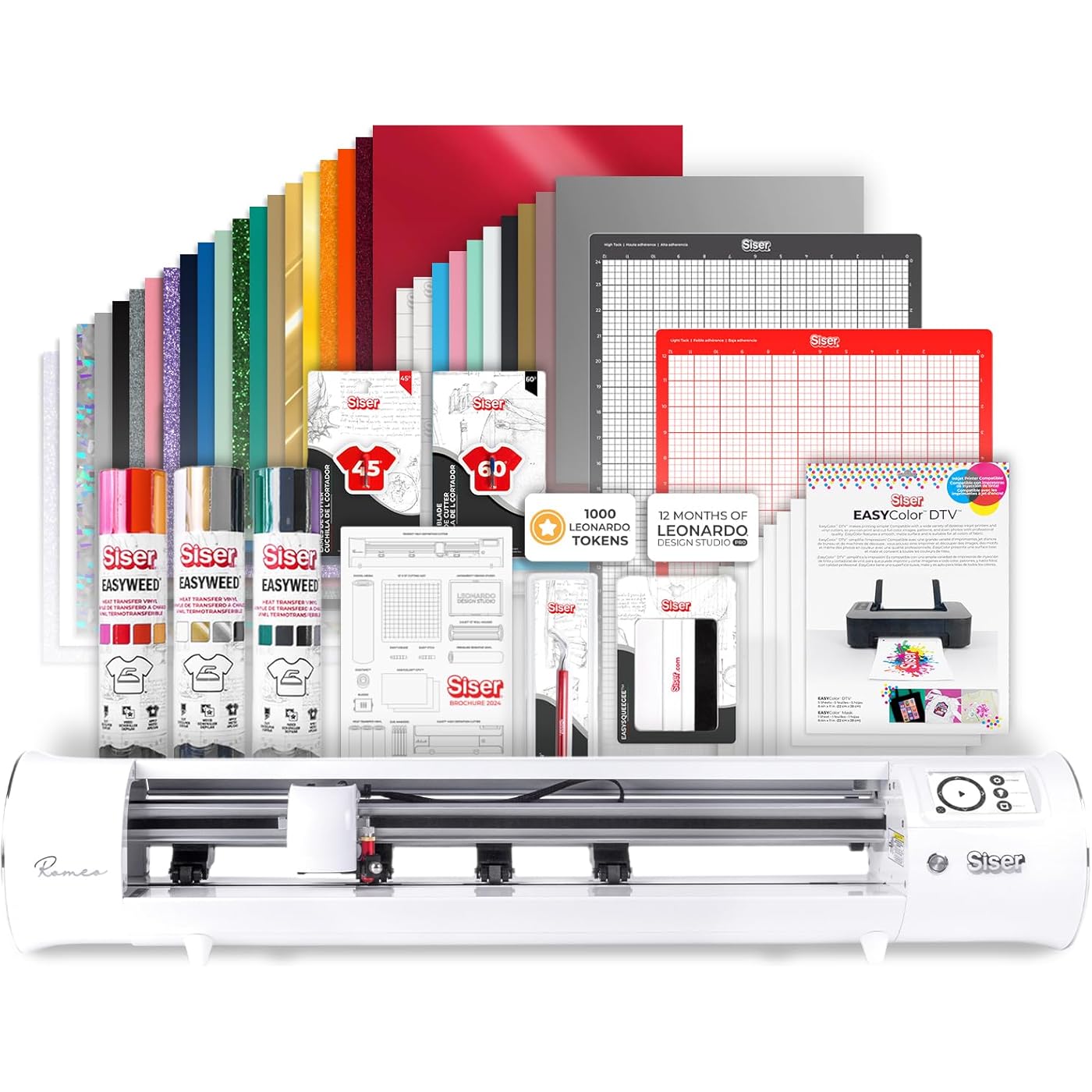
The Siser Romeo high-definition cutter offers a sleek, modern design with all the benefits of an industrial cutter. With a high-quality motor, the cut head can move quickly without sacrificing precision, allowing the cutter to cut complex designs and fine detail all while using pinpoint accuracy. Settings like force, speed, and even the cut starting point can be changed easily using the on-board touch screen. Plus, there’s a built-in Test Cut feature so you can dial in the perfect settings without wasting material. With four adjustable pinch rollers, Romeo offers increased stability when cutting projects— even when using large material. Plus, the variable grit rollers allow you to load a wide variety of different mat and material sizes quickly and hassle-free. Why stop at 12” materials? Romeo can cut materials up to 24” in width! Increase your productivity and tackle larger projects not possible with smaller cutters. A powerful cutter requires powerful software. The Leonardo Design Studio was made to take full advantage of the Romeo cutter’s capabilities. Loaded with tons of inspiration projects, tutorial videos, and an ever-expanding design library, you’re sure to feel motivated to get crafting. Best of all, Leonardo Design Studio is free with every Romeo purchase. Easily connect Romeo to Leonardo Design Studio via the included USB Cable or a Wi-Fi connection and you're ready to go! BUNDLE INCLUDES: Romeo High Definition Cutter EasyWeed Rainbow Sampler Pack 30 EasyPSV Sheets EasyWeeder EasyTweezers EasySqueegee EasyColor DTV 5-Pack 45 Degree Cutting Blade 60 Degree Cutting Blade 12" x 24" High Tack Cutting Mat 12" x 12" Light Tack Cutting Mat Siser Brochure Leoanrdo Pro 12 Month Subscription 1,000 Leonardo Apprentice Tokens Please note this bundle is a multi-box shipment. Boxes may arrive at different times.

Brand: Siser


Material: Metal


Color: Black


Active Surface Area: 576 square inches


Operation Mode: Automatic


Date First Available ‏ : ‎ November 27, 2024


Manufacturer ‏ : ‎ SISER


Best Sellers Rank: #47,045 in Arts, Crafts & Sewing (See Top 100 in Arts, Crafts & Sewing) #46 in Scrapbooking Die-Cut Machines


#46 in Scrapbooking Die-Cut Machines:


Customer Reviews: 4.4 4.4 out of 5 stars (52)


Frequently asked questions

If you place your order now, the estimated arrival date for this product is: Wednesday, Feb 4

Yes, absolutely! You may return this product for a full refund within 30 days of receiving it.

To initiate a return, please visit our Returns Center.

View our full returns policy here.

  • Klarna Financing
  • Affirm Pay in 4
  • Affirm Financing
  • Afterpay Financing
  • PayTomorrow Financing
  • Financing through Apple Pay
Leasing options through Acima may also be available during checkout.

Learn more about financing & leasing here.

Top Amazon Reviews


  • Insanely accurate, wonderful machine
Style: MACHINE ONLY
I have bought two of these, the first one malfunctioned and the seller took excellent care of me in resolving that problem (Happy Crafters has a lifelong fan as a result!). The machine itself is frankly amazing, especially compared to my Maker 3 and Cameo 4. There are things I can do on this machine that I just could not on the others, mostly comes down to accuracy, but Romeo is: 1) Much, much faster than both - try 1 pass die-cut instead of 3 at a speed about twice as fast as Maker 3 2) Much quieter than both, but especially the Cameo 4 3) So accurate that I can cut a .05" 'thumbnail peel' edge on the stickers I make without adding extra time doing the second 'kiss' cut (in the same job!) 4) The software hasn't had an update in the couple weeks I've had the machine. I can't say that when it does finally update that it won't break the cutter, but I can imagine that's a problem unique to Cricut software iykyk 5) Built in Wifi - if you have trouble getting it to connect, it doesn't like WPA3 security at all. I couldn't find this documented anywhere, but changing to WPA/WPA2 connected on the first try All of these machines have their quirks, and their accompanying software varies. Leonardo Design Studio is Siser's. It seems less capable at first, but I quickly found out that it was perfectly suited for everything I need, with several features I haven't tried yet. I will say that I DO NOT like that Leonardo Pro is a subscription instead of a one-time fee, but I also have decided that I don't need Pro at this time anyway. It came with a trial and it saved some time being able to tile your designs and have them fill the available page space, but copy/paste is free, for example. One of the better parts of Leonardo is that it is able to use more surface area of my material, I'm able to get an extra sticker per sheet because of this, so it's saving money right out of the box! If you're serious about your cuts, your time, your business, this is your machine. It's definitely an investment, but one that's well worth it, in my opinion. The feeling of quality my stickers now have was worth the cost of admission alone. I was manually slitting the back of my stickers for 'easy peel' before, this takes it to a new level of professionalism and quality. The biggest gripe I would say I have with this, its features aren't well documented, including Leonardo. I was able to find everything I needed by searching and mostly great folks on Reddit. If you have used Design Space or Silhouette Studio, most of what you can do in Leo is old hat (except they call offsets 'contours'). It has a literal camera for alignment, that works very well. Place the blade near the line, but directly above the triangle (you'll see). Tip: when it can't find the first registration mark, it's looking for the bottom left corner of the 'L' page mark. Adjust the crosshair on the screen to this corner and say OK, it should then find the other three and continue on its way. I do glossy stickers with a clear overlay and it's been able to register successfully every time (try that with the Cameo 4). In my opinion, this is going from hobby grade cutters to (entry-mid level) professional without getting into the $1000s. I love it and can't recommend it enough! ... show more
Reviewed in the United States on April 19, 2024 by Zeffor Crafts

  • Steep learning curve, AMAZING MACHINE
Style: MACHINE ONLY
I wanted to give this machine a fair shot before reviewing. I have had the Romeo a little over a month and I am absolutely in love with it. I have used a Cricut machine for the past 7 years and felt it was time to upgrade. My Air 2 has gotten a lot of use for our small business, but I felt we had reached the point where we needed something a little more advanced and quicker. I hate how Cricut design space functions and our machine just felt, clunky. The Romeo FAR outperforms the Cricut in many ways. 1. It is MUCH faster. You can adjust the cut speed from the touch screen on the Romeo. The speeds are also different levels, compared to my Air 2 which is just regular speed or turbo (which always cut like crap). 2. The smoothness of the Romeo cuts/lines is INCREDIBLE. There is literally no comparison when it comes to the quality of the cuts. There are no snags around corners, minimal slipping when the feeders are aligned with the grippy spots correctly, and it just overall performs like a QUALITY machine. It's also much quieter when running. 3. Leonardo design studio is where things got difficult for me. After getting used to Leonardo though, going back and using Cricut design space was PAINFUL. Once you learn the shortcuts in Leonardo, it is much easier to navigate. The cut screen is easier to use and making individual weed borders is a breeze. Also, being able to adjust the material width on the canvas is amazing. Being able to EASILY organize your images to maximize product usage is something I didn't know I was missing. 4. NO MORE CUTTING MATS. For the most part anyways. I still use a mat here and there for super small detailed images or when I'm using up scrap material. The Romeo also came with a roll holder which is so nice once you get it aligned and set up right. The only potential flaw I have noticed is in how Leonardo Design Studio reads "invisible" pen lines from Illustrator. It may be a "me" thing, but when I save an SVG in Adobe Illustrator that includes invisible pen pines, they do not translate over to Leonardo. They just disappear. Which is a huge bummer as this is the ONLY thing that is keeping me using my Cricut for certain images where I don't want double/triple cut lines on complex images. Again, this may be a me thing and maybe I'm missing something but it is a big bummer for me. Overall, I am so pleased with my purchase. I will NOT be going back to using a Cricut except for the few complex images previously mentioned. If you are switching from a Cricut to a Siser machine, be patient. The learning curve is a bit steep. I almost returned the machine several times but I am so glad I stuck with it. ... show more
Reviewed in the United States on August 3, 2025 by Tia Palmer

Can't find a product?

Find it on Amazon first, then paste the link below.
Checking for best price...