Search  for anything...

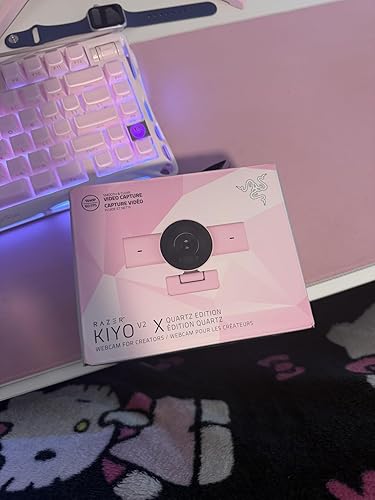
Razer Kiyo V2 X Streaming Webcam: 1440p 60 FPS - Auto Focus - Built-in Microphone - Wide Angle Lense - Integrated Privacy Shutter - Works with OBS, Xsplit, Streamlabs, Discord, Zoom, Teams - White

  • Based on 0 reviews
Condition: New
Checking for the best price...

Buy Now, Pay Later


As low as $16.67 / mo
  • – 6-month term
  • – No impact on credit
  • – Instant approval decision
  • – Secure and straightforward checkout

Ready to go? Add this product to your cart and select a plan during checkout.

Payment plans are offered through our trusted finance partners Klarna, Affirm, Afterpay, Apple Pay, and PayTomorrow. No-credit-needed leasing options through Acima may also be available at checkout.

Learn more about financing & leasing here.

Selected Option

Free shipping on this product

FREE 30-day refund/replacement

To qualify for a full refund, items must be returned in their original, unused condition. If an item is returned in a used, damaged, or materially different state, you may be granted a partial refund.

To initiate a return, please visit our Returns Center.

View our full returns policy here.


Availability: In Stock.
Fulfilled by Amazon

Arrives Sunday, Mar 15
Order within 5 hours and 18 minutes
Available payment plans shown during checkout

Protection Plan Protect Your Purchase
Checking for protection plans...

Color: White


Features

  • 1440P 60 FPS VIDEO From intense gaming sessions to casual chats, be set to impress with smooth, natural movement and clarity that will wow everyone watching
  • FAST, ACCURATE AUTO FOCUS Always stay in the moment and look sharp whether its a clutch play or an exciting unboxing
  • QUICK, EASY SOFTWARE CUSTOMIZATION Kickstart any stream with intuitive presets or fine-tune every detail with precise color and lighting adjustments using Razer Synapse
  • WIDE ANGLE LENSE Whether zooming out to show off a full setup or getting up close and personal with viewers, a wide-angle lens offers ultimate flexibility
  • BUILT-IN MIC With crystal-clear audio and sharp, smooth video, have everything needed to start creating or streaming in one convenient package
  • INTEGRATED PRIVACY SHUTTER Whether wrapping up a stream or stepping away for a short break, conveniently cover the lens with a quick twist to ensure instant privacy
  • UNIVERSAL PIVOTING MOUNT Tilt and swivel the mount to find the perfect angle on a monitor, or fix it to a tripod via its built-in thread to achieve a higher or lower angle shot

Description

Upgrade your streaming setup with the Razer Kiyo V2 X—an easy-to-use Full HD 1080p 60FPS webcam designed for smooth, high-quality video. Whether you're gaming, attending virtual meetings, or creating content, this USB webcam delivers sharp, clear visuals with natural motion. Featuring fast and accurate auto-focus, it keeps you in sharp detail during dynamic moments. Customize your video settings effortlessly with Razer Synapse software—adjust brightness, contrast, sharpness, and more, or use built-in image presets to get started fast. The wide-angle lens offers flexible framing to capture more of your background or setup, while the integrated microphone delivers clear, crisp audio. With a plug-and-play setup, integrated privacy shutter, and adjustable mount for perfect angles, the Razer Kiyo V2 X is the ideal webcam for streamers, gamers, professionals working from home, and content creators. Compatible with Zoom, Microsoft Teams, OBS, and all major platforms, it’s your all-in-one solution for professional video and audio performance.

Brand: Razer


Photo Sensor Technology: Other


Video Capture Resolution: 2K


Maximum Focal Length: 3 Millimeters


Flash Memory Type: Internal flash memory


Video Capture Format: MP4


Connectivity Technology: USB


Color: White


Camcorder type: Webcam


Model Name: Kiyo V2 X


Product Dimensions: 2.6 x 4.3 x 2.7 inches


Item Weight: 10.2 ounces


Item model number: RZ19-05380300-R3U1


Date First Available: February 24, 2026


Manufacturer: Razer


Frequently asked questions

If you place your order now, the estimated arrival date for this product is: Sunday, Mar 15

Yes, absolutely! You may return this product for a full refund within 30 days of receiving it.

To initiate a return, please visit our Returns Center.

View our full returns policy here.

  • Klarna Financing
  • Affirm Pay in 4
  • Affirm Financing
  • Afterpay Financing
  • PayTomorrow Financing
  • Financing through Apple Pay
Leasing options through Acima may also be available during checkout.

Learn more about financing & leasing here.

Top Amazon Reviews


  • Great starter
Color: Black
Very much improved from the first version. Picture is clear and the shutter is a nice feature. For the price this is the best option for starters to mid level in my opinion.
Reviewed in the United States on February 28, 2026 by Matthew M.

  • Excelente producto
Color: Black
Micrófono de calidad, la cámara tires las especificaciones que dice en la descripción
Reviewed in the United States on March 8, 2026 by Zulma Galeano

  • Great camera for the price
Color: Black
Not a bad camera for the money. Great picture. Auto focus works pretty good. I mostly use it for work, not streaming. Sits great on top of monitor without blocking any of the screen. Make sure to actually plug it in directly. If you try to use a hub or anything like that, you will notice the performance degrade over time while it's running. ... show more
Reviewed in the United States on March 11, 2026 by Allison

  • Buen producto entrada de gama
Color: Black
Es lo que esperaba, la caja llego media aplastada, pero el viaje fue largo
Reviewed in the United States on January 22, 2026 by Eric Christensen

  • Razer Cam
Color: Black
Not to bad, The microphe is kinda weak. and soon as you install it a message says to use cameo studio which costs money Thing is if i can get the mic wirking right then good sounds like talking in a well
Reviewed in the United States on March 11, 2026 by Douglas A Caruso Sr

  • Its good for what it is sold for.
Color: Black
Blurring image quality. Razer Synapse 4 will not detect the device no matter what so I cannot change setting that causes the blur. Edit: Support help me figure out the issue and quick to response
Reviewed in the United States on October 21, 2025 by Dave N

  • A stylish, capable webcam with some smart design choices and a few meaningful compromises
Color: White
The media could not be loaded. This webcam immediately stands out on the desk thanks to its big, round lens housing and clean white body. It feels well-built, with durable plastic that doesn't come across as cheap, and the overall look fits nicely into a modern gaming or streaming setup. The monitor mount is also excellent: it grips the top of my gaming monitor securely, doesn't wobble, and doesn't feel like it is about to slide off if I adjust the screen angle. Once it is in place, I can mostly forget about it. And it has an adjustable pivot point. One of my favorite features is the rotating ring around the lens, which acts as a physical privacy shutter. It is genuinely satisfying to use, you just twist the ring, and you instantly know whether the camera is blocked or not without relying on software or tiny LEDs. In terms of image quality, when the lighting is good, this camera really shines. At 1440p and 60 fps, the picture looks sharp and smooth, and for well-lit calls, streaming, or recording, it delivers a very nice, clean image. It also plays nicely with common software like OBS Studio, Teams, Zoom, Twitch, and NVIDIA Broadcast, so integrating it into different workflows is straightforward. The weaknesses start to show once the light drops. In lower light, the image quality noticeably steps down compared to a better webcam like my Brio. Noise increases, details soften, and this becomes even more obvious if I keep it at 1440p. It is still usable, but if you often work or stream in dim rooms, you will see the difference. The viewing angle is another drawback. Despite the "wide angle" claims, it feels noticeably narrower than some other webcams and even Razer's own Kiyo V2. In practice, that means I sometimes have to physically move the camera during long meetings if I'm walking around the room or using auto-framing. It just doesn't capture as much of the scene as I'd like. Autofocus is decent but not impressive. When the lighting is OK, it does its job, but it is on the slower side and becomes less reliable in low light, occasionally hunting or taking a moment to lock in, especially when you have a light source behind you. The biggest annoyance for me, though, is the non-detachable USB-C cable. On a large desk with a tower PC sitting far from the monitor and proper cable management underneath, the fixed cable is simply too short. With other webcams, I can just swap in a longer USB-C cable and be done. Here, because one end is permanently attached to the camera, I have to use adapters and extension cables just to reach the PC, which is clunky and unnecessary. All that said, for the price, I still think this is a very good camera. It is clearly not as good as the higher-end 4K webcams, but it also costs significantly less - around half the price in many cases. If you mainly use it in a well-lit environment, appreciate the clean look and excellent privacy shutter, and can live with the narrower field of view and fixed cable, it offers a lot of value. Considering what it costs, I'd call it a great buy for everyday streaming and video calls, as long as you understand its low-light and cable limitations. ... show more
Reviewed in the United States on February 27, 2026 by Ctrl+Alt+Review Ctrl+Alt+Review

  • AMAZING webcam but autofocus and image quality okay in low light
Color: White
The media could not be loaded. Wow! You can tell the difference when you scale up from a native built in laptop webcam or a cheap one to a dedicated well built webcam. Construction: really nice solid white plastic, wide lens housing. There are two moving parts, one hinge for the mount and one to rotate the upper body of the webcam. Both are quite smooth but secure, the perfect amount of give and flexibility. The bottom part of the mount has nice smooth what feels like softer silicone, so it doesn't slide on the back of the screen, and paired with the secure hinge it can grip the screen really well. Really good design, engineering, and material. Features: first off, the physical privacy shutter. They didn't have to make it so fancy but it's super nice, excellent tactile response. You turn it and then the aperture rings slides smoothly into place. It's REALLY nice. LED light indicates when the webcam is being used. The cable is great, USB-A is a good choice especially for laptops which haven't converted everything to USB-C. Comes with cord bundler, the cable is nice and thick and solid. Only problem potentially is that the USB cable is a bit short, good for laptops but for a desktop you'll have to jury rig to customize. You can't detach the USB cable from the back of the webcam and replace it with something longer. Image quality: pretty good and clean. That 60fps when you're not in the dark is HD smooth, you can notice it. White balance, sharpness, all good - they use a solid camera and it shows. It's decently wide angle but not ultra wide angle, enough for a somewhat wider setup the normal distance away from the screen. 1440p is excellent too, you can tell it's so much better than 720p or 1080p. But in low light it'll drop the image quality and that also can show. Works great with OBS though. The only other real problem is autofocus. It works, but it hunts sometimes. It's like most other webcams, not that much facial recognition and tracking if any. So that's a bit annoying. When plugged in it'll ask you to install the app where you can fine tune the webcam. I haven't tried it because I hate more bloatware and don't need any more programs on my computer I barely use, but you can go ahead and install. It's not required, though, it's just plug and play, the app is just another option. I wish they made it clear. ... show more
Reviewed in the United States on March 3, 2026 by J.C. J.C.

Can't find a product?

Find it on Amazon first, then paste the link below.
Checking for best price...