Search  for anything...

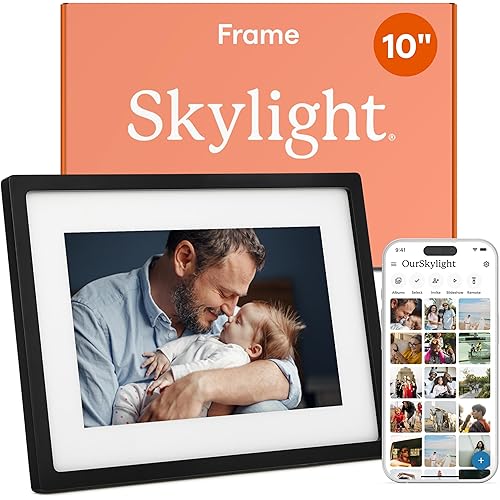
PhotoSpring No Subscription, 10in WiFi Digital Picture Frame, Email App Web, USA Company, 32gb Touch Screen, Play Videos up to 5min, White

  • Based on 0 reviews
Condition: New
Checking for the best price...
$89.90 Why this price?
Save $10.00 was $99.90

Buy Now, Pay Later


As low as $14.98 / mo
  • – 6-month term
  • – No impact on credit to apply
  • – Instant approval decision
  • – Secure and straightforward checkout

Ready to go? Add this product to your cart and select a plan during checkout.

Payment plans are offered through our trusted finance partners Klarna, Affirm, Afterpay, Apple Pay, and PayTomorrow. No-credit-needed leasing options through Acima may also be available at checkout.

Learn more about financing & leasing here.

Selected Option

Free shipping on this product

FREE refund/replacement until Jan 31, 2026

To qualify for a full refund, items must be returned in their original, unused condition. If an item is returned in a used, damaged, or materially different state, you may be granted a partial refund.

To initiate a return, please visit our Returns Center.

View our full returns policy here.


Availability: In Stock.
Fulfilled by Amazon

Arrives Friday, May 8
Order within 1 hour and 19 minutes
Available payment plans shown during checkout

Protection Plan Protect Your Purchase
Checking for protection plans...

Model: AC Only - Classic White


Features

  • NO SUBSCRIPTION FEES - PhotoSpring frames come fully featured without the need to pay additional fees ever. Other frame companies charge fees for features we include for free.
  • Makes a Great Gift - Add a gift message, and preload photos onto the frame without opening the box
  • Great for Families - Wifi connection lets family members send photos to the frame from anywhere in the world
  • Multiple Ways to Share - Send photos to the frame via email, app, or web
  • Multiple Frames for the Whole Family - Send up to 500 photos to multiple frames at the same time.
  • HD Video Support - Upload and display HD quality videos up to 5mins in length. Other frame companies will limit you to 15sec and degrade the video quality
  • 32gb of storage - store Up To 20,000 Photos

Brand: PhotoSpring


Color: White


Resolution: 1280x800


Compatible Devices: Personal Computer, Smartphone, Tablet, iPhone


Screen Size: 10 Inches


Product Dimensions: 10.1 x 10 x 0.99 inches


Item Weight: 1.8 pounds


Item model number: AC Only - Classic White


Date First Available: February 7, 2022


Manufacturer: PhotoSpring


Frequently asked questions

If you place your order now, the estimated arrival date for this product is: Friday, May 8

Yes, absolutely! You may return this product for a full refund within 30 days of receiving it.

To initiate a return, please visit our Returns Center.

View our full returns policy here.

  • Klarna Financing
  • Affirm Pay in 4
  • Affirm Financing
  • Afterpay Financing
  • PayTomorrow Financing
  • Financing through Apple Pay
Leasing options through Acima may also be available during checkout.

Learn more about financing & leasing here.

Top Amazon Reviews


  • Amazing Picture frame!
Amazing Picture frame! I got one frame for our family, and one for my parents (the grandparents). Since they live in another state, we were excited about having a simple way to share pictures with them—they love pictures of the grand-kids. I’ve been using the frame for about a month now, and have been impressed with how smoothly it works. My previous digital picture frame still has the original batch of pictures I uploaded when I first got it. It was such a pain to update and change pictures, like many of the other digital frames. We take so many pictures, I wanted a simple way to add and change and modify them and keep them updated. I also was looking for something simple enough for my parents, who are intimidated by electronics, to be able to use. A friend recommended PhotoSpring, and I compared it to Nix and the others with WiFi and the ability to send pictures directly from your smart phone. PhotoSpring had the features I was looking for, and the easiest to use. Pros: Has a touch screen interface— It works basically like an iPad. This is a must, especially for the grandparents. No need to find the remote to use it. Intuitive interface, with touch controls. This makes it easy to manage the pictures. Removing pictures you don’t want is as simple as a tap rather than going though an app or menu system like the competitors. You can select different playlists to play alternate sets of photos as well. This device has excellent screen resolution and clarity, and convenient size. Easy to set up— Instead of having to read a manual, or get referred to a web site to figure out how to use it like other frames in this class, PhotoSpring comes with a built in slide show with instructions that you can swipe through (and swipe back and fourth to review if you like) that shows you how to use it. I do recommend going through the slide show before setting it up. I go back to it every now and then and have picked up more features I had over looked initially. Smart Phone compatible—There’s a simple app to manage the frame and add pictures (as well as through the website). Through the app you can also select to have all the pictures taken from your phone automatically sent to the frame if you chose. It’s easy to hide the ones you don’t want to show by tapping on the picture and tapping the hide icon. Or use the 4 finger swipe gesture. You can manage multiple frames, and share photos through the app as well. Photo Sharing – You can send invites to friends and family to send pictures to your frame. Through the smartphone app, website or frame itself, you can send a code which links the app to your frame. Once frames are linked to your app, you can choose which frames you would like to send pictures too. (You can also manage several frames if you have multiple in your own house.) Friends and family can then send photos directly to your frame. The grandparents love this feature. My mom often calls to comment when new pictures pop up on her frame. Video—Video works as easily as the pictures. It has built in speakers and you can adjust the audio volume. Sturdy charging cradle/stand completely hidden behind frame, and it’s battery powered as well. You can pick it up and use it like a tablet without cords to unplug or plug back in. There is also a sleep schedule function for hours it does not need to be on. Cons: The app only has small thumbnails of the pictures to select and send to the frame – can be hard to see detail especially when you take several of the same shot. However, I found with the iPhone app installed, I can send pictures them directly through the iPhone camera roll. Just select the picture on camera roll then tap on the share/export icon (the one with the square and up arrow on the bottom left) then tap the PhotoSpring icon (if you don’t see it on the top row, you can enable it by scrolling to the right tap on the icon with three dots labeled “more” and add it to the options). No SD card / USB ability – not an issue for me, I prefer Wifi, but if you don’t have Wifi, and depend on loading directly from your digital camera SD card or USB computer connection, this may not work for you. You can easily upload pictures from a digital camera using the website upload option, but still needs wifi for this. One color, one size. It just comes in white, with 10 inch screen. Works fine for me, but would be nice to have all these features in additional options. It does come with different memory storage options though. The basic is 16GB, (twice as much as Nix comes with). Also comes in 32 and 80GB. Bottom Line: Easy to use, intuitive, packed with features. ... show more
Reviewed in the United States on June 5, 2017 by Michael

  • Was this on Kickstarter? Best Digital Photo Frame! Cinch to Setup, Intuitive to Use, Near-Future Cloud Integration.
07-14-2018 Update: It's been a while since I owned the photo frame, and one aspect that strikes me is how the software is always being updated to fix bugs and introduce new features. Initially I may have been tentative to purchase Photospring since they seemed like a new player on the block, but now I have peace of mind that the company stands by their product for the greater good of usability. Kudos to Photospring!! I've been in the market for the ideal digital photo frame: one that's slick to use, looks great, feels great, and feels updated and modern. I've gone through NIX Advance and Pix-star photo frames, with those being the most popular, yet I felt their designs and execution was outdated. Their products and their interface felt like they were stuck in a time before smartphones, where one must initiate a series of cryptic button presses to navigate around their product. I was looking for something more: cloud connectivity, rich with features. But nothing was offered at a reasonable price point on Amazon, so I settled for a NIX Advance frame as a timely gift. After using the NIX Advance, despite it being advertised to support movies, I found that video support isn't exactly seamless nor universal. There's a few forums on how to convert videos to allow the NIX Advance to play properly, but the mass market doesn't have time nor expertise to muck with that. In comes PhotoSpring. With the PhotoSpring completely set up and running in about 10 minutes (which, after that was done, it started downloading all my photos), it has blown away my expectations. PhotoSpring has finally delivered what is (sadly) considered a "state-of-the-art" photo frame. With an easy-to-use interface, cloud connectivity, the ability to automatically have their iOS or Android app seamlessly upload new photos in the background, plus upcoming support for Facebook & Google photo albums, this is it, folks. ... show more
Reviewed in the United States on April 27, 2017 by A A

  • Super Simple, Great Functionality
It's been super hard being away from my parents and equally hard for them to be away from the fam and our little guy. Phones are useful to text and virtual call, but we thought of gifting this because not only can you add photos and videos remotely, but any user with the frame info has the ability to do that. We already have one, and set-up is literally just a click of one button (having one is nice since it simplifies things- especially for someone that has to walk their parents through the set-up hah!) Set-up process consists of typing in your name, an email and also choosing an email that is unique to the frame that enables pictures to be loaded directly to it. If someone wants to use the app instead to load pictures, it is pretty straightforward - there are only two options (Load pics or Manage Frame), again leaving it very simple and easy for the general user. Among the options it has, you have the ability to make different "playlists"/ albums that you can choose to play. For our purpose we selected to play all videos and photos which will include any and all new photos that are loaded to the frame from email/app. The frame itself can be horizontal or vertical, and has two little notched on either side for it to sit in the frame holder. There is a simple menu that is easy to understand and set preferences (like volume of videos, slideshow preferences etc). A sleep mode is available - and if you prefer you can set it on a schedule so it automatically turns on/off. We haven't used the customer service line yet, but maybe that shows how this company really created this product with the general user in mind. This frame proves that you don't need a billion fancy buttons and options to get something that looks and does the job right. ... show more
Reviewed in the United States on May 6, 2020 by CJ

Can't find a product?

Find it on Amazon first, then paste the link below.
Checking for best price...