Search  for anything...

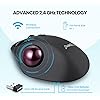
Perixx11568 Perimice-717 Wireless Trackball Mouse, Build-in 1.34 Inch Trackball with Pointing Feature, 5 Programmable Buttons, 2 DPI Level, Black

  • Based on 2,084 reviews
Condition: New
Checking for the best price...
$24.99 Why this price?
Save $8.00 was $32.99

Buy Now, Pay Later


As low as $6 / mo
  • – 4-month term
  • – No impact on credit to apply
  • – Instant approval decision
  • – Secure and straightforward checkout

Ready to go? Add this product to your cart and select a plan during checkout.

Payment plans are offered through our trusted finance partners Klarna, Affirm, Afterpay, Zip, Apple Pay, and Google Pay. No-credit-needed leasing options through Acima may also be available at checkout.

Learn more about financing & leasing here.

Selected Option

Free shipping on this product

FREE 30-day refund/replacement

To qualify for a full refund, items must be returned in their original, unused condition. If an item is returned in a used, damaged, or materially different state, you may be granted a partial refund.

To initiate a return, please visit our Returns Center.

View our full returns policy here.


Availability: In Stock.
Fulfilled by Amazon

Arrives Thursday, Oct 15
Order within 18 hours and 17 minutes
Available payment plans shown during checkout

Protection Plan Protect Your Purchase
Checking for protection plans...

Style: Wireless


Features

  • Wireless ergonomic trackball mouse with 2.4 GHz connection, 5 programmable buttons, and easy to switch the cursor speed with DPI switch buttons
  • Natural ergonomic with right-handed design; recommended to repetitive strain injuries RSI users and the users work Particularly long periods on the computer
  • Personalize your working environment with the programmable feature; you can download software by visiting Perixx website
  • Auto power-saving feature; mouse automatically enters power-saving mode After 10 seconds of being sleeping mode, 8-10 minutes of being standby mode
  • System requirements: Windows 7/8/10, a USB port; package includes Perixx 12-month limited warranty
  • Note : In case of Wireless mouse, the USB receiver will be provided inside or along with the mouse
  • Product Dimension: 5.12 x 4.21 x 1.77 inches
  • Operating range: 10m without any signal block. Operating temperature: 0oC to 40oC
  • Compatible with Windows 7,8,10. Basic function with Linux, Android and iOS

Description

System requirementwindows 7, 8, 10usb portyou can download software by visiting Perixx websitespecificationdimension: 130x107x45 approximate weight: 134 g (batteries are not included)sensor: lasertrackball size: 34 mmdpi: 400/1000power supply: two AAA batteries required (Batteries are not included in package)number of buttons: 7number of programmable buttons: 5scroll wheel with middle click: yeswireless operating distance: 10 M (33 feet)wireless technology: 2.4GHz, with NAND receiver

Brand: Perixx


Color: black


Connectivity Technology: Radio Frequency


Special Feature: Ergonomic Design, Lightweight, Wireless


Movement Detection Technology: Trackball


Connectivity Technology: Radio Frequency


Additional Features: Ergonomic Design, Lightweight, Wireless


Movement Detection: Trackball


Button Quantity: 7


Hand Orientation: Right


Compatible Devices: Personal Computer


Operating System: Windows 10, Windows 11


Battery Average Life: 100 hours


Number of Batteries: 2 AAA batteries required.


Hardware Platform: Mac, PC


Power Source: Battery Powered


Mouse Maximum Sensitivity: 1600 dots_per_inch


Minimum Required Operating System Version: Windows 7


Range: 10.0 meters


Color: black


Style Name: Wireless


Pattern: Single


Theme: Owl


Brand: Perixx


Model Name: PERIMICE - 717


Antenna Location: Office


Model Number: 11568


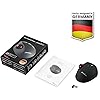
Included Components: Mouse, Receiver


Manufacturer: Perixx


Global Trade Identification Number: 32


Item Type Name: Perixx 11568 PERIMICE-717 Wireless Trackball Mouse, 7 Button Design with 5 Programmable Buttons, DPI 400/1000


Mfr Part Number: 11568


Item Weight: 134 g


Item Dimensions L x W: 5.12"L x 4.21"W


Unit Count: 1 Count


Enclosure Material: Plastic


Finish: Smooth


Frequently asked questions

If you place your order now, the estimated arrival date for this product is: Thursday, Oct 15

Yes, absolutely! You may return this product for a full refund within 30 days of receiving it.

To initiate a return, please visit our Returns Center.

View our full returns policy here.

  • Klarna Financing
  • Affirm Pay in 4
  • Affirm Financing
  • Afterpay Financing
  • Zip Pay in 4
  • Financing through Apple Pay
  • Financing through Google Pay
Leasing options through Acima may also be available during checkout.

Learn more about financing & leasing here.

Top Amazon Reviews


  • Intermittent freezing
EDIT: The intermittent issue was not due to the mouse but is a Windows 10 issue. I followed an online tutorial to fix the issue and it is working beautifully!! Changed from 3 stars to 5. I have only been using this mouse for about an hour. The feel of the mouse is great. However, intermittently the cursor will "hang-up" and you have to wildly roll the ball around a few seconds before it will start working normally again. This has happened roughly once every 10 minutes. The batteries are brand new and I have adjusted the DPI settings. The receiver is plugged in less than 3 feet away from the mouse (I don't even know if that makes a difference). When it is functioning properly, it is a great wireless mouse. I do love the ease of being able to go forward or back a web page with just a click of a button on the mouse. I am going to give this mouse a few days and if the intermittent issue continues I will attempt to return for a replacement. ... show more
Reviewed in the United States on August 19, 2020 by HollyLuYah

  • Works well (less than 1 week usage) - no serious complaints
I was looking to replace my Logitech M570 - it has lasted many years although this long stint involved a lot of frustration with automatic double clicking, sticky left click and finally the left click dying all together. The successor seems to have the same issues so I was looking into reviews of alternatives and that left me with a feeling that its going to be a total shot in the dark to replace the M570. Anyway, after a lot of review perusal, I picked the Perixx. This review is after about a few days of regular usage. The real test is longevity so a longer term review will follow when I get there. So far, my experience has been very good to excellent. - The mouse connected to its receiver without any issues - everything was plug-and-play - no software or anything installed. - My setup is an HTPC - so my receiver is about 10 feet from where the mouse is. The mouse sits either on a sofa cushion or a sofa arm. Neither surface is a hard surface. I experience very occasional stuttering but usual experience is pretty smooth. - The trackball is smooth to the touch - fits snugly - but moves smoothly. I don't feel like I need to put excessive force to move the trackball. I have so far not had to clean it or the sensors. It doesn't fall over if I tip the mouse. - I can get reasonably accurate with the mouse - I am not doing anything that requires super precision. I am able to select text, press buttons, menus without any annoyance. - It feels larger than the MX 570 - more horizontal space. All five fingers have grooves and rest comfortably. The mouse overall feels comfortable - no complaints. The whole surface has a rubberized matte texture to it - feels nice to the touch. The ball is maroon - the overall look is good. - The mouse wheel is a little clicky when it scrolls - that's fine too. What is mildly annoying is that the mouse wheel click is hard and moves the mouse on the screen because of the force it needs. But there aren't too many reasons for me to use this button so it doesn't really matter much. - At this point (less than 1 week in), I didn't feel the need for any "break in" of the mouse, and the left and right mouse buttons click accurately. - There are 2 additional buttons which do browser back/forward. I have not configured or used these much. - The mouse goes to "sleep" if idle for a few minutes and moving the trackball does not wake it. Its a little annoying that I have to click a button. I don't think the button click registers so its not terrible. There might be a setting somewhere to change this behaviour but it hasn't bothered me enough to do anything about it. All in all, very satisfied with the mouse and a worthy replacement to the MX570 so far. ... show more
Reviewed in the United States on June 5, 2022 by Amazon Customer

  • Good product for the price...Works with Linux
The Perimice-717 Wireless Trackball Mouse is a decent trackball mouse. It works on my Linux computers with the exception of the scrolling buttons below the scroll wheel. It's a good size and fits my hand. For me I wish both the left click and right click buttons were bigger so they would fit my hand better. Both buttons function good. The scroll wheel isn't as smooth as I like and the trackball feels a little gritty but both do work like they should. The forward and back buttons works and when you push down on the scroll wheel it does paste, and like I said earlier the scroll buttons don't work, but I believe that is my Linux operating system and not the mouses fault. Would I buy it again? Probably, I'm sure as I use it with time I will feel more comfortable with it. ... show more
Reviewed in the United States on October 22, 2021 by Mr. L Johnson

  • Programmed Buttons Do Not Retain Programming
The buttons were fairly easy to program but you have to keep reloading the driver to make the programming function properly. At first I thought it was when you turned off the computer that the programming was lost. When I say lost, if you go back into the software the programming is still there but it doesn't work. Today it happened after I just hadn't used it for a while but the computer was still on. You have to uninstall and reinstall to get it to work. Customer service only responds eith a generic list of things to try, one of which is reinstall the driver but after you reinstall the driver a few times it becomes apparent that is just a temporary fix and the real issue is that you should not have to do that once much less multiple times ***Update*** This trackball works fine if you don't need to reprogram the buttons or if you install software other than the Perixx provided software to program the buttons. I installed X-Mouse and was able to program the buttons and they retain the programming. The price is right so that when it begins behaving erratically in a year or two (as they all do, whether you pay $25 or $100) I will not feel like I am breaking the bank to get another mouse. Be that as it may, I stick to my original 3 star rating. It is an ordinary trackball (nothing special about it) and the software doesn't work. Should not have to resort to an outside piece of software for programming, even if it is free, when they claim to provide that. ... show more
Reviewed in the United States on March 12, 2023 by Sandy Klocinski

  • Works Great!
I am so happy I ordered this trackball. It is the perfect size, it works like a champ, and the price is right. The buttons feel good, the movement is smooth, and the app allows full configuration of the device (e.g., button assignments, movement characteristics, and click speeds. The only other thing worth mentioning is that after not using it for a few minutes, it goes to sleep to conserve its batteries (which I really like), but to wake it up, moving the ball doesn't work. After this happened a few times, I figured out that moving the scroll wheel does wake it up consistently, so all is well. (This might be mentioned in the users manual, but does anyone really read that? Lol.) ... show more
Reviewed in the United States on February 15, 2020 by MICHAEL W.

  • Mouse stopped responding after first day.
At first I was very happy with this mouse. Downloading the driver was easy and programming the buttons was not too difficult. I liked that I could program the side buttons to very specific tasks. HOWEVER, after putting computer to sleep and waking it up, the mouse stopped responding. I thought that maybe I put in old batteries by mistake so I swapped out the batteries. The mouse jumped to life and worked great...UNTIL there was a period of inactivity, then the mouse stopped responding. I packed up the mouse and submitted for a return and refund. ... show more
Reviewed in the United States on August 9, 2026 by Dergills

  • Just the Mouse I was looking for.
I just received this Mouse. I love it. It fits in my Hand perfectly. I like to lay the wrist down on the table, hover my Hand over the Mouse and still be able to reach the Buttons just fine. I got another Mouse yesterday and it had a point on the bottom so I had to lift my Hand to sit on top of the Mouse and that was uncomfortable. Great price for a simple Ball Mouse. I didn't need a bunch of Buttons. ... show more
Reviewed in the United States on May 21, 2026 by D. Vincent

  • Great device, I love it. Except one thing.
The only complaint I have for this device is the wheel, it hardly works, and is very inaccurate. It is frustrating, that when I roll the wheel, it works, goes the wrong way, don't or doubles down.
Reviewed in the United States on April 19, 2024 by LanceJZ

Can't find a product?

Find it on Amazon first, then paste the link below.
Checking for best price...