Search  for anything...

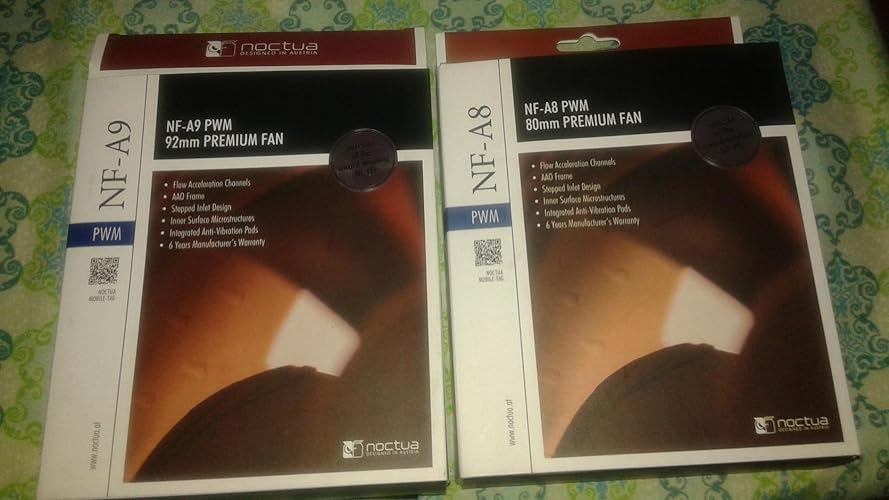
Noctua NF-A8 PWM, Premium Quiet Fan, 4-Pin (80mm, Brown)

  • Based on 2,237 reviews
Condition: New
Checking for the best price...

Buy Now, Pay Later


As low as $4 / mo
  • – 4-month term
  • – No impact on credit to apply
  • – Instant approval decision
  • – Secure and straightforward checkout

Ready to go? Add this product to your cart and select a plan during checkout.

Payment plans are offered through our trusted finance partners Klarna, Affirm, Afterpay, Apple Pay, and PayTomorrow. No-credit-needed leasing options through Acima may also be available at checkout.

Learn more about financing & leasing here.

Free shipping on this product

FREE 30-day refund/replacement

To qualify for a full refund, items must be returned in their original, unused condition. If an item is returned in a used, damaged, or materially different state, you may be granted a partial refund.

To initiate a return, please visit our Returns Center.

View our full returns policy here.


Availability: In Stock.
Fulfilled by Amazon

Arrives Tuesday, Jun 23
Order within 7 hours and 23 minutes
Available payment plans shown during checkout

Protection Plan Protect Your Purchase
Checking for protection plans...

Features

  • Premium quiet fan, 80x80x25 mm, 12V, 4-pin PWM, max. 2200 RPM, max. 17.7 dB(A), >150,000 h MTTF
  • Award-winning 80x25mm A-series fan with Flow Acceleration Channels and Advanced Acoustic Optimisation frame for superior quiet cooling performance
  • 8cm format is ideal for compact PC cases (HTPC, ITX, Small Form Factor) and other chassis (intake & exhaust), replacement fan for NAS and other devices, etc.
  • 4-pin PWM version for automatic speed control via 4-pin PWM fan headers, broad 450-2200rpm speed range (1750rpm max. with supplied Low-Noise Adaptor)
  • Includes anti-vibration mounts, fan screws, Low-Noise Adaptor, extension cable and y-cable for running two PWM fans on the same header

Features

  • Premium quiet fan, 80x80x25 mm, 12V, 4-pin PWM, max. 2200 RPM, max. 17.7 dB(A), >150,000 h MTTF
  • Award-winning 80x25mm A-series fan with Flow Acceleration Channels and Advanced Acoustic Optimisation frame for superior quiet cooling performance
  • 8cm format is ideal for compact PC cases (HTPC, ITX, Small Form Factor) and other chassis (intake & exhaust), replacement fan for NAS and other devices, etc.
  • 4-pin PWM version for automatic speed control via 4-pin PWM fan headers, broad 450-2200rpm speed range (1750rpm max. with supplied Low-Noise Adaptor)
  • Includes anti-vibration mounts, fan screws, Low-Noise Adaptor, extension cable and y-cable for running two PWM fans on the same header

Brand: ‎Noctua


Item model number: ‎NF-A8 PWM


Item Weight: ‎7.8 ounces


Product Dimensions: ‎3.15 x 3.15 x 0.98 inches


Item Dimensions LxWxH: ‎3.15 x 3.15 x 0.98 inches


Color: ‎Brown


Voltage: ‎12 Volts


Manufacturer: ‎Noctua


Is Discontinued By Manufacturer: ‎No


Date First Available: ‎September 26, 2014


Product Dimensions: 3.15"L x 0.98"W x 3.15"H


Brand: Noctua


Power Connector Type: 4-Pin


Voltage: 12 Volts


Cooling Method: Air


Compatible Devices: Desktop


Noise Level: 17.7 Decibels


Material: Fibre-glass reinforced PBT


Maximum Rotational Speed: 2200 RPM


Air Flow Capacity: 55.5 Cubic Meters Per Hour


Power Connector Type: 4-Pin


Voltage: 12 Volts


Cooling Method: Air


Compatible Devices: Desktop


Noise Level: 17.7 Decibels


Maximum Rotational Speed: 2200 RPM


Air Flow Capacity: 55.5 Cubic Meters Per Hour


Item Dimensions L x W x H: 3.15"L x 0.98"W x 3.15"H


Material Type: Fibre-glass reinforced PBT


Brand Name: Noctua


Global Trade Identification Number: 76, 64


Warranty Description: 6 year manufacturer’s warranty


Manufacturer: Noctua


Number of Items: 1


Model: NF-A8 PWM


Part Number: NF-A8 PWM


Item Weight: 0.22 Kilograms


Unit Count: 1.0 Count


Frequently asked questions

If you place your order now, the estimated arrival date for this product is: Tuesday, Jun 23

Yes, absolutely! You may return this product for a full refund within 30 days of receiving it.

To initiate a return, please visit our Returns Center.

View our full returns policy here.

  • Klarna Financing
  • Affirm Pay in 4
  • Affirm Financing
  • Afterpay Financing
  • PayTomorrow Financing
  • Financing through Apple Pay
Leasing options through Acima may also be available during checkout.

Learn more about financing & leasing here.

Top Amazon Reviews


  • cool and quiet
Size: 80x80x25mm
I replaced a dell optiplex MT i3 cpu fan, which rated much higher than the noctua. I thoughy I'd sacrifice flow for quietness. However, it immediately dropped a coulple degress at idle, and prime95 stress tests stablized around 78C after running for hours. At full speed, it's much louder than at idle, but the noise is low pichted and much tolerable than whining nosie. Although the Noctua fan is quiet, cpu fan is not the only souce of noise. I found my computer case itself makes some annoying metalic noise due to harmonic viberation with gpu and cpu fans. I could reduce the viberation noise by holding the case tight. I will probably apply some electric tape or clamps to tighten the case. ... show more
Reviewed in the United States on May 4, 2026 by honestly disagree

  • A high quality PC fan that's perfect for small factor cases.
Size: 80x80x25mm
I recently built 2 small factor Dell pc's. Both lacked a front case fan. I have used Noctua fans for some time, and find them to be very well made and quiet. This model fits in the front perfectly in the Dell 3070 or 5060 small factors.
Reviewed in the United States on April 1, 2026 by Marc B.

  • They're so quiet!
Size: 80x80x25mm
Holy crap these things are quiet. I built a PC into a rack, and stole a fan off an old PC I had lying around, but it was only a 3-pin fan, and I wanted more control. So I was looking at a different brand, and the reviews mentioned that they weren't as quiet as Noctua fans. So I dropped the extra money to grab a pair of these. I set my curves, and while I know they're working - because my temps are about half of what they were before I installed them - I can't hear them, like, at all. My CPU temps went from around 55-60 degrees down to around 34-40, so it's definitely great at cooling. Yes, there are cheaper options out there, but if you want a dead silent, very efficient fan, this is definitely worth the money. ... show more
Reviewed in the United States on January 15, 2026 by thinksojoe

  • Nice silencer included to drop rpm. Works well in my dell optiplex 3050 mini tower. Nice silencer included to drop rpm. Works well in my dell optiplex 3050 mini tower.
Size: 80x80x25mm
I love the extra cable included to connect to it for dropping the rpm. Got this to use as intake-front fan for my dell optiplex 3050 mini tower that does not have any front fan. It goes in crooked because of the tight fit, but no one is going to see that. So far so good. I've heard great things about this fan company. Oh, and the fan looks beautiful. ... show more
Reviewed in the United States on April 2, 2026 Reviewed in the United States on April 2, 2026 by Cajingo

  • Noticeable Noise Reduction Noticeable Noise Reduction
Size: 80x80x25mm
I bought a 92mm and 80mm Noctua case fan and so far it really made a difference in terms of noise reduction. I switch Noctua fan with my old one and i thought my PC died on start up because of the sudden drop of noise after 1-2 second of starting up. I can actually hear what is happening inside my PC now due to the fan being almost dead silent. It feels very weird because i never had a Desktop PC this quiet before. The Installation was easy and straight forward. It still comes in a nice looking box. The fan comes with a cable attach, also comes with an extension cord if you need the extra length, the noise reduction cord which i used for both of the fans and really made a huge difference. Along with a few other things. There was no instruction manual (maybe there was) but that was not needed. All you do is plug the fan cord into the noise reduction cord if you want to use it and then plug that into the 4 pin fan slot on the motherboard. Everything should fit together nicely, not much force is needed plugging things together. It comes with 4 screws, use a screw driver to mount the fans in place. This is not really a problem but as people know the color of fans really does not match with everything else. But i don't really look at my CPU so it not a problem for me it. They do have black now or starting to sell black color Noctua Fans. My gaming rig is not big size so these fans handle it fine. The box says a 6 year warranty so that is a plus. Overall i am very impress with the presentation and the quality. It made me want to write a review for it. The CPU noise compare to before these fans is night and day. I never realized how long my CPU noise was before using these fans. Of course this is the first day i am using them as i am writing this review so take it for what you will. Hopefully these fans will last me a good few years at minimum. ... show more
Reviewed in the United States on December 25, 2019 Reviewed in the United States on December 25, 2019 by The Student

  • excellent quiet fans
Size: 80x80x25mm
excellent fan and very quiet
Reviewed in the United States on May 16, 2026 by Wayne Wilmot

  • Best fan value, period
Size: 80x80x25mm
Excellent packaging, these are the quietest fans available, lots of accessories
Reviewed in the United States on May 22, 2026 by Michael K

  • Works in Dell Optiplex SFF 5060. Came with everything needed to install
Size: 80x80x25mm
My Dell Optiplex SFF running Proxmox with a quad 1Gb NIC and a dual 10Gb Mellanox card was running hot, like 80C. I wanted more airflow into the case, so I bought this 80mm case fan for the front, next to the PSU. Installation was simple with the included mounting adapters. Unhooked the factory CPU fan from the MB, inserted the fan Y cable and connected everything up again. At first I got a MB error code on boot. The error was sill being reported when I disconnected the case fan and only left the CPU fan. I then connected the CPU directly to the MB and sill got an error code on boot. Something was borked. Pulling the cmos bios battery out, waiting and the reinstalling solved the problem. Put the Y cable back in and connected the CPU and case fan. It booted without any errors, but I had to go through and set all my bios parameters, they were all gone. If I let the MB control the fans the CPU 65C. If I let the fans run full speed the CPU temp drops to 44C! Its a Proxmox server, so I don't mind the extra noise, which is 90% the stock CPU fan. The case fan is almost silent. ... show more
Reviewed in the United States on May 16, 2025 by USPSA_Guy

Can't find a product?

Find it on Amazon first, then paste the link below.
Checking for best price...