







Buy Now, Pay Later
- – 6-month term
- – No impact on credit to apply
- – Instant approval decision
- – Secure and straightforward checkout
Ready to go? Add this product to your cart and select a plan during checkout.
Payment plans are offered through our trusted finance partners Klarna, Affirm, Afterpay, Zip, Apple Pay, and Google Pay. No-credit-needed leasing options through Acima may also be available at checkout.
Learn more about financing & leasing here.
FREE refund/replacement until Jan 31, 2027 Learn more
To qualify for a full refund, items must be returned in their original, unused condition. If an item is returned in a used, damaged, or materially different state, you may be granted a partial refund.
To initiate a return, please visit our Returns Center.
View our full returns policy here.


At a glance
- Condition
- New
- Model
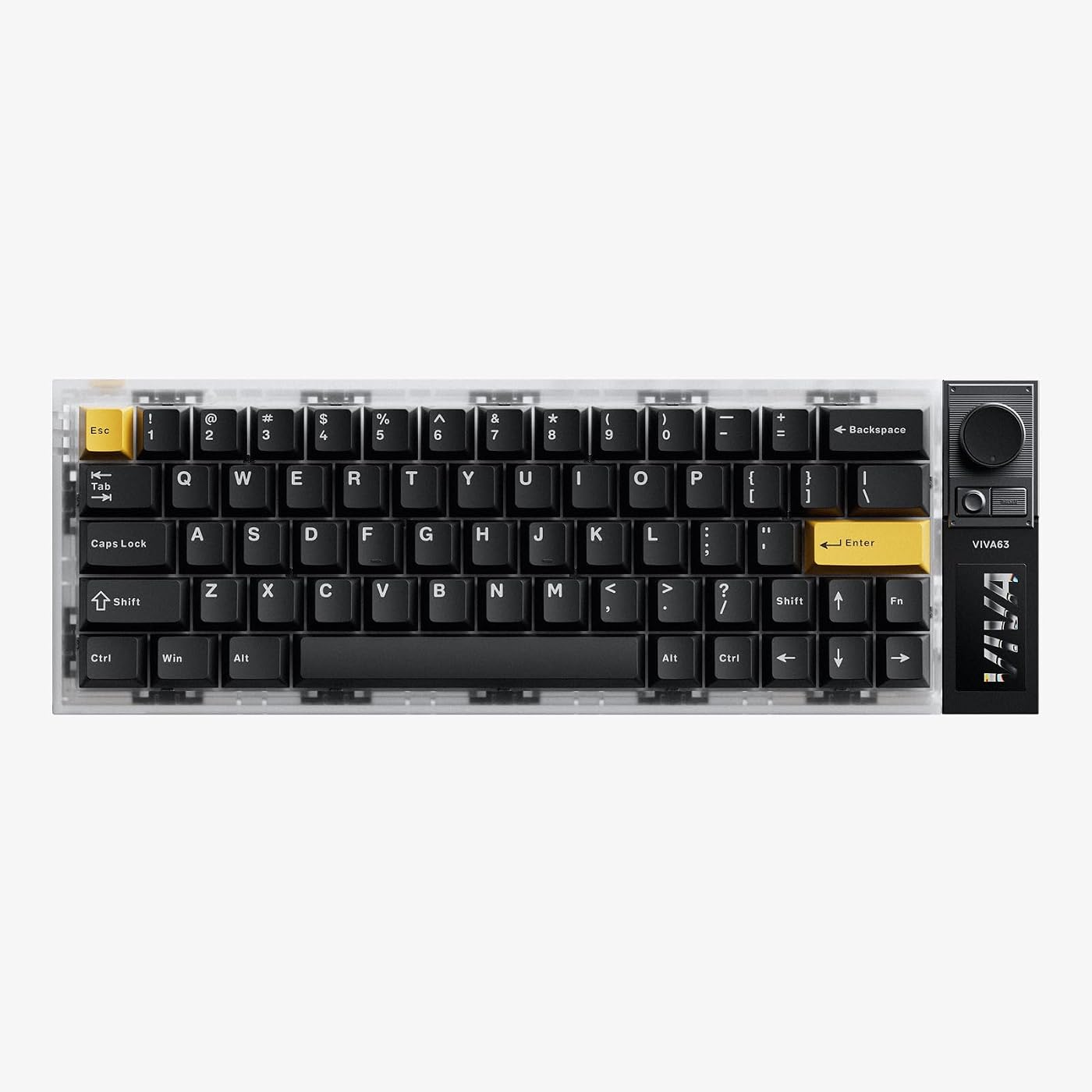
- VIVA63
- Dimensions
- 13"L x 4.5"W x 1.7"H
- Weight
- 2 lb
- Keyboard Description
- Macro/Gaming
- Special Feature
- Backlit, Hot-Swappable
- Style
- Compact
- In the box
- Keycap PullerUSB CableUser Manual
- Warranty
- 1 Year Manufacturer
- Works with
- PC/Laptop
Features 6
- LUMIDECK ALL-IN-ONE CONTROL HUB: This magnetic gaming keyboard combines an integrated OLED display with dedicated control buttons. Access settings without leaving your game, check info at a glance, and adjust features via the infinite knob with smooth, tactile mechanical feedback. One-click profile switching moves you seamlessly between Valorant, Delta Force, and CS2.
- LOW-LATENCY, BUILT FOR FPS: Built with a distributed 6-chip architecture, short signal path, and advanced magnetic shielding, this Hall Effect magnetic gaming keyboard delivers stable, consistent key detection with reduced signal interference. The 8K polling rate and 16K scan rate enable fast, precise, low-latency input, giving FPS gamers quicker response and more consistent control during competitive gameplay.
- 0.01MM RAPID TRIGGER, REACT FIRST: Built for competitive play, VIVA63 gaming keyboard features 0.01mm Rapid Trigger, adjustable actuation, and customizable dead-zone control. Set your trigger and reset points with precision for faster movement, quicker key resets, and responsive inputs. From rapid strafing to instant direction changes, fine-tune key response to match your playstyle and stay in control during intense FPS gameplay.
- SMOOTH FEEL, HI-FI SOUND: TTC MelGeek Magneto Pro magnetic switches deliver smooth, controlled keystrokes with Hi-Fi-inspired sound. This Hall Effect gaming keyboard offers a balanced feel for gaming and typingand a refined acoustic experience that matches the precision of your touch. Feel it, hear it.
- 270 LIGHTBOX, IMMERSIVE AMBIENT GLOW: A 270 surrounding side light bar delivers even, immersive ambient glowgoing beyond standard per-key RGB to create a three-dimensional desktop lighting effect. AI-powered lighting generates custom dynamic effects from your text input, while music reactive and screen sync modes pulse and match in real time. Your keyboard becomes the visual centerpiece of your setup.
- COMPACT 60% LAYOUT: This 63-key 60% gaming keyboard frees up valuable desk space for more room for your mousewider swipes and faster flick shots. The compact form factor is easy to carry between setups, while the full key set keeps everything you need within reach. A clean, minimal setup built for competitive FPS play.
Description
Tuned together with DRG pro players, our gaming keyboards are refined to deliver precise, consistent response that stands up to high-stakes tournament matches. MelGeek VIVA63 MelGeek MADE68 Ultra+ MelGeek O2 MelGeek MADE68 Pro+ MelGeek REAL67 MelGeek MADE84 Ultra+ MelGeek REAL81 What size is the VIVA63's display? The VIVA63 features a 1.58-inch Retina display with pixel density comparable to the Apple Watch Ultra and a 60Hz refresh rate for sharp visuals and smooth on-screen interactions. What does the rotary knob do? Quickly switch and confirm preset functions with crisp, tactile clicks for precise, eyes-free control. How can I update the firmware? Please make sure you’re using the latest Hive APP. Hive>>>My Device>>>Setting. If there is a red dot in the Online Update section, please click Check for Updates directly. What if the key is sticky or does not work? 1. Please use the included keycap remover to remove the keycaps. 2. Remove the switches by hand and then reinstall them. 3. If still does not work, replace the switch with another less commonly used one, and ask us for a replacement switch. How do I fix the Hive [read timeout] error? 1.Close Browser: Exit all driver-related pages. 2.End Background Processes: Close related processes via Task Manager (Windows) or Activity Monitor (Mac). 3.Restart Hive: Disconnect the keyboard, restart Hive, and try again.
Specs 32
| Brand | MelGeek |
|---|---|
| Connectivity Technology | USB-C |
| Keyboard Description | Macro/Gaming |
| Recommended Uses For Product | Business, Gaming, Student |
| Special Feature | Backlit, Hot-Swappable |
| Keyboard backlighting color support | RGB |
| Style | Compact |
| Product Dimensions | 13"L x 4.5"W x 1.7"H |
| Additional Features | Backlit, Hot-Swappable |
| Language | English |
| Power Source | Corded Electric |
| Switch Type | Linear |
| Keyboard Layout | QWERTY |
| Hand Orientation | Ambidextrous |
| Button Quantity | 68 |
| Water Resistance Level | Not Water Resistant |
| Mechanical Keyboard Switch Model | TTC Magneto Pro |
| Total USB 2.0 Ports | 1 |
| Compatible Operating System Family | Windows |
| Number of Keys | 64 |
| Style Name | Compact |
| Item Dimensions L x W x H | 13"L x 4.5"W x 1.7"H |
| Antenna Location | Business, Gaming, Student |
| Built-In Media | Keycap Puller, USB Cable, User Manual |
| Model Number | VIVA63 |
| Item Highlight | OLED screen, RGB light box, Rapid Trigger, Adjustable Actuation for FPS Gamers | Hot-Swap, Backlit Keycaps, One-Click Switch |
| Unit Count | 1 Count |
| Manufacturer | MelGeek |
| Number of Packs | 1 |
| Number of Items | 1 |
| Item Weight | 2 pounds |
| Mfr Part Number | VIVA63 |
No specs match.
Frequently asked questions
To initiate a return, please visit our Returns Center.
View our full returns policy here.
- Klarna Financing
- Affirm Pay in 4
- Affirm Financing
- Afterpay Financing
- Zip Pay in 4
- Financing through Apple Pay
- Financing through Google Pay
Learn more about financing & leasing here.
Similar Products

Logitech G PRO X Superlight Wireless Gaming Mouse - Black


