



Search  for anything...

Logitech Wave Keys MK670 Combo, Wireless Ergonomic Keyboard with Signature M550 L Wireless Mouse, Comfortable Natural Typing, Bluetooth, Logi Bolt, for Multi-OS, Windows/Mac - Graphite

  • Based on 2,336 reviews
Condition: New
Checking for the best price...

Buy Now, Pay Later


As low as $13.33 / mo
  • – 6-month term
  • – No impact on credit
  • – Instant approval decision
  • – Secure and straightforward checkout

Ready to go? Add this product to your cart and select a plan during checkout.

Payment plans are offered through our trusted finance partners Klarna, Affirm, Afterpay, Apple Pay, and PayTomorrow. No-credit-needed leasing options through Acima may also be available at checkout.

Learn more about financing & leasing here.

Selected Option

Free shipping on this product

30-day refund/replacement

To qualify for a full refund, items must be returned in their original, unused condition. If an item is returned in a used, damaged, or materially different state, you may be granted a partial refund.

To initiate a return, please visit our Returns Center.

View our full returns policy here.


Availability: In Stock.
Fulfilled by ilovetech deals

Arrives Dec 21 – Dec 23
Order within 19 hours and 26 minutes
Available payment plans shown during checkout

Protection Plan Protect Your Purchase
Checking for protection plans...

Color: Graphite


Pattern: Combo


Features

  • Meet the comfort combo: Get comfier with the Wave Keys Ergonomic Wireless Keyboard paired with the Signature M550 L Wireless Mouse - a great fit for medium- to large-sized hands
  • Compact keys: Wave Keys compact size allows you to bring your mouse closer to your body, resulting in a more natural shoulder position compared to a full size keyboard
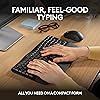
  • Type in comfort all day long: The wavy design of this compact keyboard places your hands, wrists and forearms in a natural typing position for all-day comfort
  • More palm support, less pressure: A cushioned palm rest with memory foam gives you more wrist support throughout the day (1)
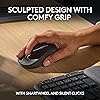
  • Less noise, more focus: On top of its sculpted design and rubber grip, this quiet mouse uses SilentTouch technology to make workdays more peaceful with 90% less click noise (7)
  • Scroll smarter: Scroll through documents line by line, or fly effortlessly through long web pages with SmartWheel
  • Smoother days, your Way: Personalize your Wave Keys experience using the Logi Options+ App, where you can choose shortcuts that save time and keep your work flowing (2)
  • Connect the keyboard via Bluetooth or Logi Bolt and use Easy-Switch* to toggle between PC, tablet, and phone (Windows/macOS/iPadOS/ChromeOS); *not-applicable for Signature M550 L mouse
  • Plastic parts in Wave Keys and Signature M550 L include certified post-consumer recycled plastic (Keyboard: 61%(5), Mouse: 65%(6))

Description

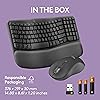
Experience day-long comfort and productivity with this wireless ergonomic keyboard and mouse combo. Typing feels instantly familiar on Wave Keys’ wavy keyframe design. The cushioned keyboard palm rest lifts pressure and improves wrist support. The Signature M550 L Wireless Mouse features a contoured shape and rubber side grip to keep medium- to large-sized hands comfortable throughout the day. This wireless keyboard and mouse combo is made with recycled plastic (10) and connect easily using Bluetooth or the included Logi Bolt receiver. The ergonomic keyboard has up to 3 years of battery life, while the mouse has up to 2 years of battery life using the included batteries (3).

Brand: Logitech


Color: Graphite


Connectivity Technology: Usb, Radio Frequency


Special Feature: Portable


Compatible Devices: Laptop, Tablet


Brand: ‎Logitech


Item model number: ‎920-012060


Operating System: ‎Windows


Item Weight: ‎2.59 pounds


Product Dimensions: ‎18.02 x 9.32 x 2.16 inches


Item Dimensions LxWxH: ‎18.02 x 9.32 x 2.16 inches


Color: ‎Graphite


Power Source: ‎Battery Powered


Batteries: ‎1 Lithium Polymer batteries required. (included)


Manufacturer: ‎Logitech


Date First Available: ‎October 11, 2023


Frequently asked questions

If you place your order now, the estimated arrival date for this product is: Dec 21 – Dec 23

Yes, absolutely! You may return this product for a full refund within 30 days of receiving it.

To initiate a return, please visit our Returns Center.

View our full returns policy here.

  • Klarna Financing
  • Affirm Pay in 4
  • Affirm Financing
  • Afterpay Financing
  • PayTomorrow Financing
  • Financing through Apple Pay
Leasing options through Acima may also be available during checkout.

Learn more about financing & leasing here.

Top Amazon Reviews


  • Best keyboard I've owned
Color: Graphite Pattern: Keyboard
I have been using this keyboard for work and personal use for 2 days and am loving it so far. It's perfect for my needs and here's why: 1. It has all the functions I need and then some 2. It's just the right size. I was using a separate keyboard for my personal pc than for my work laptop and the other keyboard is much larger, not leaving much room for my mousepad in the desk tray. 3. It connects seamlessly to both, my laptop and desktop so I don't even have to use the other keyboard now! I wasn't looking for that but is a HUGE plus now that I have it setup. You can save 3 connected devices and switch between them using F1, F2, and F3. This was a huge help since I use the same monitor for both devices (I bought an hdmi splitter for that) but would have to use 2 different keyboard/mouse each time I switched. Now I only use 2 different mouses (mice?) which I'll probably upgrade as well. 4. The keys have good response without being noisy. You can hear them, which I prefer, and feel the feedback, also preferred, but you don't have to press hard and don't get the loud click-clack of old school keyboards. 5. It's comfortable to use, at least for me. The palm rest cushion is soft but seems like it will hold up for a long time. The major keys are reachable without lifting my palm and there was minimal adjustment from my much larger keyboard. 6. Very easy setup (I use Windows...can't speak to Mac, Google OS, etc.). As soon as I turned on the keyboard, it paired with my laptop. I had to do absolutely nothing for setup (see note below). The ONLY very small con I have is that it doesn't tell you anywhere in the packaged instructions that you can pair multiple devices. I knew this from another reviewer. Even then, I had to search how to do it, because it's not obvious on the Logitech website. Once I figured it out, it was very easy to do (have your laptop/pc/whatever search for bluetooth devices and hold down the button F1/2/3 button that you want to assign to that device. The device will then discover the keyboard and you're good to go). Other Notes: I would recommend this keyboard to anyone. It's pricier than other keyboards I've bought but I didn't add a con for that because I believe it's definitely worth it. You can change how the function keys work using their application and even setup "smart actions" which will do a bunch of stuff like opening your favorite apps and a bunch of other stuff. All of this stuff is configurable too, although, I haven't tried to use it yet. I just needed a keyboard so I didn't have to use my laptop keyboard but got many features I didn't even know I needed! Get this keyboard! ... show more
Reviewed in the United States on January 11, 2024 by Matt B

  • Great keyboard. I love it!
Color: Graphite Pattern: Keyboard
I love this keyboard. I used Microsoft Comfort Keyboards for years and when my last one needed to be retired, I purchased this one to test it out. It's awesome. Here's what I like: 1. It's very comfortable to use - the curve and the hand positions are great. So is the wrist cushion. 2. It's smaller than a traditional keyboard, freeing up desk space. 3. The function keys have thoughtful primary functions and an app to customize the fn combo. 4. The ability to connect via Bluetooth AND a dongle. And the ability to connect with three different devices with the click of a button. 5. The ability to support both Windows and Mac features and toggle between them. So if you move between systems, you can use the same keyboard. 6. The indicator lights for which system you are connected to and the battery work well. 7. It uses AAA batteries and doesn't require a special expensive battery. 8. It has a convenient place to store the dongle when not in use. I am very happy I purchased this keyboard. NOTE: I also purchased the keyboard skin to go with it to protect it. That works great too! ... show more
Reviewed in the United States on April 13, 2025 by SavvyShopper

  • Might be my new favorite keyboard!
Color: Graphite Pattern: Combo
The media could not be loaded. I was looking to get a split ergonomic keyboard but wasn’t sure it was the right fit for me or my current setup. This felt like a nice baby step towards one of those so I went with this one. And I’m so glad I did. The keys are so quiet compared to some of my other Logitech keyboards I’ve had in the past. The palm rests are so soft and comfortable. I normally find my wrists aching pretty quickly when using a keyboard without one. It’s pretty small but I’m a petite person so this is the perfect size for my hands. I connected it to my tablet with Bluetooth and it works perfect. Setup was pretty easy as well. I’m not a huge fan of the shape of the mouse that comes with it but I’m slowly getting used to it. The mouse clicks are so soft and quiet that they are virtually silent. Sometimes it feels like I’m not even clicking anything while using it. But it works great and connects to my computer with ease when using the usb. ... show more
Reviewed in the United States on February 11, 2025 by Sydney W. Sydney W.

Can't find a product?

Find it on Amazon first, then paste the link below.
Checking for best price...