



Search  for anything...

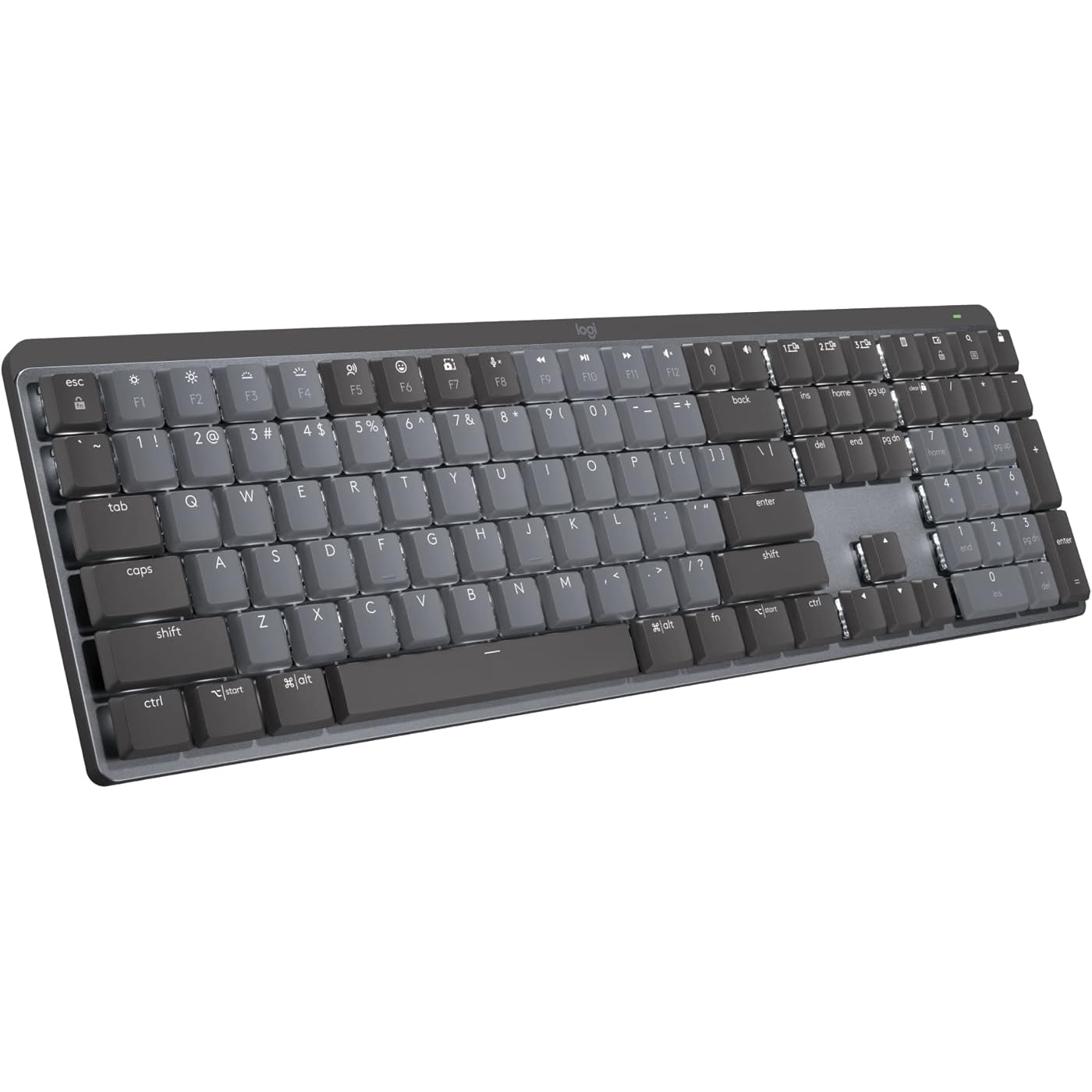
Logitech MX Mechanical Wireless Illuminated Performance Keyboard, Tactile Quiet Switches, Backlit Keys, Bluetooth, USB-C, macOS, Windows, Linux, iOS, Android, Metal, ‎Graphite

  • Based on 3,574 reviews
Condition: New
Checking for the best price...
$159.99 Why this price?
Save $20.00 was $179.99

Buy Now, Pay Later


As low as $26.67 / mo
  • – 6-month term
  • – No impact on credit to apply
  • – Instant approval decision
  • – Secure and straightforward checkout

Ready to go? Add this product to your cart and select a plan during checkout.

Payment plans are offered through our trusted finance partners Klarna, Affirm, Afterpay, Apple Pay, and PayTomorrow. No-credit-needed leasing options through Acima may also be available at checkout.

Learn more about financing & leasing here.

Selected Option

Free shipping on this product

FREE 30-day refund/replacement

To qualify for a full refund, items must be returned in their original, unused condition. If an item is returned in a used, damaged, or materially different state, you may be granted a partial refund.

To initiate a return, please visit our Returns Center.

View our full returns policy here.


Availability: Only 3 left in stock, order soon!
Fulfilled by Amazon

Arrives Tuesday, May 5
Order within 18 hours and 54 minutes
Available payment plans shown during checkout

Protection Plan Protect Your Purchase
Checking for protection plans...

Size: Full Size


Style: Tactile (quiet typing)


Pattern: Keyboard


Features

  • Tactile Quiet mechanical key switches with a satisfying tactile bump you feel - for precise feedback, reactive key reset, and less noise so your typing doesn't disturb those around you
  • Low-profile keys, more comfort: A keyboard layout designed for effortless precision, with a full-size form factor and low-profile mechanical switches for better ergonomics
  • Smart illumination: Backlit keys light up the moment your hands approach the cordless keyboard and automatically adjust to suit changing lighting conditions
  • Faster workflow, more customization: Customize Fn keys, assign backlighting effects, enable Flow cross-computer, multi-device control, and more in the improved Logi Options+ (1)
  • Multi-device, multi-OS: Pair MX Mechanical Bluetooth wireless keyboard with up to 3 devices on nearly any operating system via Bluetooth Low Energy or included Logi Bolt receiver(2)
  • USB-C quick charging: MX Mechanical keyboard stays powered up to 15 days on a full charge or up to 10 months with the backlighting turned off (3)
  • Plastic parts in MX Mechanical include certified post consumer recycled plastic (Graphite: 45%(5))
  • In case of wireless keyboard or combo (keyboard and mouse), the USB receiver is usually provided either inside the mouse (under the battery cover) or attached within the product packaging

Description

Logitech MX Mechanical Wireless Illuminated Performance Keyboard Introducing MX Mechanical - a full-size keyboard with extraordinary feel, precision, and performance. Low-profile mechanical typing delivers satisfying feedback in your choice of key switches – Tactile Quiet, Clicky, or Linear. MX Mechanical is crafted for ergonomic comfort, with smart illumination and easy-switch – allowing you to connect up to 3 devices and stay in your flow for hours. Product details: Weight: 29.2 oz (828 g) Dimensions (including keycaps): 1.02 x 17.08 x 5.18 in (26.1 x 433.85 x 131.55 mm) Compatible with Windows, macOS, Linux(4), Chrome OS(4), iOS(4), iPadOS(4), Android(4) operating systems Rechargeable Li-Po (1500 mAh) battery Optional software(1): Logi Options+ Important: FileVault might be enabled on your macOS computer, which could prevent you from entering your password at start or reboot when connected to Bluetooth. In this case, use Logi Bolt USB Receiver. Footnotes: (1) Requires Logi Options+ software, available for Windows and macOS (2) Not compatible with Logitech Unifying technology (3) Battery life may vary based on user and computing conditions (4) Device basic functions will be supported without software for operating systems other than Windows and macOS

Brand: Logitech


Compatible Devices: PC


Connectivity Technology: USB


Keyboard Description: Mechanical


Recommended Uses For Product: Office


Special Feature: Rechargeable


Color: Graphite


Keyboard backlighting color support: Single Color


Style: Tactile (quiet typing)


Product Dimensions: 18.1"L x 5.9"W x 2"H


Compatible Devices: PC


Connectivity Technology: USB


Additional Features: Rechargeable


Keyboard Backlighting Color Support: Single Color


Number of Batteries Required: 1


Power Source: Battery Powered


Switch Type: Tactile


Keyboard Layout: QWERTY


Hand Orientation: Ambidextrous


Button Quantity: 78


Mechanical Keyboard Switch Model: logitech_romer_g_tactile


Minimum Required Operating System Version: ChromeOS 137, Mac OS 13 Ventura, Ubuntu 22.04 Jammy Jellyfish, Windows 11


Compatible Operating System Family: ChromeOS, Linux, MacOS, Windows


Is Electric: No


Number of Keys: 104


Number of Sections: 7


Color: Graphite


Style Name: Tactile (quiet typing)


Theme: Office/Computer Accessories


Item Dimensions L x W x H: 18.1"L x 5.9"W x 2"H


Enclosure Material: Aluminum, Metal


Brand: Logitech


Keyboard Description: Mechanical


Antenna Location: Office


Built-In Media: Logi Bolt Receiver, MX Mechanical Keyboard, USB Cable, User Documentation


Model Number: 920-010547


Model Name: MX Mechanical


Series Number: 920010547


Global Trade Identification Number: 59


Unit Count: 1.0 Count


Manufacturer: Logitech


UPC: 097855174659


Mfr Part Number: 920-010547


Item Type Name: Keyboard


External Testing Certification: Não aplicável


Item Weight: 2.6 Pounds


Warranty Description: 1 Year Limited Hard Warranty


Frequently asked questions

If you place your order now, the estimated arrival date for this product is: Tuesday, May 5

Yes, absolutely! You may return this product for a full refund within 30 days of receiving it.

To initiate a return, please visit our Returns Center.

View our full returns policy here.

  • Klarna Financing
  • Affirm Pay in 4
  • Affirm Financing
  • Afterpay Financing
  • PayTomorrow Financing
  • Financing through Apple Pay
Leasing options through Acima may also be available during checkout.

Learn more about financing & leasing here.

Top Amazon Reviews


  • Never thought I'd love a keyboard so much...
Size: Full Size Style: Tactile (quiet typing) Pattern: Keyboard
It's taking a little getting used to the slightly different arrangement of some keys but man... overall, this keyboard KICKS TAIL!!! I love how it lights up, I'm always working in low light or the dark and my eyes aren't what they used to be so I just can't tell you how much of a difference it makes. I also feel like the key symbols won't/can't wear out because they're backlit. Typical keyboards have letter and words wear off over time, but I don't see how that's possible with this keyboard. It's not a "gamer keyboard" it's just a great basic keyboard with all the functions you need. Keystrokes feel amazing! Not sure how to describe but when you're typing it just feels really nice. A real quality built product and worth every penny. I'm considering buying another before they don't make them anymore... LOL Oh, the battery lasts forever on this thing too. You can turn it OFF when you're done for the day and you can set the keyboard to pair/work with multiple computers (even have keys configured differently if you like). The backlight shuts off when you remove your hands from the keyboard or stop typing for about 5 seconds, but its got this really cool "motion detection" feature that once you put your hands over the keys again or start typing it lights right back up! I'm telling you if you're in the market for a new BLUETOOTH keyboard and are willing to pay a little more for a NICE one... this is the board to have!!! I really love it. I'll give you the 1 thing I didn't like about it as I began using it... The FUNCTION ROW of keys has no space above the NUMBERS or Number pad, etc. So it's super easy to hit the wrong keys sometimes. I'll often go to use the "home" key and end up hitting the key to switch between machines, or the biggest one is the "lock" key the farthest top right key over the number pad's "minus/dash" key. I often go to hit the "minus/dash" key and end up locking my windows (having to sign in again). HOWEVER, using the Logitech software that is used to configure the keyboard I was able to just disable that lock key. I don't need a KEY for that anyway. When I want to lock my Windows session (log out) without shutting down, I'll just do it the normal way with my mouse (Start > Power > Lock). No big, been doing that forever anyway. Anyway, this keyboard is awesome. Especially, once you get used to it. Most times I get a new keyboard and have to get used to the key arrangements and different spacing anyway. Might as well do it with a great keyboard. 😊👍🏻 P.S. I have always been a Microsoft keyboard/mouse kinda guy. I didn't think much of Logitech until I got the MX Master 2 Mouse, which is now also my favorite ever. This keyboard goes with that mouse it's sold in bundles they're of the same product set. ... show more
Reviewed in the United States on January 31, 2026 by Yo_Paisan

  • Compact powerhouse - love this little keyboard
Size: Compact Style: Tactile (quiet typing) Pattern: Keyboard
Been rocking this MX Mechanical Mini for a few months now and it’s honestly perfect for my setup. I was skeptical about going compact at first, but the space savings on my desk is huge and I adapted to the layout way faster than expected. The tactile switches feel amazing - quiet enough for video calls but still give you that satisfying mechanical feel. Way better than the mushy membrane keyboards I used to deal with. The key travel and feedback is spot on. Battery life is incredible - I’m getting weeks of heavy use before needing to charge, and it charges fast via USB-C. The backlight is a nice touch for late night work sessions and looks clean without being distracting. Build quality is solid Logitech - feels premium and sturdy, not like some of the cheap mechanical boards out there. The wireless connection is rock solid, never had any lag or connectivity issues. Only took me a day or two to get used to not having dedicated arrow keys and function row, but honestly I don’t miss them. The function layer works great and keeps everything compact. If you’re looking for a high-quality compact mechanical keyboard that doesn’t compromise on feel or reliability, this is it. Worth the investment. ... show more
Reviewed in the United States on August 2, 2025 by Lonnie

  • Nice keyboard with a few flaws
Size: Full Size Style: Tactile (quiet typing) Pattern: Keyboard
I selected the MX Mechanical full size based on already having the MX Master 3S Mouse which I love. I like the bolt receiver and the fact that it works so well. I liked having my mouse connected via bluetooth however when I switched to having a work laptop I needed a docking station and KVM so I went back to the bolt receiver. The MX Mechanical keyboard is very nice with some pros and cons. I have the tactile version. I like the smooth keypress feel however the keypress registers very high at the top of the keypress so at first I was getting a lot of double keystrokes until I learned to be a bit more gentle with the keys. Another pro is that the keycap is not recessed into the keyboard and the way the switch is setup there is a space between the board and the keycap; this means that crumbs that sneak into the keyboard can be cleaned out easily and won't get trapped inside. The backlight is very nice and even and doesn't spill out excessively from the sides of the keys. There are a few cons. There is no space between the top number row and the function keys, or between each of the four groups of function keys, which means I can't press the function keys by feel. By default, the function key is locked on, which means when you press a function key, you are actually pressing it's alternate function like volume up or down, which is backwards to me (why do all new laptops do that too?). Fortunately, with regards to the function key, there is a way to reverse the function lock by pressing FN+ESC so that pressing a function key does not activate its alternate function by default. The other con is that there is no print screen button! I find this very annoying. Instead, you must press FN+F7 (or just F7 if you don't reverse the function lock...). Perhaps there is a way to fix this in Logi Options, but I shouldn't have to figure that out on a $160 keyboard, sorry Logitech. Also, for some reason, I had an issue with the Num Lock key and I think it had to do with the FN key there too. Very annoying. For what is to be considered a "Full-size" keyboard, this should have no need for a function key, or at least it should not for Num lock and Print screen. Otherwise, the keyboard is great and I am very happy with, quirks aside. It works great with my KVM and it works fine on my work laptop which does not have (or the ability to have) Logi Options installed. ... show more
Reviewed in the United States on January 16, 2024 by Res

Can't find a product?

Find it on Amazon first, then paste the link below.
Checking for best price...