


Search  for anything...

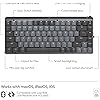
Logitech MX Mechanical Mini Mac Wireless Keyboard Low-Profile - Space Grey

Based on 538 reviews
Condition: New
Checking for the best price...
$129.99
Holiday Deal · 19% off was $159.99

Buy Now, Pay Later


As low as $21.67 / mo
  • – 6-month term
  • – No impact on credit to apply
  • – Instant approval decision
  • – Secure and straightforward checkout

Ready to go? Add this product to your cart and select a plan during checkout.

Payment plans are offered through our trusted finance partners Klarna, Affirm, Afterpay, Zip, Apple Pay, and Google Pay. No-credit-needed leasing options through Acima may also be available at checkout.

Learn more about financing & leasing here.

Selected Option

Free shipping on this product

FREE 30-day refund/replacement

To qualify for a full refund, items must be returned in their original, unused condition. If an item is returned in a used, damaged, or materially different state, you may be granted a partial refund.

To initiate a return, please visit our Returns Center.

View our full returns policy here.


Availability: In Stock.
Fulfilled by Amazon

Arrives Monday, Nov 16
Order within 18 hours and 10 minutes

Available payment plans shown during checkout

Protect Your Purchase

Easy claims online, fast replacements, no fees

Checking for protection plans...

At a glance

Condition
New
Style
Keyboard
Color
Space Grey
Model
920-010831
Dimensions
12.3"L x 5.2"W x 1"H
Weight
2 lb
Keyboard Description
Mechanical
Warranty
1 Year Limited Hard Warranty
Works with
Laptop, PC, Smartphone, Tablet

Features 9

  • Check out Logitech's MX Mechanical Keyboards (Universal PC version) for a full range of key feels (including Linear / Tactile Quiet / Clicky), in both full and compact sizes
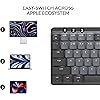
  • Mastered for Mac: MX Mechanical Mini for Mac Bluetooth keyboard features a key layout for Mac designed for feel and productivity, optimized for macOS and compatible with iPadOS and iOS(1)
  • Precise and quiet typing: Mechanical Tactile Quiet switches have a satisfying tactile bump you feel but barely hear, for precise feedback, reactive key reset, and a fluid typing experience
  • Mini size with low-profile keys: Experience more comfort with the minimalist, compact form factor featuring low-profile mechanical keys, for effortless precision and better ergonomics

Description

Excludes plastic in printed wiring assembly (PWA), FFC cable, cables, and packaging. MX Mechanical Mini for Mac A minimalist keyboard mastered for Mac with extraordinary feel, precision, and performance. Low-profile mechanical switches deliver a satisfying and quieter typing experience. Dual colored keycaps with a key layout for Mac computers help improve precision through your peripheral vision. Plus, get a complimentary 1-month Creative Cloud subscription with your purchase of MX Mechanical Mini For Mac and create, make, and do like never before. Product details: Dimensions (including keycaps): 1 x 12.3 x 5.2 in (26.10 x 312.60 x 131.55 mm) Weight: 21.6 oz (612 g) Compatible with Windows, macOS, iPadOS(1) and iOS(1) Compatible with Logi Bolt USB Receiver only (not included) Rechargeable Li-Po (1500 mAh) battery Optional software: Logi Options+ (2) Important: FileVault might be enabled on your macOS computer, which could prevent you from entering your password at start or reboot when connected to Bluetooth. In this case, use the embedded keyboard for logging in and/or purchase the Logi Bolt USB Receiver. Footnotes: (1) Device basic functions will be supported without software for operating systems other than Windows and macOS (2) Requires Logi Options+ software, available for Windows and macOS (3) Battery life may vary based on user and computing conditions (4) 4 mm minimum glass thickness.

Specs 40

Brand Logitech
Connectivity Technology Infrared
Keyboard Description Mechanical
Recommended Uses For Product Business
Special Feature Illuminated
Color Space Grey
Keyboard backlighting color support Single Color
Style Keyboard

Frequently asked questions

If you place your order now, the estimated arrival date for this product is: Monday, Nov 16

Yes, absolutely! You may return this product for a full refund within 30 days of receiving it.

To initiate a return, please visit our Returns Center.

View our full returns policy here.

  • Klarna Financing
  • Affirm Pay in 4
  • Affirm Financing
  • Afterpay Financing
  • Zip Pay in 4
  • Financing through Apple Pay
  • Financing through Google Pay
Leasing options through Acima may also be available during checkout.

Learn more about financing & leasing here.

Top Amazon Reviews


Hard to fault this keyboard!
Style: Keyboard Color: Pale Grey
I love the new Logitech MX Mechanical keyboards, including this one. This keyboard integrates with the iMac 24" very well, with no connectivity issues on Bluetooth at all, very solid connection. Which brings up the fact that this keyboard does not come equipped with the Logitech Bolt USB dongle, as does its brother, the MX Mechanical. However, I have had zero issues, or delayed start up, while using the BT connection on this keyboard. The quality is very high, well made, and I really like the keycap material and feel. Typing is excellent, although this keyboard is equipped with "tactile" key switches, while very nice, do not have a "clicky" experience, but is more like Cherry MX brown type switches, with a tactile bump, but not really much of a click. Others have mentioned that they are somewhat stiff in operation, while I find them about average. I waited for this "Pale Gray" color way, and I love it. Not a huge fan of the darker/bi color keycaps of the original. I have had no issues with the key backlighting, as some have mentioned, mine works very well, and the key caps are very well, and uniformly lit, Logi did a great job here. It also has all the Apple/Mac keys you would want, including for display brightness, and key cap brightness, and the usual, volume up/down/play/pause. Nicely laid out, and easy to find everything. I find myself very much enjoying typing on this keyboard. It's like the keyboard that Apple should have made! Not a fan of the very short travel Magic keyboard keys. This is a great keyboard for your Mac, I know I love it for mine! ... show more
Reviewed in the United States on August 26, 2023 by Glenn B.

One-and-Done "Clicky" Yet Satisfying Keyboard
Style: Keyboard Color: Space Grey
Taking a look at the Logitech MX Mechanical Mini for Mac Wireless Illuminated Keyboard from a video editor's perspective, there's a lot to appreciate, but a few considerations too. Starting with the positives, the compact design is a real space-saver on your desk. The mechanical keys deliver that satisfying click, making typing a breeze and potentially boosting your editing speed. The Mac-specific keys are a handy touch, and the illuminated feature is a game-changer, especially if you're burning the midnight oil on edits or working in dimly lit spaces. However, here are a couple of things to keep in mind. The smaller form factor might feel a bit cramped initially, especially if you're accustomed to larger keyboards. Plus, those function keys might be a touch too small for some intricate editing shortcuts. Lastly, while it's a great keyboard, the price might give you pause. It's tailored for Mac users, but the premium might feel a bit steep considering there are other mechanical keyboards available for less. All in all, the Logitech MX Mechanical Mini for Mac Wireless Illuminated Keyboard brings a lot to the table for video editors. It's got the tactile keys, Mac-specific features, and that illuminating perk—just be ready to adjust to its smaller size and consider if the price matches up with what you need for your editing setup. ... show more
Reviewed in the United States on January 3, 2024 by Marcus Robinson

An otherwise great keyboard, but it goes above & beyond in function.
Style: Keyboard Color: Space Grey
The keyboard is dense, solid, and feels great to hold & use. The sound of the keys is not as obnoxious as other keyboards, and is actually pretty pleasant. The function keys are all useful, albeit forward & backwards play not being there is a little disappointing, but understandable considering the crowd the keyboard is for. What's really cool is how you feel like some kind of wizard whenever you can hover your hand over the keyboard, and the backlighting turns on smoothly-- very satisfying. Overall, if you consider the keyboard's price point without the functionality, it would be pricey; however, the extra features and long battery more than justify the price, and actually provides good value. Very recommended. ... show more
Reviewed in the United States on December 10, 2024 by Daniel Kuskov

Looks and sounds great, but a little tiring on the wrists
Style: Keyboard Color: Pale Grey
I've been using the Keychron K3 for a couple of years now, but broke my escape key clean off, so I wanted to try something new. I saw this keyboard on one of my favorite vlogger's channels on YouTube and it looked like a solid choice...plus, I really wanted to try out a lighter color. PROS: -It looks REALLY nice sitting on your desk. -The sounds are probably the best I've heard from mechanical keyboards (that I've tried and owned). I definitely prefer this over my Keychron in that aspect. -The backlight is nice and bright, but not so much so that it's distracting or draws too much attention. Even at the highest brightness, it's not giving too much. -Bluetooth connectivity is quick and solid. I haven't had any issues with connection dropping. CONS: -It does require more pressure to activate the keys, so it can be a bit more exhaustive on the wrists if you're typing a lot. This is probably the biggest problem I have with it. - I have noticed a squeaky noise that comes from the spacebar after several hours/days of use. It comes and goes, but can be kind of annoying. -The cord that comes with it for charging is really short. Not sure why they did that, but I have to use my Keychron one to charge it since my monitors are on risers. All-in-all, it's a good keyboard for aesthetics and sounds, but if you're someone who does a lot of typing, it might be a little uncomfortable after long periods. ... show more
Reviewed in the United States on June 16, 2026 by Roxie Schnoor

FALLING APART!
Style: Keyboard Color: Pale Grey
2nd time that the keyboard break. The key come out (I am writing the be t Ic an with the one that are working).
Reviewed in the United States on September 20, 2026 by Mayra Martinez

Great keyboard for any Apple user; comparison between Logitech, Nuphy, and Keychron
Style: Keyboard Color: Pale Grey
First of all, the seller that fulfilled my order was great- it's on Prime and the keyboard came new in its packaging. I was able to snag this keyboard at a 45% discount from the MSRP. For the keyboard itself: it's great! I'm happy with the purchase and it has a lot of benefits which I'll cover below. I actually have had the Nuphy Air75 v1, and if you're a heavy Apple/Mac user, you're likely looking between Nuphy, Logitech, LoFree, and Keychron for Mac-forward/specific keyboards. All offer wireless but have some differences between them. Are you a person who's looking to customize their keyboard to the extent of changing switches? Then you're going to go for Nuphy, LoFree, and Keychron. Nuphy is cheaper than Logitech at full price, and also cheaper than LoFree. But! LoFree is a nicer build out-of-the-box where the feeling and sound is better than Nuphy. In comparison, Keychron has more Mac-forward options and many options are cheaper than the other mentioned brands but lacks that portability the others have. All are solid keyboards with their pros and cons and again offer some great customization options. Keychron is cheapest (while still being heavily lauded), and then Nuphy is next (while also heavily lauded), then Lofree is the most expensive (while being most lauded) but it does offer a great typing experience and feel in comparison to the rest. Now back to this Logitech MX Mechanical Mini- does it offer the same customization down to the switch-level? Absolutely not. You cannot hot-swap on the Logitech. However, what it does the best is the incredible battery life (10 months w/o the backlighting) and the software/connectivity. An oft-complaint with Nuphy, Lofree, and Keychron is that on wireless, it will take time to have the keyboard turn on + connect (in the matter of seconds, some say 3-5 seconds and more/less). For Logitech, it has a nifty feature that turns on the keyboard as your hands come close and it quickly turns on/connects. The software is easy to use and you can customize buttons. It's also very easy to switch between devices on the Logitech keyboard. All say they can connect with different devices (at least 3) but Logitech has them beat on the connectivity of the keyboard. Now, you CAN customize the keycaps but certain keys have odd configurations and therefore cannot be replaced. Specifically, the space bar and maybe the right shift key. The Logitech space bar has a proprietary configuration and cannot be replaced (at least not easily). But I'd still recommend finding low-profile PBT keycaps. For a keyboard that retails at $150, it's a bit of a surprise that the keys that come with it are not PBT or higher quality plastic. These keys will display wear (and stuff like oil, etc.) much more quickly than PBT keycaps, and so I would recommend replacing them at some point. Besides that, PBT keycaps just feel better. So: are you a person looking for a good typing feeling with a keyboard that has great connectivity (and especially for switching devices/waking up the computer) and battery life that is also portable enough to take with you? And you don't care so much for customization of the switches and keys? Then Logitech is for you! However, if this was at full MSRP, I would hesitate and consider the other options. But at a discount, I think the Logitech is a sound choice and what I went with AFTER having the Nuphy Air 75 v1 (of which I never customized anyways). I liken this keyboard to being something that's office/professional-coded while giving you some of the benefits of mechanical keyboards. I think it looks fantastic and I'm happy with my choice! ... show more
Reviewed in the United States on November 18, 2024 by Matthew Gaw

Look & feel - A. Bluetooth connectivity issues - D
Style: Keyboard Color: Space Grey
Keyboard looks great and feels great to use. Some odd key placement but I chalk that up to the smaller (Mini) form factor. Other reviewers noted that the keys have caps next to the lower case keys. Not the case on mine. BUT it will, at least once a week if not more often, simply stop responding to bluetooth once the Mac has been asleep. This never happens with my other keyboard. Checked firmware- all up to date. On latest version of MacOS. The fact that you can ONLY use this keyboard via bluetooth, means I have to switch to my other keyboard, forget the MX Mechanical in bluetooth and reconnect it. Pain in the neck. Shame really because I otherwise really like this keyboard. ... show more
Reviewed in the United States on June 5, 2025 by Patrick Flynn

Great keyboard, loud
Style: Keyboard Color: Pale Grey
The keyboard is great so far - i like that you can turn on or off the keyboard lights, the battery lasted a long time, and the Bluetooth connection works perfectly. (I returned another brand's high quality keyboard because it was known to be glitchy with Bluetooth). I wish this one was more quiet when typing but that wasn't a selling point for me since i work from home, just something I wanted to flag in case that's important to you. ... show more
Reviewed in the United States on June 17, 2026 by emr
Checking for best price...