Search  for anything...

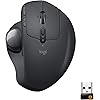
Logitech MX Ergo Wireless Trackball Mouse, Ergonomic Design, Move Content Between 2 Windows and Apple Mac Computers (Bluetooth or USB), Rechargeable

  • Based on 12,310 reviews
Condition: New
Checking for inventory...

Notify me when this product is back in stock

$109.95 Why this price?

Buy Now, Pay Later


As low as $18.33 / mo
  • – 6-month term
  • – No impact on credit
  • – Instant approval decision
  • – Secure and straightforward checkout

Payment plans are offered through our trusted finance partners Klarna, Affirm, Afterpay, Apple Pay, and PayTomorrow. No-credit-needed leasing options through Acima may also be available at checkout.

Learn more about financing & leasing here.

Selected Option

Free shipping on this product
This item's return window has been extended for the holiday season: Returnable until Jan 31, 2026

To qualify for a full refund, items must be returned in their original, unused condition. If an item is returned in a used, damaged, or materially different state, you may be granted a partial refund.

To initiate a return, please visit our Returns Center.

View our full returns policy here.


Availability: Unavailable
Fulfilled by Novel Tech LLC
Available payment plans shown during checkout

Style: Mouse


Features

  • ERGONOMIC DESIGN FOR MORE COMFORT: Customize the trackball angle from 020 for a more natural, comfortable hand position. 20% less muscle fatigue*. * Than a regular mouse.

Description

A NEW STANDARD OF COMFORT AND PRECISION Logitech's most advanced trackball for trackball enthusiasts and consumers searching for alternatives to mice and touchpads. Delivers 20% less muscular strain compared to a regular mouse. MX ERGO features a unique adjustable hinge for personalized comfort and the latest tracking, scrolling and power management technology. Logitech FLOW enables effortless cross computer control.

Brand: Logitech


Color: Graphite


Connectivity Technology: Bluetooth


Special Feature: Ergonomic Design, Portable, Rechargeable, Wireless, programmable button


Movement Detection Technology: Trackball


Wireless Type: ‎2.4 GHz Radio Frequency


Average Battery Life (in hours): ‎4 months


Brand: ‎Logitech


Series: ‎Logitech MX ERGO


Item model number: ‎910-005177


Hardware Platform: ‎Laptop, PC


Operating System: ‎Windows 10,11 or later,Mac OS X 10.8 or later,iPadOS 13.4 or later


Item Weight: ‎5.8 ounces


Product Dimensions: ‎3.92 x 5.21 x 2.02 inches


Item Dimensions LxWxH: ‎3.92 x 5.21 x 2.02 inches


Color: ‎Graphite


Rear Webcam Resolution: ‎4000 MP


Power Source: ‎Battery Powered


Batteries: ‎1 Lithium Metal batteries required. (included)


Manufacturer: ‎Logitech


Is Discontinued By Manufacturer: ‎No


Date First Available: ‎August 23, 2017


Frequently asked questions

This product is currently out of stock. Please check back later for shipping info.

Yes, absolutely! You may return this product for a full refund within 30 days of receiving it.

To initiate a return, please visit our Returns Center.

View our full returns policy here.

  • Klarna Financing
  • Affirm Pay in 4
  • Affirm Financing
  • Afterpay Financing
  • PayTomorrow Financing
  • Financing through Apple Pay
Leasing options through Acima may also be available during checkout.

Learn more about financing & leasing here.

Top Amazon Reviews


  • I miss thumb buttons :(
After quite a few years since having the Logi T-RA18 cordless trackball, I wanted once again to go back to just lazy thumbing around on the pc. I'd been staying with the Logi brand since that old trackball, but in traditional corded or cordless mice. Figured it'd been about 10yrs since then, maybe they made improvements on the trackball scene? Yep, they did. Enter this guy. First off, its nice. Very ergonomic. Then add in that tilt feature and it gets better. If you don't like the tilt, just firmly rotate it to the left and it'll plop down flat. By the way, that tilt plate is removable if you want just a flat trackball. I left it on, because I can simply add a bit of pressure and it just flops over flat. Battery life is really good. My old one took batteries, this one has power built in. Probably lithium, can't say for sure. What I can say, is that it lasts quite a long time. Plus, if it DOES start to die, you can simply just plug it in and keep on thumbing around. It charges while you use it. The ball portion is just like it used to be. Nice smooth ball to thumb with. Mine however has a ever so slight divot in it. I can feel it, but can't find it. I also can't be bothered to really look for it as well lol. And just like previous trackballs, there's a hole under it so you can pop it out to clean under the ball. The difference between then and now, is that this ball is in there quite snugly. Took a fair amount of force to pop it out so I could inspect the innards. Keep this in mind and don't use anything that might mar the surface. A new feature I haven't seen yet, is by the ball, there's a button. This button by default evidently will reduce the mouse speed super slow. Great if you want to move the mouse .5mm at a swipe of the thumb I suppose. Me personally, i've no use for it. And, its not in a convenient place to use. You have to stop, and find it in order to push the button. But it might be useful to someone out there. After all, its there right? Aside from that, it's got the typical mouse buttons and wheel along with mouse speed buttons next to the left mouse button. Gaming? Well, that's going to be user preference. And there's a learning curve to it if you've been using traditional mice for awhile, like me. So, I've got both this mouse and the G604 sitting next to it so I can have all my bases covered. By the way, this mouse does not use the g hub software that is found on alot of mice. It uses logi bolt and logi options. So far there's been no conflict between those and ghub. In the end, its a nice addition to my arsenal of gadgetry. I'd say give it a whirl. Keep in mind, there's a learning curve to it! Buy with confidence! ... show more
Reviewed in the United States on May 11, 2023 by Super Dave

  • M570 Upgrade
I've used the Logitech M570 for many years. Mice always cramped my hand and I have never had the trackball give me ergo issues. I wore out the first 570 after many years and moved to the second. I used that for a number of years and then recently started to have an issue on my work computer where the left button seemed to be working like a right button on occasion, along with some other glitchy performance. This got me doing trackball research. Meanwhile, it turns out my company's computer help desk just had to upgrade my mouse driver and it was back to working perfectly. But now I had the bug in my head that after many years it was time for an upgrade. For me, the MX Ergo has been a step up in 5 ways: 1) I like the heavier unit that keeps it nice and planted on my XL mousepad 2) I really like the cursor slow-mo button for more precise work when needed 3) the overall grip seems wider and more ergonomic for my hands and I particularly note the ball or meaty part at the base of my thumb now has a resting area, so even more relaxing for my hand. 4) Between the rubbery hand rest and rubber bottomed metal base plate the whole unit just feels more high quality and solid than the plasticky M570 and 5) Because this unit has both the Logitech Unifying USB and Bluetooth and can easily toggle between the two when set up properly from the button at the base of the wheel, I no longer am transferring the Unifying USB from my company computer to work computer, a move I've done thousands of times previously... now I keep the Unifying USB in my work computer and easily toggle to Bluetooth for my home computer work on this MX Ergo as well as my recently acquired K780 keyboard that has similar functionality. Awesome! I find keeping the unit at the 20 degree tilt via the magnetic plate on the bottom is more comfortable for me than the flat position... but the metal plate approach is pretty nifty and one can easily hop between one position and the other on the fly, no formal "adjustment" necessary. The jury is still out on the rechargeable battery that is supposed to go 4 months between charges. With my M570 it always felt I went well over a year before the battery started to give up the ghost. This rechargeable device theoretically ensures one is not caught without AA or AAA batteries. I just hope it is not a planned obsolescence device where energy retention degrades after a few years to the point recharging the trackball becomes annoying, like the crappy degrading battery life on phones we've all experienced. Finally, It is kind of cool that the new silver ball and old blue trackball are the same size... I could swap out the balls and now my new MX ergo has a Blue Ball to show I'm a legacy M570 user. ... show more
Reviewed in the United States on April 11, 2020 by Tseg

Can't find a product?

Find it on Amazon first, then paste the link below.
Checking for inventory...