Search  for anything...

Logitech Ergo K860 Wireless Ergonomic Keyboard with Wrist Rest and MX Vertical Wireless Mouse

  • Based on 7,589 reviews
Condition: New
Checking for the best price...
$193.99 Why this price?
Holiday Deal · 16% off was $229.98

Buy Now, Pay Later


As low as $32.33 / mo
  • – 6-month term
  • – No impact on credit
  • – Instant approval decision
  • – Secure and straightforward checkout

Ready to go? Add this product to your cart and select a plan during checkout.

Payment plans are offered through our trusted finance partners Klarna, Affirm, Afterpay, Apple Pay, and PayTomorrow. No-credit-needed leasing options through Acima may also be available at checkout.

Learn more about financing & leasing here.

Selected Option

Free shipping on this product

30-day refund/replacement

To qualify for a full refund, items must be returned in their original, unused condition. If an item is returned in a used, damaged, or materially different state, you may be granted a partial refund.

To initiate a return, please visit our Returns Center.

View our full returns policy here.


Availability: In Stock.
Fulfilled by Amazon

Arrives Wednesday, Dec 17
Order within 1 hour and 44 minutes
Available payment plans shown during checkout

Protection Plan Protect Your Purchase
Checking for protection plans...

Style: + Mx Vertical


Features

  • Advanced ergonomic combo: Logitech ERGO K860 keyboard and MX Vertical mouse are built for all-day comfort so you can perform at your highest level in a more relaxed, natural posture
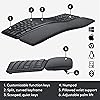
  • Ergonomic split keyboard: Type more naturally with the ERGO K860 wireless keyboard, featuring a curved, split, and sloping keyframe to reduce strain and pain on your wrists and forearms
  • Ultimate wrist comfort: ERGO K860 features a pillowed wrist rest for 54 percent more wrist support, reducing wrist bending by 25 percent compared to a standard keyboard without a palm rest
  • Adjustable palm lift: Seated or standing, this rechargeable cordless keyboard keeps your wrists in a comfortable, natural position with adjustable tilt legs of 0, 4, and -7 degrees
  • Effortless precision: ERGO K860 PerfectStroke keys match the shape of your fingertips so you can type with confidence on a full-size wireless keyboard crafted for comfort, precision, and fluidity
  • Vertical ergonomic mouse: Logitech MX Vertical places your hand in a natural handshake position with its unique 57-degree angle, reducing wrist pressure and improving forearm posture for more comfort
  • Advanced optical tracking: MX Vertical features 4000 DPI high-precision sensor that provides ultra-precise tracking and requires 4x less hand movement than a traditional mouse with 1000 DPI sensor

Description

Logitech Ergonomic Wireless Keyboard and Mouse Combo - ERGO K860 and MX Vertical Achieve high performance with this wireless keyboard and mouse set, which includes ERGO K860 ergonomic split keyboard and the MX Vertical ergonomic mouse. Ergonomist-approved and user tested, this keyboard and mouse combo allows you to work comfortably without compromising a pixel of performance. ERGO K860 Keyboard This advanced keyboard promotes a more relaxed typing posture, reducing wrist bending by 25 percent, and offering 54 percent more wrist support. PerfectStroke keys are crafted for precision, while an integrated numpad, multi-device capabilities, and two-year battery life ensures that you won’t compromise performance for ergonomics. MX Vertical Mouse The natural handshake position of the MX Vertical reduces wrist pressure and forearm strain. A 57-degree vertical angle is optimised for an ergonomic posture, while the 4000 DPI high-precision sensor delivers 4x less hand movement. A cursor speed switch lets you instantly adjust DPI speed and accuracy. One full charge delivers four months of power, while a one-minute quick charge gets you three hours.

Brand: Logitech


Color: GRAPHITE


Connectivity Technology: Wireless, Usb


Special Feature: Ergonomic, Wrist Rest, Rechargeable


Compatible Devices: Laptop, Personal Computer, Smartphone


Brand: ‎Logitech


Hardware Platform: ‎Laptop


Operating System: ‎Windows 10


Color: ‎GRAPHITE


Power Source: ‎Battery Powered


Manufacturer: ‎Logitech


Date First Available: ‎January 15, 2020


Frequently asked questions

If you place your order now, the estimated arrival date for this product is: Wednesday, Dec 17

Yes, absolutely! You may return this product for a full refund within 30 days of receiving it.

To initiate a return, please visit our Returns Center.

View our full returns policy here.

  • Klarna Financing
  • Affirm Pay in 4
  • Affirm Financing
  • Afterpay Financing
  • PayTomorrow Financing
  • Financing through Apple Pay
Leasing options through Acima may also be available during checkout.

Learn more about financing & leasing here.

Top Amazon Reviews


  • Really nice ergo keyboard!
Style: Keyboard Only
I'm in IT - I'm at a computer all day, every day. I had a boss early in my career who had severe carpal tunnel issues and he always preached ergonomics. Due to that I've been using an ergonomic keyboard for the last 17 years, specifically the Microsoft Ergonomic 4000. That keyboard is no longer produced but I've loved it, it's held up well, and I've never had any issues with my wrists from typing all day. I recently got a new job and decided to upgrade my keyboard for the first time since 2007. The Logitech ERGO K860 came up in most searches for the best ergo keyboard in 2024 so I decided to give it a shot. I couldn't be happier with it. The shape and key placement is very similar to my beloved MSE 4000. They keys are much quieter and very pleasant to type on. I was a little concerned that the "scooped keys" in the product description would be deep divots like I've seen on some keyboards and don't care for, but I needn't have worried. These are just ever-so-slightly scooped, in a way that's barely noticeable until you focus on it, but enough that it does make a positive impact on typing. It's well constructed and feels like it'll hold up for a long time (we'll see if I can get another 17 years!). The wrist rest is really comfy, nice and wide, and not a material that seems like it will wear out or get gross over time. It connected easily to two laptops and my phone, one laptop with the USB receiver and the other two via Bluetooth. Typing is nice and responsive and I don't detect any delay with typing. I like that the function keys can be customized via the Logi Options+ app, although the default functions are pretty good right out of the box. I already had the Logi Options+ app for my MX Master 3 mouse (best mouse I've ever used!) but it wouldn't recognize the keyboard until I updated it to the latest version, not a big deal though. The only change I'd make to it is the batteries. It runs on two AAA batteries. That's fine I suppose, I do have rechargable AAAs I can use. I'd prefer that the keyboard be USB rechargeable like the MX Master 3 mouse - charge it once every few months and then don't worry about it. Now when the batteries on this keyboard run low I'll have to go searching for batteries to replace them instead of just plugging it in for a bit. Not my favorite, but it's not huge deal. Overall incredibly happy with this keyboard! It's definitely a good successor to my Microsoft Ergonomic 4000! ... show more
Reviewed in the United States on August 28, 2024 by Michael Wright

  • Great key action, but: (1) locks up, (2) toggling media vs. F keys sucks, (3) no right-mouse menu
Style: Keyboard Only
UPDATE 2 (7 Aug 2021, ~7 months into ownership). I found the Microsoft context-sensitive menu pop-up key -- equivalent to the right mouse button -- of the MS EP4000. See picture. I don't love this location. But at least it exists. I'm moderately used to it's weird inaccessible placement. But I do have to always look to find it, instead of knowing it's location by muscle memory, like most keys. I probably should put one of those raised gummy circles (like on my delete key and fn key here in the pic) on it. Also, I like this keyboard now so much that I bought one for the office too. It's outside office standards, so I paid for it myself. (This really helps avoid the constant disorientation of working on two different keyboard between home and work.) UPDATE (7 Apr 2021, a few months into ownership). The problems I wrote about below, seem to have miraculously evaporated. I have no idea why. Now this keyboard only spams the volume-up (or down) signal to my PC maybe once a month. And I’ve found that just taking the USB fob out for a second, and cycling the power button on the keyboard clears that every time, and takes maybe 5 second. For something that happens maybe once a month, I can live with it. It is otherwise a very comfortable, fast, easy, quiet keyboard. I’ve even become accustomed to toggling between F-keys and media keys. All in all, this is my new favorite keyboard. ORIGINAL REVIEW This seems the best option for users who loved their Microsoft Ergonomic Pro 4000. Same split layout, and the other keys are more nearly where muscle memory expects them to be (INS, Home, pg up, DEL, end, pg down). And the key action is awesome: actually way faster than the MS EP4000. ... BUT: WARNING #1: Around 1-4 times a week, the communication between my PC and this keyboard locks in some weird setting, like increasing the volume. I can unintentionally get max volume this way in <1 second, with zero forewarning. Happens when I haven't even touched the associated media key. At that time, no other inputs are possible, since the keyboard is busy spamming that one keystroke to the PC. The only solution is (after ripping my headphones off) to remove the USB fob from my PC, wait a minute, plug it back, and hope for the best. Usually that works. But sometimes it's just more of the same, and I have to manually restart my PC. At least that (a reset) always fixes it. But it's a terrible interruption to workflow. You can lose important work that way! This happens on both my self-built PC (keyboard drivers installed), and on my HP laptop (keyboard drivers not installed). So, it's not a problem with my PC. It's not a mechanical sticking (no key is physically wedged): it's a logical sticking. To be clear, it's not just "volume up" that gets locked active. Other keys too. Volume down. And toggles between apps. And stuff I can't really explain/describe: I just see a lot of fibrillation on my monitor, as the various apps go nuts - so far without editing content, but long term who knows? I should RMA this keyboard, but the key action is so damn fluid - I type a lot faster on it - that I'm dragging my feet on the RMA. That, and it's otherwise the prefect replacement for my beloved Microsoft Ergonmic Pro 4000. WARNING #2: I HATE that I have to toggle between the F-keys between F-functions and media key functions. I am not used to that. My old keyboard -- like many who buy this, I bet -- was a Microsoft Ergonmonic Pro 4000 (before Microsoft ruined that line with their terrible 7000 update). It had physically distinct media keys vs. F-keys. So I'm used to adjusting sound volume instinctively, without thinking about it, and ditto hitting F2 to edit a cell entry (e.g., in Excel), or hit F11 to enlarge my browser (to remove navigation bar shrubbery). But on this Little Compromise of a keyboard, I have to constantly recover from hitting an F-key/media with the toggle set to the wrong usage. Aarg! I am slowly learning to press the F/media key toggle, while watching my monitor for the brief flash that tells which mode it's in, then deciding whether to repress the F/media key toggle again, before trying to get either an F-key or a media key to perform some function. I'm Not loving that! I would REALLY prefer a keyboard set-up like the MS Ergonomic Pro 4000, but that is probably tied up in a patent, that MS won't release or reasonably license, but neither will they manufacture them anymore. Oh, you may still find one on eBay, used, for $300. Ugh. WARNING #3: The Microsoft context-sensitive menu pop-up key -- equivalent to the right mouse button -- of the MS EP4000, is missing. Replaced by a second key: "opt/ctrl". You'd think the driver software would let you program this key to do different things. I have not found how to make it act like the awesome key that it replaced (the Microsoft context-sensitive pop-up menu key). I'm still mourning the loss of that little key of wonder. Slows me way down to have to take hands off keyboard to fiddle around to right-mouse click every time. ... show more
Reviewed in the United States on January 5, 2021 by ZenGeekDad ZenGeekDad

Can't find a product?

Find it on Amazon first, then paste the link below.
Checking for best price...