

Search  for anything...

Logitech Combo Touch iPad Pro 13-inch (M4 & M5)(2024 & 2025) Keyboard Case - Detachable Backlit Keyboard with Kickstand, Comfortable Typing, Multi-use Mode - Midnight Black

  • Based on 0 reviews
Condition: New
Checking for the best price...
$219.99 Why this price?
Save $40.00 was $259.99

Buy Now, Pay Later


As low as $36.67 / mo
  • – 6-month term
  • – No impact on credit to apply
  • – Instant approval decision
  • – Secure and straightforward checkout

Ready to go? Add this product to your cart and select a plan during checkout.

Payment plans are offered through our trusted finance partners Klarna, Affirm, Afterpay, Apple Pay, and PayTomorrow. No-credit-needed leasing options through Acima may also be available at checkout.

Learn more about financing & leasing here.

Selected Option

Free shipping on this product

FREE 30-day refund/replacement

To qualify for a full refund, items must be returned in their original, unused condition. If an item is returned in a used, damaged, or materially different state, you may be granted a partial refund.

To initiate a return, please visit our Returns Center.

View our full returns policy here.


Availability: Only 3 left in stock, order soon!
Fulfilled by Amazon

Arrives Tuesday, Jun 30
Order within 15 hours and 7 minutes
Available payment plans shown during checkout

Protection Plan Protect Your Purchase
Checking for protection plans...

Color: Midnight Black


Style: 13" (M4)


Pattern: TABLET KEYBOARD


Features

  • Compatibility: For iPad Pro 13-inch (M4 & M5) (2024 & 2025) A2925, A2926, A3007, A3360, A3361, A3362; not designed for use with iPad Pro with Nano-texture glass
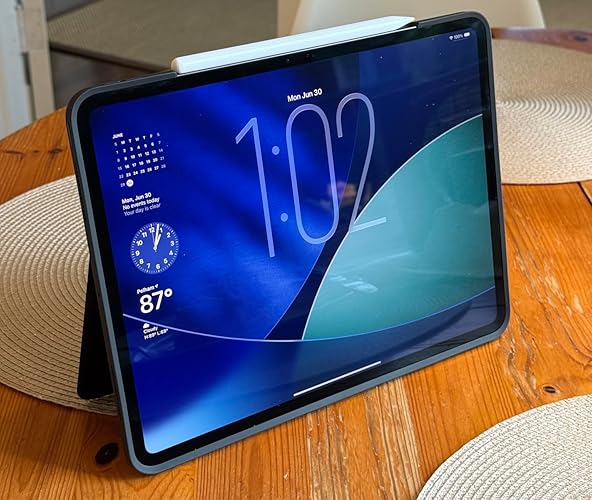
  • Use-your-way Modes: Multiple use modes and infinite possibilities; switch it up to type, sketch, watch videos, read, or hop on a video call without removing your iPad Pro from the keyboard case
  • Flexible kickstand, Detachable Keyboard: Find your perfect angle for the task at hand with the ultra-flexible kickstand; detach the keyboard to sketch, watch or read with total freedom
  • Large Multi-Touch trackpad: Its the biggest trackpad yet, giving you that intuitive tracking experience; familiar Multi-Touch gesture controls let you swipe, pinch, double-tap, and more
  • Secure, form-fit protection: The uniquely sturdy, yet lightweight iPad keyboard case keeps your iPad safe from scuffs and scratches, so you can take it anywhere with total peace of mind
  • Type away, day or night: The adjustable wireless backlit keyboard glows elegantly with precise lighting, so your mood-lit work sessions are even more enjoyable than ever
  • Smart Connector: Seamless, instant, secure connectivity on your Combo Touch iPad Pro keyboard case with no charging requiredits powered by your iPad
  • Plastic parts in Combo Touch include certified post-consumer recycled plastic (Midnight Black: 19%)*.

Description

Type, sketch, view and read with the Combo Touch keyboard case. A flexible kickstand and a full-size, detachable keyboard give you multiple use modes for any task. Take iPad further with a bigger trackpad that gives you superior, intuitive tracking experience with familiar Multi-Touch gesture controls. The slimmest Combo Touch yet, it slips into bags, travels light, and powers your productivity anywhere. The uniquely sturdy, yet lightweight case keeps your iPad safe from scuffs and scratches, while adjustable backlit keys glow elegantly with precise lighting, so your mood-lit work sessions are more enjoyable than ever. Take iPad further with Combo Touch.

Brand: Logitech


Compatible Devices: iPad Pro 13-inch (M4 & M5)


Connectivity Technology: Apple Smart Connector


Keyboard Description: Membrane


Recommended Uses For Product: Business, Education, Everyday Use, Personal, Student


Special Feature: Integrated Stand, Lightweight, Low-Profile Key, Trackpad, Wrist Rest


Color: Midnight Black


Keyboard backlighting color support: RGB


Style: 13" (M4)


Product Dimensions: 11.26"L x 8.96"W x 0.54"H


Compatible Devices: iPad Pro 13-inch (M4 & M5)


Connectivity Technology: Apple Smart Connector


Additional Features: Integrated Stand, Lightweight, Low-Profile Key, Trackpad, Wrist Rest


Keyboard Backlighting Color Support: RGB


Power Source: iPad Pro


Switch Type: Membrane


Keyboard Layout: QWERTY


Hand Orientation: Ambidextrous


Button Quantity: 19


Water Resistance Level: Not Water Resistant


Mechanical Keyboard Switch Model: Membrane


Minimum Required Operating System Version: iOS 13


Compatible Operating System Family: iPadOS


Compatible Tablet Computer Models: Apple iPad Pro 11-Inch (M4), Apple iPad Pro 13-Inch (M4)


Is Electric: Yes


Number of Keys: 84


Color: Midnight Black


Style Name: 13" (M4)


Brand: Logitech


Keyboard Description: Membrane


Antenna Location: Business, Education, Everyday Use, Personal, Student


Built-In Media: Detachable Keyboard, Flexible Kickstand


Model Number: 920-012860


Model Name: Combo Touch


Global Trade Identification Number: 08


Unit Count: 1.0 Count


Manufacturer: Logitech


UPC: 097855197108


Mfr Part Number: 920-012860


Item Weight: 23.28 Ounces


Generation: 2024


Warranty Description: 1 Year Limited Hardware Warranty


Item Dimensions L x W x H: 11.26"L x 8.96"W x 0.54"H


Enclosure Material: plastic_with_coating_or_covering


Frequently asked questions

If you place your order now, the estimated arrival date for this product is: Tuesday, Jun 30

Yes, absolutely! You may return this product for a full refund within 30 days of receiving it.

To initiate a return, please visit our Returns Center.

View our full returns policy here.

  • Klarna Financing
  • Affirm Pay in 4
  • Affirm Financing
  • Afterpay Financing
  • PayTomorrow Financing
  • Financing through Apple Pay
Leasing options through Acima may also be available during checkout.

Learn more about financing & leasing here.

Top Amazon Reviews


  • Overpriced, but still excellent. Overpriced, but still excellent.
Color: Midnight Black Style: 13" (M4) Pattern: TABLET KEYBOARD
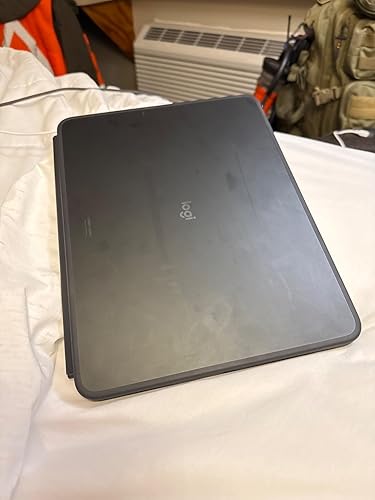
I had a case like this on my M1 iPad Pro, so when I got the 13 inch M4 iPad Pro I decided to stick with Logitech for my case. The design of this case emulates the Microsoft Surface and Surface keyboard, providing a kickstand for the iPad and a removable keyboard. I do feel the price is outrageous, but there aren’t many quality options when it comes to cases in this design. This updated version functions better - the trackpad is larger and does not randomly stop working like the older version did, and the case feels less flimsy that the older version. The keyboard feels a little more comfortable to use, and the back lighting is much better as well - there seems to be more steps in brightness and the backlight adjusts with the automatic brightness on the screen. There is still a bug from the prior version of this case where the back lighting doesn’t always come back on after going to sleep while open. Pressing the brightness buttons will turn the back light on again, but I do feel this is an oversight. Installation is mildly anxiety inducing because you have to use some force to get the case on the iPad, but I managed to do it without breaking anything; just follow the instructions in the box. Some other cases just attach with magnets to the rear of the iPad, but by wrapping around the frame of the iPad this case provides more protection. I certainly wouldn’t try dropping my iPad in this case, but I feel confident that my iPad is protected while in my bag. One thing I dislike about this case is the material used on the exterior. The exterior portion which sits on the rear of the keyboard is a smooth plastic (or maybe metal? I can’t decide) which is prone to marring and fingerprints, while the exterior on the rear of the iPad is more rubbery feeling, akin to the official folio cases. The older version of this Logitech case used a fabric material on all portions of the exterior and for the wrist rest, and I definitely preferred that design over this. I carry a regular iPad from work in the same pouch as my M4 in my work bag, and the rubber feet on the work iPad’s case have marked up this Logitech case like a gym floor. This case, only being available in black was also a disappointment, but at least it’s a neutral color. There does seem to be slightly more noticeable battery drain from the keyboard on this version of the case versus the original, but you can always turn off the back light reduce power draw from the iPad. ... show more
Reviewed in the United States on November 25, 2024 Reviewed in the United States on November 25, 2024 by Kozad

  • Strong and sturdy Strong and sturdy
Color: Midnight Black Style: 13" (M4) Pattern: TABLET KEYBOARD
Good weight to it, strong material that protects the iPad. I like this brand better that the magnetic one by Apple. The material doesn’t allow your fingers prints to show. And you can detach the keyboard if you want to use it vertically or I detached it to place the iPad on a stand for my meetings, versatile. ... show more
Reviewed in the United States on May 27, 2026 Reviewed in the United States on May 27, 2026 by Wendy Thomas

  • Case has steadily fallen apart in under 2 years of use. Impacting functionality.
Color: Midnight Black Style: 13" (M4) Pattern: TABLET KEYBOARD
As an owner of many Logitech products, including many iPad cases dating all the way back to the iPad Air 2, I am overall dissatisfied with this product. I’m a huge fan of Logitech products but was quite disappointed by this case. For context, my iPad is primarily used at home for mostly entertainment and web/social media browsing. It is my primary device used for day to day tasks. Pros: The keyboard is great and the function buttons are extremely useful. Being able to easily detach the keyboard on the fly and use the iPad as strictly a tablet is good. Cons: Like many other users have said, the keyboard is useless without a good surface to use it on. No go for using it on your lap or on an uneven/soft surface like a bed or couch. The case over 1.5 years of ownership has begun to completely fall apart. The rubber/silicone lip that covers the front edge of glass on the iPad is peeling away from the hard plastic piece that snaps onto the iPad. The power button has completely snapped off the case at around 8 months of use and now the volume buttons are about to snap off and are almost useless. Due to the aforementioned issues with the keyboard, I have basically stopped using it and it sits in a drawer, which does leave the screen of your iPad exposed. ... show more
Reviewed in the United States on January 19, 2026 by Johnny

  • Outstanding in every way, phenomenal way to transform your iPad. Outstanding in every way, phenomenal way to transform your iPad.
Color: Midnight Black Style: 13" (M4) Pattern: TABLET KEYBOARD
OUTSTANDING!!!! After 4 years with the OEM keyboard on my last iPad, I wanted something with the features this keyboard provides. The ultra-thin screen holder fits super snug, the keyboard is backlit (keys above 3 and 4) and just so thin and sturdy. The kickstand is more adjustable than the factory one & the magnetic detachment feature is awesome. While this one is not inexpensive, it is still reasonably priced given the quality. The keyboard feels natural, great keystroke click depth, low noise no need to charge it, just WOW. If I could have given this 10 stars, I would have. You won’t be disappointed. ... show more
Reviewed in the United States on January 16, 2026 Reviewed in the United States on January 16, 2026 by MAC24211

  • Updated: a less-durable version with a few nice features
Color: Midnight Black Style: 13" (M4) Pattern: TABLET KEYBOARD
I had an older version of this case for my first generation iPad Pro. This newer version is sleek and sturdy- feels stronger than the old version, particularly on the keyboard side which no longer folds in the middle, and the magnets that keep the keyboard attached are greatly improved. The addition of the mousepad is interesting, and I'm sure will come in handy when editing text, etc. My only two complaints are that 1. the kickstand no longer has the little rubber feet on them, which doesn't have much of an effect on its stability but makes it much more difficult to get your finger under it to pull the stand out. 2. There is no longer a loop to hold your pencil, so you have to rely on the magnets to keep your pencil safe- something you certainly can't rely on, and is pretty worthless when you toss it in a bag. Overall a strong case with a good keyboard. It'll keep your iPad safe UPDATE: falling apart at the seams after a year, and I’m pretty gentle with it. Much less durable than the old version and absorbs fingerprints way too easily. Disappointing for the money ... show more
Reviewed in the United States on July 30, 2024 by T Kenney

  • Well-Designed, Functional Case w/a Few Minor Drawbacks
Color: Midnight Black Style: 13" (M4) Pattern: TABLET KEYBOARD
After a long search for a high-quality yet affordable protective case for my 13-inch iPad Pro, I decided on this one ... and overall, it’s exactly what I needed. I was looking for a folio-style case that could securely hold my Apple Pencil, had a detachable keyboard with a trackpad, and didn’t require removing the main case. This checks all those boxes. Both the keyboard and the Apple Pencil holder are magnetized. The pencil holder keeps the pen in place well enough for everyday use, but I wouldn’t rely on it for travel ... it’s just not strong enough for secure storage on the go. The keyboard, on the other hand, attaches beautifully. The magnetic connection is strong and satisfying ... it really snaps into place. I frequently remove the keyboard when I’m writing or drawing, and this design makes that super easy. When not in use, I just snap it back on to protect the screen. The typing experience is also excellent. The keys are well-spaced, not too small, and have a great tactile feel ... I actually type faster on this than on other keyboards I’ve tried. The trackpad is also a highlight. I have an Apple Mouse, but I never use it anymore because the trackpad feels more natural and responsive. The only annoyance I’ve noticed is that I occasionally bump the trackpad with my palm while typing, which moves the cursor. There may be a setting to adjust this, but I haven’t looked into it yet ... this could be an iPad OS limitation. As for the material, it has a soft, suede-like texture; not quite suede, not quite leather. It feels nice but does pick up smudges and fingerprints easily. I clean it with a microfiber cloth and a bit of water and rubbing alcohol, which helps, though the marks come back quickly. All in all, I’m very happy with the purchase. It’s functional, thoughtfully designed, and a great fit for my iPad Pro needs. ... show more
Reviewed in the United States on May 13, 2025 by April

  • Truly Excellent Logitech Keyboard Case! Truly Excellent Logitech Keyboard Case!
Color: Midnight Black Style: 13" (M4) Pattern: TABLET KEYBOARD
I have always been a big fan of the Logitech combo touch keyboards. I used one for years with my 11 inch iPad Pro. It worked perfectly all the time. And I love the fact that the keyboard detaches when you want it to. (You can’t do that with the Apple magic keyboard, and therefore I feel like the Logitech solution is simply better.) When I got my 13 inch iPad Pro M4, I held off on getting the combo touch because I wanted to keep the iPad as light as possible. That certainly did the trick using a simple front and back cover. The one that I used was the. Pitaka case. It’s better than Apple‘s case because it has more prop up options due to its origami structure. Fast forward to a couple months ago. I decided to get the new Logitech combo touch keyboard for my 13 inch iPad. Having done so, I am once again completely an enamored of this case. It works absolutely perfectly, and adds a whole new level of functionality to using the iPad. I always knew this, but I knew it would make the unit weigh more, but in my opinion, it is well worth it. I love the fact that the iPad is protected on all edges. I love the fact that the keyboard is back lit and the action on the keys is excellent. On the 13 inch iPad, the Querty keyboard is full-size. It’s very luxurious to use. You can do all the keyboard command, and trackpad tricks very easily on this device. I am currently running the beta version of iPadOS 26. Just a little heads up, this OS is a game changer for the iPad. Multi screen management will be taking a giant leap forward with this OS. The iPad will now behave much more like a MacBook. File management is way better. And the keyboard shortcuts are even more enabled in this new version of the operating system. This just helps to add to the functionality and value of this keyboard. I love the fact that the new version of the combo touch for the pro is black. It’s super cool looking. But keep in mind, this case is a huge fingerprint magnet. It fingerprints like crazy. You will have to accept that with the material they chose to make this out of. You can clean it up pretty easily though with a dampened static cloth so it’s not the end of the world. 😊 Overall I cannot recommend this keyboard case enough. It is absolutely fantastic. Oh, and one other great advantage to this particular keyboard case is that the kickstand technology enables you to set up the screen at a very shallow angle if you want to draw or paint on it. Again, you cannot do that with the Apple keyboard. ... show more
Reviewed in the United States on June 30, 2025 Reviewed in the United States on June 30, 2025 by Thomas Bricker

  • Do NOT drop the keyboard attachment EVER. Otherwise its great. Do NOT drop the keyboard attachment EVER. Otherwise its great.
Color: Midnight Black Style: 13" (M4) Pattern: TABLET KEYBOARD
I love how well the hardware and the software communicate. Logitech did a great job embracing the Smart connector. Unfortunately the physical aspect is where everything falls apart. The actual case for the iPad is fantastic, the keyboard attachment is awful. The trackpad flexes a lot as you press. You can see the insides the keyboard through the trackpad outline slot as you press on it or flex it in anyway. After one drop this is what my keyboard looked like. This is unacceptable at this price point. I think this thing is made out of cardboard. ... show more
Reviewed in the United States on May 20, 2026 Reviewed in the United States on May 20, 2026 by Michael Duckworth

Can't find a product?

Find it on Amazon first, then paste the link below.
Checking for best price...