Search  for anything...

Logitech Combo Touch for iPad Air (3rd Generation) and iPad Pro 10.5-inch Keyboard case with trackpad, Wireless Keyboard, and Smart Connector Technology - Graphite

  • Based on 1,319 reviews
Condition: New
Checking for the best price...
$141.99 Why this price?
Save $8.00 was $149.99

Buy Now, Pay Later


As low as $23.67 / mo
  • – 6-month term
  • – No impact on credit to apply
  • – Instant approval decision
  • – Secure and straightforward checkout

Ready to go? Add this product to your cart and select a plan during checkout.

Payment plans are offered through our trusted finance partners Klarna, Affirm, Afterpay, Zip, Apple Pay, and Google Pay. No-credit-needed leasing options through Acima may also be available at checkout.

Learn more about financing & leasing here.

Free shipping on this product

FREE 30-day refund/replacement

To qualify for a full refund, items must be returned in their original, unused condition. If an item is returned in a used, damaged, or materially different state, you may be granted a partial refund.

To initiate a return, please visit our Returns Center.

View our full returns policy here.


Availability: 16 left in stock
Fulfilled by Amazon

Arrives Aug 3 – Aug 6
Order within 6 hours and 19 minutes
Available payment plans shown during checkout

Protection Plan Protect Your Purchase
Checking for protection plans...

Features

  • COMPATIBILITY - iPad Air 3rd gen (A2152, A2123, A2153, A2154), iPad Pro 10.5 - Inch (A1701, A1709, A1852)
  • PRECISION TRACKPAD - Use familiar multi-gesture controls to navigate iPad in a whole new way. Edit documents, navigate apps, and build presentations with unparalleled speed, precision, and accuracy.
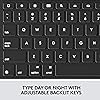
  • WELL-SPACED BACKLIT KEYS - Type away comfortably and accurately using a familiar laptop-like keyboard. With a full row of iOS shortcut keys and well-spaced backlit keys, you can optimize your productivity anywhere, day or night.
  • POWER AND PAIR IN ONE CLICK - The keyboard and trackpad easily connect to your iPad in just one click using the Smart Connector.
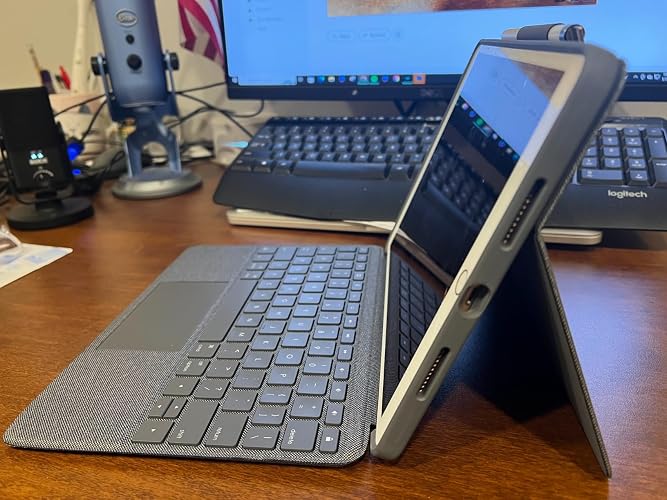
  • FOUR USE MODES - Four use modes and an adjustable kickstand let you comfortably use iPad for any task from typing notes to watching videos, and more.
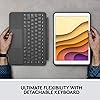
  • ADJUSTABLE KICKSTAND - Flexible kickstand offers 40 of tilt so you can always have the right angle for the task at hand. When typing isnt needed, detach the keyboard and enjoy your iPad screen with nothing in the way.

Description

Some ideas just click. Introducing the game-changing Combo Touch trackpad case for iPad—a case that combines a full-size backlit keyboard with a precision multi-gesture trackpad. Navigate iPad with familiar gestures and easily edit spreadsheets, documents and more. A flexible design with detachable Smart Connector keyboard supports four distinct use modes for extra versatility no matter where you are - a café table, desk, or even your lap. The light and durable case keeps iPad protected from bumps and scratches. There's even a convenient spot to stow Apple Pencil (1st gen) or Logitech Crayon. Plus, enjoy a full row of iOS shortcut keys.

Brand: Logitech


Compatible Devices: Apple Pencil, Stylus, Tablet


Connectivity Technology: Power by iPad via Smart Connector


Keyboard Description: Wireless


Recommended Uses For Product: Office


Special Feature: Backlit, Trackpad


Color: Graphite


Keyboard backlighting color support: Single Color


Style: Contemporary


Product Dimensions: 0.85"L x 7.68"W x 10.12"H


Compatible Devices: Apple Pencil, Stylus, Tablet


Connectivity Technology: Power by iPad via Smart Connector


Additional Features: Backlit, Trackpad


Keyboard Backlighting Color Support: Single Color


Power Source: Powered by iPad via Smart Connector


Switch Type: Linear


Keyboard Layout: QWERTY


Hand Orientation: Ambidextrous


Button Quantity: 78


Compatible Tablet Computer Models: Apple iPad Air (3rd generation), Apple iPad Pro 10.5-inch


Number of Keys: 3


Number of Sections: 2


Color: Graphite


Style Name: Contemporary


Theme: Tablet Accessories, Keyboards


Item Dimensions L x W x H: 0.85"L x 7.68"W x 10.12"H


Enclosure Material: Plastic


Brand: Logitech


Keyboard Description: Wireless


Antenna Location: Office


Built-In Media: Documentation, Keyboard Case


Model Number: 920-009610


Model Name: COMBO TOUCH


Series Number: 3


Global Trade Identification Number: 05


Manufacturer: Logitech


UPC: 849944079662 097855157805


Mfr Part Number: 920-009610


Item Type Name: Tablet Keyboard Case


External Testing Certification: Não aplicável


Item Weight: 1.34 Pounds


Generation: 3rd Generation


Warranty Description: 1 Year Limited Hardware Warranty


Frequently asked questions

If you place your order now, the estimated arrival date for this product is: Aug 3 – Aug 6

Yes, absolutely! You may return this product for a full refund within 30 days of receiving it.

To initiate a return, please visit our Returns Center.

View our full returns policy here.

  • Klarna Financing
  • Affirm Pay in 4
  • Affirm Financing
  • Afterpay Financing
  • Zip Pay in 4
  • Financing through Apple Pay
  • Financing through Google Pay
Leasing options through Acima may also be available during checkout.

Learn more about financing & leasing here.

Top Amazon Reviews


  • This Keyboard greatly increased the usability of my IPad Pro
Because I use my IPad Pro for 90% of the things I do, I need a keyboard for it. For the past three years I have used a case with a removable Bluetooth keyboard. I seemed to work fine with the only hassle being the need to charge it occasionally. However the case was watering out so I needed a replacement. I decided on the Logitech because it had a trackpad and the keyboard was powered by the IPad so no need to charge. I was not prepared for the change this keyboard made in the usability of my IPad. The trackpad works wonderfully with all applications do far. The Home key is a nice feature and has made it easier to return to the Home Screen when I need to. The keyboard attaches and detaches easily; now I do not need to carry the keyboard with the IPad when I only need to use it as a tablet. Also, unlike another reviewer, I have never had to detach and rewatch the keyboard to use it even when the IPad gore to sleep. Because of this keyboard, and recent updates to Apple IOS, I am now using the IPad for virtually all work. It has become, effectively, a true laptop replacement. From now on when I go on trips, I will no longer need to take both the IPad and a laptop. Finally, I feel the case does an excellent job of protecting the IPad from damage. ... show more
Reviewed in the United States on June 12, 2021 by henryc32

  • The perfect keyboard case for my iPad Pro 10.5 The perfect keyboard case for my iPad Pro 10.5
My iPad Pro 10.5 inch has become 10x more functional after I bought this keyboard case! Doing everything on the iPad has become more efficient, I even had time to write this review. I never knew I needed this case, I wish I bought it sooner. I’ve had my iPad for 3 years now, but with this new case, it feels like I have a new iPad. I’m used to using macbooks and tried to replace my macbook with the iPad and a separate keyboard and mouse, but it just isn’t as great as using an actual laptop. This Combo Touch case is PERFECT mainly because of its trackpad! I didn’t realize what I was missing was a trackpad. This trackpad is amazing! It works well with all the iPad’s multitasking features. When using this, it feels like I am actually using a macbook. The function keys on top is also amazing. I use them all and I rarely have to lift my arm up to tap on the touch screen to multitask on the iPad. When I am just watching videos or using the apple pen on procreate, it is also very quick and easy to remove the keyboard and my iPad is still protected by the case. The whole set up is just amazing and I am very happy with this purchase. :) ... show more
Reviewed in the United States on March 5, 2021 Reviewed in the United States on March 5, 2021 by r.e

  • Excellent keyboard and touchpad. Drains battery even when locked. Loose connection in lap.
Pros: 1. Excellent build: The keyboard and trackpad feels amazing to use - on a desk. The trackpad has matte glass on it I think, similar to a MacBook trackpad. It has some flaws, but it still is a joy to use. 2. Pencil does not drain: Some iPad cases keep the apple pencil too close to the tablet & it drains the pencil battery because the pencil never goes into "sleep" mode. This case does not do that. The pencil is at a good distance and secure. 3. Strong: The case is very thick & feels like it will protect the iPad from damage. 4. Nice Hinge (after 1-2 months): The hinge works very well. There is a wide range of angles that it can tilt to, and it holds pretty firm. It has only been a couple months since I got it, however. Over time this might get worse. Cons: 1. Loose connection: When using on a lap or bed, sometimes the keys stop working or the thing loses connection. I think this is because the magnetic connection used to transfer data is not strong enough. Either make a DIY solution yourself, or use it on a firm surface like a desk. Another related issue is that, if you lift up the tablet by the keyboard or by the tablet itself, the magnetic connection will detach and you will drop the other piece. You get used to it, but just keep this in mind when you first get it - don't accidentally grab it like that, drop it, and break the iPad. 2. Battery Drain: This one is major. I keep the keyboard disconnected when I am home, otherwise it feels like the battery drains too fast. On iPadOS 14 with my old 10.5 iPad Pro, it goes from 100% to 96-97% in 24 hours without the keyboard connected & no usage. If the keyboard is connected, I think it went from 100% to 93% or less in the same time period, without any usage whatsoever. At lower percentages, I think it drains even faster. If the keyboard is connected, the battery drains faster when even reading a PDF. If you're typing on it, it drains faster, and if you have the backlight ON, it drains EVEN faster. I understand the backlight draining the battery.. but it's not okay that it's draining battery when it's not even being used. (Also I don't know if I'm tripping but the battery drains faster when it's colder outside) 3. Heavy & Bulky This one does not bother me much, but the tablet with the case & keyboard attached is quite heavier than the tablet by itself. You might also use up more room in your backpack when using this. Related: 4. Charging warms up the tablet: It's a good idea to remove the case when fast charging, because the case feels like it will trap the heat generated by fast charging. This heat is very damaging to the battery otherwise. 5. No handle to hold the tablet in one hand: There is no grip or handle, so I have to lift up the stand for the case & put my finger by the hinge, between the case & the stand to hold it in one hand. Since the case is heavy, this might hurt your hands really quick. Also you can still drop it if you aren't careful. 6. App support Selecting text using the trackpad does not always work too well. Sometimes it will select text, but right-clicking the text sometimes deselect the text instead of giving me the popup options to copy the text or something. Some apps like Excel and Google Sheets might not always work with the arrow/shift keys in selecting multiple cells, for example, since the devs haven't enabled it properly. Ask questions in the product page here to confirm if features you want for apps work well. ... show more
Reviewed in the United States on October 22, 2020 by Seb

  • Breathed new life into my 10.5" iPad Pro
This works perfectly with my 10.5" iPad Pro. The keyboard feels high quality and the track pad is smooth as butter! The stand is great because you can put it just about any angle you want. But there are a couple of things that surprised me. The first surprise was how heavy the keyboard and case are. My iPad is now heavier and bulkier than my Surface Pro. I would take 1/2 star off for this if I could. The Surface Pro keyboard has a few tricks that this product misses. First, this keyboard only lays flat on the desktop. The Surface Pro can either lay flat or on a slight angle. Secondly you can fold the Surface Pro keyboard over the back of the Surface Pro. This is pretty handy when you want to use the device in tablet mode but don't want to take the keyboard off. Overall this is a good product and I will buy another when I upgrade my iPad. ... show more
Reviewed in the United States on February 2, 2023 by MFD14534

  • A great overall case
This is an amazing case for your iPad. It really makes an older iPad feel new by adding the ability to have a keyboard and trackpad. I was also very impressed with the overall build of the case. The keys are very sturdy and the trackpad is very similar, but smaller, than a MacBook trackpad. The case is on the thicker and heavier side but does add great protection to the iPad. I also really like that there is a loop to put the Apple Pencil in so I always have it with me in case I want to use it. I previously had Apple's smart keyboard but the smart connector started to fail and I had to unhook it and plug it back in to make it work, and I am SO glad I decided to give this case a try. So if you're debating on getting a cheaper keyboard case for your iPad is highly recommend just going with this because overall the build of this is far superior. ... show more
Reviewed in the United States on December 20, 2020 by Evan Manley

  • Makes iPad easy to type on Makes iPad easy to type on
I gave my daughter my Mac book for school, since she spilled tea on hers! Instead of buying a new Mac book, I decided to use our iPad with the Logitech Combo Touch for iPad keyboard - it works great, the back has a stand that keeps it upright, which is helpful. I like having a mouse pad/track pad that helps to give it more of a laptop feel, there is also a built in apple pencil holder, which is handy. I love the color and the texture of the case, it's classy looking. The combo touch is sturdy, but not too heavy. Be careful to order the correct size based on your iPad model, you can tell your model by reading the number at the back of your iPad mine is A2152 (see photo) and then googling that number, it will tell you the model name of your iPad, this will help with ordering. I highly recommend! ... show more
Reviewed in the United States on January 16, 2024 Reviewed in the United States on January 16, 2024 by Anja

  • High quality
I read a lot of reviews before buying this Logitech keyboard case for my iPad Pro10.5”. I didn’t see the weight as a drawback. Yes its bit heavy but not a burden. Very sturdy. Feels solid & well built. It’s just been a few days and I’m liking it a lot. I’m a touch typist. I like the feel of the keyboard and spacing of the keys. I had two Logitech iPad keyboard cases with older iPads. I bought this one based on the quality, reliability & durability I experienced with those older keyboard cases. The lighted keys are a nice feature. Loading the app puts the keyboard adjustments in the keyboard section in the iPad settings. I highly recommend this Logitech keyboard case. ... show more
Reviewed in the United States on February 5, 2021 by Steve G

  • Outstanding buy
I really liked my original Logitech keyboard. However over time, I would have to close it and reopen it for it to work. This new gem words perfectly! The connectivity is perfect and the overall case has a good feel and it's durable. But I wasn't expecting the trackpad to be a dream. To scroll, pull up recent screens, scroll to different pages was very useful. And for it to work like this for an older ipad (iPad pro 10.5) was well worth the price. OUTSTANDING buy. ... show more
Reviewed in the United States on August 30, 2024 by C. Harrison

Can't find a product?

Find it on Amazon first, then paste the link below.
Checking for best price...