Search  for anything...

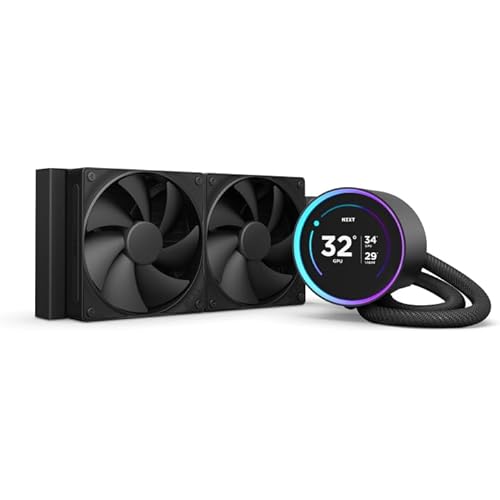
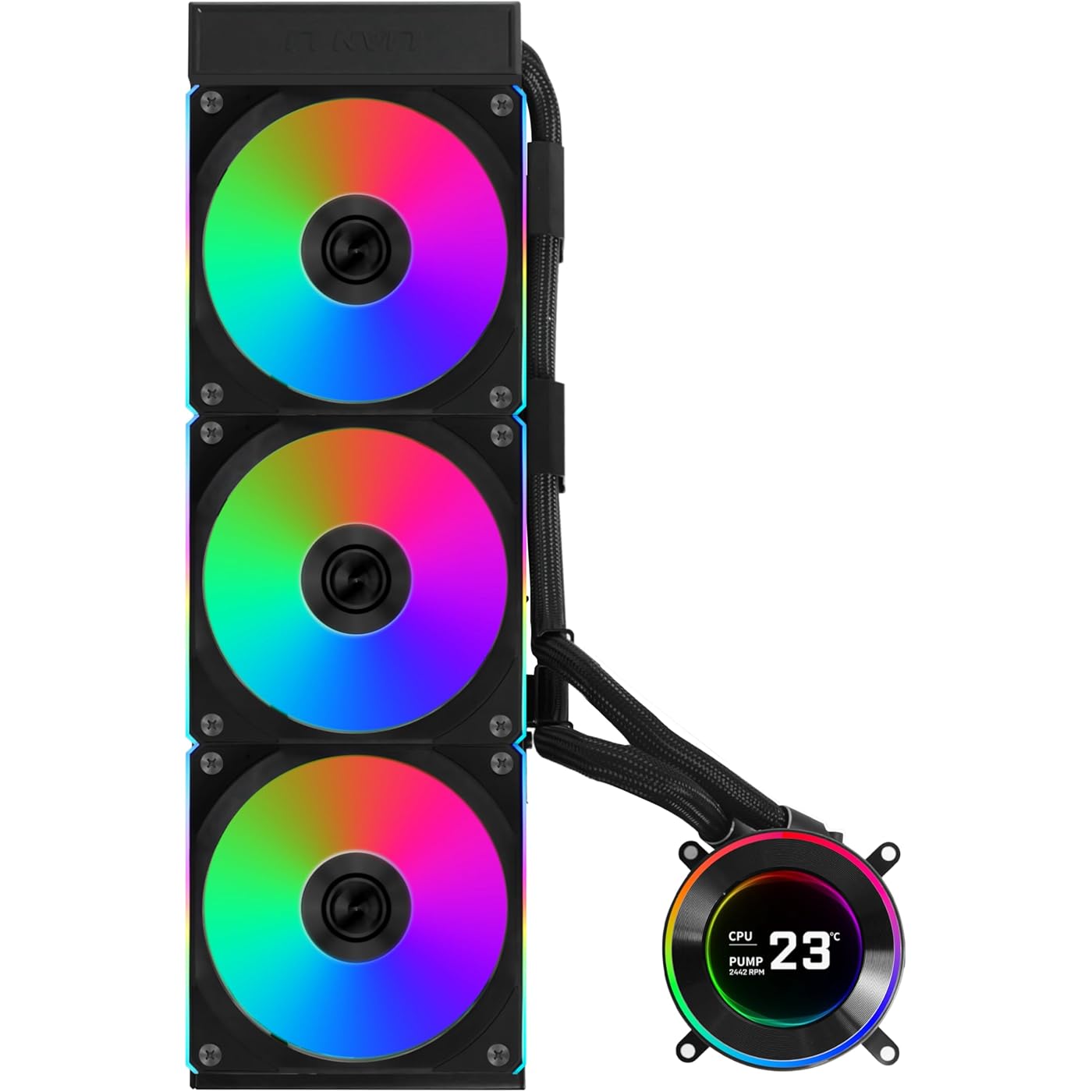
Lian Li Hydroshift II-C 360CL Liquid CPU Cooler, Round Screen, Black | 3x 120mm CL Wireless RGB Fans, 2.1" IPS LCD, 3 Control Modes, Sliding Tube Clamp, LGA 1851/1700, AM5/AM4 (HS2LCD36RB)

  • Based on 503 reviews
Condition: New
Checking for the best price...
$164.99 Why this price?
Save $15.00 was $179.99

Buy Now, Pay Later


As low as $27.50 / mo
  • – 6-month term
  • – No impact on credit to apply
  • – Instant approval decision
  • – Secure and straightforward checkout

Ready to go? Add this product to your cart and select a plan during checkout.

Payment plans are offered through our trusted finance partners Klarna, Affirm, Afterpay, Zip, Apple Pay, and Google Pay. No-credit-needed leasing options through Acima may also be available at checkout.

Learn more about financing & leasing here.

Selected Option

Free shipping on this product

FREE 30-day refund/replacement

To qualify for a full refund, items must be returned in their original, unused condition. If an item is returned in a used, damaged, or materially different state, you may be granted a partial refund.

To initiate a return, please visit our Returns Center.

View our full returns policy here.


Availability: In Stock.
Fulfilled by Amazon

Arrives Monday, Jul 27
Order within 16 hours and 42 minutes
Available payment plans shown during checkout

Protection Plan Protect Your Purchase
Checking for protection plans...

Color: Black


Size: Circle LCD


Set name: 360 CL


Features

  • Pre-Installed 3X CL Wireless Fan. USB Connection Set Up Tips:If L-Connect 3 still shows USB is not detected after connection, and HydroShift II is not detected in Device Manager, it may be due to lack of power from the connected PWM port. Please enter your BIOS and set the connected PWM port (recommended CPU_FAN or AIO_PUMP or PUMP ) to PWM/DC mode instead of Auto. Make sure to set the port to full speed.
  • 3 Control Modes: Featuring a 2.1 round IPS LCD display with 480x480 resolution, users can choose between Offline Mode for quick adjustments, Wireless Mode for remote control, and Streaming Mode for full customization via USB.
  • Innovative Sliding Tube Clamp: The sliding tube clamp allows for precise alignment of liquid cooling tubes, ensuring an organized setup. It can be removed for installations requiring tighter fan-to-motherboard clearance.
  • Durable and Flexible Tubing: Constructed with server-grade corrugated tubing, the HYDROSHIFT II LCD-C offers improved bendability and durability, ensuring reliable performance over time.
  • (1) Offline Mode: Adjust LED and LCD content using a rotatable cap without a USB connection, displaying coolant temperature and pump seed. (2) Wireless Mode: Adjust screen hardwar info, background themes, and cap lighting effects wirelessly with the L-Wireless Controller while syncing with other LIAN LI wireless devices. (3) Streaming Mode: Connect via USB to fully customize settings using L-Connect 3 software, supporting various media formats like MP4 and GIF for personalized displays.

Description

Why L-Connect 3 still show "USB not detected" after connection, and why is HydroShift II not detected in Device Manager? It may be due to lack of power from the connected PWM port. Please enter your BIOS and set the connected PWM port (recommended CPU_FAN or AIO_PUMP or PUMP ) to PWM/DC mode instead of Auto. Make sure to set the port to full speed. Motherboard Doesn't Read Pump RPM 1.Use the 6-pin power cable. 2.Connect the 4-pin to SYS_FAN (for RPM signal), and the 2-pin to CPU_FAN (to ensure adequate power). HydroShift II LCD-C – L-Connect 3 Doesn’t Detect Fan RPM Ensure the power-supplying PWM cable is connected to the motherboard’s CPU_FAN or AIO_PUMP header. AIO Cooler Bracket Installation Steps 1.Install CPU. 2.Mount water block bracket (notch to the right). 3.Secure screws with screwdriver (notch right). 4.Attach pump head (right to left) and tighten. For full details,please refer to the user manual. Visit the Store Visit the Store Visit the Store Visit the Store Visit the Store Visit the Store

Brand: Lian Li


Cooling Method: Water


Compatible Devices: Cpu, Desktop


Noise Level: 30 db


Material: Aluminum


Maximum Rotational Speed: 2200 rpm


UPC:


Set Name: 360 CL


Number of Packs: 1


Manufacturer: LIAN LI


Cooling Method: Water


Compatible Devices: Cpu, Desktop


Noise Level: 30 db


Maximum Rotational Speed: 2200 rpm


Material Type: Aluminum


Brand Name: Lian Li


UPC: 840353048751


Set Name: 360 CL


Warranty Description: No Warranty


Manufacturer: LIAN LI


Number of Items: 1


Unit Count: 1 Count


Included Components: Liquid cooler, UNI FAN CL Wireless x3


Model: HS2LCD36RB


Part Number: HS2LCD36RB


Frequently asked questions

If you place your order now, the estimated arrival date for this product is: Monday, Jul 27

Yes, absolutely! You may return this product for a full refund within 30 days of receiving it.

To initiate a return, please visit our Returns Center.

View our full returns policy here.

  • Klarna Financing
  • Affirm Pay in 4
  • Affirm Financing
  • Afterpay Financing
  • Zip Pay in 4
  • Financing through Apple Pay
  • Financing through Google Pay
Leasing options through Acima may also be available during checkout.

Learn more about financing & leasing here.

Top Amazon Reviews


  • BUILDER FRIENDLY
Color: White Size: Square LCD Set name: 360 TL
Lian Li has came so far with all of their product lines. First off visually this AIO is stunning. I love the color and lighting lines. the LCD is great and it comes on and off and is powered through some magnetic connectors. The connection seems pretty stable and applies pressure pretty evently. it works with 4 screws and is very very easy to connect. The material of everything feels great overall and the radiator is nice and beefy. The pump is pretty quite and i can only hear it if i try hard enough, the fans are also pretty quite. The support for cable management is what throws this to the next level. Cable management is something I love because i can flex but also annoying cause it can take a while if you are dealing with escessive amounts of RGB. Lian li daisy chain makes it so its only 1 cable from the fans. and the lcd only has the pwm heads for the pump and usb for the rgb etc. the rgb software is very straight forward and works really well. If you go lian li i would try to get as much of nay rgb as possible so you dont have to work a billion didfferent software. I think it still falls behind in software and integration with other products. ... show more
Reviewed in the United States on January 24, 2026 by Amazing drive

  • Awesome AIO cooler
Color: Black Size: Circle LCD Set name: 360 CL
So far this cooler has worked great and looks amazing. Getting it plugged in and synced to the management software was easy. The software lets you manage the colors of the RGB and sync them to other Lian Li components. I did have an issue to where 2 of the fans would not initially turn on. Tried all kinds of things to figure out the issue, but eventually had to contact lian li for help. Finally figured out that the two fans were not fully connected to the working fan. Removed them from the cooler, clicked together, and now they work like a charm. So far it has kept the cpu temps supercool under load. However, I haven’t stressed it yet. Will update when I test a more intense game. ... show more
Reviewed in the United States on June 14, 2026 by Koby McWilliams

  • Amazing Cooling Performance – Even with Overclocked 9800X3D!
Color: White Size: Square LCD Set name: 360 CL
I installed the Lian Li HydroShift II-S 360CL in my Lian Li O11 Dynamic EVO XL, and I’m blown away by how well it performs. My CPU is the Ryzen 7 9800X3D, and I’m running a +200 MHz overclock (5.425 GHz). Despite the extra heat, this cooler handles it like a champ. I replaced the stock fans with Lian Li TL fans, and the results are excellent: • Cinebench R23 max temp: 79°C (For an overclocked X3D chip, this is incredibly good.) • In gaming, temps stay much lower and completely stable. • Noise levels are very low even under load. • The cleaner tubing + hidden cable design makes the build look super premium. • Installation was very easy, especially for a 360 mm AIO. The HydroShift II-S 360CL gives both strong thermal performance and top-tier aesthetics. If you want an AIO that can handle an overclocked CPU without sounding like a jet engine, this is the one. Definitely recommended ... show more
Reviewed in the United States on November 30, 2025 by AD

  • Best balanced AIO currently in 2025 IMO
Color: White Size: Circle LCD Set name: 360 TL
I spent some time trying to figure out which AIO I wanted to go with, between NZXT, Asus Ryujin, and my personal favorite brand, Arctic Liquid Freezer. I wanted a combination of LCD screen, good cooling capabilities, and easy tube and wire management. I was strongly aiming for the Arctic Liquid Freezer III 420mm because of their low price and great cooling, but sadly no LCD or OLED screen on it. All the other AIOs were much higher in price, and I wasn’t too familiar with them. Lian Li Hydroshift II LCD-C TL caught my eye, and although I was kinda worried about their radiator thickness being reduced, I was convinced that cooling efficiency is on par or better than most AIOs out there at the same size after much research on tests performed on PC building channels from YouTube. Aside from cooling and functionality, it just looks so much better than most of what’s currently on the market. The tube management, the simple wiring, and the customization, and the premium look. I wanted to control most if not all RGB with only one software, so I went with all Lian Li wireless products, which I’m glad I did for not only did my build came out looking amazing, but I can also set the fan curve speeds exactly how I wanted, especially for how I have my Hydroshift II setup with top and bottom fans for a push pull configuration for optimal cooling when gaming or under heavy load, cuz why not? ;3 Best of all, it’s still super quiet when gaming even with double fans on the AIO! Hopefully Lian Li may release a 420mm version of the Hydroshift II LCD with 140mm TL wireless fans, and with VRM fans under the LCD screen in the near future! I’ll buy that up real quick and also do a push pull config with 3 additional 140mm TL wireless fans for that extra cooling capacity! ... show more
Reviewed in the United States on June 30, 2025 by Manny Tega

  • Good, But Could Have Been Great
Color: Black Size: Square LCD Set name: 360 CL
My Old AIO was loosing performance as it was aging and the water was evaporated enough where you can hear it sloshing around very freely within the radiator so it was time to get a new one. I like the idea of the Hydroshift with it's minimalistic design with no tubes draping across the inside of the case so I decided to give it a try. Pros: * Tubes/Wiring - The best thing about the Hydroshift series is that the tubes are mostly hidden behind the radiator, so a minimum is visible going from the block/pump to where it "appears" to disappear towards the top of the case. What's even better is that the wiring is also ran along the tubes so there are no visible wires going from the block which make a very clean look. Also you can adjust the tubes in the back of the radiator so that they go straight up from your CPU instead of in an angle for an even cleaner look. Another plus is that there are only 3 cables going out from the radiator, 2 PWM cables and a single cable going out to the USB header, no controller box is a plus in my book. * Fans - For an extra $20 for the CL version compared to the fan-less this is a no brainer in my opinion. You're basically getting 3 fans that normally cost about $20+ for 1, so you're getting 2 for free when you get the bundle. If you don't use them you can sell them and get extra money back so that's a win in my book. The other nice thing about going with one of the fanned versions is that all the cables for the fans are completely hidden inside of a compartment at the end of the radiator. * Screen - This is also a good implementation as the screen as it is only connected via some pogo pins on the block, no wires at all. My Asus one had 2 wires coming out from the screen so while you could take off the screen easily there were wires going to the USB header and the controller box so it would just half to hang if I had to do any maintenance. This fixed the greatest gripe about the screen in comparison to my old one. This is also an IPS display so the viewing angles are much better. Cons: * Radiator - I don't know the reason but the radiator seems to be a downgrade from the previous generation, I'm guessing it might have to do with the improved pump. The previous generation was 27mm thick while this one is only 24mm, would be nice if it was the same or upgraded to 30mm for improved performance. * Cables - While it is nice that it only has 3 cables, there is one downside to it being that if it doesn't get a certain amount of power then the Lian Li L-Connect software won't see the AIO. The solution they give you is a PWM splitter hooked up to a SATA port (which I needed to use for my setup). For this it can be a bit confusing as the instructions don't make it clear as to which of the PWM cables will do the job, basically you will need to hook up the connector with 4 wires to the CPU header on your motherboard and the one with 2 cables to they adapter. I think a better solution would just to have a dedicated SATA power cable coming out as well with the other cables. * Lighting - While the lighting works good, unfortunately at the time of this review there isn't a way to have the AIO sync with your motherboards lighting, you have to use Lian Li's software. While there is a MB Lighting Sync switch in the Quick/Sync Lighting tab it has no effect on the AIO nor the fans. * No Fill Port - Would have been a nice addition so extend the life of the AIO for when the water evaporates. * No VRM Cooling Fan - Your VRMs can get hot so when you have an air cooler it is designed to blow air down onto the VRMs but for AIO there is nothing there to give them that extra air. While not necessary for the overall functionality it a good feature to add a down firing fan on the pump to help the VRMs a bit. While not perfect this overall is a very good AIO. Hopefully they will make improvements on the next iteration of the AIO and to the software adding sync support, but overall I'm happy with my purchase and would recommend. ... show more
Reviewed in the United States on January 12, 2026 by Brian

  • The fans and pump looks great together
Color: Black Size: Circle LCD Set name: 360 CL
The product image doesn't do it justice. Together the fans and pump look perfect together, it's a great balance of little rgb. Cooling is good. Not top of market of course. You buy this for looks.
Reviewed in the United States on July 1, 2026 by Mark

  • Great Product
Color: Black Size: Square LCD Set name: 360 TL
This thing is awesome. I bought a pre built and basically gutted it. Started with this and ended up getting all Lian Li fans thanks to their easy installable hardware and software it comes with is a breeze to work with.
Reviewed in the United States on June 20, 2026 by adam balsimo

  • Beautiful AIO, Bad Temperatures, Pump Noise
Color: White Size: Square LCD Set name: W/o Fans
An AIO with a beautiful LCD screen and smart tubing design, but inconsistent cooling, pump noise, and LCD connectivity issues on a Ryzen 7 9800X3D. Pros: - LCD screen is absolutely beautiful, and it abstracts so much of the clutter on a typical motherboard. - The tubing hidden behind the radiator is a genuinely clever design. I’m surprised more companies haven’t attempted something like this before. Visually, it looks excellent—and after using this AIO, traditional exposed tubing in a PC starts to look awkward by comparison. Cons: - CPU temperatures ran hot with inconsistent cooling behavior. - The pump made noticeable noises on startup and would occasionally do so at random afterward (see attached video). - The LCD screen would intermittently lose connection with L-Connect. Resolving this required a full PC reboot. When this happened, the screen would revert to the default out-of-box display, which still looked fine—but the main appeal of the LCD is being able to reliably run a custom display. - The mounting mechanism felt a bit awkward. Sliding the unit in from right to left while working around the standoffs made installation slightly annoying. This isn’t a dealbreaker by itself, but it’s worth noting. My Experience: I initially replaced my Cooler Master AIO (which was using Lian Li P28 fans) with this fanless HS2 pump and installed the same P28 fans onto the radiator. Right away, CPU temperatures were extremely spiky. I would see jumps from ~45 °C to ~62 °C just from opening a browser tab. Running Cinebench pushed temperatures straight to 95 °C. While troubleshooting, I checked the thermal paste application and noticed it appeared slightly uneven (see attached photo). After reapplying the paste, the temperature spikes became noticeably calmer. I also adjusted the fan step-up and step-down timers in the BIOS to reduce constant fan ramping caused by erratic CPU temperature behavior. These changes helped stabilize temperatures, though they still ran somewhat high. Cinebench would now peak around 91–92 °C. At that point, I considered the results acceptable and continued using the system. For a couple of days, everything seemed fine. However, on the third day, while playing Marvel Rivals, CPU temperatures suddenly jumped from the usual ~60 °C range straight to 95 °C. At the same time, my frame rate dropped from ~240 FPS down to 20–25 FPS. Even after closing the game, CPU temperatures remained elevated and did not recover as expected. After all that, decided to put back my Cooler Master AIO back on, and live without the pretty LCD screen (unfortunate). I do miss it, but I can play my games with the peace of mind that my temperatures are in normal operating ranges, no massive spikes, no throttling. See video of noise, picture of the initial "bad" paste application, and the picture of it on my PC. UPDATE: Lian Li did reach out to me to apologize for my experience and offered either a replacement or a refund. I appreciate the attentiveness from them and will definitely try a different product in the future. ... show more
Reviewed in the United States on January 9, 2026 by Mario

Can't find a product?

Find it on Amazon first, then paste the link below.
Checking for best price...